Welcome to our community

Be a part of something great, join today!

  • Hey all, just changed over the backend after 15 years I figured time to give it a bit of an update, its probably gonna be a bit weird for most of you and i am sure there is a few bugs to work out but it should kinda work the same as before... hopefully :)

Large Thunderbolt RAID for Editing & Thunderbolt enclosure for REDROCKET

Add this one to your list Joe... Small, Inexpensive but effective...

http://www.drobo.com/products/professionals/drobo-mini/index.php

Effective?
Please explain (lol)

Its Total piece of garbage (Just returned).

No 1- Gets extremely Hot.
No 2- You can't use drive without Drobo mini (I meant in different enclosure once you installed via mini)
No 3- Your drives takes forever to appear on your machine.
No 4- Mini with my OCZ - 512 GB (Vertex 4) speed write 130 read 90 (are you serious?)
so on....

Please Check following link, my alternative solution instead of Drobo mini. This is what I was expecting fro drobo, but It disappointed me. Waited 3 month for this piece of garbage.

I know it looks Poor Man Institute but works;
http://www.reduser.net/forum/showth...CK-PLUS-with-THUNDERBOLT-ADAPTER-(Speed-test)


Sorry Follows... Now get back to Large Thunderbolt RAID for Editing & Thunderbolt enclosure for REDROCKET
 
can any of these fast thunderbolt raids be hooked to a mac pro xeon through esata? i want to buy a fast raid to go with a macbook pro but i'd like legacy abilities to hook it up to other machines if its possible. thanks
 
Just bought a 16TB Thunderbolt RAID from MacGurus. It's the same unit MaxxDigital is selling, but for a much better price. Enclosure is built by ARECA but MacGurus tests and installs their own drives. Talked with the owner and they seem really nice. Should be here in a few weeks. I'll report back.
 
Last edited:
Areca only recommends using certain approved drive models. I would check your drives, if they are not approved you may not have a warranty on your enclosure. Maxx Digital is also know for their customer service, and are available 7 days a week. It may have been cheaper but data is priceless.
 
where can i get a good price on the areca without drives? i wana load one with 3tb seagates if the drivers work
 
MacGurus installs drives they test and support. I spoke with them before purchasing and I have no doubt they'll be around if I need support. I like Maxx but their entry price is high.

Areca only recommends using certain approved drive models. I would check your drives, if they are not approved you may not have a warranty on your enclosure. Maxx Digital is also know for their customer service, and are available 7 days a week. It may have been cheaper but data is priceless.
 
Nice set-up Ketch. I'm leaning towards Maxx Digital, need to call and find out when their FastMax Thunderbolt RAID will be available. How many bay enclosure is that, and what are you using for drives?
I assume your experience with Maxx Digital has been a positive one.


That is a 48TB unit Joe, and it was set up as RAID 5, we also had a bunch of Mini VR units at the time of that job were 1TB, now you can get 2TB, thanks to progress... ;)

I am extremely happy with Maxx Digital, and not only because I am a friend of Ron, but because their service and product quality is second to none, and while I agree you can get better prices elsewhere, once you got your unit if anything happens to them, most of the time that remains your problem, as you will get n real assistance, with Maxx Digital you will never have to worry about that.
 
Maxx Digital Thunder Raid

Maxx Digital Thunder Raid

Hello All
I can not say to much about the other TB Raids as it would not be in good taste to talk about competitors , however i can tell you that there was a reason Maxx Digital waited to release the Thunder Raid. There are only a few approved TB solutions with several on the horizon for now with no ETA or coming soon ( so they say) . The Thunder Raid by Maxx Digital comes in 16,24 and 32 Terabyte solutions and is backed by the Maxx can do warranty and support that many Red Users have grown a custom to from our Evo line.

We also in conjunction with ATTO are now able to use our large SAS Raids with Thunderbolt and or external mini SAS. The best way is to contact mattstone@maxxdigital.com or info@maxxdigital.com to get more info and stay tuned for the special RED USER discount code for your dedicated pricing. Happy Holidays and as always we will be available every day through the Holiday for your needs,

:cheers2:
 
MacGurus installs drives they test and support. I spoke with them before purchasing and I have no doubt they'll be around if I need support. I like Maxx but their entry price is high.

Matt
That is why we always have a RED USER price if you contact us. The online price is for the "other camera "guys. LOL. Happy Holiday and have fun with your new TB toy.
 
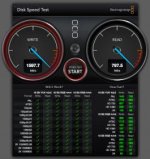
Well, I've got it up and running, 14TB(usable) in RAID5, and so far so good.

dtQr1.png
 
Gtech G-Raid with thunderbolt

Gtech G-Raid with thunderbolt

Anyone had any luck raiding 2 of these (G Raid w thunderbolt ) together?
I bought 2 and wanted to raid them together but had no luck with disc utility.
Drives appear to be locked.
Tried changing permissions and ignore ownership etc but dice.

Gtech does not recommend it but says it is possible.

Really want to turn the 2 into one 16 tb raid 0 set to work with davinci.

Any ideas
 
jup, drobo has been discussed here before - and you find enough info on the internet I guess...
it's "simple" and "good" (no problem using it as a 2nd[!!!] private backup solution) but I wouldn't use it in a professional environment -> these units are not the fastest and especially on higher load (like disks fully loaded to 80-90 percent) transfer rates drop pretty fast and problems can occur - and since it's a proprietary RAID-system you're pretty much doomed without a second unit upon hardware failure (ok, this goes for about _every_ RAID, but well - even more for something not as wide spread)... And I say this with own experience on my hands (with a standard 2nd Gen Drobo -> went fine for about a year; but after filling it up pretty much I wanted to upgrade to larger disks and ended up with loosing the whole unit [longer story tho - and also user error included; anyways - I would have had better rescue-options with a non-proprietary RAID I guess]).
 
Just an FYI from the floor of this year's NAB:

CalDigit has some new Thunderbolt products coming to market in the next few months. Their 2 and 3-bay enclosures (http://www.caldigit.com/T3/) looked really nice at the show. I liked them a lot better than the new G-tech Thunderbolt products. BUT the CalDigit guys did let me know that they are working on a new 8-bay Thunderbolt Raid that will basically be an updated HDPro2 with Thunderbolt. This looks really, really promising. I believe they are planning on a 32TB 8-bay Thunderbolt in/out with 800 MB/s in/out and a list price somewhere around $5000.

It sounds almost too good to be true but CalDigit rarely fails to deliver the goods... I was told this T8 Raid will ship in the Fall, maybe Q4.
 
Rob,

What is your hardware config on this?

Jon
 
Rob,

What is your hardware config on this?

Jon

I went with a JMR SilverStor for the RAID:
http://www.jmr.com/en/systems/silverstor/

I have the 18-drive versions with commercial HDDs installed.

After lots of testing, I decided on RAID 50. Each RAID 0 slice is controlled by a dedicated RAID card (ATTO) and then data is being transported to either Mac Pro (machine #1) or PC (machine #2) via miniSAS cable. The miniSAS cable connects to a PCI card you install into your workstation. I then physically move the SAS cable between the Mac and PC, as desired.

In total, there are 4 ATTO cards (2 of which are RAID controllers) to make the transport and RAID 50 work. 3 of those cards are installed into the SilverStor and the fourth goes into your workstation. Add one more ATTO card to that mix if you want to do what I did (make this setup work with a second machine).

Best of all, you can daisy-chain one SilverStor into another and get compounding performance. It's a very good setup.
 
Back
Top