Welcome to our community

Be a part of something great, join today!

  • Hey all, just changed over the backend after 15 years I figured time to give it a bit of an update, its probably gonna be a bit weird for most of you and i am sure there is a few bugs to work out but it should kinda work the same as before... hopefully :)

Kinefinity MAVO Edge

I understand what everyone is saying above. However, much of what I did to the images above was to give them some kind of look it was done very quickly and with very little thought and I used extreme measures that I absolutely wouldn't suggest using to do so. So I would absolutely not use the examples above to make any kind of determination on the viability of one camera over another. Again, you would have to try to grade the original footage provided by Luigi.
 
Last edited:
I understand what everyone is saying above. However, much of what I did to the images above was to give them some kind look it was done very quickly and with very little thought and I used extreme measures that I absolutely wouldn't suggest using to do so. So I would absolutely not use the examples above to make any kind of determination on the viability of one camera over another. Again, you would have to try to grade the original footage provided by Luigi.

I think we all understand that Rand. It was just a jumping off point for us anyhow. Thanks for sharing them.
 
Hrvoje,

What I have been during for last year and a half, rightly or wrongly, is to not use any Secondary color corrections at all. But along with not using qualifiers, power windows, hue vs hue curves, or RGB curves , I don't use tint only Kelvin and then using the Primaries to correct the image from that. The only time I will use tint is to show an example in a tutorial so that you can see that an image matching in both Redcine-X and Resolve. I realize some qualifying is needed in some situations, but for now I'm trying not to use it.
 
Last edited:
Hrvoje,

What I have been during for last year and a half, rightly or wrongly, is to not use any Secondary color corrections at all. But along with not using qualifiers, power windows, hue vs hue curves, or RGB curves , I don't use tint only Kelvin and then using the Primaries to correct the image from that. The only time I will use tint is to show an example in a tutorial so that you can see that an image matching in both Redcine-X and Resolve. I realize some qualifying is needed in some situations, but for now I'm trying not to use it.

Why not use tint ?
Things can drift towards magenta and green with NDs, environment casts etc. : )
 
Hrvoje,

Tint drastically changes the effectiveness of using primaries. And with tint your images have either a hint of green or magenta in them and it's hard to get neutral looking blacks, whites and greys with it. Now in severe mix lighting situations, tint may be needed.
 
Hjvoje,


here's an example of what I mean


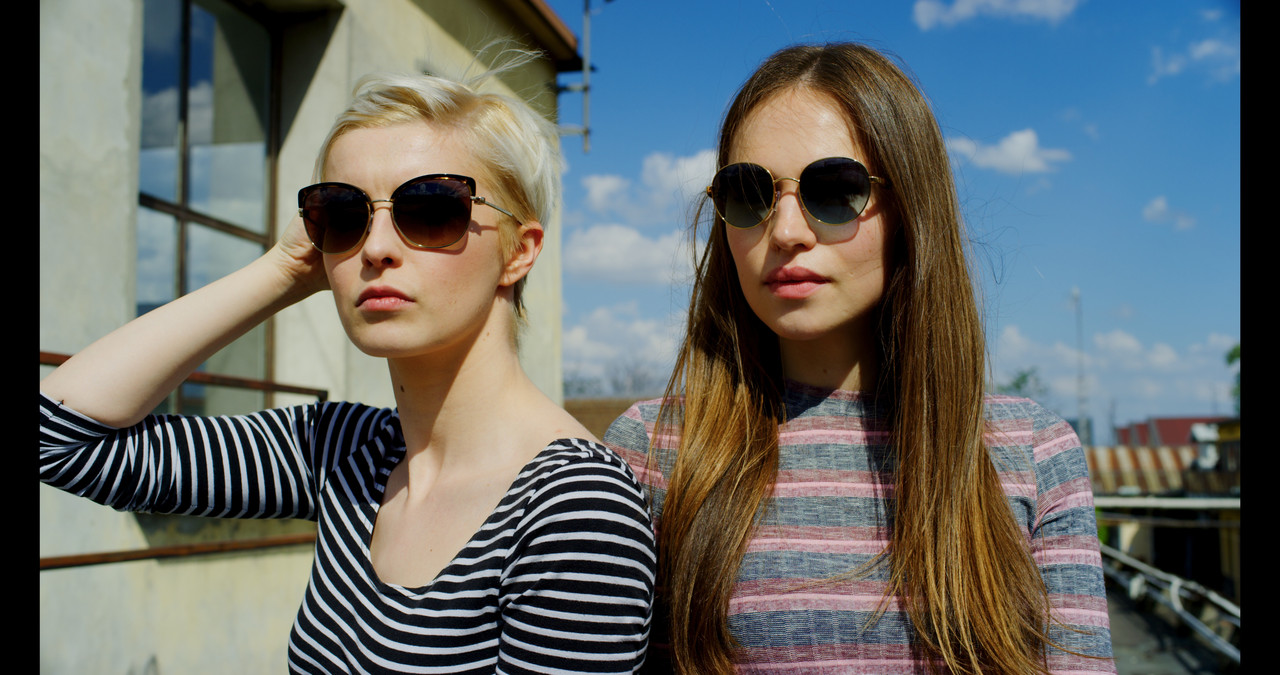
here is a r3d image from Luigi at 5600K no tint, the skins looks green

primary-1-1-4.jpg


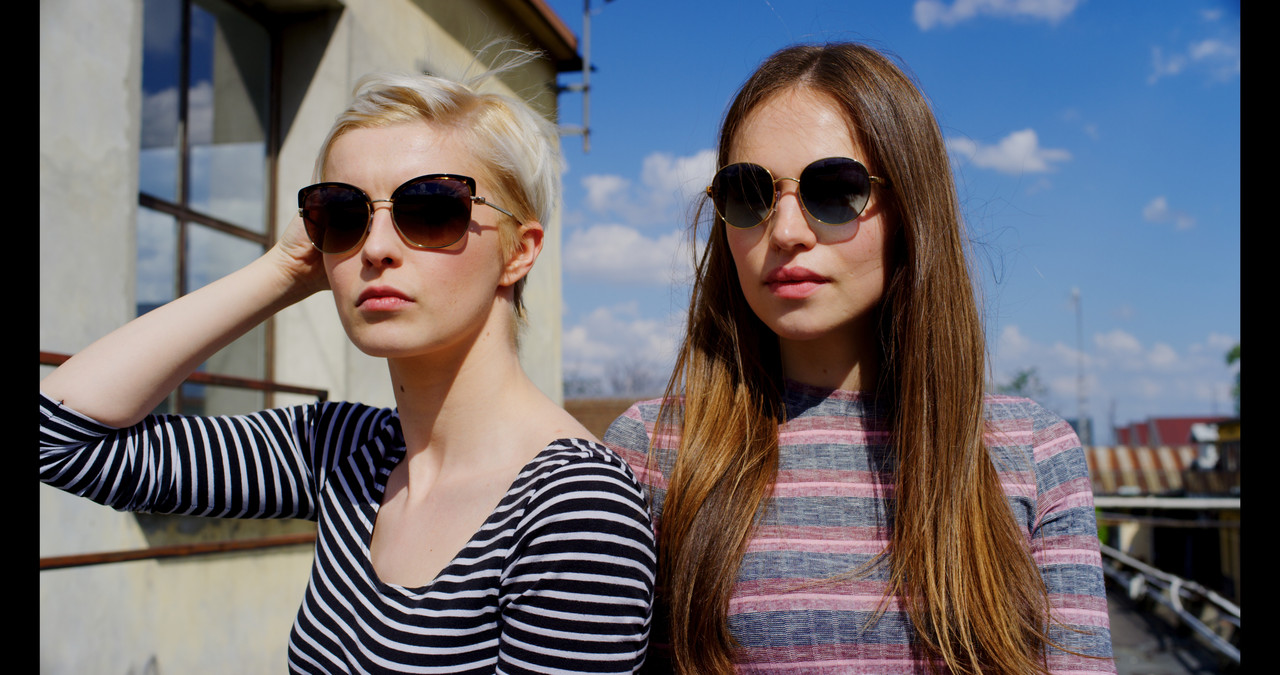
here it is with a -6.28 magenta tint adjustment to try to correct for the green skin in the original with no other corrections. the sky and the blonde's shirt has a magenta cast along with some other things.

with-megenta-1-1-3.jpg


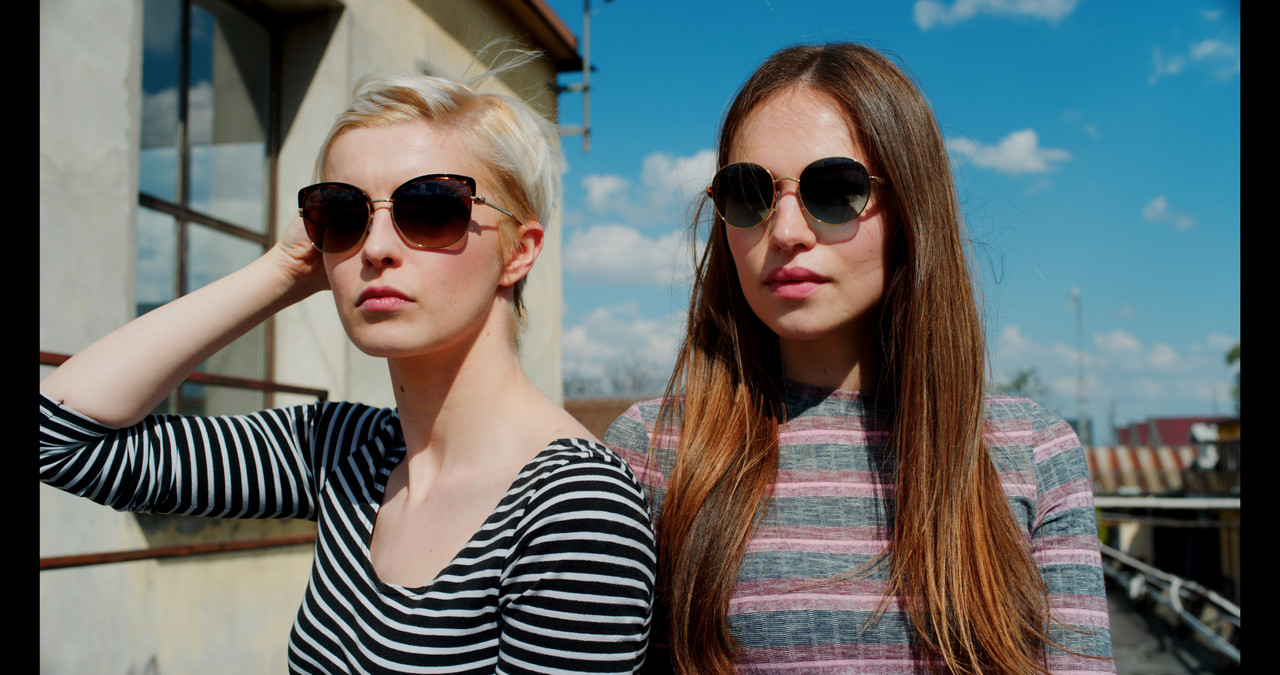
here it is back at 5600k with no tint with two Primary adjustments. the skin looks about the same however with no magenta cast in the sky or the blonde's shirt

6-1-1-6.jpg
 
Last edited:
Hrvoje,

Tint drastically changes the effectiveness of using primaries. And with tint your images have either a hint of green or magenta in them and it's hard to get neutral looking blacks, whites and greys with it. Now in severe mix lighting situations, tint may be needed.

Color temp adjustment only changes Red-Blue axis values, it is not a true Kelvin compensation. Tint corrects the magenta-green axis. Tint is absolutely necessary to get a neutral white balance since the Kelvin WB locus at different color temps follows a curve, so a change in color temp (R-B)also requires a change in tint (M-G) to get to neutral white. Easiest way to do this is on the color page under raw settings using RGB picker values to get equal values for a designated white or neutral gray pick in the image or ideally on a white or gray chart swatch. Looks to me like you way over corrected magenta in your example. Try color temp and tint adjustment using a non-clipped cloud value in your examples. Correct the cloud pick to equal RGB picker values with CT and tint. Top of cloud pick white correction should give you a cooler image, bottom of cloud gray pick a warmer one (might be the other way round). Play with several different pick points to find one that gets closest to the look you want when balanced.
 
Hey Rand, check this out:


VT9fjuV.jpg


Temp, tint, transformation.
 
David,


I understand about color temp, what I'm saying is that , in my experience, using the primary controls for red r3d files gives better results than using tint to correct for inaccurate color temperature. Color charts can sometime give you different results depending on how you angle them toward the camera and certain lighting conditions. I basically eyeballed the correction of the two girls on the roof so the skin may be off. However , I got the results without really focusing at all on magenta. The correction I made was to the entire image not towards or away from or to any specific color. That maybe the downside of only using Primaries to color correct.
 
Hrvoje,

Tint drastically changes the effectiveness of using primaries. And with tint your images have either a hint of green or magenta in them and it's hard to get neutral looking blacks, whites and greys with it.

You can also look at this the other way around.

If an image has green/magenta tint, and you don't compensate it throughout the whole range, CC three-segment work gets more difficult and needlessly complicated.
Because the image overal is not balanced properly.
 
Hrvoje,

I believe those are the accurate representation of the colors under those lighting conditions for the red camera Luigi used. I just wanted to correct away from that to give it a different look. I was outside one day and looked up at the sky just casually and I saw that for some reason it actually was slightly magenta. I think what we have been conditioned to believe is that the sky should always be blue. So I guess i just say rightly or wrongly it's just my personal preference for the time being and always subject to change. So some will like it, some will hate it .
 
Hrvoje,

I believe those are the accurate representation of the colors under those lighting conditions for the red camera Luigi used. I just wanted to correct away from that to give it a different look. I was outside one day and looked up at the sky just casually and I saw that for some reason it actually was slightly magenta. I think what we have been conditioned to believe is that the sky should always be blue. So I guess i just say rightly or wrongly it's just my personal preference for the time being and always subject to change. So some will like it, some will hate it .

Just to be clear what we are talking about - your creative choice is not the question at all, I am talking about general principles. : )
 
Hrvoje,

I know you're right because I have never really had to deal with an image with a problem the other way around. So like a politician , i just say that I will be re-evaluating my existing re-evaluations. I think it's just my Primaries only workflow that I will be taking another look at and how to add only tint, qualification when they could better serve the existing color correction problem.
 
Just to be clear what we are talking about - your creative choice is not the question at all, I am talking about overal principles. : )


I understand, and thanks for getting me to take another look at my color correcting methology :)
 
Hrvoje,

I believe those are the accurate representation of the colors under those lighting conditions for the red camera Luigi used. I just wanted to correct away from that to give it a different look. I was outside one day and looked up at the sky just casually and I saw that for some reason it actually was slightly magenta. I think what we have been conditioned to believe is that the sky should always be blue. So I guess i just say rightly or wrongly it's just my personal preference for the time being and always subject to change. So some will like it, some will hate it .

There are multiple different ways to get to the same goal.

Skies here in the South Eastern Appalachians can go greenish during thunderstorms. At higher altitudes they can shift a bit teal sometimes. In any case we are always dealing with approximations and aesthetic judgement counts.
 
David,

That's true, I guess we all have some bias on how things "should" look in certain situations based on our own experiences.
 
Single Node in Resolve.

Camera RAW Parameters Adjusted -
Color Space - REDWideGamutRGB/Gamma Curve - Log3G10.
Output Tone Map - Low/Highlight Roll-Off - Very Soft.
ISO/Exposure Adjust/Color Temp.

Color Wheels Parameters Adjusted -
Contrast/Temp/Tint/MD/Col Boost/Lift-Gamma-Gain-Offset.


For me, that's all I need to do to get the image where I want it.

I'm still impressed by how the RED sensors and Colour Science can capture and interpret the data like that.

I think they provide a good base from which to move into more creative grades too, and allow a lot of room for corrections if there's a problem with what gets put in front of the camera.

Still not sure any other camera system is better at doing that.
 
Last edited:
Back
Top