Welcome to our community

Be a part of something great, join today!

  • Hey all, just changed over the backend after 15 years I figured time to give it a bit of an update, its probably gonna be a bit weird for most of you and i am sure there is a few bugs to work out but it should kinda work the same as before... hopefully :)

ISO of Red

Redspace and 250-400 ASA (meter and camera) will yield an excellent picture quality if exposed correctly. Everybody here that insists on a 160 ASA rating uses REC709, an old antequated video display color space. RAW is 120~160 if you are going to expose for that. Rec 709 is very close to RAW exposure wise. Rec 709 yielded terrible skin tones and skewed up until build 20.

RedSpace gives nice and vibrant pictures with a distinct "Red" look. RedSpace applies to the linear signal a gamma curve that heavily compresses skintones and highlights, hence the picture becomes more saturated and contrasty. If you look closely to the highlights you will see that you will lose information in the whites by selecting RedSpace in the contrary to Rec709 or RedLog.

Rec709 does not throw away information in the whites when 250 ASA is selected. Skintones do look more dull indeed but increasing contrast in the mids will bring them in the realm of RedSpace, if desired.

I found that RedSpace is the way for all the people who need an easy kind of WYSIWYG workflow. For those who will do a more subtle grading later in the pipeline RedSpace sacrifies too much information for a satisfactory look. Here Rec709 or RedLog are more appropriate, IMO.

Because RedSpace makes the picture more brighter and "kills" information in the whites it helps to expose on the safe side (protecting the highlights). If one really wants to know what's going on one can use RedRAW. The difference between these two gamma curves leads to the 160 ASA vs 320 ASA debate when using a lightmeter. Plus there is is the false colour issue which will be resolved in a future build, according to Jim.

Personally I rate the camera at ISO 250 (lightmeter). This way I never lost information or introduced too much noise. In a high-key environment 160 ASA makes a lot of sense though...

BTW. in the new SDK 2.5 Rec709 improved a lot and is a very meaningful basis for grading, IMHO.

Hans
 
RedSpace gives nice and vibrant pictures with a distinct "Red" look. RedSpace applies to the linear signal a gamma curve that heavily compresses skintones and highlights, hence the picture becomes more saturated and contrasty. If you look closely to the highlights you will see that you will lose information in the whites by selecting RedSpace in the contrary to Rec709 or RedLog.

I found that RedSpace is the way for all the people who need an easy kind of WYSIWYG workflow. For those who will do a more subtle grading later in the pipeline RedSpace sacrifies too much information for a satisfactory look. Here Rec709 or RedLog are more appropriate, IMO.

Hans

Redspace can be used very effectively in this workflow without disregarding any highlight information whatsoever:
-monitor Redspace on set and generate Redspace dailies (observe your clients loving their images on set and during the edit)
-grade from redlog dpx sequences with or without a Log to Lin LUT or work natively in Color
This really does give you the benefit of a true RAW workflow. You go back to the RAW material at the very end for final grading and generate a nice looking monitor image and dailies while protecting the highlights.
 
On the issue of the RAW meter clipping before the RGB meter - could that just be a case of the white balance of the RGB being different to that of the native RAW and therefore the relationship of the channels in the RGB being adjusted such that one particular channel clips sooner in the RAW.

Or are you guys seeing these anomalies between the meters when the white balance in RGB is close to that of the native RAW?
 
On the issue of the RAW meter clipping before the RGB meter - could that just be a case of the white balance of the RGB being different to that of the native RAW and therefore the relationship of the channels in the RGB being adjusted such that one particular channel clips sooner in the RAW.

Or are you guys seeing these anomalies between the meters when the white balance in RGB is close to that of the native RAW?

That's a good point Nicholas. The same would be true for ISO as well. If you are at - say 160 ISO - your RGB would be telling you things are fine, but your RAW would show clipping.
 
False Color NOT correct in RAW? And Waveform reading-

False Color NOT correct in RAW? And Waveform reading-

So I have two questions / observations ...

First the setup:
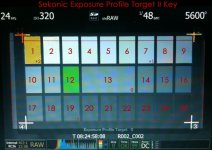
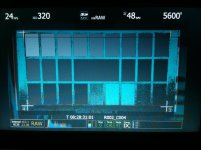
In a completely black room I shot my Sekonic Exposure Chart II. It goes from +2 to -2. The chart was lit to T5.6 @ ISO 320 using two 5600k Kino's. The chart had a variance of 1/10 of a stop from corner to corner - verified with the incident meter. According to the incident reading the exact measurement at the chart was T5.6 2/10, and reading the grey chip (#13 - center) with the spot meter it was T5.6 4/10. The chart was shot on Build 21.4.1, in 4k 2:1, RC36, 23.98 fps, 180 degree shutter, 5600k. The lens used was a 85mm RPP. And the results were viewed in RAW on the LCD. When I processed the images, I use Red Alert and kept all of the settings at the default RA settings- I only changed the Color Space (Camera RGB) and the Output LUT (Redlog). TIFFs were exported for reference. I think the only way this could get more Red Centric is if they made the lights and the chart. :)

If you want to download all of the JPGs you can do so here:
http://www.ryanewalters.com/downloads/ExposureTest02.zip
(I had to convert them all to JPG's as the TIFFs were over 400MB- the waveforms were generated off of the TIFFs.)

Question / Observation 01: False Color does not seem to be correct in RAW.

It was my understanding that since around build 18 or 20 False Color had been calibrated to work correctly with the RAW view. IMO this seems to be the best use of FC as it is reading off of the RAW image and not reading a LUT. (Yes I know the image on the LCD is not a true RAW.) As we all know the benefits of shooting RAW are huge, so knowing what I am getting in the RAW is key. When I was exposing my chart, I noticed two things about False Color that lead me to believe that it is not correct in RAW mode- and this concerns me. (It may also be a source of some of the confusion when it comes to exposing the image.):
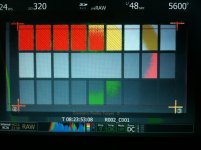
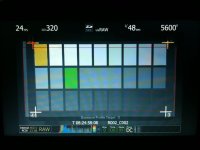
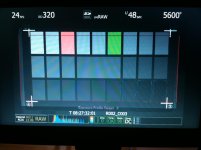
1. The distance between Colors is not consistent. If you look at LCD01, green (#21/22) has 5 spaces until pink (#15). If you look at LCD02, green (#12) has 3 spaces until pink (#8). If you look at LCD03, green (#6) has 2 spaces until pink (#3). The chart is consistently lit, so that is not the variable here.

2. False Color does not match the results we would expect- ISO320 on my meter, and in my lighting does not yield ISO320 in the camera. (Which is what we have been talking about here.) LCD04, which was shot at Exposure (T5.6) does not show ANY green on the chart. LCD03 (T4), shows green on #6- which REALLY concerns me. If the camera was one stop slower, then at T4, patch #13 should be green. However, according to False Color, it is another 1 and 1/6 stop slower (Around ISO 80!) since #6 is showing as grey.

It is because of these two things that I think that False Color is NOT correct in RAW view. The other alternative is that it is correct, and the camera is actually ISO 80. (Although I've shot with it enough to know that the camera is around ISO 160 - 500 depending on the situation.)

So is False Color Calibrated for RAW? And if so, then why am I getting the above results? Something doesn't seem right here ...

Well, this post is getting rather long, so I'll separate my next question / observation into a different post.
 

Attachments

  • 000-SekonicEPT02Key.jpg
    000-SekonicEPT02Key.jpg
    91.2 KB · Views: 0
  • 001.jpg
    001.jpg
    92.3 KB · Views: 0
  • 002.jpg
    002.jpg
    83.7 KB · Views: 0
  • 003.jpg
    003.jpg
    85.2 KB · Views: 0
  • 004.jpg
    004.jpg
    89.6 KB · Views: 0
I've read most of this topic, very useful and full of critical info but I have one question. Some people are saying to put 160ASA on the meter and leave 320 on the camera. Wouldn't this give overexposed images at some point on the monitoring path ? Or should I use 160 only in situations when I want a perfect noisefree image with clean shadows and blacks and when much of the frame is low key ?

thanks,
Mihai
 
Waveform reading observation / question-

Waveform reading observation / question-

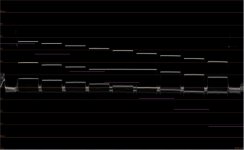
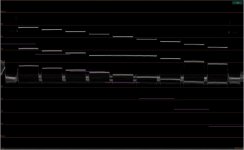
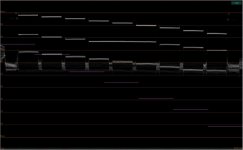
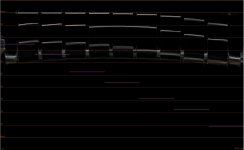
The attachments are the Waveform results from the TIFF files. I used Final Cut Pro to generate the Waveform readings. (Yes I know the FCP is not the same as an actual Waveform monitor.)

Question / Observation 02: Am I reading this correctly, and am I evaluating it correctly?

If I take the reading of chip #13 on waveform 004, which is at exposure according to Red's recommendation, then 18% grey of the RAW image falls around IRE 55-ish. Two stops up from that (#1) falls at about IRE 77-ish. Moving on to waveform 003, I look for the chip at about IRE 77-ish to continue my count (#7). Chip #1 falls at about IRE 87 and I continue my count to the next exposure. (I then repeated this process for the underexposure.)

Is this correct, or is my reading methodology wrong?

If it is correct, then using the waveform from the RAW TIFFs, then based of a meter reading at ISO 320 there are:
4.5 stops overexposure. (Until they hit 100 IRE)
5.5 stops underexposure. (Until the chips stop dropping in values around 25 IRE.)

If I then go back to the readings that False Color was giving me and count out the exposure, then I end up with:
2.33 stops overexposure.
6.5 stops underexposure.
(Which leads me to think that False Color is not correct when in RAW view, as I thought there was more overexposure latitude then that.)
 

Attachments

  • 004-4k-ISO320-T5-6-RAW-Meter-WV.jpg
    004-4k-ISO320-T5-6-RAW-Meter-WV.jpg
    54 KB · Views: 0
  • 003-4k-ISO320-T4-RAW-Meter-WV.jpg
    003-4k-ISO320-T4-RAW-Meter-WV.jpg
    56.6 KB · Views: 0
  • 002-4k-ISO320-T2-8-RAW-Meter-WV.jpg
    002-4k-ISO320-T2-8-RAW-Meter-WV.jpg
    57.4 KB · Views: 0
  • 001-4k-ISO320-T1-8-RAW-Meter-WV.jpg
    001-4k-ISO320-T1-8-RAW-Meter-WV.jpg
    52.7 KB · Views: 0
Last edited:
I've read most of this topic, very useful and full of critical info but I have one question. Some people are saying to put 160ASA on the meter and leave 320 on the camera. Wouldn't this give overexposed images at some point on the monitoring path ? Or should I use 160 only in situations when I want a perfect noisefree image with clean shadows and blacks and when much of the frame is low key ?

thanks,
Mihai

On camera ISO is only metadata- until you process your image and bake it in. When the camera is set at ISO 320, and processed that way it yields an image where 18% grey is closer to the middle of the exposure. When you process the image at ISO160, you are putting middle grey up one stop, loosing a stop in the highlights and trading it for one more stop in the shadows. Conversely, if you process the image at ISO 640 you are trading one stop of shadows for one stop of highlights. Essentially, all you are doing is changing where middle grey falls in the final image.
 
Thanks for the answer Ryan. Yes I know it's only metadata but I was asking more from a "what I see in the my monitoring instruments (lcd, evf, other screens) " perspective, while i'm shooting. If I meter 160 and set the camera to 320 maybe in some cases my images will look overexposed. So shouldn't I also set the camera to 160 just so that I could get an ideea of what the recorded image will roughly look like. I don't undersantd what would be the advantage of letting the camera at 320 while i'm lighting and exposing for 160.

thanks,
Mihai
 
Thanks for the answer Ryan. Yes I know it's only metadata but I was asking more from a "what I see in the my monitoring instruments (lcd, evf, other screens) " perspective, while i'm shooting. If I meter 160 and set the camera to 320 maybe in some cases my images will look overexposed. So shouldn't I also set the camera to 160 just so that I could get an ideea of what the recorded image will roughly look like. I don't undersantd what would be the advantage of letting the camera at 320 while i'm lighting and exposing for 160.

thanks,
Mihai

In a low contrast scene the benefit of leaving the camera at ISO 320 and setting your meter at ISO 160, is that mid grey falls where you expect it to with your meter and the camera's exposure. If your scene does not have a lot of overexposure tones in it, then it could be worth it to trade that highlight info for shadow info when processing the image by using ISO 160. Just be sure to watch your highlights, as the roll off is quite sharp.
 
Toughts / Input / Comments?

Toughts / Input / Comments?

Any thoughts, input or comments on my previously mentioned questions?
 
I use ISO 160 in my meter and the camera at default 320, when You use raw its better to expose more. The problem is the right system setup to convert it. regards, good luke, Leone.
 
Hello, so, I couldnt read all the posts, but before deciding meter setting, It depends what is your monitoring LUT set to, be it REDSPACE , 709 or RAW. Personally I use 709, seems more accurate with the RAW LUT, if there wasnt a client on the set, I´d choose RAW monitoring, that´s the real thing at the end of the day, my final file to use on post, for a client watching in color I´ll choose 709, and as for clipping on highlights goes, that s something you deal monitoring with RAW, using your meter and the spot meter on the camera, My rating at 160 ISO, whatever goes 2.2/3 or is that over key, its gone ( for RAW or monitoring at 709. ) but that is just my simple method derived from film, I dont work with REDSPACE on post, as I heard from a very very experienced DIT, ( referring to REDSPACE and 709 ) they are just LUT´s RAW is what matters at the end.
Many thanks
Oscar
 
Back
Top