Welcome to our community

Be a part of something great, join today!

  • Hey all, just changed over the backend after 15 years I figured time to give it a bit of an update, its probably gonna be a bit weird for most of you and i am sure there is a few bugs to work out but it should kinda work the same as before... hopefully :)

IPP2 metadata--how do I set Gamma?

Michael Tiemann

Well-known member
Joined
Oct 4, 2008
Messages
2,216
Reaction score
1
Points
38
Website
manifoldrecording.com
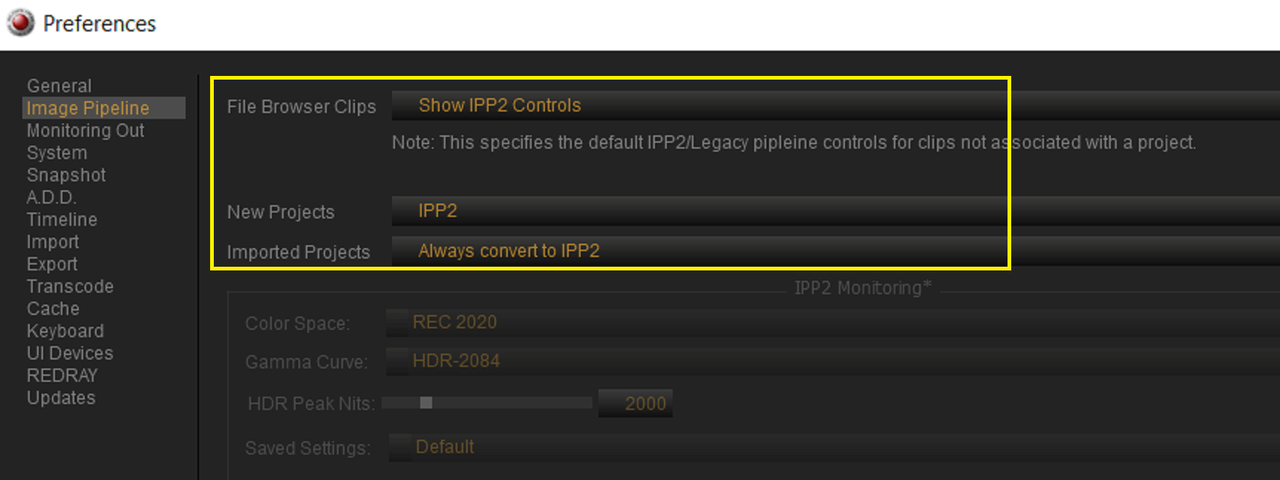
I've recently switched around my workflow from SDR-first to HDR-first. One gap I have not been able to bridge is setting proper metadata in the Camera. I use Davinci Resolve and IPP2.

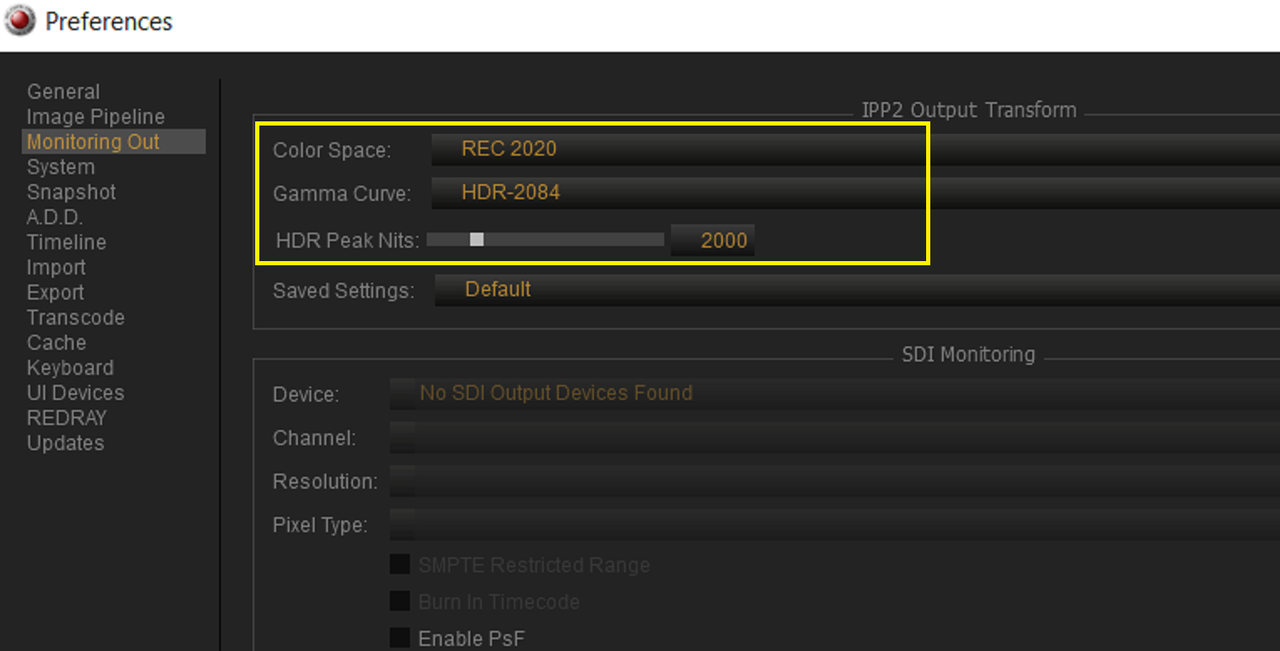
In the Image section of the menu, the IPP2 menu let me set an Output Color Space (I choose REC 2020), Output Tone Map (I choose Medium), and Highlight Rolloff (I choose Hard). But I cannot choose Output Gamma. Instead, the camera chooses for me, and it chooses BT1886. I want ST 2084. The defeats my ability to use "Use Camera Metadata" as my preferred source of metadata. Instead, I have to largely replicate my settings in the Resolve Project settings. Worse, when I choose Clip as the starting point for a custom grade, Resolve seems to choose the dumbest combination of wrong metadata from the camera and its own perverse notions as to what a good starting point would be.

In my perfect world, I could set completely correct metadata in the camera from the get-go, and Resolve would honor that, either when I choose "Use Camera Metadata" or as the starting point of selecting "Clip".

What's with the BT1886 default?
 
Micheal,


Maybe try these settings and whatever Nits brightness you need. You can also use this IPP2 Output Transform Lut with a RWG/LOG3G10 image.

RWG_Log3G10_to_REC2020_HDR2084_User_with_MEDIUM_CONTRAS


Screenshot-1911.png
 
I think this calls for a color managed transform between camera or clip metadata and the HDR display color space/gamma of your planned delivery codec or grading monitor. The attached article gives a brief definition of the various SDR/HDR standards and how they are interpreted by modern displays and delivery codecs.
I’ve simplified my own workflows by applying these transforms between camera native color space and display or grading color space standards for all footage in project settings as the first step rather than applying them as downstream grading nodes on a per clip basis. One still has full access to raw menu grading tools with this approach. I did a short beginner’s tutorial of this process for the Bolex user’s group some time ago. That was with Resolve V14 I think. Would be happy to share it if there is interest.

https://www.mysterybox.us/blog/2016/10/19/hdr-video-part-3-hdr-video-terms-explained
 
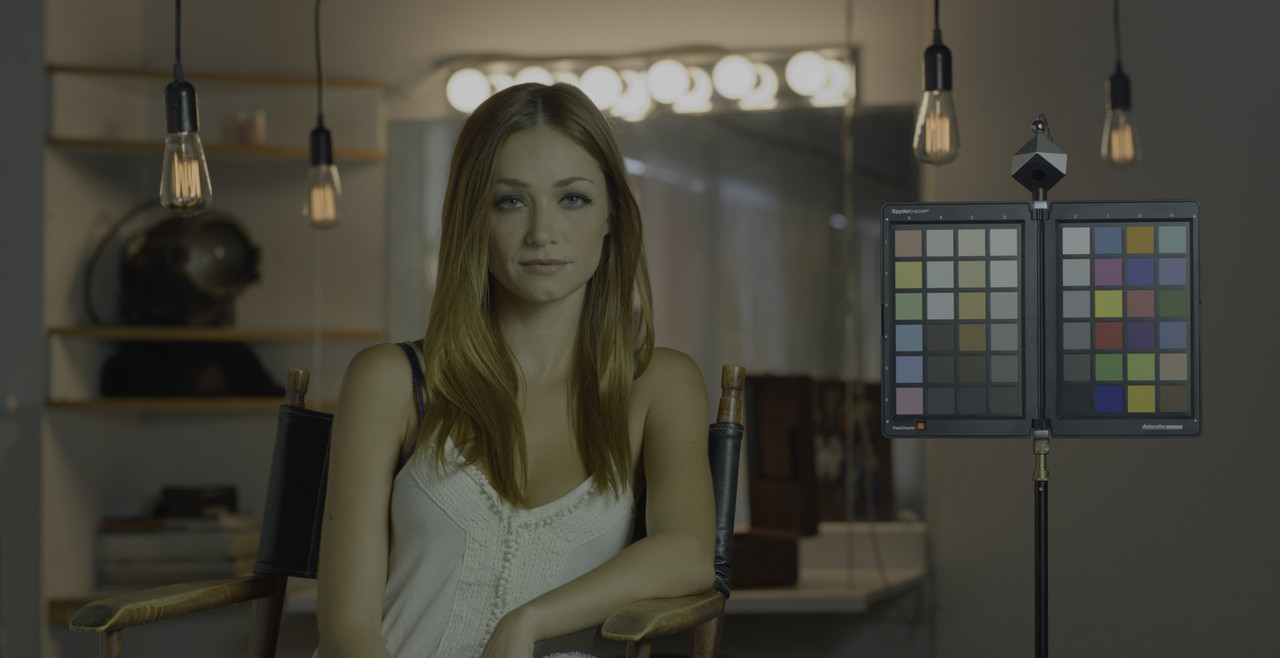
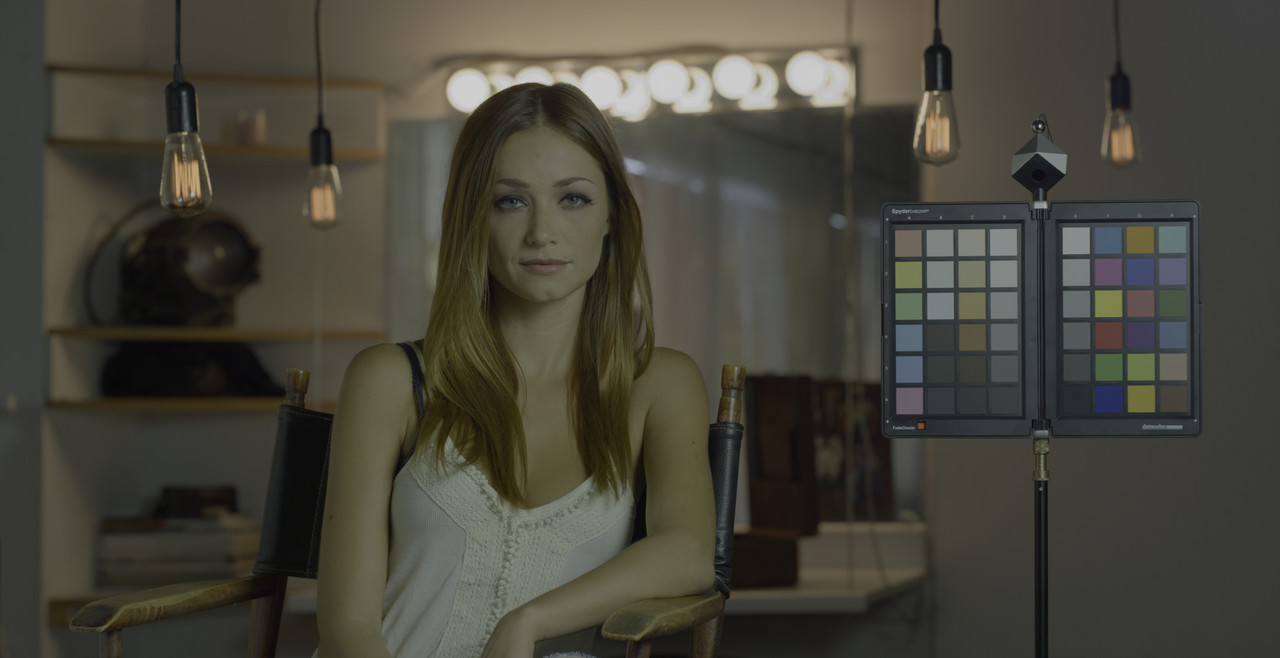
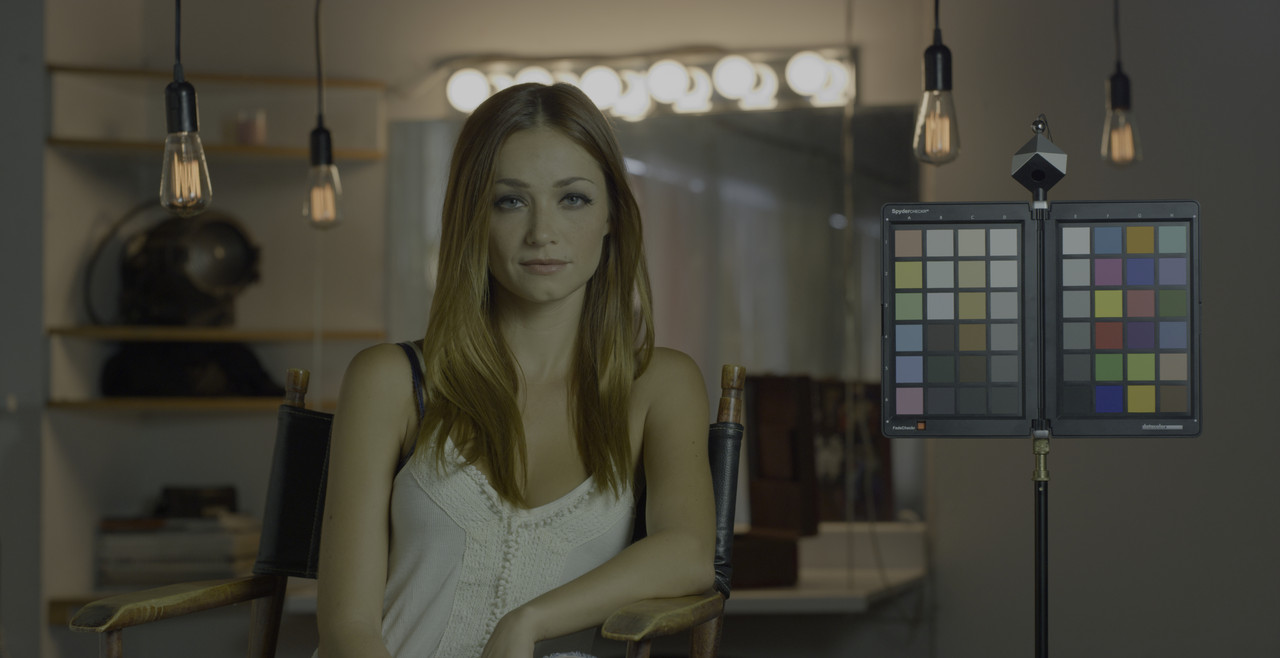
Redcine-X with these settings and Medium/Hard

Screenshot-1921.png


Screenshot-1920.png


W001-C005-1014-V3-0000000.jpg


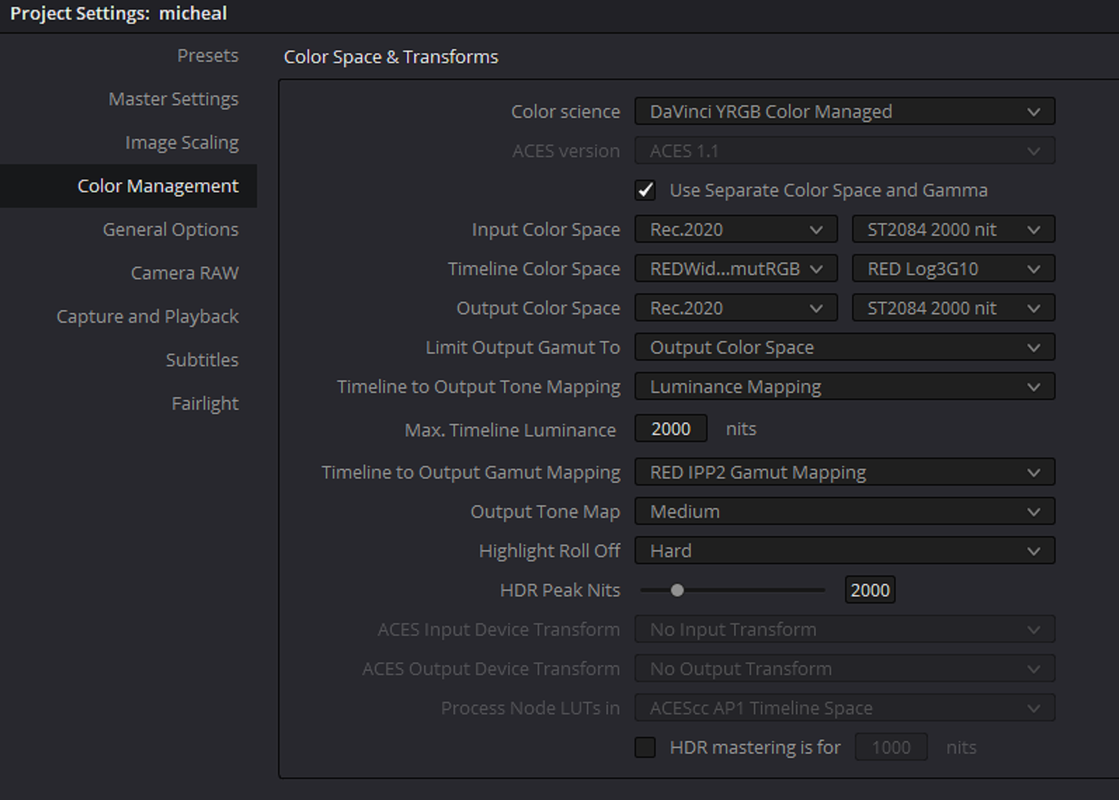
Resolve with the Color Managed settings above.

Screenshot-1911.png


mt1-1-1-1.jpg
 
Last edited:
Perhaps the problem really is with Resolve, which should completely ignore the concept of Gamma when output tone maps are in force. Instead, it should look at my Timeline gamma, which is set to ST 2084 PQ, and it should use the transforms appropriate for that. And it should ignore the foolishness of there being a BT1886 gamma tag in the metadata, which is absolutely meaningless when it's applying tone maps to what is in fact a Log3G10 source.

But I could work around that foolishness if I could touch the Gamma setting, as I could in the Legacy dialog boxes or with Red Cine-X. I just hate adding a step to my ingest process.
 
Micheal,


Here is something a little easier.


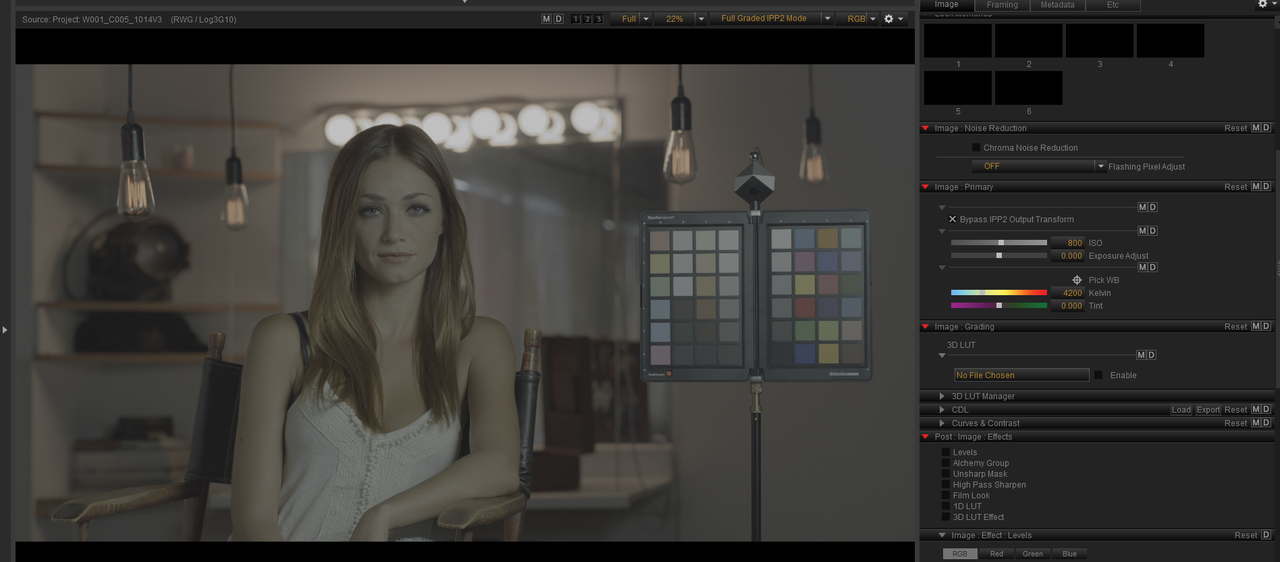
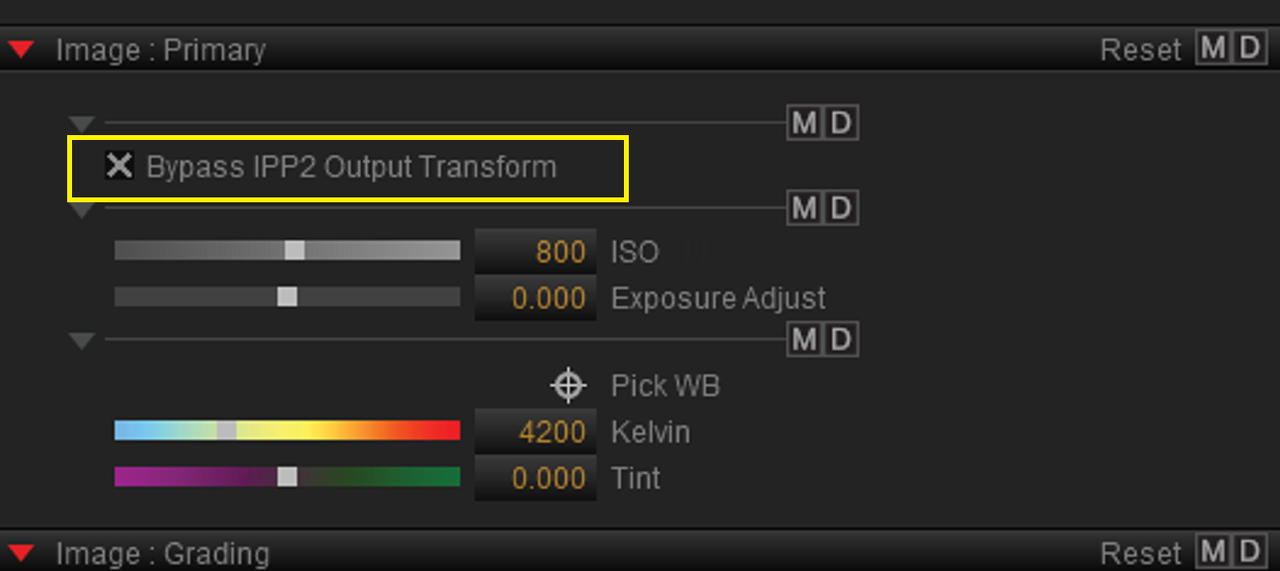
in Redcine-X version 52.0.49422, the latest version select "Bypass IPP2 Output Transform". This will bypass, like it says, the IPP2 Output Transform and the "Monitoring Out" settings and leave the RED R3D file in the RWG/LOG3G10 format.

Redcine-X Pro

Mac Version 52.0.49422 5/14/2020

https://www.red.com/download/redcine-x-pro-mac

Windows Version 52.0.49422 5/14/2020

https://www.red.com/download/redcine-x-pro-win


In Redcine-X version 52.0.49422

Screenshot-1922.png


Screenshot-1922-2.png


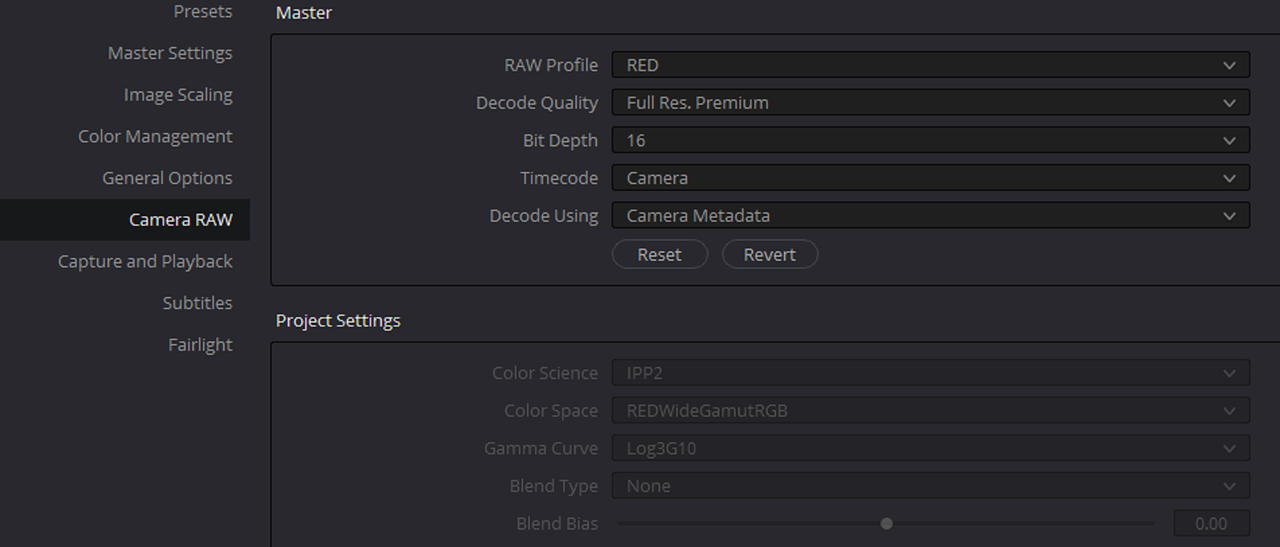
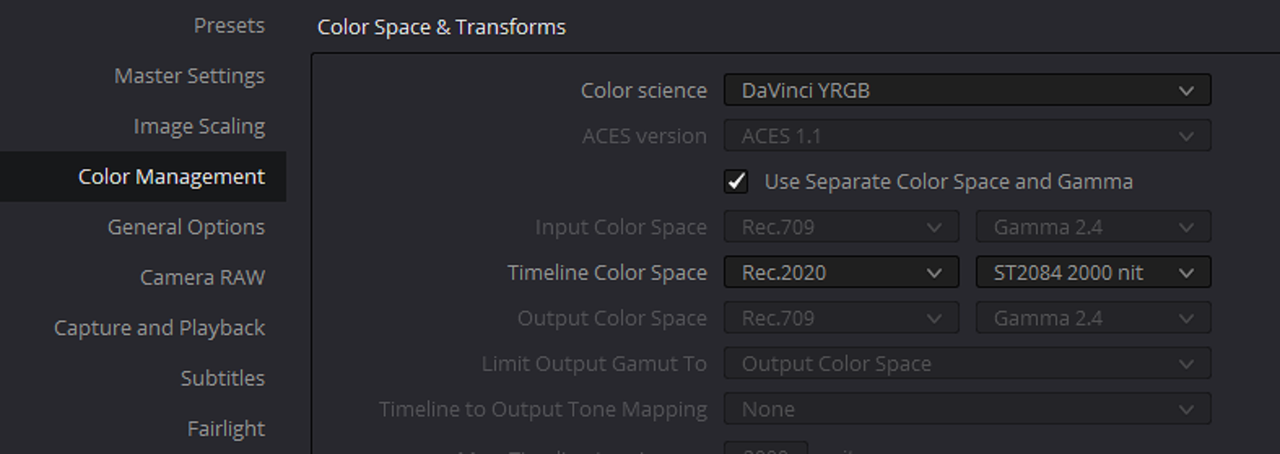
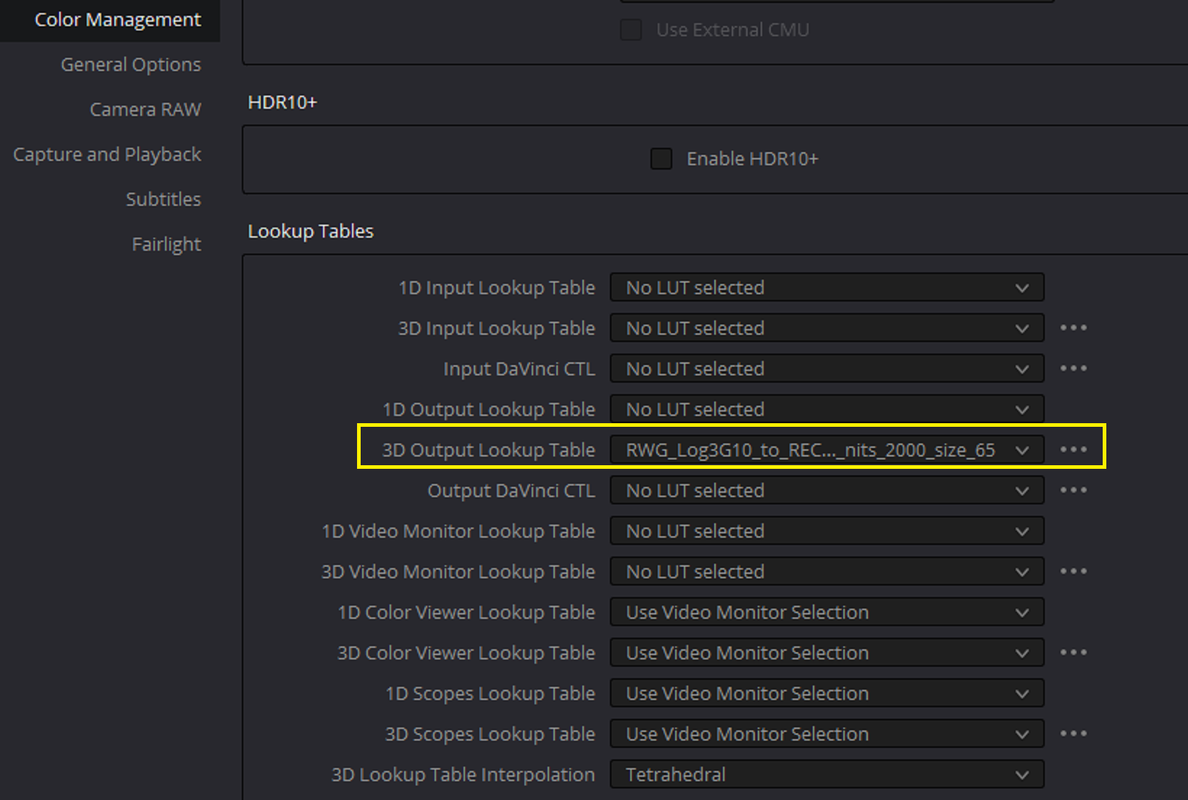
In Resolve, use these settings with a IPP2 Output Transform of, see below

"RWG_Log3G10_to_REC2020_HDR2084_User_with_MEDIUM_CONTRAST_and_R_1_Hard_and_peak_nits_2000_size_33.cube"

in the "3D Output Lookup Table" under "Lookup Tables"


Screenshot-1924.png


Screenshot-1923.png


Screenshot-1925.png


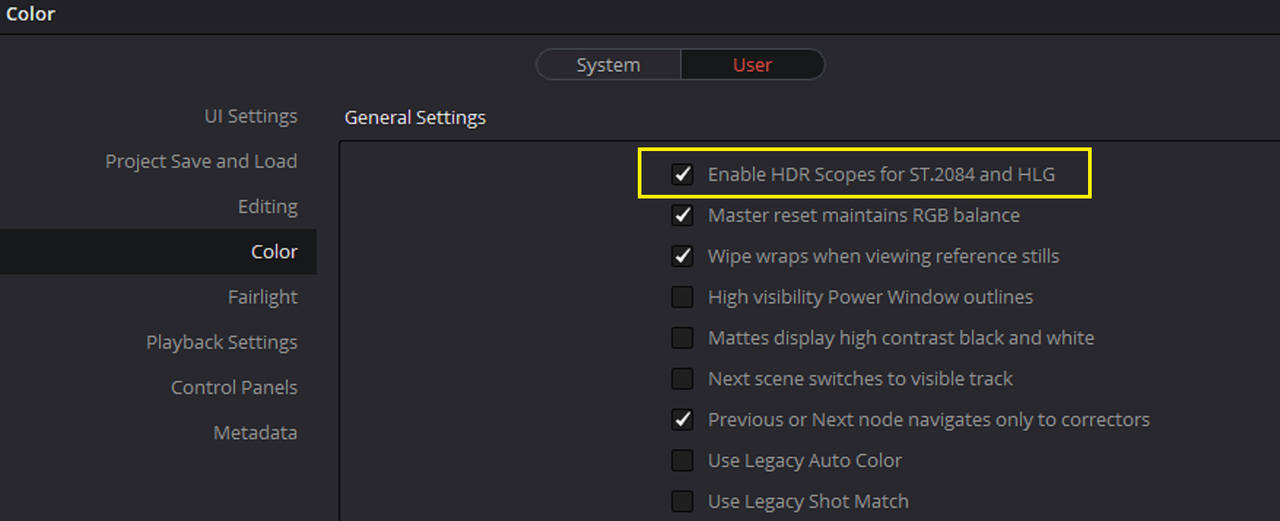
Oh yeah don't forget to enable" Enable HDR Scopes for ST.2084 and HLG" in "Preferences" under "User" and "Color"


Screenshot-1919.png


davinci-yrgb-1-1-1.jpg
 
Last edited:
I think this calls for a color managed transform between camera or clip metadata and the HDR display color space/gamma of your planned delivery codec or grading monitor. The attached article gives a brief definition of the various SDR/HDR standards and how they are interpreted by modern displays and delivery codecs.
I’ve simplified my own workflows by applying these transforms between camera native color space and display or grading color space standards for all footage in project settings as the first step rather than applying them as downstream grading nodes on a per clip basis. One still has full access to raw menu grading tools with this approach. I did a short beginner’s tutorial of this process for the Bolex user’s group some time ago. That was with Resolve V14 I think. Would be happy to share it if there is interest.

https://www.mysterybox.us/blog/2016/10/19/hdr-video-part-3-hdr-video-terms-explained


Thanks for this info David!, I didn't see this post of yours from just looking at the last posts.
 
Perhaps the problem really is with Resolve, which should completely ignore the concept of Gamma when output tone maps are in force. Instead, it should look at my Timeline gamma, which is set to ST 2084 PQ, and it should use the transforms appropriate for that. And it should ignore the foolishness of there being a BT1886 gamma tag in the metadata, which is absolutely meaningless when it's applying tone maps to what is in fact a Log3G10 source.

But I could work around that foolishness if I could touch the Gamma setting, as I could in the Legacy dialog boxes or with Red Cine-X. I just hate adding a step to my ingest process.

I think the BT1886 default is what Resolve automatically applies to raw camera inputs absent another definition. My Bolex outputs linear CIE1931 XYZ values, the native defined color space of uncompressed CDNG. With my current Slimraw lossless 10 bit compressed workflow the camera raw color space is Cineon log. But the raw menu defaults to REC709 for DNG. Useless.
 
David,


Yeah, usually Resolve will honor your "Monitoring Out" settings you set in Redcine-X. However, in the case above where I selected Rec2020/HDR-2084 in "Monitoring Out" in Redcine-X, in Resolve it came in as Rec709/Bt1886.
 
With color managed workflows in Resolve you are actually dealing with four different potential color space transforms:

1. Input color space: defined to match the native color space of your source.
2. Timeline color space: defined to match your reference monitor calibration or your preferred grading color space. For instance if you use third party LUTs, timeline color space should match the native color space the LUTs were written for. I.E. if you use Arri Log C luts, that is what your timeline should be set to.
3. Monitor color space if different from timeline and output.
4. Output color space: transform to match the color space of your export codec or content delivery standards.

I don't know if I can still find the article, but I first learned this process from a post workflow article on a feature film that mixed film and digital sources. All sources were converted to and graded in an REC709 timeline on REC709 broadcast reference monitors (pre HDR) with export transforms to REC709 for broadcast, SRGB for web delivery, or DCI-P3 for theatrical delivery.
 
David,

There are a lot of settings that you have to get right to make sure you are coloring and displaying your image properly.
 
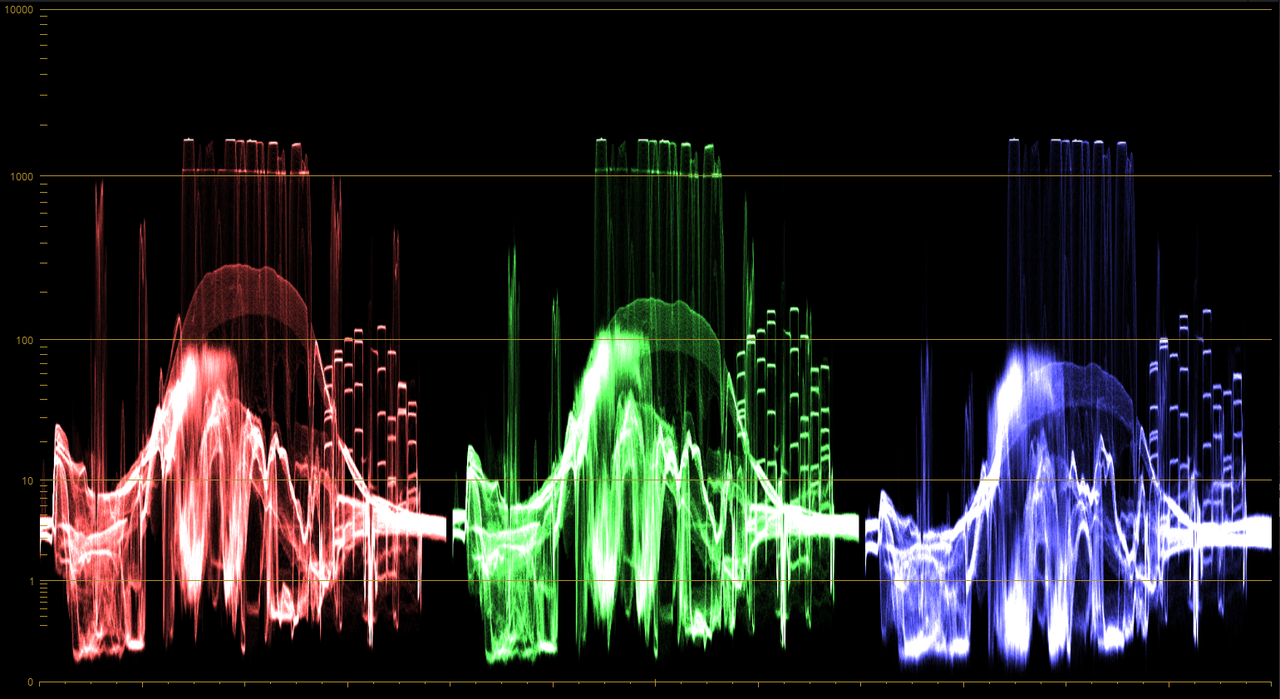
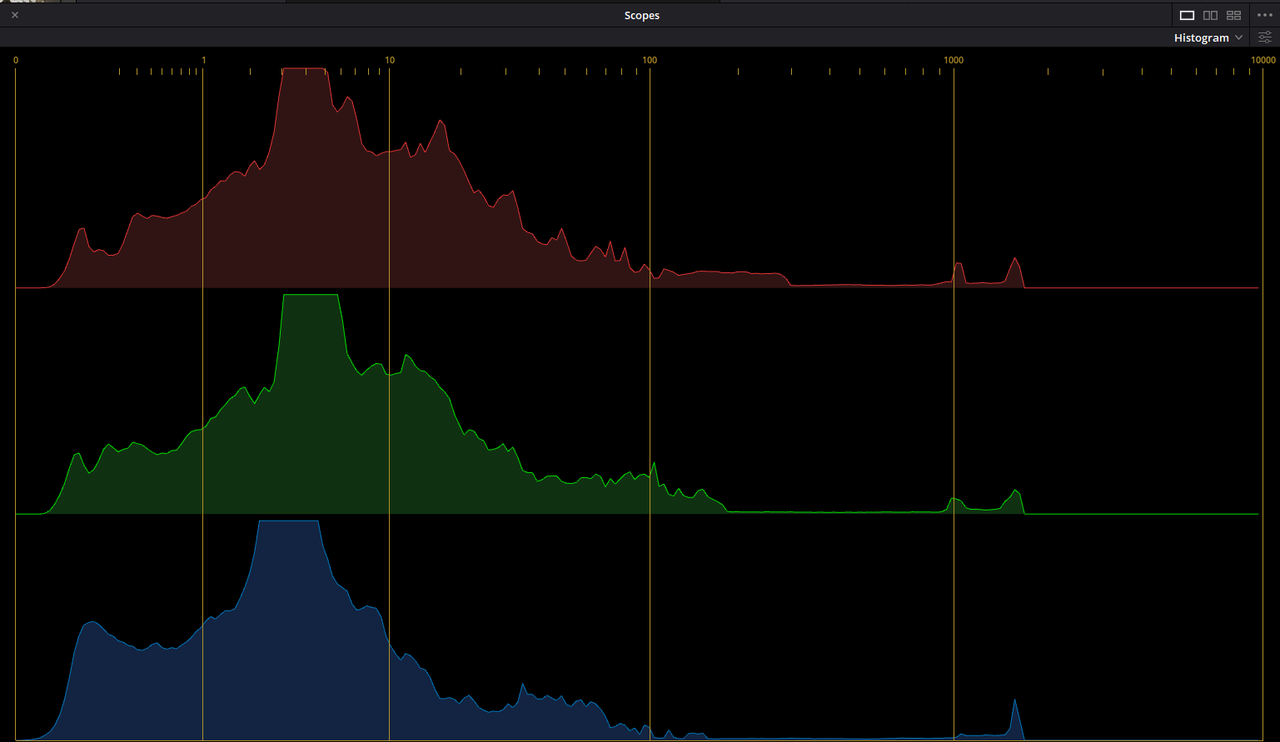
Here's the "Parade" and "Histogram" Scopes for the Rec2020/ST.2084 2000 Nits Project settings with a Medium/ Hard IPP2 Tone-Mapping and Highlight Roll-Off on the Previous Page.

Screenshot-1933.png


Screenshot-1934.png
 
David,

There are a lot of settings that you have to get right to make sure you are coloring and displaying your image properly.

Basically you are always visually grading to the color space and calibration of your reference monitor. Correct workflow settings insure that exports match what you see when you grade with no out of gamut color or image values.
You can't grade what you can't see, and there are certainly many different potential paths to the same outcome. HDR has greatly expanded, and complicated, the potential choices.

There are two points in the production chain where light is converted to analog voltage, then digital data or converted from digital data to analog voltages, then light. Only those two points are defined by reference standards: the camera maker's color science represented in a defined color space, often proprietary and particular to the camera and recording codec being used, and the display representation of the graded values from an ever widening range of defined standard color spaces. Some of these are particular to the chosen delivery codec. Between those two defined points, what is seen is up to the skill, and aesthetic choices of whoever grades the footage. It is literally, especially with raw formats, a painter's palette.

This year I updated all our home TV's to 4K UHD capable displays that support HD10+ and HLG HDR formats. For a video to display HDR correctly on these it must be exported with a codec that includes the appropriate HDR metadata supported by the TV's HLG or HD10 decoders.

Same is true of BT1886/REC709 too. I'm still working in REC709 2.4 gamma for the most part because that looks substantially the same as my grading monitor across most displays I view them on, both computer monitors and TV's.
The covid shutdown has given me the time to begin exploring HDR a bit, but I haven't set a color management work flow for that yet.
Hybrid log gamma,HLG, has by far the broadest support in common 10 bit computer and TV displays and is backwards compatible with BT1886 for SDR displays. So for now I'm playing with that for HEVC H.265 web delivery encoding.
For this purpose virtually all consumer displays top out at between 250 and 350 nit peak white, HDR encodings for higher nit values will be value compressed on decoding by the TV, not always with the intended results.
HLG also works for HD and 2K HDR delivery as well with some of the new transforms available in Resolve.
Few people seem to know these days that REC709 at 2.4 gamma mathematically defines a 10 stop plus grayscale, though typically SDR TV's display that 10 stop scale over a 3 to 5 stop photometric light output range. So with HLG encoding, REC709 HD is capable of true 10 stop HDR if the display is up to the task.
 
David,


I'm kinda like you, still using just Rec 709/ BT1886(Gamma 2.4). I also have been trying to get more into the HDR workflow and how to best use it with both IPP2 and ACES. I also got a Sony 55inch 4K UHD with support for different formats this pass Xmas.

I've seen a lot of Netflix shows lately, which are from highly skilled professionals, that just don't seem to look right. The first I noticed was "Annihilation" which didn't look good at all in some scenes. That made me think that if professionals that Netflix are using for Post-Production of their multi-million dollars films can't seem to get HDR right, what chance do I have.


I think IPP2 with HDR has a lot of non-standard ways in which to work. You would think that for "Input Color Space", in a " Davinci YRGB Color Managed" workflow, that it would be "RWG/LOG3G10" and that "Timeline Color Space" and "Output Color Space" would both be "Rec2020/ST.2084". However, before the"Red IPP2 Gamut Mapping" became available in Davinci Resolve in the "Timeline to Output Gamut Mapping" drop down menu, we only had the "Project" settings and the "Camera Raw" settings to use for IPP2. It was a while before IPP2 settings were even available in the Project settings.


Peter Chamberlain of Blackmagic Design stated that the correct way to use IPP2 in the "Davinci YRGB Color Managed' workflow was as I showed it above. However that has been debated by some also.
 
I hear all that. And I appreciate the workflow suggestions. I just have trouble sleeping at night knowing that every time I press RECORD I'm saving metadata that's wrong.
 
Other than test clips downloaded from Red.com, and similar offerings from other camera sites or individual users, I'm still working with 12 bit 2K linear CDNG from the Bolex, or Cineon log 10 bit lossless from a Slimraw transfer of same.
Played a little bit with RCX and IPP2.

I think you and I share a similar approach to basic color grading objectives if not the same workflow to get there. I love saturated color and teasing out visual depth with microcontrast enhancements (midrange detail in the raw menus).
 
I hear all that. And I appreciate the workflow suggestions. I just have trouble sleeping at night knowing that every time I press RECORD I'm saving metadata that's wrong.

It may not be your meta data that is wrong, but Resolve's baked in assumption about it. That is certainly the case with my Bolex. It dumps CDNG into REC709 automatically absent a color managed workflow. That is disastrous as the camera produces way out of gamut color values with an REC709 default.

Edit: Other than exposure and white balance, I think Resolve ignores much camera metadata, gamma for sure. But not not sure how that would apply to Red IPP2 footage since there is no defined display gamma in CDNG raw metadata, probably not in Redcode either if there isn't an export menu option for it.
 
Michael,


I hear what you are saying! I've been working around with the IPP2 workflow since the first Beta in I think Redcine-X 42.x.xxxx, can't remember the exact version. I've jumped through so many hoops to try to understand the logic behind the IPP2 Workflow, that in the early days it literally gave me migraine headaches. So believe me I understand your frustrations. The settings you've seen me post here and in the past come from first trying everything I could think of that would seem logical and conventional. Then I finally came to the settings that just worked despite seeming illogical. Like you I wanted to understand the reasoning behind why I had to do it this way and not that way. However, if the settings actually work, they just work and there's no need, at least for me, to continue to ask why.
 
Back
Top