Welcome to our community

Be a part of something great, join today!

  • Hey all, just changed over the backend after 15 years I figured time to give it a bit of an update, its probably gonna be a bit weird for most of you and i am sure there is a few bugs to work out but it should kinda work the same as before... hopefully :)

Importing .mov into Premiere and Resolve issue

Tom Gleeson

Well-known member
Joined
Nov 7, 2007
Messages
1,405
Reaction score
7
Points
38
Location
Sydney
Website
www.cinematography.net
I have had a call from an editor in regards to a project I shot on the Weapon where using Premiere he is having trouble with the Apple Pro res 422 QT files. The R3D files are all good but he is finding that the .mov files are failing to consistently import. About a quarter of the .mov will not import. I have tried it out on a different system and Premiere is coming up with a dialogue error box on import saying "A low-level exception occurred in ImporterQuicktime (importer)" If I finder drag files directly into Premieres media bin I can see the file and it will play. Not familiar with Premiere so I tried FCP7 and it could see and import the .mov files and no issue with QT7 player and QT10.4. With Resolve 11 I cannot even see the .mov files and I cannot import them using my usual process. Resolve gave me an error dialogue " Error occurred while opening video clip.............. using QTDecoder. Has anyone else experienced issues with any of the software packages importing Reds .mov files?
 
Is this Windows or Mac? If it's in Mac, what happens if you try to open them within QuickTime itself? Worst case, load the R3D files into Resolve and render them out as dailies with normal RedColor/RedGamma settings for Rec709 and matching timecode & sound.

My suggestion is also not to use ProRes LT but use ProRes 422 instead, which is still lightweight but works fine for offline editing. Make sure you keep the aspect ratio identical to that of the original file.
 
Marc,

This is on Mac systems and we did use ProRes 422 although we shot 6K2:1 thus producing 2048 x 1024 Pro Res files. No issues with playback of these Pro res files with Quicktime 7 player and Quicktime Player 10.4. I am in a good position as the client is just as happy with the R3D files but its something I want to sort out for future reference. I don't want to tell clients how useful the Pro Res files are then they can't get them into an NLE or Resolve.

Just did another test from another shoot and imported into Resolve 12 some Pro Res files 422 from the camera but this time they were 1920x1080 pixels and they were no problem. I wonder if some systems are having trouble with the Pro res files when they are non standard pixel dimensions?

It is hard testing for this as I do not have access and the skill to test all the post software
 
I could test it against avid, resolve, fcpx, cs5 if you upload a sample? Thx
 
Brian,

I would need to upload a 120gig as the editor is reporting that about three quarters of the QT files import but he can never get them all in. I will try and get hold of a single .mov file but as it was for a TVC shoot I can't use the originals but will generate a new one on Monday and make that available instead. Thank you.
 
Sounds good, I don't mind testing it out...
 
Just did another test from another shoot and imported into Resolve 12 some Pro Res files 422 from the camera but this time they were 1920x1080 pixels and they were no problem. I wonder if some systems are having trouble with the Pro res files when they are non standard pixel dimensions?
That could very well be it, since 2048x1024 is not a "legit" aspect ratio for theatrical release or broadcast. I kind of wince at people making up their own aspect ratios when there's no rational reason to do so. You've got four really good ones now: 1.33, 1.78, 1.85, and 2.39. I would bet those will suffice for 99.9% of any scripted production on earth, and it'll be compatible with all streaming services, downloads, YouTube, film festivals, theaters, and broadcast stations. If you create something different, trust me -- those people will bitch about it.

I get that Storaro and a few others have tried promoting aspect ratios like 2.00, and I know there are 2.20 aspect ratios for 65mm (and Hateful 8 is 2.76). But I think the choice of aspect ratio is something that you have to plan for very carefully, particularly to make sure it's going to work with your chosen workflow and all the people that are part of the project: editors, colorists, creative execs, VFX people, and so on.

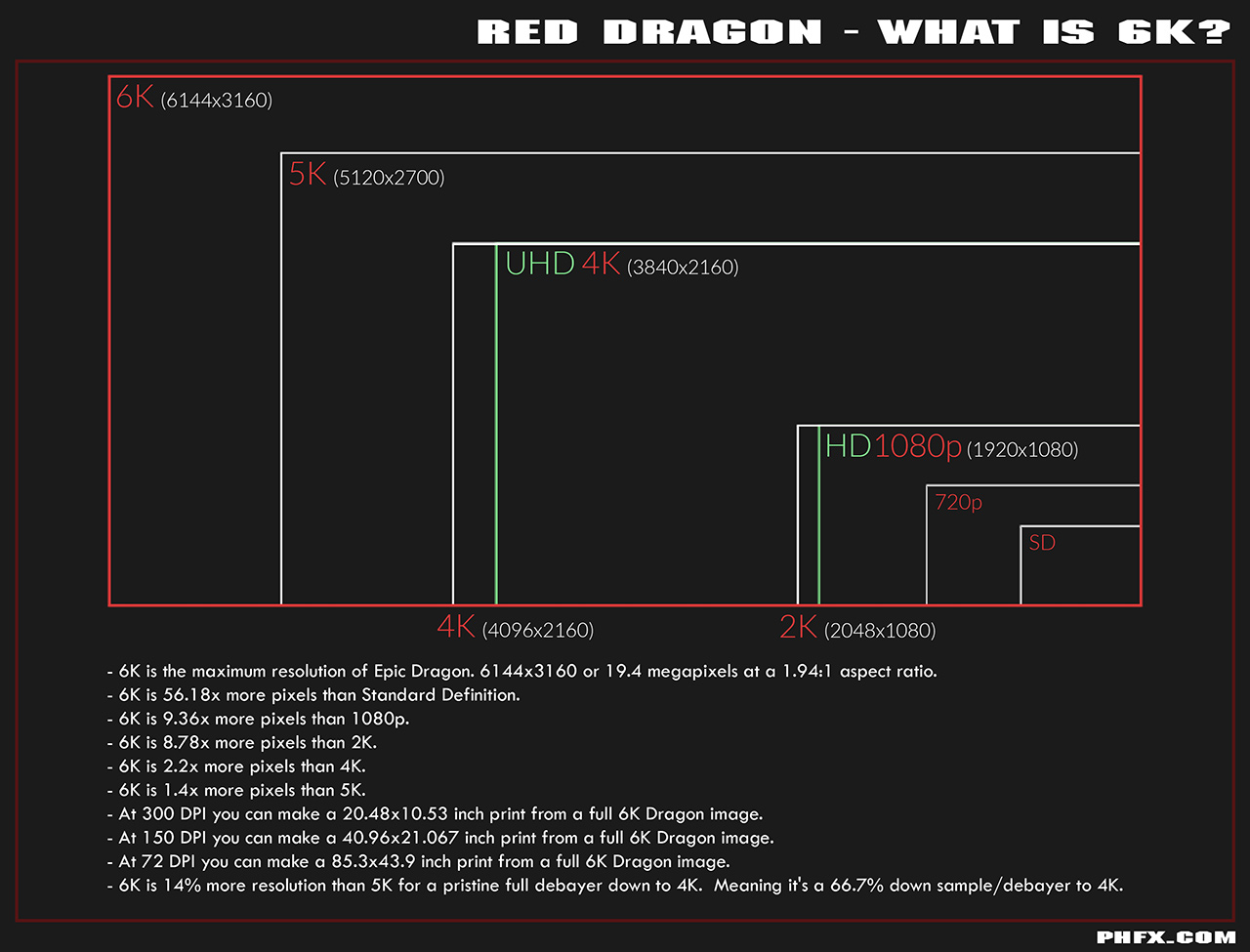
There's a lot to be said with shooting a bigger frame -- even full sensor 1.90 -- and then masking off and reframing in final delivery to 2.39 or 16x9 or whatever you want. But for that, you've got to shoot camera sizing charts every day on the set and make sure that everybody is on board with this. Otherwise, you're going to run into unpleasant surprises on down the line. I know that some DPs are uncomfortable with the idea of reframing in post, but my position is as long as the DP is part of that decision, I don't see the problem. Ideally, we'd set one position and use it for the entire feature, changing only on rare occasions where an actor stepped out of frame or some unwanted detail popped in.

Phil Holland's chart works very well to give you an idea of your available options:

phfx_redDragon_whatIs6K.jpg
 
Marc,

I agree about aspect ratios and I thought and assumed that the Pro res files would be letterboxed within a 1.78 image. You live and learn and luckily for most of my work the Pro Res files remain a curiosity. Its a rare day I go outside the standard aspect ratios but I will still work to determine the situation when the Weapon gives you files outside the norm.
 
I've had two such calls from editors and I've let Red know about it. Both using 5k HD, and 6k HD with 1920x1080 ProRes 422 HQ proxies. From my understanding, part of it is that clips get broken up beyond 4gb (fat32 limit) and they're not being linked back together in Premiere. The first editor said that some files worked and some didn't. Second editor said some files were missing and some were broken. The second editor manually sorted the clips but they went offline during a rough cut presentation... Apparently he linked back to the R3D's and it was fine.... I suspect it's something that's going to get fixed in an update pretty soon, but I'm going to try to work with the DIT on the next job to see if there's an easy way they can sort it out on set for now.
 
Brian,

OK here are some short .mov files from the camera in a variety of aspect ratio flavours. I got an error message on some of these files from DropBox but they still appear in the folders? Ping me a message if any of them are corrupt and i'll try again but my internet connection is SO crap. Apologies for the boring image.

https://www.dropbox.com/sh/qpxreuhc7dg0i8c/AABXb1yP7J__7OteE9xCmNYZa?dl=0
https://www.dropbox.com/sh/w5m9c6abs4mcgzy/AAAh6hpHxQsy7wXROn7NX61Qa?dl=0
https://www.dropbox.com/sh/efh2sq3369jwk9y/AACxumJ3tvOvQnneZZMpy_lQa?dl=0
https://www.dropbox.com/sh/esw6hcvxzz9e8gt/AABu3JEfGhcy8WDPA3_Iourqa?dl=0
https://www.dropbox.com/sh/x8n1vo1i2hovzb2/AABPwpO7t8oKNbK7i7ShKSuya?dl=0
https://www.dropbox.com/sh/fi6jle5yj4t639g/AAAbjngy6K9anBek799i-dafa?dl=0
 
This has also been reported from other people, I've heard from a seminar about the new Weapon that they had problems getting the QTs into Resolve and other color grading software. There seems to be something wrong with the files and this needs to be adressed rather urgently. There's a lot of Red haters that grasp for gasoline to ignite their hate-fires.
 
I'm having random issues with ProRes also. Some just won't play. The RAW files are all fine. I've tried all flavors of ProRes now and each of them have 90% good clips and 10% that just won't play or import to Premiere CC. Very odd.
Still transcoding from R3D for now until this gets worked out.
 
Jeffery,

Have you tried importing the files that Premiere rejects into any other NLE or playing in QT? Are they 1920x1080 files?
 
Brian,

OK here are some short .mov files from the camera in a variety of aspect ratio flavours. I got an error message on some of these files from DropBox but they still appear in the folders? Ping me a message if any of them are corrupt and i'll try again but my internet connection is SO crap. Apologies for the boring image.

https://www.dropbox.com/sh/qpxreuhc7dg0i8c/AABXb1yP7J__7OteE9xCmNYZa?dl=0
https://www.dropbox.com/sh/w5m9c6abs4mcgzy/AAAh6hpHxQsy7wXROn7NX61Qa?dl=0
https://www.dropbox.com/sh/efh2sq3369jwk9y/AACxumJ3tvOvQnneZZMpy_lQa?dl=0
https://www.dropbox.com/sh/esw6hcvxzz9e8gt/AABu3JEfGhcy8WDPA3_Iourqa?dl=0
https://www.dropbox.com/sh/x8n1vo1i2hovzb2/AABPwpO7t8oKNbK7i7ShKSuya?dl=0
https://www.dropbox.com/sh/fi6jle5yj4t639g/AAAbjngy6K9anBek799i-dafa?dl=0


Thanks so much for posting these Tom,

why is the 6:5 ANA desqueezed and recorded to 1920x788 ??????

It's the wrong AR...it's not 2.4:1 that's strange for sure.

6K WS is 2048x864 which is 2.37:1, matching perfectly the R3D AR.
 
Jeffery,

Have you tried importing the files that Premiere rejects into any other NLE or playing in QT? Are they 1920x1080 files?

Yes, and they don't play even on the desktop. Yes they are 1920x1080.

I JUST SAW THAT JARRED ANNOUNCED NEW FIRMWARE WHICH FIXES THIS ISSUE AND IT IS AVAILABLE NOW :)
 
So somebody test it and let us know if everything works!
 
Has anyone figured this out yet? Just received my Weapon and am running into this issue as well with my test footage.
I have clients that are thinking about utilizing the ProRes for shoots coming up. I'm not going to go down that road if this isn't resolved. Firmware V6.2.44 which according to the website is the latest.
 
Last edited:
I have run into this problem...with the new firmware (6.2.44). I sent test cases to RED, who reproduced the problem. But it's clearly an Adobe problem, not a RED problem. What makes it clear? If I copy the "bad" .mov file to my dropbox folder (which I did in order to report the problem), and then open that isolated file in Premiere Pro (which I did to verify that RED would be able to see the problem I saw), the import worked. But with a bit-identical file, and with precisely the same import command of just that file within the file structure of the RED card, it fails.

Resolve, Quicktime, Compressor, and VLC were all happy to read/play the file, whether it was in the RED directory structure or isolated in a DropBox folder. So I doubt the problem is with the file. I think the problem is with Premiere Pro's ProRes reader.

M
 
Thanks so much for posting these Tom,

why is the 6:5 ANA desqueezed and recorded to 1920x788 ??????

It's the wrong AR...it's not 2.4:1 that's strange for sure.

6K WS is 2048x864 which is 2.37:1, matching perfectly the R3D AR.

Tommaso,

For my workflows I am glad that the pro Res files are desqueezed at the 6:5 ANA setting as I would generally use the pro Res files for editorial and match back to R3D at the grade. Not sure why the 6:5 ANA pro Res files are in a 2.436 aspect ratio and the 6KWS aspect ratio is is 2.37. Although it's a small difference I would expect them to be the same. Am I missing something here?
 
Back
Top