Welcome to our community

Be a part of something great, join today!

  • Hey all, just changed over the backend after 15 years I figured time to give it a bit of an update, its probably gonna be a bit weird for most of you and i am sure there is a few bugs to work out but it should kinda work the same as before... hopefully :)

IBC - GPU Build REDCINE-X Beta 21

reinstalled multiple times.. download link from here and red.com
3930k hexacore i7
titan video card
64gb ram
osx 10.8.4
hackintosh?

just asking because i had the beta on one SSD which i used as a startup for iMac (which worked fine) and then retina mbp...which is where the freezes happened....(complete, had to force shut down)...once i removed and re-installed RCX, everything was fine.....seems like somehow running it on 2 systems from the same install caused problems....i wonder if there is some hardware related install going on.....
 
hackintosh?

just asking because i had the beta on one SSD which i used as a startup for iMac (which worked fine) and then retina mbp...which is where the freezes happened....(complete, had to force shut down)...once i removed and re-installed RCX, everything was fine.....seems like somehow running it on 2 systems from the same install caused problems....i wonder if there is some hardware related install going on.....

didnt work when i installed it to another drive either...

yes hack...

anyone else have a 3930k processor?
 
reinstalled multiple times.. download link from here and red.com
3930k hexacore i7
titan video card
64gb ram
osx 10.8.4

It's because you have a Titan, which is not fully supported in ML. You have to do one of 3 things:

1. Use build 20 instead.
2. If you want BMD Decklink (or similar) output, you need build 21. To get 21 to run, edit ~/Library/Application Support/red/RedCineX/Preferences/Preferences.ini and set the "open_cl_enabled" key to false. It's in the "[image_processing]" section. I use Text Wrangler to edit the file. Do not turn OpenCL back on for the Titan or it will crash.
3. Use Windows.

OpenCL support for Titan will arrive in Mavericks.
 
It's because you have a Titan, which is not fully supported in ML. You have to do one of 3 things:

1. Use build 20 instead.
2. If you want BMD Decklink (or similar) output, you need build 21. To get 21 to run, edit ~/Library/Application Support/red/RedCineX/Preferences/Preferences.ini and set the "open_cl_enabled" key to false. It's in the "[image_processing]" section. I use Text Wrangler to edit the file. Do not turn OpenCL back on for the Titan or it will crash.
3. Use Windows.

OpenCL support for Titan will arrive in Mavericks.

Not working with my gtx 780 either
Build 20 opend
Resolve works.
Fcp..so on
 
didnt work when i installed it to another drive either...

yes hack...

anyone else have a 3930k processor?
I'm running a Hackintosh with a 3930K, but I'm still using OS X 10.7.4. No problems running build 21 - except there's no video out through the HDMI on my Decklink, although I'm not sure if the HDMI is even supposed to work, since I've asked about it twice and gotten no replies.
 
Not working with my gtx 780 either
Build 20 opend
Resolve works.
Fcp..so on

That's because the Titan and 780 use the same chipset. Neither are fully supported in ML, so no OpenCL.

I'm running a Hackintosh with a 3930K, but I'm still using OS X 10.7.4. No problems running build 21 ...

That's because it has nothing to do with the CPU. It's because of the lack of full support for the Titan and 780 in ML.
 
Hey guys,

We've finally pushed out an update. Tons of good fixes and improvements. Check the release notes for a full list. You can find it on red.com/downloads under the Beta tab. As always keep the good feedback coming!

Thanks,
David
 
Hey guys,

We've finally pushed out an update. Tons of good fixes and improvements. Check the release notes for a full list. You can find it on red.com/downloads under the Beta tab. As always keep the good feedback coming!

Thanks,
David
Awesome, thanks ... I see you got the openexr updates in there ;) thanks !
 
Just downloaded and installed the latest version. All I can say, wow. Finally I can play 1/2 res with no problem whatsoever. With the previous version this was impossible- the app would become unresponsive, resulting in need to farce quit. Now it just works.
 
Guys I run osx so I don't know... but how do you transcode to quicktime if using windows?
On windows you can encode to QuickTime, but Apple does not release ProRes encoders for windows, so we can't encode to ProRes.
 
Windows is useless...

Ok..so since my gtx 780 and titan are crashing redcinex in my osx hackintosh .
Can I put my gtx 680 in alongside my 780? (Will redcine read the 680 and open without crashing?
 
RCX 21.1 has some new opencl crash detection on startup that will disable opencl if it crashes then. The next time you start up you should be able to re-enable opencl and select the 680. After that you should be fine.

If the crash detection doesn't work, there are some posts earlier in the thread from Mike Halper on how to disable the GPU by manually editing the preferences file.
 
Decklink 4k output at any resolution still broken with or without gpu:

10-03-10-44-50-232] DeckLinkAPI Version: 9.7.8
[10-03-10-44-50-244] DeckLink device created
[10-03-10-44-58-065] stream can't be setup
 
Does this mean that GPU decode is always 8bit?

[10-03-11-16-04-647] CL Input Buffer: Channels: 3 Depth: 8 PixelCount: 3456000 Size: 10368000
 
Christopher,

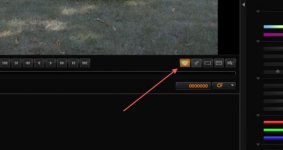
Are you hitting this button to turn on SDI output?
 

Attachments

  • Screen Shot 2013-10-02 at 2.26.03 PM.jpg
    Screen Shot 2013-10-02 at 2.26.03 PM.jpg
    13.7 KB · Views: 0
Back
Top