Welcome to our community

Be a part of something great, join today!

  • Hey all, just changed over the backend after 15 years I figured time to give it a bit of an update, its probably gonna be a bit weird for most of you and i am sure there is a few bugs to work out but it should kinda work the same as before... hopefully :)

HP 820 Tower - RED EDITION

So what do you do with your new HP machine if the client asks you deliver Quicktime Prores? Until there's an answer to that question there is no way.

Here you go :)

http://www.fallenempiredigital.com/...n-a-windows-pc-with-redcine-x-pro-and-ffmpeg/


edit line #20 with these settings as you need it. It's set to default to LT, under the -profile lt line. Can set to proxy, lt, std, hq. Now if there was only a way to make this into a UI via VB or something that called this script and edited the file as you needed for input and output directories ... and maybe LUT support .... :) who's game for a little coding ??
 
Here you go :)

http://www.fallenempiredigital.com/...n-a-windows-pc-with-redcine-x-pro-and-ffmpeg/


edit line #20 with these settings as you need it. It's set to default to LT, under the -profile lt line. Can set to proxy, lt, std, hq. Now if there was only a way to make this into a UI via VB or something that called this script and edited the file as you needed for input and output directories ... and maybe LUT support .... :) who's game for a little coding ??

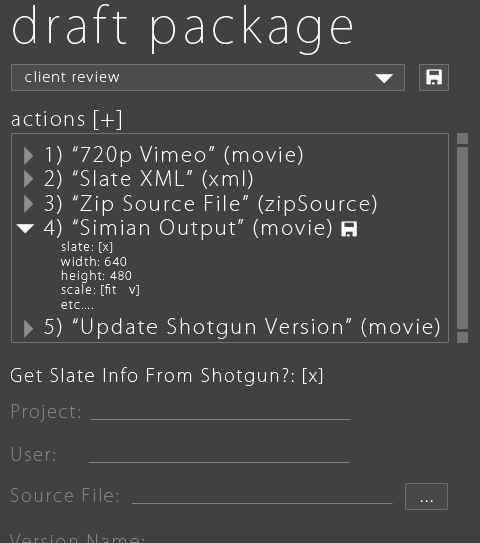
I'm collaborating with Thinkbox Software on something that might interest you. LUTs, Python based plugins, PyQT interface and Draft (based on ffmpeg) backend for image processing.

Thinkbox-Draft-v2.gif
 
For the record - I have tested a proto of this box at Tekserve and it kicks serious, serious ass. Wait until you try encoding from R3D to H264 in AME CS6 with a 6000 card on one of these suckers ... it's just nuts. Scratch Lab + CS6 on this box and you will run circles around the DITs with MACs.
 
I'm collaborating with Thinkbox Software on something that might interest you. LUTs, Python based plugins, PyQT interface and Draft (based on ffmpeg) backend for image processing.

Thinkbox-Draft-v2.gif


Nicely done Gavin! - email me alpha :) mark (at) offhollywoodny.com

Does this have integration with Shotgun Software? We run Offhollywood's digital lab on Shotgun -
 
Now the real question is can we hack OSX on 'em?......hehehe......
 
Here you go :)

http://www.fallenempiredigital.com/...n-a-windows-pc-with-redcine-x-pro-and-ffmpeg/


edit line #20 with these settings as you need it. It's set to default to LT, under the -profile lt line. Can set to proxy, lt, std, hq. Now if there was only a way to make this into a UI via VB or something that called this script and edited the file as you needed for input and output directories ... and maybe LUT support .... :) who's game for a little coding ??

Saw this posted up the other day, and been looking into it for my new Windows tower. It still kind of pains me that there's two transcoding steps, though I guess going from Uncompressed to ProRes won't take as long as the initial R3D to Uncompressed. Anyone tested this workflow and have any impressions?
 
Ok, this kicks ass, although I wish it also shipped in a Linux flavour.

But seriously, a workstation is great... now do a mobile Red Workstation.

The Macbook Pro Retina screen seems like a huge step up in resolution, a perfect fit for 4K+. But even with Thuderbolt, its limited for Pro use. Multiple 2.5" drives, upgradable RAM, and more highspeed ports than you can shake a stick at.

If HP is serious about media professionals they need a serious mobile workhorse.
 
you will run circles around the DITs with MACs.

Yes I guess if you have to do the transcoding twice you'll be running extra laps on your PC system while the Mac DIT is already packed up and home (with proes422 deliverables, 65% of our work).
 
Yes I guess if you have to do the transcoding twice you'll be running extra laps on your PC system while the Mac DIT is already packed up and home (with proes422 deliverables, 65% of our work).

Okay - in fairness - depends on your workflow and what deliverables you are making. 90% of the features and shows we support cut on AVID DNxHD36 and use H264s for DAX or PIX mobile dailies - those encodes are much slower on the fastest MAC.
 
Yes I guess if you have to do the transcoding twice you'll be running extra laps on your PC system while the Mac DIT is already packed up and home (with proes422 deliverables, 65% of our work).

You could just keep your ol' Mac truck for Pro Rez and buy the HP Lamborghinni for everything else.
 
heh heh heh... :) Word on the street is that Apple has left the pro tower game for at least another year, if not forever.

Unfortunately, I think it is time to either wait and painfully milk everything you can out of that 5 year old mac pro tower, or move on to the dark side for your heavy lifting needs.

HP is eager to make some new friends as shown by there unprecedented support to the professionals that really kicked off with their mega booth at NAB. You would be surprised at just who has switched to these.. and just looking at the fact that two legendary pro mac system builders both PROMAX and TEKSERVE have jumped into the game it is very telling.


Made the switch! Totally stoked! No looking back! I LOVE being "ahead" of the curve! Welcome to the Dark Side, my friend... welcome!
 
Good suggestion Mark.
 
OK. Never thought I'd say it, but after the latest WWDC disappointment, I'm considering making the switch.
But a few questions: Creative Suite. I have the master collection for Mac - do I have to re-buy it in PC format?
Also, once I'm into creative suite, does it function identically to the mac version or is there a different interface to learn?
Lastly, all my archives are in HFS+. Can I continue to access these?
 
OK. Never thought I'd say it, but after the latest WWDC disappointment, I'm considering making the switch.
But a few questions: Creative Suite. I have the master collection for Mac - do I have to re-buy it in PC format?
Also, once I'm into creative suite, does it function identically to the mac version or is there a different interface to learn?
Lastly, all my archives are in HFS+. Can I continue to access these?

Yes, the interface is nearly the same. The keyboard shortcuts are nearly identical, but Command becomes "control."

It actually runs BETTER on a PC, as you now have access to the Mercury playback engine. Welcome aboard!
 
Yes, the interface is nearly the same. The keyboard shortcuts are nearly identical, but Command becomes "control."

It actually runs BETTER on a PC, as you now have access to the Mercury playback engine. Welcome aboard!
I've had access to Mercury Playback Engine on the Mac for a while, utilizing the supported GPU cards. I don't disagree with the fact that you have more potential to run it better on a PC though. But I have to say, CS6 on a Mac with CUDA card, and RED Rocket is pretty good.
 
I've had access to Mercury Playback Engine on the Mac for a while, utilizing the supported GPU cards. I don't disagree with the fact that you have more potential to run it better on a PC though. But I have to say, CS6 on a Mac with CUDA card, and RED Rocket is pretty good.

Yes I agree Steve - but wait until you try CS6 with a 6000 card on a Z820 - it's fucking nuts. Fucking nuts is way faster than pretty good :)
 
Back
Top