Welcome to our community

Be a part of something great, join today!

  • Hey all, just changed over the backend after 15 years I figured time to give it a bit of an update, its probably gonna be a bit weird for most of you and i am sure there is a few bugs to work out but it should kinda work the same as before... hopefully :)

Histogram not tightly enclosed by raw-bars as in manual

I've find out this thing, the gap in the right side if the histogram, only in these days, nothing similar before. I'm saying this because I checked once I read this post and I'm sure everything worked fine, the right side of the histo reached all the right side (but yes, now in redcolor3 the gap is bigger then redlog (but still there)).
Btw I'd like to know, dear Matthew, if it's something affecting only the histogram in the display or a riduced DR of the sensor. I'm a little bit worried about that...

Depending on your settings for gamma, color and iso you will see the histogram change ... and you may observe a gap. You will observe the same histogram behavior in RCX if you change the same settings there.
 
I've find out this thing, the gap in the right side if the histogram, only in these days, nothing similar before. I'm saying this because I checked once I read this post and I'm sure everything worked fine, the right side of the histo reached all the right side (but yes, now in redcolor3 the gap is bigger then redlog (but still there)).
Btw I'd like to know, dear Matthew, if it's something affecting only the histogram in the display or a riduced DR of the sensor. I'm a little bit worried about that...

Please open a R3D in RCX and view the histogram. Then, keep observing the histogram while walking through the different curve options you have available to you (RG3, RG2, RLF, etc) . Tell me if what you see there doesn't match the camera.

The histogram is not a view of the RAW data and does not reflect the actual DR of the sensor. It reflects the color / curve options you have chosen... ie metadata.
 
In RCX the histogram is totally normal, at least for me.

Matthew, do you know if all or only some of the EPIC/Scarlet shooters are effected by this problem with the histogram and gap on the right side?

As mentioned earlier, when using the VIDEO tool I see no colors for the highlighted areas. Neither in RAW nor in RG3/RG2. So no yellow, orange or red colors.

I thought that these problem would have been adressed in the otherwise awesome 3.2.8 build. :(
 
In RCX all is normal and the Histogram goes fluently at the very end of the right side. I have to tell U I've changed from redcolor3 to redlogfilm and redcolor2 and now, after a reboot, the Histogram in camera is ok (it goes at the very right end of the Highlight side). But probably nex time it will be in the old situation again (hope not). I understand about metadata and so on but I'm thinking it's a issue. Same lighting situation, one time the histo doesn't reach the right (but clips) and there is a gap, other time after reboot there is no gap (and the visual data reach the right side as the left side usually do). I'm hardly thinking this can be a normal thing, dear Matthew.
p.s. I'm running the 3.2.8 firmware but the same thing I've found in the 3.0.7 too. Nothing before (so if this stuff goes on I'll come back to the 3.0.6 at least, hoping that will work).
 
I'm not sure if this is related or not....but Scarlet's video peak and SMPTE bars output of the HD-SDI max out at about 88% on a waveform. I have asked someone at Red about this, and have posted at least 1 link on this forum asking what people are doing about calibrating the output properly, and I've had no explanation nor reply to be honest. I'm not saying there's not a good reason, or a way to adjust the output to peak where it should. I just haven't heard anything yet.

I'm still curious about this. Is there an explanation for why the HD-SDI output doesn't seem to be be full range?
 
In RCX all is normal and the Histogram goes fluently at the very end of the right side. I have to tell U I've changed from redcolor3 to redlogfilm and redcolor2 and now, after a reboot, the Histogram in camera is ok (it goes at the very right end of the Highlight side). But probably nex time it will be in the old situation again (hope not). I understand about metadata and so on but I'm thinking it's a issue. Same lighting situation, one time the histo doesn't reach the right (but clips) and there is a gap, other time after reboot there is no gap (and the visual data reach the right side as the left side usually do). I'm hardly thinking this can be a normal thing, dear Matthew.
p.s. I'm running the 3.2.8 firmware but the same thing I've found in the 3.0.7 too. Nothing before (so if this stuff goes on I'll come back to the 3.0.6 at least, hoping that will work).

I've justed returned after 4 days of shooting stereo landscape scenes, all of them static shots. The amount of times I had to turn the cameras off and back on to get them both exposed correctly was quite annoying. It seems to be random, one minute the left cam is under exposed 4-5 stops, the next minute the right cam, even sometimes both. Been quite educational in the fact that it has taught me to identify when the cameras are exposing correctly and when not, and yes, most of the time the histogram on the faulty cam is compressed over to the left. This sounds like the exact same problem a lot of you guys are suffering, but are adjusting the exposure so the histogram looks satisfactory. I have the 2 cams side-by side and it is very obvious there is a problem sometimes.
 
I've just started a long-term project with a Scarlet, and find this issue to be supremely frustrating and non-intuitive.

Additionally, it seems to me that there is no longer a real RAW viewing mode anymore? The RAW view, according to the manual, just removes the ISO metadata, but seems to still be using some gamma/matrix settings. Hence, no way to see a true RAW histogram? I like the Exposure mode, which is very helpful, but not having a true RAW histogram totally negates the value of the histogram in the first place. And the fact that highlights clip at 88% may make sense from an engineering standpoint, but that's totally useless from a usability standpoint for those who would otherwise be OK with using the color-space encoded histogram.

Ugh.
 
Couldn't you add some dotted lines that marks the boundaries of a clipped image for a given meta setting?
 
I've just started a long-term project with a Scarlet, and find this issue to be supremely frustrating and non-intuitive.

Additionally, it seems to me that there is no longer a real RAW viewing mode anymore? The RAW view, according to the manual, just removes the ISO metadata, but seems to still be using some gamma/matrix settings. Hence, no way to see a true RAW histogram? I like the Exposure mode, which is very helpful, but not having a true RAW histogram totally negates the value of the histogram in the first place. And the fact that highlights clip at 88% may make sense from an engineering standpoint, but that's totally useless from a usability standpoint for those who would otherwise be OK with using the color-space encoded histogram.

Ugh.

Odd that your highlights clip at 88%. My highlights jam up around 97% and blacks around 4% on my waveform. And viewing any false color on any external monitor, other than the RED Touch, is not going to be accurate because the full range signal is just not present through the HD-SDI or HDMI. I also wonder how this affects people when capturing to an external recorder...?
 
+1 that this is a significant bug. I can wrap my head around why it showed up, but from a user standpoint it's something I hope gets solved soon. I just had a DP bring it to my attention, which makes all of us look bad. I don't tend to rely on the histogram for my under/over exposure (primarily just as a reference for how skin tones and how hero subjects are recording) so I hadn't noticed the issue, but it can cause others who don't know the tools as well to be setting misinformed exposures.

The RC2 change also seemed to fix it on my end--temporary working solution.

Cheers
 
Please RED, Fix This

Please RED, Fix This

We are now at release built 3.2.19 and beta built 3.3.3 and this problem is still not being addressed.

1. That is a 3-4 mm gap at the far right end of the histogram when the image is totally overexposed.

2. No yellow, orange and red colors show beyond pink and green when using the video tool.

– The gap at the far right of the gets down to 2 mm when restoring the camera to factory default settings.
– It goes right back to the 3-4 mm gap when applying any kind of setting.
– The gap is there no matter if shooting in RC2, RC3, RG2, RG3 or REDLogFilm.

When I had my R1 the histogram and the Video Tool were the most valuable instruments for getting good exposure. So why doesn't this work with Epic and apparently also Scarlet?

:cryin:
 
frame grabs

frame grabs

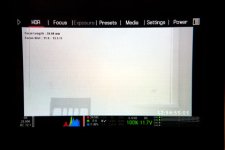
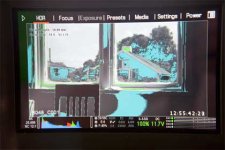
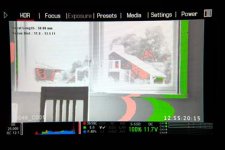
Frame grabs from LCD monitor showing the gap at the far right side of the historgram plus no yellow, orange or red colors in false color/video mode.

Picture 1: Slightly underexposed.
Picture 2: Fully overexposed – no yellow, orange or red.
Picture 3: Slightly overexposed – only green and pink, no yellow, orange or red.
 

Attachments

  • 03_FULLY_OVEREXPOSED.jpg
    03_FULLY_OVEREXPOSED.jpg
    17.3 KB · Views: 0
  • 01_EXPOSED.jpg
    01_EXPOSED.jpg
    18.7 KB · Views: 0
  • 02_OVEREXPOSED.jpg
    02_OVEREXPOSED.jpg
    17.7 KB · Views: 0
histogram according to EPIC MANUAL

histogram according to EPIC MANUAL

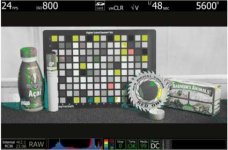
This is a frame grab from the EPIC manual showing how the histogram and false color mode should operate correctly.
 

Attachments

  • EXPOSURE_ACCORDING_TO_RED.jpg
    EXPOSURE_ACCORDING_TO_RED.jpg
    18.5 KB · Views: 0
To RED

To RED

I'm soon going to post a video of how my Epic is not able to properly display the histogram. I'm leaning more and more towards the conclusion that this is a hardware problem. And if so, a tiresome repair process.

Why a hardware problem?

a) No builts or resets have resolved the bug.
b) It seems like not all Epic and Scarlet users are affected by this.
c) The official posts by and private emails from RED have stated that this is in fact not a bug but instead a failure by those affected to understand the philisophy of exposure.
d) My R1 always displayed the histogram correctly according to both the R1 and current Epic manuals.
e) I can't imagine that any of the big guys (such as Cameron, Jackson, Soderbergh) would accept this continiuos bug. Or else the bug would surely have been addressed much sooner. In other words, this would mean that they don't have the histogram bug on any of their numerous Epics.
 
Different builds have shown, at least on my Scarlet, slightly different gaps (still no more then yellow on false color tool).
It looks to me like it would be possible to trim it correctly via firmware, but it should be an individual one (single camera specific). And that could be the reason we haven't seen plain answer from Red?
 
What ISO are you at? This happens to me at lower ISO settings. Raising to 800 fixes the issue.
 
Back
Top