Welcome to our community

Be a part of something great, join today!

  • Hey all, just changed over the backend after 15 years I figured time to give it a bit of an update, its probably gonna be a bit weird for most of you and i am sure there is a few bugs to work out but it should kinda work the same as before... hopefully :)

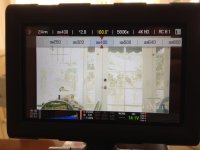
Histogram not tightly enclosed by raw-bars as in manual

The histogram as it stands shows you what the color science is actually doing to the data. Just as you can view the histogram in RCX while tweaking any parameter, the camera offers the same flexibility.
Matt this is exactly where I am having problems in understanding. I could care less about gap or no gap as long as I know how to read it. So please do explain a bit more. For example how do we have to understand the 0 value in the highlights in the higher 80%? I understand the right side of the histogram to read 100% value bright white but it seems that this is wrong. Could you please explain more in depth what is what or point me into the right direction where to get the information. That would really be helpful if we knew what we are looking at!

Thanks a ton in advance!
 
The histogram as it stands shows you what the color science is actually doing to the data.


I filed a support ticket not long after I received my Epic X for just this problem. After several weeks of back and forth they concluded nothing was wrong. Then I contacted my Bomb Rep. and explained the problem and sent in it. They sent it back saying nothing was wrong. Finally I spoke to an individual who admitted it was a bug they thought they had squashed. This was two firmware releases ago.

My question Matt. Is the camera recording the full range capable and displaying it truncated? The highlight data in RAW or at 320iso never go beyond around 85-90%. Or is it recording a limited range of data and then the color science is stretching it back out to 100%? Thanks.
 
So now there's a new page about exposure tools in the "Learn" section of RED.com: http://www.red.com/learn/red-101/red-camera-exposure-tools

After reading it I'm more confused than ever about how to use the histogram. The text makes no mention of how the histogram behaves when monitoring in RAW mode (i.e. "OFF" is highlighted on the OSD). In fact, the text kind of implies the histogram is always affected by current ISO and look settings, as if there's no RAW mode at all. The last paragraph reads, "Furthermore, ETTR can be misleading since the live histogram doesn’t represent raw image data."

And yet I can see the histogram changes visibly when switching to RAW/OFF monitoring.

Also, the page does not clarify the strange behaviour reported by some users in this thread. Like how the histogram shows no gap on the right for a while, and then suddenly the gap appears again.

Someone educate me, please.
 
So now there's a new page about exposure tools in the "Learn" section of RED.com: http://www.red.com/learn/red-101/red-camera-exposure-tools

After reading it I'm more confused than ever about how to use the histogram

Also, the page does not clarify the strange behaviour reported by some users in this thread. Like how the histogram shows no gap on the right for a while, and then suddenly the gap appears again.

Someone educate me, please.


Apparently the Epic's and Scarlet's in this thread do not work in the same way as the ones at RED HQ. Theirs are gap free, ours come wih the tag "mind the gap"... :)
 
Just updated to the last release firmware and it appeared on my Scarlet.

In my case the left side is ok, but on the right there is a gap.

It wasn't there before on older firmwares.

EDIT: No gap on higher ISOs
 
So now there's a new page about exposure tools in the "Learn" section of RED.com: http://www.red.com/learn/red-101/red-camera-exposure-tools

After reading it I'm more confused than ever about how to use the histogram. The text makes no mention of how the histogram behaves when monitoring in RAW mode (i.e. "OFF" is highlighted on the OSD). In fact, the text kind of implies the histogram is always affected by current ISO and look settings, as if there's no RAW mode at all. The last paragraph reads, "Furthermore, ETTR can be misleading since the live histogram doesn’t represent raw image data."

And yet I can see the histogram changes visibly when switching to RAW/OFF monitoring.

Also, the page does not clarify the strange behaviour reported by some users in this thread. Like how the histogram shows no gap on the right for a while, and then suddenly the gap appears again.

Someone educate me, please.

I believe the histogram represents what you are viewing- if that happens to be red gamma or any gamma curve applied with ISO and all your look settings then the histogram will reflect the image with those settings applied. If you toggle to raw view and the histogram changes then it's showing you a histogram based on raw. The goalposts however are always representing the raw data. The raw data histogram should approximately match the histogram at ISO 320.
 
I'm not sure I totally understand WHY the histogram NOW has gaps before the clip points. I understand that it is reflecting the metadata and that the different gamma selections roll off the highlights in a different way so I think that's why there is a gap. RG3 never lets values get to 100. (nor does RG2). When I load a clip into RCX with severe overexposure the whites never get beyond 97 or 98 on the waveform. My question is:

WHY NOW? It did not used to be like this just a few months ago. So why the change? I find it extremely frustrating that a change like this is made, which to the end user represents a significant change in the way we use and understand the histogram tool. Yet it gets a half sentence line in a release note. This is yet another reason this camera is viewed as unreliable or confusing to many. I'm all for improvement but it's impossible to test every feature of every new build every time the camera is updated.

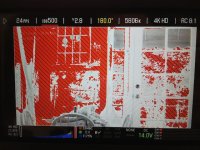
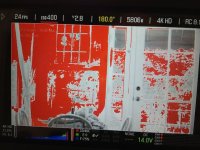
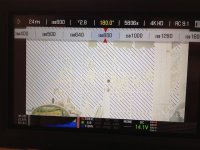
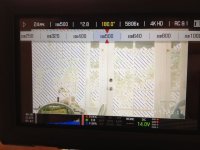
Furthermore, the zebra function doesn't work. Shooting a clearly OVERexposed scene with zebras set to 98 to 108. Look at the following images. Redgamma 2 is selected. At ISO 500, zebras are present and Exposure check shows red overexposed areas. At ISO 400 zebras disappear but exposure check still shows red overexposure. Is this a known issue?
 

Attachments

  • IMG_0649.jpg
    IMG_0649.jpg
    79.4 KB · Views: 0
  • IMG_0648.jpg
    IMG_0648.jpg
    69.8 KB · Views: 0
  • IMG_0646.jpg
    IMG_0646.jpg
    63.4 KB · Views: 0
  • IMG_0645.jpg
    IMG_0645.jpg
    51.2 KB · Views: 0
  • IMG_0644.jpg
    IMG_0644.jpg
    38 KB · Views: 0
Furthermore, the zebra function doesn't work. Shooting a clearly OVERexposed scene with zebras set to 98 to 108. Look at the following images. Redgamma 2 is selected. At ISO 500, zebras are present and Exposure check shows red overexposed areas. At ISO 400 zebras disappear but exposure check still shows red overexposure. Is this a known issue?

Zebras are showing the IRE value which is a video out level measurement (http://en.wikipedia.org/wiki/IRE_(unit)); This is operating on the cooked data (meta data is applied).

The exposure check mode shows where the raw data is being clipped (or in danger of being clipped).

It is expected that they would behave differently based on your meta data settings.
 
Zebras are showing the IRE value which is a video out level measurement (http://en.wikipedia.org/wiki/IRE_(unit)); This is operating on the cooked data (meta data is applied).

The exposure check mode shows where the raw data is being clipped (or in danger of being clipped).

It is expected that they would behave differently based on your meta data settings.

That is very counter intuitive. Most operators or DPs would use the zebra To set exposure and keep an eye on what is blown out. How can something be blown out on raw exposure check but be BELOW 98 IRE at 400 ISO in red gamma 2 (500 in rg3)? This makes no logical sense. The sensor is clipped. There is no information in that highlight. But the zebra indicates the value is below 98??

Also, can you please tell me why the change was made on the histogram? It used to go from goalpost to goalpost in a full exposure in rg2. I shot hundreds of days that way. Now, when the histogram approaches highlights there is a gap between the brightest it can represent and the goalpost in rg2. Why the change?

Thanks for your replies.
 
That is very counter intuitive. Most operators or DPs would use the zebra To set exposure and keep an eye on what is blown out. How can something be blown out on raw exposure check but be BELOW 98 IRE at 400 ISO in red gamma 2 (500 in rg3)? This makes no logical sense. The sensor is clipped. There is no information in that highlight. But the zebra indicates the value is below 98??

I'm going to take a stab at explaining this just to make sure I'm understanding it correctly. I may end up getting my arse kicked. :-)

It's only counterintuitive if you think about the Scarlet as if it's a video camera...it's not. What you say makes perfect sense for something like an EX1 or F35, which don't record raw sensor data and have no concept of metadata.

It seems as if you're thinking that the IRE values are somehow a subset of the wider sensor values on the same scale and that's not the case. One can inform us about the other but they don't drive one another, at least not in the way that you seem to think. They measure different things at different stages.

After you set your frame rate and shutter angle/speed, the ONLY other on-camera control that has an effect on how the sensor gathers light is the aperture control. If you set up a scene where you're shooting an evenly lit, pure white background but you're not clipping the sensor because you've adequately stopped down to just below the clipping level, you can crank the ISO all the way to 12,500 and make the zebras scream but it will not overload the sensor because you're merely changing the metadata. The only ways to clip are to open the aperture or add more light to the scene.

Well, the converse is also true, which is your situation. You're blowing out portions of the sensor but you can get the zebra to go away if you lower the ISO. The zebra is based on IRE values which ARE driven by ISO (they have to be), but the ISO value and the REDgamma settings are metadata. The metadata has no effect on the raw sensor data.

It may help to think of it like this: raw sensor data --> metadata --> video data. The IRE and zebra values are downstream of the metadata and therefore the metadata is cooked (as Trent put it) into those readings, but they're only really relevant at the video outs. That explains why you can lower the ISO and eliminate the zebra but still have a clipped sensor. IRE just cares if you're going over 100 at its stage, not about what happened upstream.

"What happens upstream is none of my business." - IRE

Again, RED's cameras understand video but they're not video cameras.

Zebra and IRE are relevant to any VIDEO signal present at the Scarlet's VIDEO outputs, namely the SDI, HDMI and lcd/evf ports. At that point, signals must conform to video standards and it's where it makes sense for the metadata to have its impact because that's where those settings "stick", whether they're going out to an external monitor or recording device. It's a different space than the raw data.

IRE (video space) doesn't care if you have headroom in the highlights or not - go above 100 and you're clipping. If you're not clipping the sensor but you are above 100 IRE you can bring the levels down and reclaim the highlights in post.

Exceed 100 IRE but clip the sensor and bringing the levels down will do you no good in terms of reclaiming the highlights because they're simply not there.

Do what you have to do to to get your video feed looking right for monitoring or external recording but, by all means, protect your "negative" and don't clip the sensor unless you can live with the outcome.
 
Last edited:
Zebras are showing the IRE value which is a video out level measurement (http://en.wikipedia.org/wiki/IRE_(unit)); This is operating on the cooked data (meta data is applied).

The exposure check mode shows where the raw data is being clipped (or in danger of being clipped).

It is expected that they would behave differently based on your meta data settings.

So what you're saying is that the sensor is clipped in the highlights, but the metadata is pulling everything that is clipped down below 98%? At ISO 400? The sensor (ISO 320 right) is clipped - at 320. But at 400 the processed video out is not clipped?
 
So what you're saying is that the sensor is clipped in the highlights, but the metadata is pulling everything that is clipped down below 98%? At ISO 400? The sensor (ISO 320 right) is clipped - at 320. But at 400 the processed video out is not clipped?

It's not just the ISO but all the meta data - including the color and gamma curves.
 
I think Brian Boyer's explanation is pretty accurate as far as I can see. It's why I primarily use the RAW exposure tools in preference (especially since FLUT was introduced).
 
It's not just the ISO but all the meta data - including the color and gamma curves.

I had no other look setting applied. So Redgamma2 (and Redgamma 3) are taking clipped sensor data and representing them as below 98% luminance at ISO 400 and ISO 500 respectively?
 
I had no other look setting applied. So Redgamma2 (and Redgamma 3) are taking clipped sensor data and representing them as below 98% luminance at ISO 400 and ISO 500 respectively?

That is correct. If you go back and read all of Matt's comments on this thread he covers that.

BTW, you have atleast one other meta data item applied that affects the histogram - color temperature.
 
Last edited:
That is correct. If you go back and read all of Matt's comments on this thread he covers that.

BTW, you have atleast one other meta data item applied that affects the histogram - color temperature.

ok- it just doesn't make logical sense to me. I would interpret a highlight at below 98 zebra as not being blown out. But it is blown out on the raw. I could kind of understand this if the ISO were set lower than the camera's raw sensitivity which is generally agreed upon at 320. But it doesn't make any sense at 400 or 500 for the exposure tool in the camera to represent something that is blown out on the sensor at below 98 ire when the iso setting is set to higher than the raw iso. It becomes a much less useful tool. If I am shooting at 500 and looking at zebras in RG3 I would expect as a common sense approach that if the zebra is not active then I still have detail in the highlight. But this is not the case. So i'm not sure what use the zebra is as set to 98 to 108. It is giving the false impression that there is not overexposure happening when there actually is. Again, this would make sense if my ISO is set at 250.
 
ok- it just doesn't make logical sense to me. I would interpret a highlight at below 98 zebra as not being blown out. But it is blown out on the raw. I could kind of understand this if the ISO were set lower than the camera's raw sensitivity which is generally agreed upon at 320. But it doesn't make any sense at 400 or 500 for the exposure tool in the camera to represent something that is blown out on the sensor at below 98 ire when the iso setting is set to higher than the raw iso. It becomes a much less useful tool. If I am shooting at 500 and looking at zebras in RG3 I would expect as a common sense approach that if the zebra is not active then I still have detail in the highlight. But this is not the case. So i'm not sure what use the zebra is as set to 98 to 108. It is giving the false impression that there is not overexposure happening when there actually is. Again, this would make sense if my ISO is set at 250.

Understood.

However, the goalposts, exposure check tool, and traffic lights can all be used to determine if there is any RAW data being clipped.
 
I understand that and have been using the goal posts and exposure check as a primary way to set exposure. I only started using zebras this past week when i noticed the gap in the histogram that has newly appeared.

I think these exposure tools can be confusing for a lot of people as they are currently designed- the zebras here being one example. The histogram gap is another. Maybe it's more a problem with the Redgammas than with the actual exposure tool. Consider this test:

1. Shoot a shot that fills the image area with complete raw overexposure- pure blown out white- the entire frame represented as red in exposure check.
2. View in redgamma3 in RCXPro the waveform shows a line at 93 or 94 IRE (ISO 800 all other settings default). In camera the histogram has a gap between the goal post and histogram.
3. View in redgamma2 in RCXPro the waveform shows a line at 97 or 98 IRE (ISO 800 all other settings default). In camera the histogram has a minimal gap between the goal post and histogram.

Why do the redgammas pull blown out white down to 94 or 98 IRE? Why not let sensor blowout be 100?
 
So what you're saying is that the sensor is clipped in the highlights, but the metadata is pulling everything that is clipped down below 98%? At ISO 400? The sensor (ISO 320 right) is clipped - at 320. But at 400 the processed video out is not clipped?

I don't know how familiar you are with audio recording but it seems very similar to what we're talking about now and might illustrate that this situation isn't isolated to RED, their implementation of standards or even to digital systems.

The metadata is basically a series of gain stages that affect different portions of the data, much like how the gain stages on an audio console affect the audio signal. ISO is basically a gain or level control. So are FLUT, brightness, exposure, the curves, etc.

You have to be careful at every stage in order to not overload the available bandwidth. If you clip something in an earlier stage you can't get that info back in a later stage.

If you have a guitar amp --> mic --> mixer preamp --> eq --> aux section --> channel fader --> mix bus --> recorder input, each one of these stages has the potential to clip if you're not mindful of your levels.

It's possible to add gain to a particular parameter (eq, for example) earlier in the chain while subtracting an equivalent amount on another parameter (channel fader) later in the chain. The net result, in that case, is no change in level. It's the same with the metadata. The metadata may not be applied in series like I've outlined things here but its effects are still cumulative.

If your settings are such that the metadata produces a drastic reduction of the overall level (especially with a custom look) but then you increase ISO you could conceivably have the situation you described where ISO 400 isn't inducing clipping at the video out stage on a 320 ISO rated sensor that is clipping earlier in the chain.

It's a bit of a balancing act.

Try this:

1) Use the setup you showed in your example scene.

2) Then, using various combinations of the camera controls (metadata) darken the image a considerable amount.

3) Monitor the resulting video out on a waveform monitor. You'll have a really dark image (low levels) from a nearly completely saturated sensor.

4) Crank the ISO and see what happens to the zebras.

Depending on how dark you make the image, you may have to go pretty high before they light up. And your highlights are still lost even though you brought the levels way down in-camera.


It's pretty similar to:

1) Recording the overloaded audio preamps of the Scarlet

2) Bringing that clipped audio into Premiere

3) Cutting certain eq bands and lowering the channel volume considerably

4) Cranking the master volume to compensate for the decrease in level

You may be able to tweak the audio but it's still going to be clipped even though the final output level stays below 0.
 
It's possible to add gain to a particular parameter (eq, for example) earlier in the chain while subtracting an equivalent amount on another parameter (channel fader) later in the chain. The net result, in that case, is no change in level. It's the same with the metadata. The metadata may not be applied in series like I've outlined things here but its effects are still cumulative.

If your settings are such that the metadata produces a drastic reduction of the overall level (especially with a custom look) but then you increase ISO you could conceivably have the situation you described where ISO 400 isn't inducing clipping at the video out stage on a 320 ISO rated sensor that is clipping earlier in the chain.

.

I get what you're saying but the only look parameter is 5000K, iOS 400, and redgamma2. The problem is that both redgammas compress the highlight range from sensor clip and represent them below 98 IRe. It's the reason there is a gap in the histogram as well. Hoping someone like Graeme can chime in and answer why the redgamma curves do not represent clipped highlights at 100+ IRE or far right on the histogram.
 
Back
Top