Welcome to our community

Be a part of something great, join today!

  • Hey all, just changed over the backend after 15 years I figured time to give it a bit of an update, its probably gonna be a bit weird for most of you and i am sure there is a few bugs to work out but it should kinda work the same as before... hopefully :)

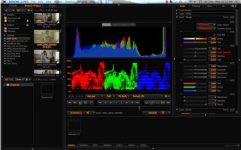
Histogram not tightly enclosed by raw-bars as in manual

Just realized, I too have the gap.
 
But only on the right side...any suggestions until Red gets this fixed?
 
We were told by RED support to switch to REDgamma2 and it would solve this problem, it doesn't unfortunately fix the gap. I have replied to support with this latest result and will await their reply.

Yes, the gap is always on the right side, so the goal post that shows that the highlights are clipping. All RGB stop lights are on yet there is a large gap between the end of the histogram and the right hand goal post, just as shown in the first image of this thread.

The histogram runs up against the left hand goal post (shadows/black) if things are under exposed, as should be the case.
 
Trying to understand if we all (the few ones that we are, I mean..) have the same behaviour:

1) My histogram spreads between goal posts dependenly on ISO settings. It uses about 70% at 250 iso, little more at 320 and so on. It only spreads goal post to goal post at 2500 iso

2) My false color (video tool) can't show orange and red when it should (pointing at 105 ire and above level objects) when viewing with iso 250-320. Starts to show orange at about 1250 iso. It only show all of the colors (included orange and red) from 2500.

3) My exposure tool shows red (very little) before the first one of the 3 channels appears on stoplight tool. Maybe this is the correct behavior, but I'd like to know witch tool I have to look at to avoid clipping.

If we all have the same behaviors we can maybe have a dedicated 3.0.? firmware to solve this.
Thanks Stuart for chiming in (I opened a ticket already. Kindly and promptly listened. But the problem hasn't been solved)
 
I am also having this issue on both Epic-x and Epic-M. Re-installing 3.0 firmware and black-shading didn't solve it.
 
I think this issue could be related to a problem I discussed with a Red Team member regarding low video output levels showing up from the camera's smpte bars, as well as video levels in general, which should be clipping around 100 IRE. The camera's internal color bars, fed via SDI to waveform, max out at about 88 IRE. The Red team member asked a few questions, but ultimately forwarded the issue to the engineers to see if they could see what's going on. No response yet. I am reading elsewhere that another individual has checked the camera's dynamic range, and keeps coming up with about 10 or 10.5. Could certainly be user error, but it seems to me if the camera is clipping well below 100 IRE, like around 88 or 90, we cannot be getting full dynamic range.
 
Last edited:
Is there any news on the Histogram-Right-Bar front? I'm having the same issue with mine as well. anything we can do?
Tried reinstalling firmware, black shading, restoring factory settings.
 
Interesting discussion... as additional data points, I am getting this phenomena as well - gap on the right side. Usually it is fairly narrow; about the width of the goal post bar itself, but when I monitor in RAW, it gets about twice as wide. On the left side of the histogram (noise) there is no gap.

One other thing I noticed is that I still get a narrow histogram on the left even when I have the lens cap on. Is this normal?

EDIT: Oh, and one additional thought: I noticed there is no histogram on the REDmote when I have the lens cap on - just a full red goal post indicating noise! However, the gap on the right side is still there on the REDmote.
 
I think this issue could be related to a problem I discussed with a Red Team member regarding low video output levels showing up from the camera's smpte bars, as well as video levels in general, which should be clipping around 100 IRE. The camera's internal color bars, fed via SDI to waveform, max out at about 88 IRE. The Red team member asked a few questions, but ultimately forwarded the issue to the engineers to see if they could see what's going on. No response yet. I am reading elsewhere that another individual has checked the camera's dynamic range, and keeps coming up with about 10 or 10.5. Could certainly be user error, but it seems to me if the camera is clipping well below 100 IRE, like around 88 or 90, we cannot be getting full dynamic range.

I also think that my Scarlet clips well below 100IRE. I just opened a shot I did a couple of weeks back in Redcine X and you can clearly see that the Image clips at slightly above 90%.

Screen shot 2012-04-16 at 10.52.55 AM.jpgScreen shot 2012-04-16 at 10.52.55 AM (2).jpg
 
I had the gap when monitoring in RG3. Switched to RG2 and the gap disappeared. Odd.
 
I had the gap when monitoring in RG3. Switched to RG2 and the gap disappeared. Odd.

Yeah, I tried this in the past but it didn't work. Now suddenly it did, toggling from RG3 to RG2 the gap on the right side disapeared. I even got the yellow and orange back in false color. But then 5 minutes later the gap in the histogram returned again.
 
No sooner than 5 minutes after I wrote this post, the gap returned again, without me chaning a thing: "On my Epic, restoring the system twice in a row and then changing RG3 to RG2 eliminates the gap on the right side of the histogram. Things like changing the values under Look seems to put the gap right back again."
 
Last edited:
After starting this thread and reporting that the problem is solved, also here... the problem returned again today! Tried any possible setting, but it seems a haphazard issue.

Also, the camera clips around 85% !!! And that is NOT amusing at all. So, it's not the histogram display that is faulty, it probably is exactly showing what's going on: some kind of signal processing anomaly.

I hope this is fixed a.s.a.p because it severely limits the DR and usability of the camera.

Martin
 
After starting this thread and reporting that the problem is solved, also here... the problem returned again today! Tried any possible setting, but it seems a haphazard issue.

Also, the camera clips around 85% !!! And that is NOT amusing at all. So, it's not the histogram display that is faulty, it probably is exactly showing what's going on: some kind of signal processing anomaly.

I hope this is fixed a.s.a.p because it severely limits the DR and usability of the camera.

Martin

Hi Martin, sorry to hear that! I tried contacting RED on the issue. No word yet. I hope the next firmware fixes it. New built will be out in about 2 weeks....
Maybe you should remove the huge "solved" from the first post ;)
 
Back
Top