Welcome to our community

Be a part of something great, join today!

  • Hey all, just changed over the backend after 15 years I figured time to give it a bit of an update, its probably gonna be a bit weird for most of you and i am sure there is a few bugs to work out but it should kinda work the same as before... hopefully :)

Help with Grading

David Ellison

Well-known member
Joined
Apr 1, 2009
Messages
335
Reaction score
0
Points
0
Location
Manchester UK
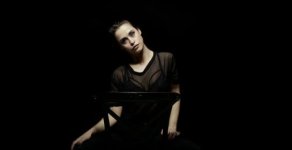
Hey I need to grade this shot so the black background disappears as much as possible. Any ideas how?
I normally grade in premiere but can use other software if need be.

Clips_00_31_20_20_Still002.jpg


Many thanks.
 
Hey I need to grade this shot so the black background disappears as much as possible. Any ideas how?
I normally grade in premiere but can use other software if need be.

Clips_00_31_20_20_Still002.jpg


Many thanks.

That would be a difficult one. possibly you can difference matt her out if you got a take / slate without the girl or if she moves so you some how can create a clean plate. or use aftereffects roto paint tool if she does not move to much.

Last but possibly best option is to send it of to india. there they create a perfect matte for such shot for, I would estimate, 1 dollar per frame or less including fine hair and everything. then not only can you make the background pitch black but replace it with a fine defocused grade gradient blob without the paper wrinkles... to me that would look better than pitch black, but thats only my taste.
 
interesting request for this lighting. since there is backlight to cut her out of the background, her hair will blend into a darker backdrop. That being said, Bjorn is right, thats a tough one. You might have to rotoscope or rotopaint her out in After Effects or Resolve.
 
This is a job for VFX. I just did a music video project like this, and the problem is crushing the background while not crushing the black detail in the actor. This would be a case where blue-screen or green-screen might have been a better solution: keying out the background and replacing it with solid black, and cleaning up any fringing matte lines. Mocha Pro for tracking and Maya for the matte would be one possible choice.

If it's not a long shot (like more than 30 seconds or so), this is not a super-expensive, difficult job to do. But there's still a distance between VFX and color-correction... though that line continues to narrow as the years go on.
 
This is a job for VFX. I just did a music video project like this, and the problem is crushing the background while not crushing the black detail in the actor. This would be a case where blue-screen or green-screen might have been a better solution: keying out the background and replacing it with solid black, and cleaning up any fringing matte lines. Mocha Pro for tracking and Maya for the matte would be one possible choice.

If it's not a long shot (like more than 30 seconds or so), this is not a super-expensive, difficult job to do. But there's still a distance between VFX and color-correction... though that line continues to narrow as the years go on.
Exactly. I would rotopaint out the chair first, then add it back in on the final comp. The mistika technique Brett quoted btw needs at least one channel that is separable(i.e. atleast least a red, green or blue has to stand out ... and in this you have black over blacks - so you have to mask out the chair and any "good" blacks before the color grading "keying" technique is used). That mistika tutorial took me 2 hours to watch at vmivfx(that's just a promo on vimeo, it cost money for that lesson), probably a week to really understand that technique plus mistika operations like "and" on colors channels are not obvious in packages outside of mistika. This would only be about 2-4 hours of work for someone that knows how to rotopaint in nuke(depending on the sequence length). There's a bunch of vfx classes on fxphd.com that walk through this in detail, but I'd say would take a couple of months to learn those techniques from scratch and you'd still be inefficient compared to sending it to someone whom will only take a few hours max.
 
It's an old thread but I saw this and couldn't resist.

Attached is the result. I spent less than 5 minutes on it. My laptop has both a Linux and a Windows partition. I'm in Linux now so I used Mistika as the grading software. I used a key and the laziest shape you've ever seen combined with a Difference Matte for the final finesse. I've also got a custom Edge-Detect Preset that I use a lot for stuff like this. The Edge-Detect actually works a bit better thanks to the compression, particularly along lines like her neck.

Black2Clean2.jpg

It's a very compressed image so I took some small liberties due the compression. I could have kept all of the hair detail for instance but I blended that in with the background. I'm guessing that the hair was supposed to wind up being the same shade/darkness as the background.Took me longer to write this reply than it did to create.

I'm on: sam@silverscreen.co.uk if you have any more that need work. Ideally you'd send the RAW/highest-quality rather than a proxy like this of course.
 
Last edited:
Back
Top