Welcome to our community

Be a part of something great, join today!

  • Hey all, just changed over the backend after 15 years I figured time to give it a bit of an update, its probably gonna be a bit weird for most of you and i am sure there is a few bugs to work out but it should kinda work the same as before... hopefully :)

HDRx samples...

I have a question about HDRx™.

Let's say you take an HDRx™ shot where the under is perfectly exposing the darker parts of the image but not clipping the highlights, just overexposing them; and then the over is exposing the highlights perfectly but not clipping the shadows, just underexposing them. In this situation HDRx™ makes perfect sense to me as the blend should create an image where everything is properly exposed.

Now let's say you take an HDRx™ shot where the shadows and highlights are further apart. The under is perfectly exposing the shadows but the highlights are significantly clipped; the over is perfectly exposing the highlights but the shadows are significantly clipped. I figure this is pretty typical. So what I don't understand is how this would have the same effect as in the previous example… because now the clipped shadows, whether they were barely out of the exposure range or very far out of the exposure range, are blending in as if they were all the same color (black); and the clipped highlights, whether they were barely out of the exposure range or very far out of the exposure range, are blending in as if they were all the same color (white). So now any part of the blended image that was blended with either clipped shadows or clipped highlights is still getting "half clipped" if that makes any sense.

For instance, let's say a wall is filling the frame, and the wall is being lit in such a way that one side is in shadow and the other side is brightly lit, and it gradually changes from one to the other so that the middle of the wall is 50% as dark as the shadow side and 50% as bright as the well-lit side (so the wall is a linear gradient). Using HDRx™, wouldn't the resulting blend have a consistent, linear ramp up from the dark to light in the middle of the wall where neither the under or the over was clipping, but then once you get to far enough in either direction that either shadows or highlights are clipping, the change in apparent exposure would no longer account for the clipped values?

If that doesn't make any sense, think about it like this:

100 = white
000 = black
1XX = clipped highlights

(assume the pattern remains the same over this imaginary gradient)
OVER|UNDER: BLEND
020|069: 44
026|075: 50
032|081: 56
038|087: 62
044|093: 68
050|099: 74
056|1XX: 77.5 ("should be" 80)
062|1XX: 80.5 ("should be" 86)
068|1XX: 83.5 ("should be" 92)

Hopefully that makes sense. As you can see (?), once you get to the part of the gradient where there is clipping in either the under or over image, the blend becomes increasingly inaccurate.

So my question is: does HDRx™ take note of what is being clipped (whether it be in the under or the over) and compensate in the blend by replacing clipped values with "super white" or "super black" values which are calculated using the exposure metadata and values from the other image (under or over) in which that part of the image was not clipped?

I'm not trying to figure out how you've done what you've done from a technical standpoint (I am interested, but I know you have to keep it close to your chest), but rather, I'm trying to determine the limitations of HDRx™. I'm assuming you do somehow compensate for this issue, but if not… couldn't you? Using a system like the one I described in the previous paragraph?


David, I think the point is to expose as accurately as possible and then let HDRx work its magic. In the example you present, if I'm reading it correctly, an error in either direction becomes uncorrectable. I would assume this to be the case, given the whole point of HDRx is highlight protection. The example of the wall you give should have an acceptable exposure range if the entire shot is correctly exposed-- it being exposed in the context of the overall scene. But can the result be skewed? Perhaps on purpose? I'd say yes. And that just adds to the creative options. The compensation you seek is in your own creative choices, IMO.
 
Oh this is just so cool! Seems so obvious. The new 'two strip' process. Brilliant RED folks. All of you. We're writing and scouting right now for a show later in the year, and I keep getting more and more hungry to use this bad boy!
 
HDRx in Workflow

HDRx in Workflow

I've recently had the opportunity to work with HDRx from the post production perspective. I find that implementing Epic HDRx media into a normal workflow is seamless, efficient, and won't create a burden in the post or DI processes.

One of the best things about shooting with HDRx is that specific decisions as to how to create a desired end result does not need to be determined immediately. This is a critical notion when discussing how to deal with HDRx media when planning your offline strategy. With HDRx captured media, dailies can still be generated using the traditional "A-frame" for normal processing and delivery to the cutting room. REDCine-X provides a simple (toggle-able) way to view both the "A" and "X" frames upon review and initial debayer. Once you are ready for DI, a conformed list will call for a single (HDRx pre-packaged) R3D where an operator can affect "A" and "X" frames independently of one another.

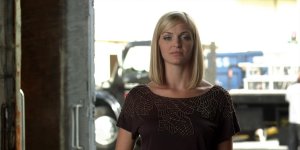
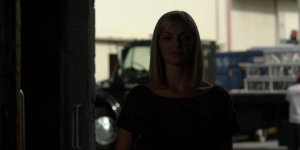
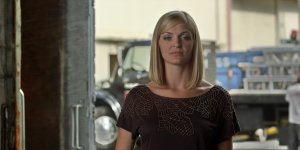
Below is an extreme test clip shot by John Schwartzman in which we initially processed the "A" (normal) frame for primary review/dailies. The second frame represents the "X" (under) frame which was set at +6. The final frame represents the composite (blended) frame which was determined by the colorist and DP.

The most important component to our experience with HDRx media is that HDRx frames do not require external compositing which is very important in maintaining a cost-effective DI workflow. With advanced DI tools, the ability for a colorist and DP to have a timeline that contains both standard R3Ds accompanied by HDRx R3Ds means they have complete control over the end result without ever having to leave the DI timeline. These files were custom-composited together in 4K using Quantel Pablo by Ian Vertovec during the DI session. In other words, they were not treated as an external visual effect.
Thank you, John, for letting us share these.
m
 

Attachments

  • Normal.jpg
    Normal.jpg
    82.6 KB · Views: 0
  • Under.jpg
    Under.jpg
    54.8 KB · Views: 0
  • Blended.jpg
    Blended.jpg
    87.3 KB · Views: 0
Thanks for the info and images Michael. I'm trying to figure out what's going on with the shirt in the background (right side of the image). Where did the highlight on the left and the bottom of the shirt in the blended version come from? It looks about equal in brightness to the highlight at the top of the shirt. The whole shirt is blown out in the underexposed shot and in the normal exposure, the left and bottom of the shirt is significantly darker than the highlight at the top of the shirt.
 
I've recently had the opportunity to work with HDRx from the post production perspective (...)

Thank you for the post Michael.

+6 looks great. I would love to see its Magic Motion properties. If I am not mistaken, there is a more pronounced edge from the short exposure, but I can't believe that would be the only "trade off" --if one considered it a trade-off-- for being able to catch that exterior so effortlessly.
 
HDRx™ Dance

HDRx™ Dance

I know these are only basic test shots but this effect could easily be obtained by simply shooting two passes with the second pass with a ND9. What I would love to see is how the HDRx™ deals with movement. This is the tough question. I will be more than pleasantly suprised if this HDRx™ mode works in every scenario of moving subjects and cameras.

Even if it doesn't work effectively in every scenario I am still thrilled at this development. :-)
 
And we'll have also HDRx on the Scarlet ? Can't wait to test !
 
I know these are only basic test shots but this effect could easily be obtained by simply shooting two passes with the second pass with a ND9. What I would love to see is how the HDRx™™™ deals with movement. This is the tough question. I will be more than pleasantly suprised if this HDRx mode works in every scenario of moving subjects and cameras.

Even if it doesn't work effectively in every scenario I am still thrilled at this development. :-)

There are limits to HDRx... and certain conditions where MNMB is better choice than Magic Motion. That typically is a very bright object(s) in a very dark environment moving around quickly. There is a reason why there is a panning speed limit when shooting 24fps, whether it is film or digital. Same kind of thing. You learn the rules. As with everything, there is a breaking point.

HDRx™ is an incredible advancement and wonderfully useful tool. It is not the cure for cancer... but it is the cure for boredom. :-)

Jim
 
Very interesting!!!

As you know well I was already in HDRx mood two months ago (1)search by treads and (2) search by posts.

Also looking forward to test the new REDCINE-X with HDRx enabled features soon.
 
Looks very "normal", and I mean it as a compliment :-)

For motion work, it looks like it will be a great tool to have a smoother transition into the highlights; given the combined power of the MX sensor in the Epic and the new color science, I'm pretty sure lots of people won't use more than +1 or +2. Can't wait to see some moving images in "real world" scenarios...
 
Fransesco... great point. A little HDRx goes a long way. I find myself using it in moderation now that I have had time to play "let's see what we can do with 18 stops".

Jim
 
Looks very nice. Can I put in a request for the first Scarlet HDRx™ footy to be shot on the snow, in the shade with a bit of action thrown in? :sifone:
 
The coolest thing about this, is as Francesco said, that it doesn't look like alien tonemapped paintings, but just like photographies...

Normality is a good thing
 
Back
Top