Welcome to our community

Be a part of something great, join today!

  • Hey all, just changed over the backend after 15 years I figured time to give it a bit of an update, its probably gonna be a bit weird for most of you and i am sure there is a few bugs to work out but it should kinda work the same as before... hopefully :)

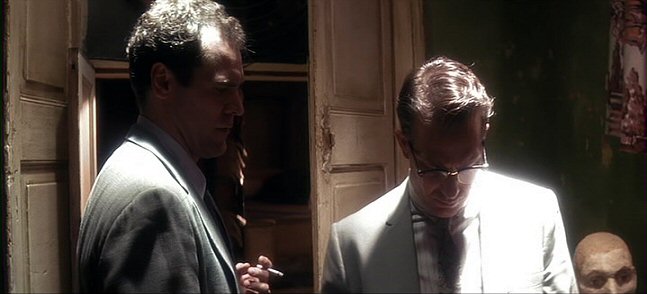
Harsh lighting / peaking highlights

A low con filter will help avoid the hard white hole by softening the edges, and producing some blooming/graduation up to peak white. Any "pink edge" is probably due to blue and green channels clipping before red, so apply the DRX tool for that.

Obviously if you overexpose the highlights too much, the white holes will be too large, and look like white holes with a soft edge.

Also consider using HDRx.

But as David already suggested, there will likely always be some differences between digital and film capture - they are inherently different technologies.

Yes, that low con filter has got me interested, but I'm following that same discussion on another thread and there seems to be some people concerned about some loss of detail or definition. I guess I will have to try it myself. But my point on this thread is exactly to know what happens when you overexpose like a maniac. Because sometimes that's exactly what you might want, case in point, the JFK examples, or what Janusz Kaminsky does. And all I'm tying to figure out is how can I get that on a Red without a flaw.

Certainly you can have overexposed spots of light when shooting on the Epic; your posts imply that you wouldn't do such a thing until the roll-off into clipping matched film stock exactly -- and my point is that you are being unnecessarily conservative in your thinking. Yes, film stock does it better but a digital camera with over 13-stops of dynamic range can do it pretty well!

David, I said it and I say it again, I don't give a damn if it looks like film or not. Hell, I want it to look better than film, that's what we are told here, isn't it? But no, I don't want it to look like film, I want it to look good. And my viewing and shooting experience this kind of light 'might' give me below standard highlight. And please let's not start with the 'conservative thinking' attacks, because you say; 'it is what it is, live with it. I say; 'no, it can bet better!' Who's being conservative?

But I guess that's up to anyone's taste and search for the optimum representation of our ideas...

THere's this commercial I shot about 5 years ago on film, we did try some of that harsh top light as well. The transitions are very small, but they look fine. To my eyes at least.

9fced4c2e257875885e0a28c6509f062.jpg


Different kin of shot, but maybe illustrates my point on the Red. Lens straight into the sun, fine. But look at the transition in the sky, it's not that pleasing, is it? Not to my eyes at least. This highlight transition got worse once we leveled the blacks and mids... flat it didn't look as bad.

99c161fb5fbd49f757754be1e7a823dc.jpg


An example where I wanted to have the windows behind the girl, completely blown out. It's not sky behind her, its grass, with a backlight on her... gradual transitions are not very good here. I mean, these highlights might be ok for you, but I wish they looked 'better'. Of course all of these hard transitions are only worsened once we grade, but we are only grading the idea of our light, and I don't want to go against that in the grade.

I didn't shoot these, I only directed them.

9e0b9f686d4ce187dcff9fa65c257129.jpg
 
Last edited:
Hi António,

RECIPE:
- EPIC MX
- BIG LIGHT, TUNGSTEN
- FILTERS: LOW CONTRAST, ANTIQUE SOFT, CLASSIC SOFT
- DAVINCI RESOLVE

Aim the camera at the big light, turn HDRx on, try different filters.
Bring into resolve, mix the higlights from HDRx, have a JFK still next to you as reference.
Enjoy the results.
You will see awesome images playing on the highlights.

We can already have great results with EPIC MX, FILTERS AND HDRx. Now lets wait for DRAGON.

And a little fact: It is more pleasing and has more information than the Alexa already. Just know the tools.
 
Great thread

We know that we have more DR and a bit more flexibility when working with highlights with the Dragon. More DR means that we'll end up with less blowouts overall as well as more control over blowouts...I'm good with that. Moving forward, I'll play with some filtration options and I also plan to shoot at a slightly higher ISO when shooting the scenes with harsher light. This should also give me some latitude in post as well.
 
Hi António,

RECIPE:
- EPIC MX
- BIG LIGHT, TUNGSTEN
- FILTERS: LOW CONTRAST, ANTIQUE SOFT, CLASSIC SOFT
- DAVINCI RESOLVE

Aim the camera at the big light, turn HDRx on, try different filters.
Bring into resolve, mix the higlights from HDRx, have a JFK still next to you as reference.
Enjoy the results.
You will see awesome images playing on the highlights.

We can already have great results with EPIC MX, FILTERS AND HDRx. Now lets wait for DRAGON.

And a little fact: It is more pleasing and has more information than the Alexa already. Just know the tools.

sounds good.

You would't by any chance have a reference picture or video where you did that, would you. If you could kindly post those for better understanding it would be great. I'm sure more people would like to see good exames of extreme highlight behavior on the Red.

thanks
 
But if you want to shoot something akin to those David posted, pushing the highlight in post is not going to look even close as good as if you were able to let them blow on set. IMO that's the beauty of that idea. Blown highlights. But since the camera can't handle that kind of rolloff and extreme highlight, then I can't get that look...

So much for control then...


I don't understand what the problem is. Imitating the kind of bloom film does it's very easy to do in post. And I'm not even sure the bloom you see in the JFK frame grabs is 100% from the film.
And if further highlight/ clipping management / is needed - you can process more the upper parts with curves.

a picture from the internet

6g5o.png


and the previous picture posted with some bloom added

hsfa.png


Nice post Sebastian. I am going to try this on a few clouds that have been giving me problems. Any tips on best way to isolate the highlights, and bloom them without making the highs even brighter?

I don't understand what the problem is. Imitating the kind of bloom film does it's very easy to do in post. And I'm not even sure the bloom you see in the JFK frame grabs is 100% from the film.
And if further highlight/ clipping management / is needed - you can process more the upper parts with curves.

a picture from the internet

6g5o.png


and the previous picture posted with some bloom added

hsfa.png
 
The image with the woman in the church I posted is perhaps not a very good example - but you can take it as an exaggerated example.
A bloom that strong should appear when you have a bigger burn/white portion in the picture.

I'm not sure this type of bloom is good for burned clouds, but you can try it. I can see bloom like this for example with shiny portions of metal.

I don't know any tips right now besides the classic - isolate with Levels, blur it and composite with screen blending mode. For better control you can try 2 or 3 layers - each one with a different opacity and blur size. I used the 3 layers method for the pictures above.
 
Last edited:
Since nobody in this thread seems to have mentioned it, it's worth noting (for those who might not know) that True Blood is shot on film, one of the very few remaining film television series.
And the look of the show is also very much tweaked by dailies colorist Peter Ritter and final colorist Scott Klein, both of whom have done a great job on that show for many years at Technicolor/Hollywood. But it all starts with great lighting and great lenses.

I don't understand what the problem is. Imitating the kind of bloom film does it's very easy to do in post. And I'm not even sure the bloom you see in the JFK frame grabs is 100% from the film.
Yes, it was, since JFK was a movie shot in 1991 by Bob Richardson, also on film. Much of that look (cross-processing, different stocks, heavy filtration, different formats, etc.) was all done in-camera and in the lab, all by deliberate choice, not done as an effect in post per se. This is the first movie I can think of that had scenes shot in 35mm anamorphic, 35mm B&W, 35mm flat, 16mm color, 16mm B&W, Super 8mm, 8mm, and standard def video. Even some 35mm slides, now that I think about it. Just about every photographic format known to man wound up in that film. I think this is one reason why Richardson won his first Oscar for it, as did the editing team.

Richardson definitely pushes the envelope in terms of getting very unique, stylized looks for his films -- anywhere from lush, beautiful images to very harsh, high-contrast pictures depending on the mood of the scene and what he and the director wants.
 
Not being David in any respect, but I do overexposures all the time. Deliberately and willingly, and do not think that can be done the same way in post, and if you lower the exposure for "control" you end up underxposing important parts of the shot, even those you want to have good exposure.

Optical is a cool way to shoot... ;)

then post gets just sooo much easier.
 
New user here. Just chiming in to say that I have been scouring the web for a discussion on this topic and am so glad to have found one here with so many talented folks offering their take. I'm hoping to blast a table with a harsh top light for an upcoming short I'm shooting and was curious how a DSMC would handle it. I'm less worried now. Thanks all.
 
New user here. Just chiming in to say that I have been scouring the web for a discussion on this topic and am so glad to have found one here with so many talented folks offering their take. I'm hoping to blast a table with a harsh top light for an upcoming short I'm shooting and was curious how a DSMC would handle it. I'm less worried now. Thanks all.
Shoot tests first! And take it through the final, so you know what the limits are.
 
I have to disagree that the current Red cam can handle that lighting situation. I think it's hideous. Film handles it without an ugly computer-generated quality to it. The Dragon sensor will handle it better, still digital, but better if not pushed too far so that the white area is so large. Film just can do that, and digital struggles. I would never want to ruin a shot just for an effect, ever.

As for Battlestar Galactica, I must respectfully disagree. I hate the harsh blown out looks and wish they used a different image system. Period. I'm rewatching the entire series now, and that is the one thing I would definitely want to change about the show.
 
Back
Top