Welcome to our community

Be a part of something great, join today!

  • Hey all, just changed over the backend after 15 years I figured time to give it a bit of an update, its probably gonna be a bit weird for most of you and i am sure there is a few bugs to work out but it should kinda work the same as before... hopefully :)

Harsh lighting / peaking highlights

Wes Howell

Well-known member
Joined
Dec 15, 2011
Messages
307
Reaction score
0
Points
0
Last night I was watching some True Blood with the wife and was paying particular attention to some of the scenes where parts of the scene (accents on faces and hair, etc) looked blown out. (think of this as a stylistic choice - I thought it looked good) While I can expose my camera properly, I'm pretty sure I couldn't create that look in-camera on my Epic so I'd love to learn more about how others handle this. Some of those hotspots in the show were on the verge of being blown out and shooting with the highlights hot like that would make me nervous as a shooter. (not blaming the camera - blame me that's fine) I know that some will say that the Alexa is better, etc etc and maybe it is better with highlights - I'm not sure. But I'd love to see some examples of what people have done with the camera I own (Epic) and get some advice. Are there any colorists that could provide a couple links or examples of how they have "softly tempered" light blowouts / harsh accents on the MX sensor? Or do you need to underexpose a tad and bring the highlights up in the grade?
 
Hi Wes,

I don't know if you'll find this helpful, but here's a very simple TV spot I did that features the blown-out look. Some of that window is definitely in-camera-overexposed-ain't-comin'-back. In this case, I was doing my own post, and the decision chain was me and my client, without any agency people or anybody else to say, "What if we change our mind about that window later?" The burned-out areas are helped by being out of focus–I think I shot everything on the RPP 100 at about 2.8. We stuck various objects back there to break it up, knowing they'd be soft.

In this case I think it worked. If I thought there was going to be a lot of second-guessing down the road, I might have approached it differently.


http://www.youtube.com/watch?v=sLzKE4kfQGc

Mike
 
I'm guessing they used a strong backlight, possibly brighter than they key, and controlled it with flags or something.
 
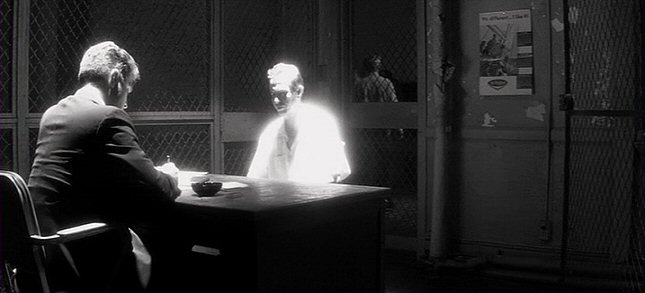
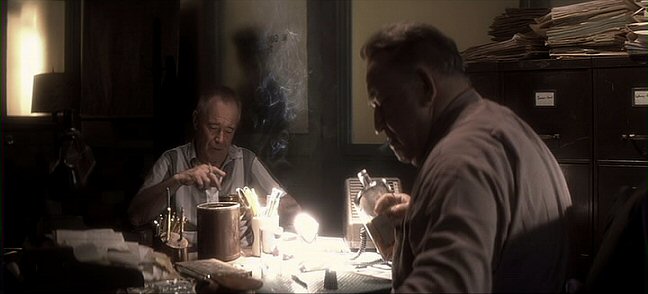
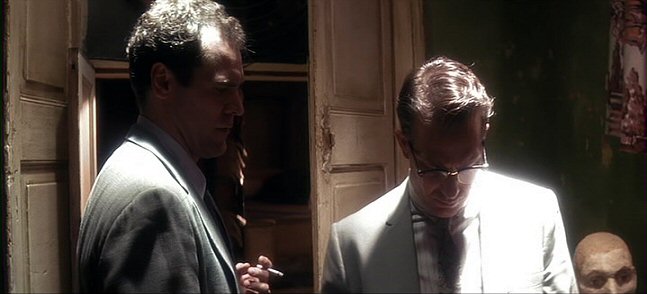
Look at these frames from "JFK", which was shot on film:

jfk6.jpg


jfk7.jpg


jfk8.jpg


I don't see a problem with doing it in-camera if you know what you are doing. Plus in the case of a dark room with a hot spotted top light, most of the scene is below key and lit by the return bounce from the spot -- so if you underexpose to hold detail in the brightest spot, you aren't recording as much shadow detail. Now if it weren't a narrow down spot or a hot backlight, but an overexposed frontally-lit face and the majority of the room was that hot, I'd probably shift the exposure downward a bit so I could play with the gamma curve of the roll-off into white better. But when the hot spot takes up a smaller percentage of a frame, there is less reason to bias the whole exposure around it. A prime example is when a car drives by and the sun momentarily kicks off of the windshield -- you wouldn't base the exposure of the scene on a momentary flash of overexposure like that.
 
Mike. Thank you. Yup. That's right along the lines of what I'm looking for. Looks great. I guess the blur helps with the roll off. Looks very nice.

Ill have to try this. Thanks for the replies.
 
Look at these frames from "JFK", which was shot on film:

jfk6.jpg


jfk7.jpg


jfk8.jpg


I don't see a problem with doing it in-camera if you know what you are doing. Plus in the case of a dark room with a hot spotted top light, most of the scene is below key and lit by the return bounce from the spot -- so if you underexpose to hold detail in the brightest spot, you aren't recording as much shadow detail. Now if it weren't a narrow down spot or a hot backlight, but an overexposed frontally-lit face and the majority of the room was that hot, I'd probably shift the exposure downward a bit so I could play with the gamma curve of the roll-off into white better. But when the hot spot takes up a smaller percentage of a frame, there is less reason to bias the whole exposure around it. A prime example is when a car drives by and the sun momentarily kicks off of the windshield -- you wouldn't base the exposure of the scene on a momentary flash of overexposure like that.

Thanks for this post David. I used to be quite into this sort of harsh pool light back when I first saw Robert do this, if I recall correctly, the first time he started doing this was on The Doors. JFK and Casino have this lighting design done quite wonderfully. He did something similar on Hugo, not as harsh and not on actors, but rather on windows and backlights and such, and it worked.

Question, could you get away with this on a Red? Because from what I understand, Red wants to leave highlights up to the user to control, but I'm either confused or doesn't this actually take away control from the user, because sometimes what you want is to let the highlights to just go all the way up, and not worry about what f stop their at or where they are peaking, we want them to 'peak' pretty much just what Robert used to do, according to whatever contrast ratio his shooting film stock was, he knew that by overexposing so many stops he would achieve this look. But we know that on a Red, these same type of highlights clip in a not very nice way, making this look more like a technical mistake rather than a aesthetic choice.

Or, to achieve this same look, you would have to tone it down at the shoot and then control that highlight in post?

Thoughts?
 
I don't lose sleep over trying to make a digital camera behave exactly like color negative, I accept that there are some inherent looks to each. I think if you rate the Epic at 800 ISO, maybe a bit over, you should have enough overexposure range to apply a curve that rolls off detail a bit more smoothly. It's not going be exactly like color negative though. You'll have even more flexibility with the Dragon sensor.

Light for the look you want, the mood you want, use overexposure creatively, audiences aren't going to notice whether the gamma curve is exactly like film if you are in the ballpark. "Battlestar Galactica" wasn't afraid of hot clipped highlights even though they were shooting on the F900 in Rec.709, it was a creative choice to create a mood. Don't let the technology make you less bold.
 
I don't lose sleep over trying to make a digital camera behave exactly like color negative, I accept that there are some inherent looks to each. I think if you rate the Epic at 800 ISO, maybe a bit over, you should have enough overexposure range to apply a curve that rolls off detail a bit more smoothly. It's not going be exactly like color negative though. You'll have even more flexibility with the Dragon sensor.

Light for the look you want, the mood you want, use overexposure creatively, audiences aren't going to notice whether the gamma curve is exactly like film if you are in the ballpark. "Battlestar Galactica" wasn't afraid of hot clipped highlights even though they were shooting on the F900 in Rec.709, it was a creative choice to create a mood. Don't let the technology make you less bold.


Got it. The original True Blood scenes I referred to we're very hot. Large sections of the face. It was stylistic but the subtleties of how the camera handles highlights and roll off in these cases would definitely be considered, right? I think I'm just gonna have to shoot and test. I hope the highlights are easier to work with / more flexible on the Dragon. That's my next decision :).

P.S I saw the Red tint in highlights on Toia's footage.. It can be dealt with but I'd prefer it to not be there in the first place.

I was trying to keep this discussion away from the Dragon hoopla thread. Looks like that has become the hot topic. Interesting posts anyway.....
 
Last edited:
I don't lose sleep over trying to make a digital camera behave exactly like color negative, I accept that there are some inherent looks to each. I think if you rate the Epic at 800 ISO, maybe a bit over, you should have enough overexposure range to apply a curve that rolls off detail a bit more smoothly. It's not going be exactly like color negative though. You'll have even more flexibility with the Dragon sensor.

Light for the look you want, the mood you want, use overexposure creatively, audiences aren't going to notice whether the gamma curve is exactly like film if you are in the ballpark. "Battlestar Galactica" wasn't afraid of hot clipped highlights even though they were shooting on the F900 in Rec.709, it was a creative choice to create a mood. Don't let the technology make you less bold.

I didn't mean to sound like I was trying to make Red look like film, I understand and appreciate that both behave and look differently. BUT, both have to be able reproduce what's in our mind's eye. So, I was wondering if doing that sort of harsh pool light look would look 'as good' as if it was shot on film? I say film, because it captured this sort of harsh light wonderfully.

Sure we can do it, we can do anything, even on a 8bit sensor recording in 709, but does that look good? Surely if a good visual representation of our ideas weren't essential we would all be making movies on our iPhones...

I was just wondering, since you posted those pics, if Red would manage to make that sort of lighting look as good? Because at the moment, if I had to shoot something like that, I wouldn't risk it and would rent an Alexa or a F65 instead...

But I want to be wrong about this, that's why I asked... :)
 
Short answer - shape your curve (in RCX-Pro for example) to get the roll off characteristic you seek.

Longer answer - highlight compression; feature? or bug? Since hard clipped highlights are rarely desired, and wasting more bits on full well voltages is pointless, subtle highlight compression is typically engineered into the signal chain (in DSP usually). RED wants to give the image author exactly what was captured and allow them to finesse the transition from very bright to clipped as they see fit. I prefer control, not everyone does.

Cheers - #19
 
RED wants to give the image author exactly what was captured and allow them to finesse the transition from very bright to clipped as they see fit. I prefer control, not everyone does.

Cheers - #19

That's where the confusion comes, because that's precisely what doesn't happen.

The highlights clip precisely because the sensor wasn't able to read any more into the highlight, or whenever the transition becomes too much for the sensor to read, so it's not captured... that's why I don't understand the argument of 'having control', because that's not having control, you are loosing data, data that is part of my light design!

Up to a certain point the camera stops reading data, leaving a me only with a pink edge and a electronic white hole! As far as I'm concerned that can't be fixed in post. You can certainly cheat that to look 'better' in post, but it's miles away from what a good overexposed highlight that rolls off nicely looks like.

But if somehow the sensor was able to read that hard highlight transition with more detail, then I would consider that to 'have control' and I would easily just let it blow away, because the transition would be intact. Then I would feel confident in shooting something akin to the Robert Richardson lighting style. But even with the Dragon footage I saw, I don't see those highlights behaving even slightly that way.

But I wouldn't know for sure, because I never ventured to shoot anything like this on a Red. But if someone has, could kindly show me differently.

With actual video or pics, please.
 
Since nobody in this thread seems to have mentioned it, it's worth noting (for those who might not know) that True Blood is shot on film, one of the very few remaining film television series.
 
Just run it up to the edge and the do the rest in post.
 
Just run it up to the edge and the do the rest in post.

Yes that's what I thought.

But if you want to shoot something akin to those David posted, pushing the highlight in post is not going to look even close as good as if you were able to let them blow on set. IMO that's the beauty of that idea. Blown highlights. But since the camera can't handle that kind of rolloff and extreme highlight, then I can't get that look...

So much for control then...
 
Would love to see some concrete examples. :)
 
I think it's crazy and nitpicky to avoid doing a lighting effect that works 100% on film but only 90% on an Epic, honestly you're going to avoid a cool lighting effect just because it doesn't render exactly like it would on film???

David, would you give that answer to your director and producers?

Judging by the quality of your work, I don't think you would. So I don't think you are being truthful here... :)
 
That's where the confusion comes, because that's precisely what doesn't happen.

The highlights clip precisely because the sensor wasn't able to read any more into the highlight, or whenever the transition becomes too much for the sensor to read, so it's not captured... that's why I don't understand the argument of 'having control', because that's not having control, you are loosing data, data that is part of my light design!

Up to a certain point the camera stops reading data, leaving a me only with a pink edge and a electronic white hole! As far as I'm concerned that can't be fixed in post. You can certainly cheat that to look 'better' in post, but it's miles away from what a good overexposed highlight that rolls off nicely looks like.

But if somehow the sensor was able to read that hard highlight transition with more detail, then I would consider that to 'have control' and I would easily just let it blow away, because the transition would be intact. Then I would feel confident in shooting something akin to the Robert Richardson lighting style. But even with the Dragon footage I saw, I don't see those highlights behaving even slightly that way.

But I wouldn't know for sure, because I never ventured to shoot anything like this on a Red. But if someone has, could kindly show me differently.

With actual video or pics, please.

A low con filter will help avoid the hard white hole by softening the edges, and producing some blooming/graduation up to peak white. Any "pink edge" is probably due to blue and green channels clipping before red, so apply the DRX tool for that.

Obviously if you overexpose the highlights too much, the white holes will be too large, and look like white holes with a soft edge.

Also consider using HDRx.

But as David already suggested, there will likely always be some differences between digital and film capture - they are inherently different technologies.
 
David, would you give that answer to your director and producers?

Judging by the quality of your work, I don't think you would. So I don't think you are being truthful here... :)

I am being truthful -- I've done overexposed hot spots and slashes in lighting even back on the Sony F900, let alone the original Red One, Epic, Alexa, Genesis, F35... I do it when it looks interesting and serves the mood of the scene. I don't avoid it because film stock replicates the effect slightly differently or does it better. Honestly, the point of filmmaking isn't to absolutely replicate the look of film with no hint of digital origination. The point is to tell stories with images that have a mood and drama appropriate to the story; the point isn't some technical exercise in the mimicry of film stock.

And yes, I always tell producers and directors the same thing: if you want it absolutely to look like it was shot on film, then shoot on film. I don't lie to them and tell them that I can fool 100% of the audience that something digital was shot on film. I tell them I'll do my best and the results will have some digital-film hybrid look because the lighting will still be cinematic and I will minimize the bad artifacts (unless we want them for a reason) -- minimize, not eliminate.

The truth is that most directors don't obsess over the roll-off of digital versus film -- even back in the days of shooting Rec.709 on the F900, most directors got excited when I started using overexposed hot spots and let things clip.

Certainly you can have overexposed spots of light when shooting on the Epic; your posts imply that you wouldn't do such a thing until the roll-off into clipping matched film stock exactly -- and my point is that you are being unnecessarily conservative in your thinking. Yes, film stock does it better but a digital camera with over 13-stops of dynamic range can do it pretty well!
 
Last edited:
David Mullen, ASC, you’re 100% CORRECT! As a Director, I always loved the images to be at least 1/3 of a Stop over the Top, just a preference! I never have taken the opportunity to thank-you for all your wonderful and voluminous posts that you have imparted to the Red User Community, so THANK YOU!

Humberto Rivera
 
Back
Top