Welcome to our community

Be a part of something great, join today!

  • Hey all, just changed over the backend after 15 years I figured time to give it a bit of an update, its probably gonna be a bit weird for most of you and i am sure there is a few bugs to work out but it should kinda work the same as before... hopefully :)

Gray Cards: Placement and Exposure

JT Thurlow

Well-known member
Joined
Feb 16, 2015
Messages
66
Reaction score
0
Points
0
Hello,

I've read conflicting things about how to place gray cards, ranging from placing them flat in front of the subject, to angling them to 45 degrees toward the light source. I'm testing in a room with one window and the results have been uncertain/inconsistent.

I've also read conflicting things about exposure: mainly that you should get the gray card to appear green in false color mode, but with one source saying you should then overexpose half a stop.

Any clarification would be greatly appreciated.

Many thanks
 
Last edited:
The grey card can be angled so that it gets darkened by falling into its own shadow, or lightened by having its surface glare or shine.

In regards to that lightening or darkening, there are two angles to consider; the angle of the light hitting the grey cards surface, and the angle of the grey card as it's seen by the camera.

If either of those angles changes enough, you'll get a different result.

The eveness of the lighting on the card can also effect the result, eg. one part of it being further away from, or closer to, the light source.

The most consistent and accurate angle, relative to the light and camera, is the one that neither lightens or darkens the grey card with shadow or glare.

That's obviously a very limiting arrangement of angles when shooting something other than a grey card, something that will probably not have 18% reflectance and that will often be a non-flat surface and that will in fact be reflecting light from various angles.

So, the question is, why do it?

In this case, it's so you can then use something like Gioscope in-camera, or use an incident-light meter to get a reading that shows where that same 18% grey card level of reflectance is, in any other lighting, aperture, fps, shutter speed/angle, subject scenario. So that you can then adjust those exposure parameters to determine and choose a consistent (or deliberately inconsistent) level of exposure for any chosen part of any scene.

Deliberate over or underexposure is just a matter of where you want that measured 18% or mid-grey level of reflectance to land within your camera's dynamic range. Either so that the end picture is lighter or darker, or so that you can then correct that over or underexposure in post, with the result that you will increase or decrease the level of noise in the dark parts of your image or potentially the level of clipping in the brightest parts of your final image.

Once you know what settings your light-meter needs to expose 18% grey where you want it, or what colour in Gioscope corresponds to that same exposure, it then comes down to what subjects or objects within your scene you choose to put in that exposure 'zone'. If you have very bright subject-matter, you might want to decrease your exposure to place it at that 18% grey card level, or vica-versa, if you have very dark subject-matter, you might want to increase your exposure to light it at 18% grey card level. A camera with a decent dynamic range will be able to hold reasonably lighter and darker subject-matter anyway, if you just put mid-toned details/subjects at 18% mid-grey exposure levels.

In any case, the point is, you don't need to use the grey card itself in your actual scene once the in-camera Gioscope tool or your light meter can already show you where that level of 18% mid-grey reflectance is. Likewise, when you do use the grey card to set up where you want your exposure to be, and get the light-meter or Gioscope reading to indicate that, you don't have to be in the scene you intend to shoot. As long as you're lighting your grey card with a light that's not so out of whack colour-wise that it throws your actual exposure off (eg. something so off-normal that it actually underexposes one of the RGB colour channels enough to throw off the overall exposure reading).


In post you can get down to things like 1/10th of a stop adjustments that can make a difference to your final image, and when you're dealing with trying to maintain consistent lighting-contrast ratio's, or factoring in colour-related issues, or when your in-camera look is getting baked in and there won't be any post-adjustment done at all, exposure precision can be a big deal, but otherwise, when it comes to setting general exposure levels, there's a fair bit of leeway imo.

Your camera's exposure latitude will probably cover any exposure differences on the grey card that are within the range of eyeballing anyway. That is to say, unless your grey-card is angled out past visible glare or shadow, that you can see with your eyes and make adjustments for, it'll still give a useable reading out to about one or two stops off. Gioscope can show that even more clearly if you watch what it reads on a grey-card as you angle it around.

Hope that all makes sense and is of some help. I've literally been dealing with similar questions myself in the last couple of days doing tests with grey cards, trying to determine how to expose simultaneaously for camera's that have a full stop difference in their rated mid-stop, so it's been on my own mind too.
 
At Technicolor for decades (both in final color for film and digital), we typically asked for DPs to shoot a grayscale chart and a color chart at the beginning of each shoot day, or on each major set change. I would personally rather have a full-screen stair-step chart rather than just 18% gray, because then we have a "0" black reference and a "1023" peak white reference for scopes.

AB2t18t.jpg

Generally, the bulk of the gray on the chart is normal 18%. We ask the DP to pull the gels and shoot the chart normally (if there's mixed lighting in the scene), so once the chart is pulled and the gels are restored, we now see the correct creative intent of the color balance.

I would rather have a grayscale chart than an old-school MacBeth chart, but the newer DSC charts are great, and the ColorChecker Videos are not bad.

ZIFZ0eT.png
 

Attachments

  • aKwCgAL.png
    aKwCgAL.png
    26.4 KB · Views: 2
  • aKwCgAL.png
    aKwCgAL.png
    26.4 KB · Views: 2
Thanks for your input Marc.

I think it's a good example of how exposure strategies, methods and tools need to be viewed in the context of the overall workflow they're part of.

The same tools, in this case grey-cards and colour charts, can be used to achieve the same objective results, but for different purposes.

In one instance, the card/chart is used to help the cinematographer capture what they want to capture, by providing a known reference image or subject that can help them determine what exposure (or colour) settings they choose when capturing the scene.

In the other instance, the recording of the card/chart is used to help the colourist achieve a final look, which may or may not be the same as what the cinematographer attempted to achieve in-camera.

Preferably, it is the same thing and everybody is on the same page, but it just goes to show that it's more about determining what aim or goal or overall result the tools are used towards, rather than their unquestioned (and perhaps unnecessary or misapplied) inclusion in the workflow chosen to achieve that aim.
 
In the other instance, the recording of the card/chart is used to help the colourist achieve a final look, which may or may not be the same as what the cinematographer attempted to achieve in-camera.
Well, with a predictable and calibrated chart, we can look a DP in the eye and honestly say "this is what you shot." Now of course, it may not be what he or she wants to wind up with, but it helps the colorist get a starting point. Without that... it's all guesswork.

With just an 18% gray image, we really only know the midrange -- we don't really know what peak black (DMIN) or peak white (DMAX) are. With a dead-on neutral color & grayscale chart that hits 1023 and 0 (in 10-bit), we can pretty much say "this is a down-the-middle" look for this camera. I know for a fact that Arri and Sony and BMD use charts like this when the cameras are designed. Kodak had their own in-house charts for formulating film emulsions, but those were pretty top-secret and weren't sold, to my knowledge.
 
Thanks for providing a professional colourists perspective on the use of grey-charts Marc.

Interesting to hear what's required or recommended when shooting charts in order to meet certain standards.
 
Looking a bit further into the whole exposure thing, I thought this was an interesting little test to see how well mid-grey can be seen on any given monitor - https://jsfiddle.net/L47ysmtw

Don't know how it works, but it shows a rectangle within a rectangle and lets you see the relative colour and brightness of your monitor compared to a reference level - "On a correctly calibrated sRGB monitor, if viewed from a distance, the central hatched rectangle should appear to be of equal colour and brightness to the surrounding field."

Seems to be assuming a Gamma of 2.2 not 2.4, but it looks accurate to me.

Also wanted to compare a couple of grey-charts with Gioscope and an incident light-meter reading while looking at some other stuff.

This was evenly lit to within about 1 footcandle -


Interesting to see the different levels when viewed in Resolve, stretching the image from high to low (more than I probably would for a more creative grade) -


I'm assuming the different levels are a result of variance in the pigments and reflectivity of the different charts, and that other charts would also give different results depending on how they're made. Which backs up Marc's point about using a calibrated chart if you want consistent results not only within your own workflow, but even more so when others also have to interpret the footage.

Here's a crappy composite phone pic showing the Gioscope levels -


I think, depending on what you're trying to do, the charts and light-meters and scopes and exposure tools can all be lined up close enough to get consistent and adjustable results, even at the lowest end of the spectrum of possibilities.

There's always a limit to the precision and controlling of all the variables.
 
I can say with great confidence Color Charts are the only subject I've filmed consistently for over 25 years in motion, still, on film, and in digital.

I'm still a Macbeth (previously X-Rite and now Calibrite) purest when it comes to charts used on the day. DSC Labs has some nice ones that I use a fair bit. I have used the Spydercheckr in the past, whip it out occasionally. Of the 250 or so films I've been involved with, Macbeth has been the way most often. The expanded SG Chart I use for more specific work and not necessarily on set.

Camera and meter-wise. Yes you can get 18% gray to land consistently within 2/3s or 3/4s of a stop depending on factors mostly related to companies Output Tone Maps. There is a variance I refer to as the ceiling and floor of 18% Gray. Though from an empirical perspective there is a very precise exposure level to be had, but in practice a less than one stop wiggle is fine.

In terms of charts being used, remember they are reference. There is a way to photograph a beautiful color chart, that's cool. However, you can also use them as point of reference to understand deliberate exposure, color, and lighting decisions. For instance, shooting a scene under key and keeping that consistent along the way. And the tone patches are wonderful to use to ensure your ratios and perhaps even curves are lining up across the board.

Spydercheckr is great as they offer a nice chart that can be collapsed and is protected as well as easily mounted. They also have the Cube that features a decent light trap, angled tone reference, and reflective sphere. Very useful. Sphere could be smidge larger however.
 
Playing around with some charts while cooking dinner -


Thanks for the info and insights Phil.

I find the Spydercheckr handy for the reasons you mentioned. An updated version of the case/shell could include a way to lock it open with both sides perfectly flat. Would be good if it could also incorporate a way to easily attach extra charts on its outer faces as well.

Never did get one of those Spydercubes, after reading some negative reviews about some aspects of the overall product. Was mainly interested in the light-trap feature, but figured I could probably rig up something similar myself if I really needed it.

The way I see it, the charts and meters and in-camera tools are just standardized ways of measuring the variables that make up moving or still images. Interesting in their own right, but meant to be used to gain information that helps the end-user achieve an objective beyond the measuring itself.

I will say though, it sure can make a difference to the process and end-result when it's helped by the use of those standardized and consistent measurements. So I do generally try to make use of the charts and other standardized measures, to the extent that they're relevant and available, and would encourage others to do the same.
 
...it gets infinitely more complicated when operating in a high dynamic range space. "mid tone" becomes much more variable, depending on intent.
 
It depends on how much of the HDR space you assign to the 'H' aka highlights DR, and where the normal range fits below, for example at 100 or 120. Once you've set this bar, the range below can be treated as usual. But this may just be my rule of thumb and not good for everything.
 
So Marc...correct me if I'm wrong but haven't camera manufacturers luts basically replaced both printer points and grey scale charts? If I shoot say an Alexa at 800 and then apply the arri lut in Resolve, I can then basically determine whether my exposure is over or under exposed. It seems to me the lut has now become the "baseline" for exposure instead of 18 percent gray. I come from shooting film years ago and understand the use of the grey card in film to determine exposure but now it seems that luts pretty much tell me the same thing.
 
Not trying to speak on Marc's behalf, but I think he was just making the point, with all the emphasis on how the cinematographer can make use of charts for their particular purposes, that having a calibrated chart shot on set can also help the colourist make sense of the footage and make grading decisions post-shoot.

My own emphasis was on using the charts as a way of testing, calibrating and dialling-in, before actual shooting, how you want to expose.

As you point out, actual exposure decisions can be made in other ways besides shooting charts on set, when using modern cameras and methods.

I can see the advantage of covering all bases, using charts to help make shooting and grading decisions, but it all just depends on the aims and circumstances.
 
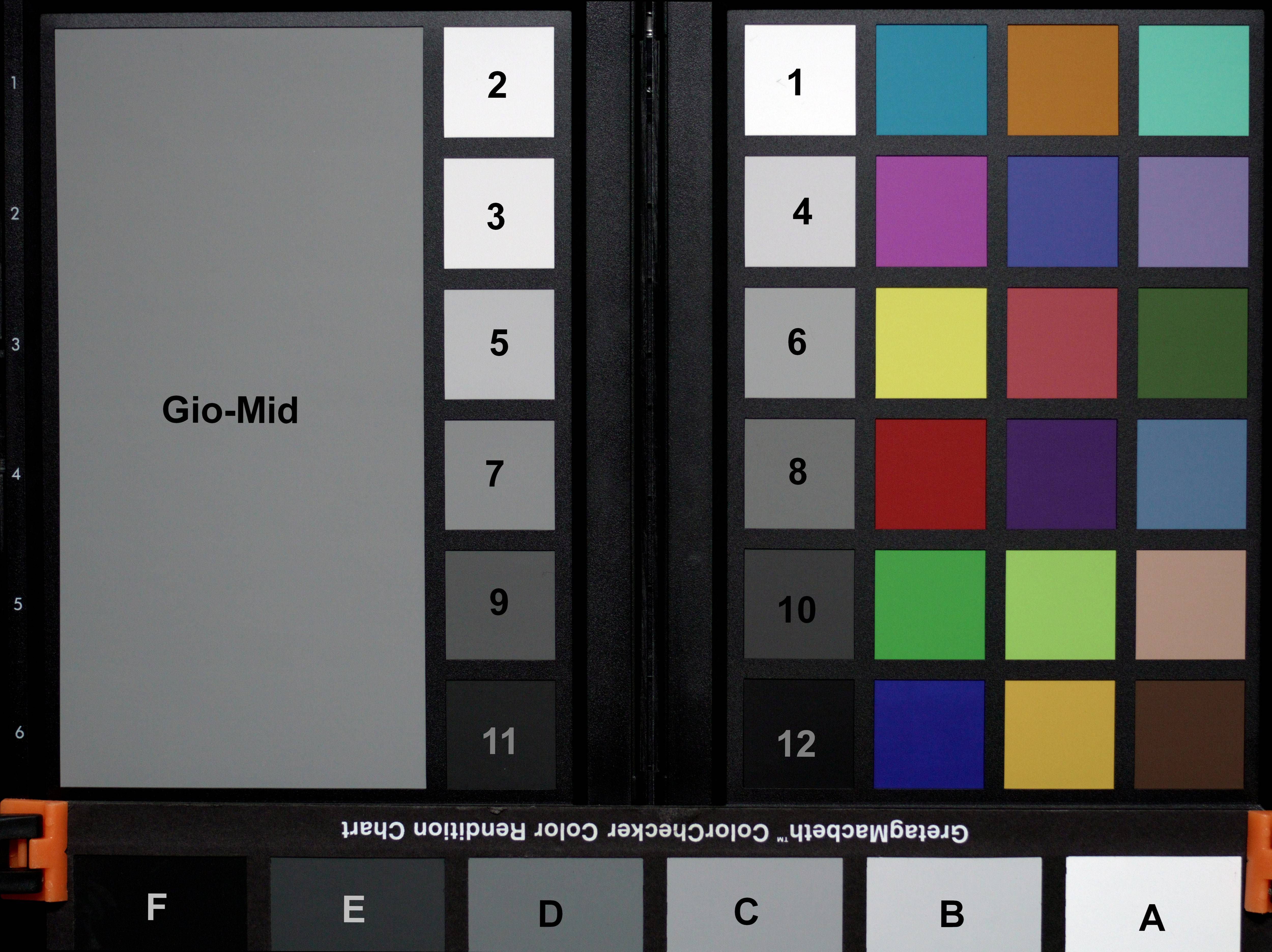
Wanted to see for myself how some of the charts compared in terms of colour and max blacks and whites -


The charts were evenly lit and angled to reduce glare and the comparitive black and white levels that can be seen in the picture match what could be seen by eye and what the Parade scope also showed -


Haven't looked too far into it, but shooting the full charts separately and using the scopes in Resolve to balance the colours, the DSC Labs chart was easiest and most accurate to use, then the Calibrite Colorchecker Video, then the Spyderchecker and Macbeth charts. But I have to say, the DSC Labs chart was so much easier to dial in, using the other charts was a comparitively time-consuming chore and ended up with a noticeably less accurate result.

The automatic chart-matching feature in Resolve gives a very similar result for all the charts, and you can get them all to look very similar just using colour temp and tint adjustments, but if you're manually adjusting for accuracy in the first place, it really does help to have those reference colours to work with.

The 24-chip Macbeth type charts have the advantage of their easily recognizable and familiar colours. It's easy to look at one in a picture and see something's off, compared to the less familiar colours on the DSC Labs and Calibrite Video charts. But you still end up having to eye-ball it if using one to colour-balance with, which can work, or not.

Just putting the observations out there, too many different work-flows and end-goals to say what anyone else should be doing, but glad to have revisited the topic and found some things I'll probably be doing differently from now on.
 
Last edited:
So Marc...correct me if I'm wrong but haven't camera manufacturers luts basically replaced both printer points and grey scale charts? If I shoot say an Alexa at 800 and then apply the arri lut in Resolve, I can then basically determine whether my exposure is over or under exposed. It seems to me the lut has now become the "baseline" for exposure instead of 18 percent gray. I come from shooting film years ago and understand the use of the grey card in film to determine exposure but now it seems that luts pretty much tell me the same thing.
For a lot of us, color management has replaced the LUT, and it (theoretically) uses the manufacturer's own color science to accurately decode the image before we manipulate it in post. Now, you could add a LUT to create a certain look, and I think this can work once the camera color space and gamma space are correct. Of course, we can hand the DP a custom LUT to use on set so they see exactly the same picture on their monitor as we see in the color room.

Not trying to speak on Marc's behalf, but I think he was just making the point, with all the emphasis on how the cinematographer can make use of charts for their particular purposes, that having a calibrated chart shot on set can also help the colourist make sense of the footage and make grading decisions post-shoot.
I think modern cameras at this point have so much headroom, you can pretty much get anything you want on set (within reason). I think camera tests are still necessary so that the DP knows when the image goes off a cliff, how far you can over-expose, and what the limits of key-to-fill ratio are. I worry more about noise and highlight clipping than anything else, and some cameras do start misbehaving if you use mixed color temperatures and then drastically change exposure. On the other hand, there's no harm in tip-toeing right up to the line and saying, "OK, this will work, but we can't go over that" in the test.
 
Back
Top