Welcome to our community

Be a part of something great, join today!

  • Hey all, just changed over the backend after 15 years I figured time to give it a bit of an update, its probably gonna be a bit weird for most of you and i am sure there is a few bugs to work out but it should kinda work the same as before... hopefully :)

FREAKY FLY - 4K Version Now on Youtube, Shot with a RED ONE M-X

Rogelio Salinas

Well-known member
Joined
Jan 25, 2007
Messages
187
Reaction score
0
Points
0
I am almost certain that Youtube is streaming in 4K as long as it is uploaded in 4K and Original resolution is selected. I just uploaded a 4K version of this short film called FREAKY FLY that I uploaded in 2K a few months ago, and even though the video info shows 2048x1536 on both when they are playing, there is a clear difference in the streaming speed and clarity between the Original 2K version I uploaded in June and the newer 4K version I uploaded today. Also, downloading the video file back from Youtube shows the resolution at 4096x2304.
 
Nice
 
Interesting,
Maybe we should try uploading a resolution chart or something with line pairs to verify if YouTube is indeed lying about the pixel dimensions.
My suggestion would be to superimpose a little pixel on pixel off line pattern onto part of the video and uploaded that at 4k. See if the line pair pattern survives. We did this for verifying if the iPad will indeed display 2048 pixels, and we proved it did.

How do you download the media you previously uploaded?
 
Hi Les. It allows you to download the file as long as you own it. That is what I had done yesterday to verify the resolution and it showed the file as 4096x2304. There is a program called youtube video downloader that lets you do this as well. It would be great to get solid verification on this, because I ran across several other 4K resolution videos that took quite a bit more time to stream and played back very choppy compared to the 1080p versions. That's why I embedded the 4K and 2K versions of the video listed above to show the differences.
 
Hi Les. It allows you to download the file as long as you own it. That is what I had done yesterday to verify the resolution and it showed the file as 4096x2304. There is a program called youtube video downloader that lets you do this as well. It would be great to get solid verification on this, because I ran across several other 4K resolution videos that took quite a bit more time to stream and played back very choppy compared to the 1080p versions. That's why I embedded the 4K and 2K versions of the video listed above to show the differences.

Yes it's confirmed as it works if you download somebody else's 4k stuff in original resolution, you will get a 4k file.
 
OK, I confirmed that higher than 2048 is also view-able for sure from youtube.
To test, I made a 2560 across video, with some pixel patterns on it to see if there is scaling going on.
The triple lines survive unscaled at 2560 !
I don't have a 4K monitor, so I can't test for 4096 streaming yet.

Here is the 2560 video ( for 30 inch monitors ) http://www.youtube.com/watch?feature=player_detailpage&v=hYXyDsB7dh4

I just tried tricking the YouTube fullscreen to span two monitors to test 4K playback, but so far haven't got that working.

here is a 4K video, with line pairs to see if it's actual 4K on playback, if someone has a 4K display ( noy UHD, but 4096 ).
http://www.youtube.com/watch?feature=player_detailpage&v=ikeHtRGLu0I
 
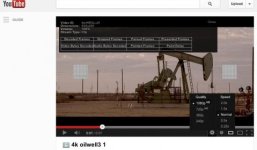
Like I figured there must be something wrong with the video info that Youtube is displaying, because the two videos you posted links to do not give the option to show Original resolution and when I select the 1080p version, the video info only shows that it is 640x290.
 

Attachments

  • Screen Shot 2013-01-07 at 8.31.45 AM.jpg
    Screen Shot 2013-01-07 at 8.31.45 AM.jpg
    19.1 KB · Views: 0
So you don't get the full 2560 fullscreen playback ? I just tried it again, after logging out of Google, and it still works OK for me.
Did anyone else not see the 2560 version OK ?
I'm on a PC.
 
So you don't get the full 2560 fullscreen playback ? I just tried it again, after logging out of Google, and it still works OK for me.
Did anyone else not see the 2560 version OK ?
I'm on a PC.

I did. On a macbook pro. I selected Original for quality, but it's not full 2560...:
Screen-Shot-2013-01-07-at-10.34.36-PM.png
 
Freaky Fly is also only 2k:
Screen-Shot-2013-01-07-at-10.38.12-PM.png


Is this youtube resizing to 2k from the 4k source in both cases? I know it supports 4K video but looks like they downrez it to 2k for playback.
 
OK, it's either a Mac thing , or my computer has somehow cached the video and not playing like a random person would see it.
When I play it from the link, those line patterns are crisp pixel-on-pixel-off patterns.

Matt : This video is for 2560 x 1600 30" monitors, is that what you played it on ? If it's less than 2560, it will smash the quality, it has to.... what are macbooks, more, maybe ?

This may also be a factor: the macbook display scaling : http://www.anandtech.com/show/5996/how-the-retina-display-macbook-pro-handles-scaling
 
Last edited:
Thanks Matt and Les. I believe that Youtube is just not displaying the resolution on the video info option correctly once it goes above 1080p. That is my guess. Like I had mentioned in the first post. Even though both versions of Freaky Fly show it displaying at 2048x1536, there is a distinct difference in streaming speed and video quality between playing the Original setting in the 2K and newer 4K version. In fact the 2K version is actually 2048x1152 not 2048x1536, so I'm guessing that anything 2K and above is automatically showing 2048x1536. There are numerous factors in favor that the 4K version is playing in 4K and numerous other factors showing that it is not. It would be great to get an official word from technical support or someone who is familiar with streaming 4K video at Youtube.
 
Update: I had a buddy play my Youtube 2560 link, and it worked on his 30" monitor with full resolution in 'origanal' quality mode.
So YouTube does in fact play higher than 2048 for sure.
The line pairs pattern being preserved is 100% proof that it does not get resized in this case. No 'I think it's sharper' type of judgement needed.
Now the question is: will it go to 3840 or 4096 ?
 
What is the exact resolution it showed on your buddy's 30" monitor? The other question is also why it would show the 2K version that was uploaded in 2048x1152 as 2048x1536.
 
YouTube file info ( shown by right clicking on image ) says 2048x1556 .... which is not true, it's rubbish.
The video seen is the full non-resized 2560 across that I uploaded. Note: I did not upload 4K for this, I uploaded the exact size I wanted, 2560 in this case.
YouTube correctly streamed me the 1:1 pixel size faithfully.


What is the exact resolution it showed on your buddy's 30" monitor? The other question is also why it would show the 2K version that was uploaded in 2048x1152 as 2048x1536.
 
Back
Top