Welcome to our community

Be a part of something great, join today!

  • Hey all, just changed over the backend after 15 years I figured time to give it a bit of an update, its probably gonna be a bit weird for most of you and i am sure there is a few bugs to work out but it should kinda work the same as before... hopefully :)

Frame summing

martinnoweck

Well-known member
Joined
Feb 18, 2007
Messages
994
Reaction score
0
Points
16
any estimates when frame summing will be enabled on dragon?
best wishes and kind regards,
martin
 
Frame Summing is in the Beta build for sure.

Menu>Settings>Recording>Frame Processing

Select Frame Summing.
 
What is frame summing exactly?
Here's the manual's answer as it's the most accurate and descriptive.

Frame Summing:
Combines the specified number of frames into one frame, and adds together the exposure time for each of the original frames. The resultant frame has an effective integration time that is equal to the current integration time multiplied by the number of frames.

For example, if you select 16 as your Frames to Process value, and set your exposure to 1/48th of a second, your resulting image has an effective integration time of 1/3 of a second. (16 x 1/48)

Frame Summing results in a final image that is brighter and possibly blurrier than any of the original frames, so you can use frame summing to achieve the effect of a long exposure.


Frame Averaging:

Combines the specified number of frames into one frame, and averages the exposure time for each of the orginal frames. The resultant frame has an effective integration time that is equal to the current integration time.

For example, if you select 16 as your Frames to Process value, and set your exposure to 1/48th of a second, your resulting image still has the exposure value of 1/48th of a second, along with the effect of long exposure.

You can use frame averaging to achieve the effect of a long exposure along with the benefits of reduced noise. However, frame averaging does affect motion blur characteristics.


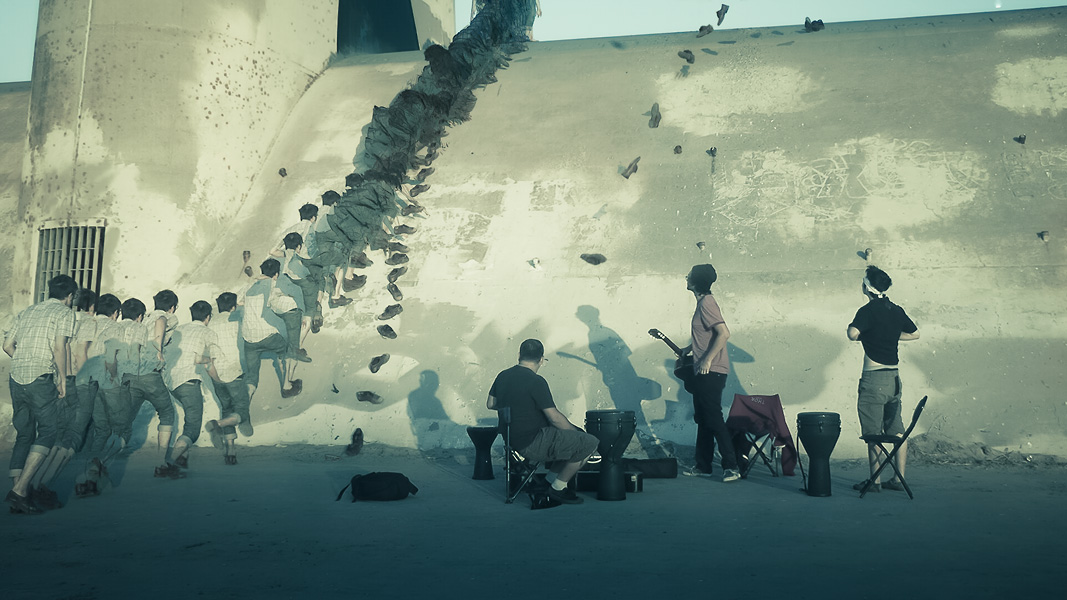
I'll add to this that both of these methods can be achieved in post given a sequence of images and both of these frame processing methods can be used for rather creative effects. Practically speaking I find these methods most useful for timelapse recording. However, in post or in camera you can produce some rather fascinating results:

comp_final.jpg
 
I see. Thanks!

Is there a way to do exposures of longer than 1 second on the Dragon?

by summing 16 frames at 1/2 second exposure you can effectively create an 8 second exposure. You can use this mode to create long streaks on moving traffic at night or to look into the night sky.

Battistella
 
by summing 16 frames at 1/2 second exposure you can effectively create an 8 second exposure. You can use this mode to create long streaks on moving traffic at night or to look into the night sky.

Battistella

So it sums the images but you're still only getting the half second exposure? Or does this actually give you the extra light that an 8 second exposure would give you as well?
 
So it sums the images but you're still only getting the half second exposure? Or does this actually give you the extra light that an 8 second exposure would give you as well?

Averaging averages, but summing sums. Since the electronic sensor can not be open like a bulb exposure on film, the n what emulates that is where it exposes 16 times at. 1/2 second to emulate an 8 second exposure (by summing it) averaging would take the average of those exposures to create the frame. It sensor can only "expose" for so long, this allows that to be extended.

Battistella
 
Averaging averages, but summing sums. Since the electronic sensor can not be open like a bulb exposure on film, the n what emulates that is where it exposes 16 times at. 1/2 second to emulate an 8 second exposure (by summing it) averaging would take the average of those exposures to create the frame. It sensor can only "expose" for so long, this allows that to be extended.

Battistella


OK, NOW I think I get it. I need to test this out! Thanks David (and Phil).
 
OK, NOW I think I get it. I need to test this out! Thanks David (and Phil).

summing is for extending exposure and averaging is more for noise reduction because you are averaging the frames to create a normal shutter exposure.

battistella
 
Can you use frame summing for shooting like Ang Lee did?
Can you shoot 96fps @360º and the sum 2 of every 4 frames to get 24fps @180º for the bluray master?
If so, what's the process? What software do you need?
The built-in frame-summing isn't mean for that kind of use-case. It sums internally, so you won't get the 96fps on your media.

What you are trying to do is basically done by shooting 96fps@360 + post-processing via software like Tessive's Time-Shaper (http://tessive.com/time-shaper-info/).
 
P.S.: i totally hope RED is considering to include this kind of frame-summing in RCX and their SDK in the future. More possibilities and potential with such a direct integration and access to the raw-data.

I also did some experiments with AVIsynth in the past, doable and tweakable to death, especially in combination with different plugins, but not an easy solution and currently not working with modern R3D-files (the VirtualDub-plugin is no longer updated and doesn't support the newest R3D-SDK).
 
It's all in the name with this two modes

1. Averaging - makes 2,4,8, or 16 exposures and averages those exposures to create a frame

2. summing - makes 2,4,8, or 16 exposures and combines/adds them together/ or sums them to create a frame.

#1 is for super clean images.
#2 is to extend/create/simulate longer "BULB style" exposures, but it doesn't work the same way as a manual shutter because RED uses an electronic shutter.

David
 
Back
Top