Welcome to our community

Be a part of something great, join today!

  • Hey all, just changed over the backend after 15 years I figured time to give it a bit of an update, its probably gonna be a bit weird for most of you and i am sure there is a few bugs to work out but it should kinda work the same as before... hopefully :)

Flip Monitor/Touch Screen Image Upside down - Software/Firmware

HD Hildebrand

Well-known member
Joined
Dec 28, 2006
Messages
857
Reaction score
0
Points
16
Location
planetearth
Website
www.hildebrandfilms.com
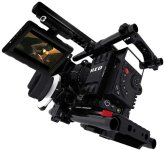
Is there a way to flip the image on the monitor (Red Touch 5.0) through settings? I wish to mount the touch screen upside down for handheld, off the side of the camera, in line with my eyes. This will allow for solid rigging and low profile.

If not, I would like to request this option in a future firmware upgrade.
 
I agree that the LCD would be perfect for hand-held use if we could mount it upside down on something like the Wooden Camera Easy Stick. I've attached an image of what I mean.
 

Attachments

  • Epic Upside Down LCD.jpg
    Epic Upside Down LCD.jpg
    55.3 KB · Views: 0
+2 Exactly what I have in mind.

I think a lot of Scarlet users who can't afford an EVF will be disappointed if this is not enabled by the time the Scarlet kits start shipping. Of course, playback is probably even more important.
 
also for 3d shooting this would be a really nice option and has been suggested earlier already too
 
Does the current firmware only allow for a vertical flip? It would be handy if at least the EVF /Monitor image could be horizontally flipped (aka flopped) for monitoring the lower camera on an underslung beamsplitter.
 
I really need this vertical image flip option as well - please keep everyone posted - thanks
 
Vertical flip helps out those who want the LCD off center axis and also really helps for those moments when you have the camera up a bit taller than you.

+1 for this.
 
Any buzz about the vertical flip? Or current work-arounds? Thanks
 
Back
Top