Welcome to our community

Be a part of something great, join today!

  • Hey all, just changed over the backend after 15 years I figured time to give it a bit of an update, its probably gonna be a bit weird for most of you and i am sure there is a few bugs to work out but it should kinda work the same as before... hopefully :)

Filtration

Peter Lyons Collister ASC

Well-known member
Joined
May 23, 2008
Messages
1,339
Reaction score
1
Points
0
I am curious how people have been using diffusion filtration on their REDs.

What tests you have done and how you feel about all the different choices....

I know, for me, that when I was shooting features on 35mm, I went through phases... 8 films in a row using nets (fogal) and then I was clean for the next 6....

So now with 4K resolution and master Primes, how do you all feel... especially if you have really looked at a Hi Rez render of your work.....


Please post your thoughts and results of your tests.... Thanks,

Peter
 
Hi Peter,

I'm shooting tests this week with different nets. I'll be sure to get some images your way.
 
I think it depends on the individual project. I used #1/8 and #1/4 Classic Soft Blacks on "Manure" (Red One) but shot clean for "Big Sur" (Epic) with the plan to diffuse/fog the blacks in the D.I. Right now on "Smash" (Alexa) I am using mostly Schneider Hollywood Black Magics, and the lightest filter I have is a #1/8 Schneider Black Frost (since the #1/8 Hollywood Black Magic is a #1/8 Black Frost + #1/8 HD Classic Soft, so the #1/8 Black Frost alone is lighter.) But occasionally I use Classic Soft Blacks or a Tiffen GlimmerGlass, and now and then, a light black net filter I made.

I think the #1/8 Black Frost is a nice subtle filter to use in general when you just want the littlest bit of halation. But if you want subtle diffusion with a bit of glow, then the Hollywood Black Magics are great. If you don't want that bit of glow then there is the Tiffen Black Diffusion-FX but frankly that filter is so subtle as to almost be boring.

I use the #1 GlimmerGlass or a #1/4 Black Frost when I want more of that "ProMist-y" look.

On a recent feature in 35mm, I used a #1/8 White Frost which was also subtle, added the slightly period feeling I wanted.

I use the Classic Softs or Classic Soft Blacks when I want that blurred fringe/bubble around lights and hot edges. Sometimes it's a pretty artifact but on long lenses it can be distracting because the blurred edge becomes larger, hence using the Hollywood Black Magics instead, which are basically the same idea as Classic Soft Blacks but the lenslet dimples in the glass are smaller and more random.
 
Hey Peter,

Hope all is well. Would love to talk to you about those tests I missed out on.

As for filtration, my feeling normally is shoot it clean and add filters in post. That being said, I do like the pro mist for beauty shots.
 
Peter,

Interesting subject.
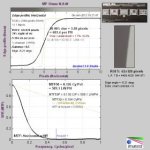
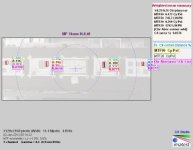
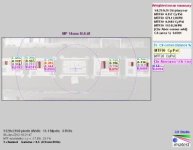
I recently shot several SFR charts for Imatest with Epic using Master Primes. What I noticed in Imatest is relatively heavy filtering on OLPF compared to still picture cameras. OLPF acts as a type of a diffuser and provides gentle edge roll off already. I decided that, unless there is specific shot requiering additional filtration, the EPic creates already very "cinematic" and creamy image free of harsh edgedes.

Also, because the effect of front filtration depends on the focal length I try to stay away from any diffusion filters and add any diffusion or/and sharpenning, if needed, in post.
 

Attachments

  • MP 14mm f4.0_YR70_05_cpp.jpg
    MP 14mm f4.0_YR70_05_cpp.jpg
    15.6 KB · Views: 0
  • MP 14mm f4.0_YR83_04_multi_cpp.jpg
    MP 14mm f4.0_YR83_04_multi_cpp.jpg
    12.7 KB · Views: 0
  • MP 14mm f4.0_YR89_06_multi_cpp.jpg
    MP 14mm f4.0_YR89_06_multi_cpp.jpg
    13.3 KB · Views: 0
I'm not the biggest fan of post diffusion. I like the way light interacts with optical filters. I just feels different when it is done digitally. That said I mostly only use grads, and Polas, and ND of course. I agree that the OLPF takes the harsh edge off the image and yet the images still feel sharp but smooth, if that makes any sense.
 
I agree with David that it's usually a project to project type of thing. I think i have been most impressed with the DPs I've worked with who weren't afraid to get the look they want at the point of acquisition rather than leaving it to post. Certainly there are times when that may not be the best approach. But in general I have loved seeing DPs tweak the look of the RED, Alexa, etc. to get just the right type of aesthetic they are going for. I love seeing them deal with skin tones and how they are able to smooth out blemishes, things like that. To me, doing it in the moment, affecting how the light is hitting the lens seems like a better way to go as long as the freedom exists to do so. Even if the effect is subtle.
 
I agree with David that it's usually a project to project type of thing. I think i have been most impressed with the DPs I've worked with who weren't afraid to get the look they want at the point of acquisition rather than leaving it to post. Certainly there are times when that may not be the best approach. But in general I have loved seeing DPs tweak the look of the RED, Alexa, etc. to get just the right type of aesthetic they are going for. I love seeing them deal with skin tones and how they are able to smooth out blemishes, things like that. To me, doing it in the moment, affecting how the light is hitting the lens seems like a better way to go as long as the freedom exists to do so. Even if the effect is subtle.

doing it on set, just guarantees that look in post, and that's hours (money) that doesn't have to be spent in post cleaning it up. and sometimes the shot can be so problematic, that it's excruciating or near impossible to fix it in post (at least in a natural looking way) and coming from a big post background, i'm a total proponent of getting it on set, especially when it comes to cleaning up skin. it always looks so much more natural rather than that airbrushed plastic look that's done in post.
 
$10/day to rent a filter versus $500/day to rent a colorist (and maybe more). It will always be cheaper to fix it upfront.

And for those that don't have extensive knowledge of all the diff options, you have the Tiffen DFx software that will let you play around with different filters and even different grades within a filter series, so that you can get a good idea of which filter(s) you need to rent/buy.

Location scouting: snap a pic on the EPIC/Scarlet/Alexa. Casting, same thing. Bring up the pix in the Tiffen software and spend 30 minutes playing. Voila!
 
Michael, sounds to me like false economy...

if your colorist charges for a full day to adjust diffusion then you may look into changing the colorist.
$10/day x number of shooting days = $100s or even $1000s for different grades of diffusion that you need for each focal length.

I would argue that, once you figured out what you want to do, adjusting the diffusion in post is quicker than inserting/changing/cleaning filters.
I would also argue that figuring out what difussion you need is also quicker and cheaper in post than on set. And, can be easily undone unlike the glass filter option. But, that's just me :)

I can only see the use of diffusion filtration to create hallation around point sources, which is difficult to do in post.
In my opinion filtration to remove wrinkles or create a softer look can be done with much more control, selectively and with less cost in post.
 
Although... Any respectable rental house will let you test shoot at theirs and with digital it's a quick turn around and you can go home and view the tests immediately. Not like in the old days when you had to ask Kodak for some stock and get the lab to develope it for you.
 
Pawel: I am saying that there is a 3rd option: to figure it out in pre-production. Of course that would require a DP who knows what they want up front (as opposed to figuring out what they want after filming)
 
I am curious how people have been using diffusion filtration on their REDs.What tests you have done and how you feel about all the different choices....I know, for me, that when I was shooting features on 35mm, I went through phases... 8 films in a row using nets (fogal) and then I was clean for the next 6....So now with 4K resolution and master Primes, how do you all feel... especially if you have really looked at a Hi Rez render of your work.....Please post your thoughts and results of your tests.... Thanks,Peter

Peter,
by my post here I mean not to disrespect any one in any way and just voicing my strong opinion in this important subject,
which at the end of the day is IMAGE QUALITY"In my 30+ years of Image taking, from Stills to more recently Motion,
I have used lots of filters, especially in the orly age of shooting Film.then I past on to Digital, and continued to use filters
as not only I had a S%$#@ load of them but that was what I was used to... Then...Here comes RAW, and the power of Photoshop,
and now more tools for Post grading then we can think of, so as Colorist, (not for hire, he he).

I want to have as much choices as I can, and thanks to the RAW material I can, however if I do use filters... BOOM... all bets are gone!!
So the only filter I really use is a Polarizer filter, as this can not arguably be done in post with same results, all else I do in post,
unless I am 110% positive I will not want to use that image for nothing else but for which purpose I used that particular filter to bake in what
ever particular look.People in the industry of both Photography and Cinematography I respect dearly use them, I DON'T, they have their
reasons I have mine, they don't do grading in post as I do, they don't know how, they don't care to learn how, they don't want to seat for
hours with a Colorist, well I am the one that has done all the color adjustment and all various grades and retouching on all my work for
many years now, and finally starting to learn how to do it on Motion Imaging as well, plus why would I use the Best Cine Glass in the world,
sorry no longer talking about my Ex favorite Mastewr Primes, there is a new SHarpest of them all kid on the block, its called LEICA s.C. Prime,
and with EPIC 5k RAW, I'll be enjoying it even more, and for this we are investing in the RESOLVE SURFACE system... Enough said... ;)
 
I think another issue is that has not been discussed is that Tiffen, Schneider, and Formatt all have their own marketing terms of different diffusion effects. Many years ago, there was discussion amongst the manufacturers of a unified system of describing, or coding, filter qualities so that a consumer would know exactly what a Tiffen versus a Schneider filter was going to do to an image. Apparently that effort was abandoned and, as a result, consumers have to experiment themselves or rely upon 2nd hand knowledge when choosing filters. Its too bad that the filter manufacturers are not making it easier for their customer base because, as Ketch pointed out, there are now alternatives that don't involve buying their products.

I am actually surprised that Tiffen, Schneider, and Formatt are not out there talking up the advantages of production filtration.
 
Ketch, my dear friend... I understand your viewpoint and your workflow. IF I always was involved all the way through post....AND had creative power in the grade then I agree with you. But so often the project (insert commercial, music video, TV show, feature) is taken away or we are not able to be involved. In the past, when we shot film, sometimes we would underexpose the film to such a degree that no one could ever brighten it for broadcast. Very extreme but you hopefully see my point.

Hope to see you soon,

Peter
 
Michael, sounds to me like false economy...
I would argue that, once you figured out what you want to do, adjusting the diffusion in post is quicker than inserting/changing/cleaning filters.
I would also argue that figuring out what difussion you need is also quicker and cheaper in post than on set.

Having done it both ways -- in post and on the set - I disagree. It takes a few seconds to drop a diffusion filter in front of a camera lens and that filter may be used on several shots and many minutes of footage shot before the filter might be changed. And I don't take time up on set trying to decide what filter to use! And if I'm not bright enough to figure out what filter to use on the set without taking several minutes, then why would I suddenly be bright enough to figure it out in post in a shorter amount of time???

There are arguments both ways, in-camera and in post, and both are valid and both do slightly different things, create different effects. But I haven't worked in any D.I. suite where there was an instant "1/8 ProMist" button built into the system, there is always a series of keystrokes involved and rendering time -- and it adds up if there are thousands of cuts that require individual diffusion effects applied. Plus any time you can shave in a D.I. suite is going to be significant in terms of savings -- in general, a D.I. session is always going to go smoother when the footage is shot close to the final look and does not require heavy manipulation.

There are three reasons I would save diffusion for post:

#1 If the look was overall meant to be sharp and unfiltered, and therefore softening was only needed for select close-ups where an actor needed some cosmetic help, or if there were a few odd flashbacks or dream sequences that needed manipulation. In this case, I'd likely shoot sharp and look at the shots in the D.I. suite to select the few that needed some help.

#2 If the type of diffusion was best created digitally -- such as halation of blacks, which can't be done with optical filters.

#3 If the project had a lot of chroma key compositing, when it's better to add the diffusion to the final composited image.

The time I would do diffusion in-camera:

#1 If the whole movie had a visually diffused look from start to finish, in which case why not do it in camera and get the look built into the footage and the dailies, rather than have months of incorrectly sharp dailies? And there is nothing stopping me from using a lighter grade of optical diffusion knowing that I can always add more in post.

#2 The director and I wanted optical artifacts as part of the look -- using filters would be part of a plan that also included, let's say, using older lenses with uncoated elements, types of lenses that flared more easily, not using sunshades and pointing lights into the lens to create more flares, etc. And many of these oddball artifacts are too organic to be easily recreated in post, not to mention, instead of getting "happy accidents" optically, the fun aspect of shooting, of discovery, every artifact would be chosen selectively in post, which is not the same sort of filmmaking process.

#3 The project would have a very short post production schedule, such as a TV series, where there is hardly enough time to do basic color balancing let alone individually soften each shot in post to taste, let alone the possibility that you won't even be there for the color-correction session if you are shooting while the show is being delivered. In which case the more you can get in-camera, the better.

But it also comes down to dailies and the set monitors -- if you have a high-powered actress on a set and her make-up people are looking over your shoulder at the HD monitor and reporting the results back to the actress, saying that you will make her look better later in post isn't going to fly. And I have even been in the situation of promising an actress that I would fix a problem in post and then having the producers nix that in post because they didn't want to take the time or spend the money, making me a liar.

There are also examples of movies that just used one diffusion filter for everything more or less -- most of "Barry Lyndon" was shot with a #3 Low-Con for example, so I doubt there was time lost on every set-up trying to select the diffusion filter. Most of the period section of "Titanic" was shot with a #1/4 ProMist. Most of Geoffrey Unsworth's movies in the 1970's were shot with a #2 Fog. Using a filter doesn't have to be time-consuming.
 
Last edited:
Another filter besides the polarizer that can't be easily done in post is the Grad. There are lots of grad effects in post but using a filter to lower the exposure of an area of the image is much different than darkening an area of the image in post. A good example is clouds and skies, once they are overexposed then that's the way they stay. Unless you are doing some sort of compositing of the same image, similar to HDR, two different exposure or debayering of the same shot, darkening a bright area of the image doesn't bring back the detail the way a nice grad will. My 2 cents. I'd love to hear other opinions, I am sure there are things I don't know about post grads and such.
 
ND grads, yes, if they bring something bright down to a recorded range, then that's something that cannot be done in post if the information would be clipped without the grad. But colored grad effects, on the other hand, can be done so easily in post that I usually just use ND grads.

A lot of this comes down to philosophy, whether to do things in post or in camera. I just worked with a director who loved in-camera tricks -- we shot through blocks of glass partially covering the edges of the frame to blur & diffract light, we put fishing line behind the lens to create fake anamorphic flares, I put fingerprints on the corner of the filters, I sprinkled water on the filter, anything to create optical accidents. Many of these tricks were things he asked for.
 
Hey guys,

I'm curious to see some really good quality post filtered material. Can you guys link some examples of footage filtered in post? Mr. Mullen, you mentioned doing halation around blacks in post, can I pull up something that will show off what you are talking about?

I have a short coming up, and I'd LOVE to filter the entire thing with black supermist, to aid the fantasy genre elements, and to throw some help out to the makeup department who is really up against it since this short features a lot of 4K closeups of some facial prosthetics. I think any help I can give them will be good for everyone. Unfortunately, we have a bit of sky replacement with greenscreen, and naturally our protagonist walks off into the wasteland sunset aka green screen at the end of the film.

I've never been blown away by results in post, but maybe you guys can show me some great results that I can forward to my colourist?

Thanks!
 
Back
Top