Welcome to our community

Be a part of something great, join today!

  • Hey all, just changed over the backend after 15 years I figured time to give it a bit of an update, its probably gonna be a bit weird for most of you and i am sure there is a few bugs to work out but it should kinda work the same as before... hopefully :)

Film Making Masterclass with Final Cut Pro X

Final Cut Pro X — What's New in Final Cut Pro X 10.4.7? Speed, HDR improvements and much more!


By POST-PROfessionals - Robin S. Kurz


Final Cut Pro 10.4.7 - FCP X and Metal


By Ripple Training


Final Cut Pro 10.4.7 - HSL Range Isolation


By Ripple Training


Final Cut Pro 10.4.7 - HDR Tone Mapping


By Ripple Training


Final Cut Pro X 10.4.7 Update


By Frame.io


Don't Get Caught Out by macOS Catalina & Final Cut Pro X updates - Resource Links in Description


By Ben Halsall: Final Cut Pro X & Adobe Tutorials


mTitle Cinematic FCPX Plugin Sneak Peek


By motionvfx


Just want to say the first video in this thread -- the Guildhall masterclass -- is really good. Hard to imagine being introduced to more features in a shorter amount of time, and all displayed in a very applied manner. FCPX is pretty amazing. Thank you for posting the link!
 
thanks for posting the above video Brian!
 
No problem Rand. I try to contribute when I can.
Cioni talking about anything industry related (particularly RED, FCP X, Frame io, and the future)
is always worth a listen. He mentions some very interesting bits about future tech in this interview.

Brian Timmons
BRITIM/MEDIA
 
Interesting what Michael alludes to being exciting upcoming Red Hydrogen developments coming in the next 12 to 18 months.
 
Using iPhone 11 Pro with Final Cut Pro


By Serge M


Start editing your video on your iPhone, and export and finish it in Final Cut Pro. In this video we’ll take a look at the benefits of using an iPhone 11 Pro with Final Cut Pro. Use your iPhone to film your footage, use iMovie to perform basic edits, and export your iMovie project to Final Cut Pro for more advanced editing.
 
Easily Control the Duration of Multiple Layered Clips in Final Cut Pro X


By Ben Halsall: Final Cut Pro X & Adobe Tutorials


RippleLIVE Episode 19


By Ripple Training


0:27 - Show Start
2:36 - Creating a LUT in Resolve for use in FCP X
13:36 - Can you Pan Footage using Ripple Tools Complete?
15:18 - Can you add Audio Keyframes During Playback in FCP X?
17:17 - What is the easiest Tracker for FCP X?
18:35 - Best workflow for making a Slideshow
20:30 - Can I connect a Logitech Camera to FCP X
21:54 - FCP X Updates & Bugs
23:51 - Viewing a List of 64 Bit apps on your Mac
30:37 - Highlighting Text on Images in FCP X
31:18 - XLR/Mic Suggestions for FCP X
33:21 - Fastest way to Input Metadata for Multiple Clips
35:37 - Video Files not Supported in Catalina
36:39 - Can you Rename Source Files after they have been Imported?
38:57 - Video Files not Supported in Catalina (Continued)
42:17 - When will Ripple Training Produce Plugins for Resolve?
44:32 - Working with .mts files in FCP X
45:09 - Multicam Syncing Tips
47:45 - Graphics Cards & FCP X
49:03 - Converting FCP X Captions to Titles
50:24 - DaVinci Resolves Media Pool
53:20 - Trimming Stacked Clips in FCP X at the Same Time
54:35 - Ripple Training Tutorial Deals
56:24 - FCP X Creative Summit
57:11 - Easiest way to Add Subtitles to a Project
58:44 - Working with Audio Effects in FCP X Discount Code
58:48 - Sign Off
 
Final Cut Pro CINEMATIC Color Grading // Use ALL The Tools! (No Plugin)


By Taylor Moore


Best FEATURE of FINAL CUT PRO X 10.4.7 // Color Grading Tutorial


BY Pascal Basel


I'm new to Red, just bought a Raven probably one of the last new ones in the market. Have two basic questions (pardon this newbie if its too basic!):

1. As an FCPX user I see that I have two options to edit: a base grade in Redcine Pro first, or go straight to FCPX using the Red Apple Worlflow Installer. Any advice on best practices? Pros and cons for either option?

2. The Raven does not have IPP2 in camera. To take advantage of IPP2 workflow in post, which color space/gamma should I use to shoot? Should it be RedwidegamutRGB/Log3G10 always - or it does not matter?
 
Dipanka,


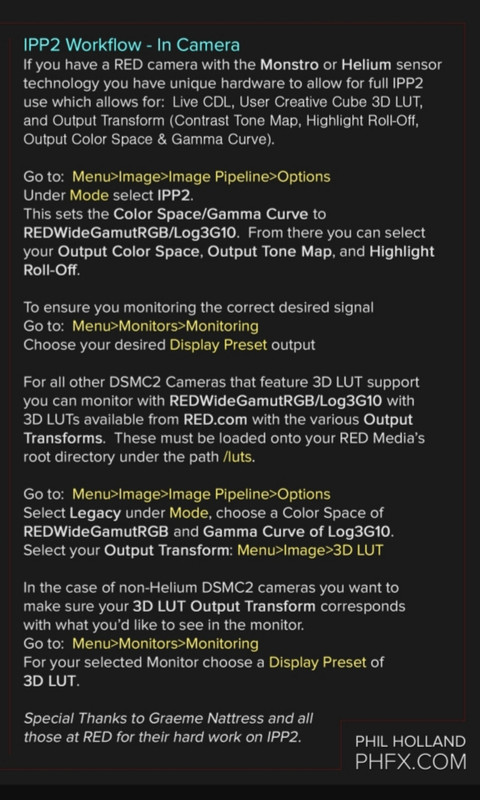
I dont own a Red camera nor do I use FCPX. However, in Phil Holland's " RED - IPP2 Introduction", which can be seen at his website here:

http://www.phfx.com/temp/reduser/phfx_RED_IPP2Introduction.jpg


He suggests different in-camera settings for IPP2 compatible Red cameras and Non IPP2 compatible Red cameras.

20191028-131830.jpg


Also, you should always use RedwidegamutRGB/Log3G10 for IPP2.
 
Thank you very much Rand. It seems the issue they primarily address here is using 3D LUTs for your monitor while shooting. Unfortunately Raven does not support 3D LUTs. But its a great help to know that I should always use RedwidegamutRGB/Log3G10 for IPP2 workflow. Appreciate your help.

The image on the monitor does look very flat and unsaturated when shooting with RedwidegamutRGB/Log3G10, but it hasn't bothered me greatly. Oddly, I've found composing easier on a flat image. Nevertheless, if anyone has experience with the Raven please let me know if there is some way to alter the "look" on the monitor while shooting.
 
Alright then Dipanka, sorry I couldn't be of more help. Hopefully we can get some Raven owners to Chime in with their experience with this matter.
 
Thank you very much Rand. It seems the issue they primarily address here is using 3D LUTs for your monitor while shooting. Unfortunately Raven does not support 3D LUTs. But its a great help to know that I should always use RedwidegamutRGB/Log3G10 for IPP2 workflow. Appreciate your help.

The image on the monitor does look very flat and unsaturated when shooting with RedwidegamutRGB/Log3G10, but it hasn't bothered me greatly. Oddly, I've found composing easier on a flat image. Nevertheless, if anyone has experience with the Raven please let me know if there is some way to alter the "look" on the monitor while shooting.

You can always get a monitor that supports 3D LUTs and build one that works well to help you achieve a look on set that translates well in post for you. I have two on camera monitors that work really well in this regard and don't break the bank at all. The Portkeys BM7 and the Portkeys BM5 which I just got and so far is a dream to work with. That one costs $499. Very bright for outdoor use and good color and plenty sharp. All kinds of scopes and other tools. So, for these older RED cameras, that's one way to address this.
 
Back
Top