Welcome to our community

Be a part of something great, join today!

  • Hey all, just changed over the backend after 15 years I figured time to give it a bit of an update, its probably gonna be a bit weird for most of you and i am sure there is a few bugs to work out but it should kinda work the same as before... hopefully :)

Film Making Masterclass with Final Cut Pro X

Final Cut Pro Help Live Snippet | Episode 9 | Precisely Moving the Playhead


By Final Cut Pro Help


Watch this snippet from Episode 9 of Final Cut Pro Help Live that contains a tip about how to move the playhead by a specific number of frames.

Watch Episode 9: https://youtu.be/Ejdu3jrEsiM

Have a question? Leave it in the comments or send an email to FinalCutProHelp@me.com

Subscribe to be notified when this channel goes live.

Instagram.com/FinalCutProHelp

@FinalCutProHelp

#FinalCutPro #FCPX #FinalCutProX #Live #FCPHlive #FilmMakingTips
 
How to Track & Customise Title Layers in Final Cut Pro X FCPX


By Idustrial Revolution


https://idustrialrevolution.com/colle...
A set of 70 helpful plugins for Final Cut Pro X. Version 2 gets added object tracking, new tracking pointers and upgrades to many of the existing tools.

#FCPX #FinalCutPro #Plugins

This is a FREE UPDATE for all existing users for XEffects Toolkit V1 for FCPX.

XEffects Toolkit is a pack of 70 utility plugins and tools that make the hard tasks in editing easier. We set out to create the most advanced, most featured and most helpful set of tools on the market for Final Cut Pro X.

Designed by professional broadcast editors, this set of tools is perfect for work such as documentary, news or sport and it's also great for adding polish to corporate and event productions.

New to XEffects Toolkit version2 is a set of Tracking Pointers and tracking added to many of the existing plugins.

The plugins range from essential tools such as Subtitles, Caption Safe Area and Pillarbox Shoulders to fine tuning plugins like Alpha Adjust, RGB Channel Adjust or Channel Swap.

The Shrinkback series of plugins range from a Quad Split builder to a completely adjustable Shrinkback with beginning and end scale, position and individual side crop control. All have options to use the move at the beginning, end or both.

We feature a suite of tools for analysis. An Arrow Highlight, Circle Highlight, a Telestrator and Zoom Split Analysis that enlarges footage in a split compared to the original. The two Side Shade plugins allow a vertical or horizontal section of the screen to be darkened with a gradient for graphics or picture overlay. All have optional transitions so you don't have to add them.

The pack also contains a set of Variable Splits, Auto Zoom and Auto Rotate, Guides, 3D Spotlight and 3D Perspective as well as a set of Long Fades and more. We've also included industry standard VT Clocks and Countdown Slates!

Please help us by liking the video and subscribing. We hope to bring you many more great Final Cut Pro X tutorials in the future and every click helps!

**Check out our great plugins on our site**
https://idustrialrevolution.com

The best way to get in touch is via the contact page on our website.
https://idustrialrevolution.com/pages...
 
MY FIRST HACKINTOSH BUILD


By atola visuals


For over 10 years, I’ve dreamed of building the craziest PC for editing, gaming, and rendering. I knew I wanted something faster than most PCs on the market today, and most importantly, I wanted to run Mac OS! Finally, the day came when I pieced it all together and built my ultimate PC. And you better believe it has a ton of RGB in it!

Go subscribe to Lee! Zed Pro Media: https://www.youtube.com/user/zedpromedia

--LINKS—

Gigabyte X299 Designare EX Motherboard - http://geni.us/uxRE

Corsair Crystal 570X RGB Mid-Tower Case: http://geni.us/SGm4R

G.SKILL TridentZ RGB Series 32GB (4x8GB) DDR4 3000MHz DIMM F4-3000C15Q-32GTZR: http://geni.us/0JNUb

Gigabyte GV-N108TGAMINGOC BLACK-11GD GeForce GTX 1080 Ti Gaming OC 11G Graphic Card: http://geni.us/BsQDrg

Intel Core i7-7820X Processor: http://geni.us/uoiTBx
Corsair RMx Series, RM750x, 750W, Fully Modular Power Supply, 80 PLUS Gold Certified : http://geni.us/9asi1Gp

Samsung 860 EVO 1TB 2.5 Inch SATA III Internal SSD (MZ-76E1T0B/AM): http://geni.us/OzcH3Un

Samsung 970 EVO 500GB - NVMe PCIe M.2 2280 SSD (MZ-V7E500BW): http://geni.us/Zj1A

Corsair Hydro Series H100i v2 AIO Liquid CPU Cooler: http://geni.us/JQUvhC

---IM EVERYWHERE---

https://linktr.ee/atolavisuals

--GEAR--

Sony A7Riii: http://geni.us/Qz2qgj
Sony 24-70mm: http://geni.us/fALt
Canon 100mm L Series: http://geni.us/aKMXr
Small HD Focus: http://geni.us/90O5
Aputure 120 D: http://geni.us/xYj4CP
Aputure LS 1/2W: http://geni.us/VlI0
Falcon Eyes RX-29TDX: http://geni.us/EDRt
Sennheiser AVX Lav Mic: http://geni.us/WBe5LI
Manfrotto 755CX3: http://geni.us/m98SADM

---MUSIC---

Get my tracks here: http://bit.ly/2S2vllz

Juicebox - Dylan Sitts
Mitsuwa - SINY
Fumes - Ocean Jams
Sick Days - Dylan Sitts
Star Gazer - AGST
Snowy Day - Dylan Sitts
Overload - AGST

---THANKS AFAM!---
#pcbuilds #hackintosh #editingstation
 
Final Cut Pro 10.4.6 Update!


By 9to5mac


On this week's episode of Final Cut Friday, we discuss the one key feature that you should know about in Final Cut Pro 10.4.6. Be sure to subscribe for more videos each week. https://9to5mac.com/2019/03/22/final-...
 
Frame.io Update & Remote FCPX Collaboration!


By LumaForge


Frame.io just released an update! Included are features like mentions, PDF support, Reel View, and project archiving. We also discuss how to use a Jellyfish Editing Server, Kyno media management software, and Frame.io to enable remote editing workflow with Final Cut Pro X!

#LumaForge #EditBayA

For super easy collaborative video storage, check out the LumaForge Jellyfish.
https://lumaforge.com/jellyfish/

Don't forget to Subscribe for more presentations from the Faster, Together Stage.

To learn more about us, go to our website, or follow us on social media.
Website: https://lumaforge.com
Twitter: @lumaforge
Facebook: LumaForgeInc
Instagram: @LumaForgeInc
 
Final Cut Pro X Audio Tips | Ask The Editor - Episode 3


By Archaius Creative


n this week's episode, Brianna goes over audio basics to help clean up your audio when editing in Final Cut Pro X.

Episode 2:
https://www.youtube.com/watch?v=ir4EM...

Want to get beyond these basics and take your audio to the expert level? Mention this video to receive 25% off an audio-only project.
https://www.archaiuscreative.com/contact

If you have any questions you want answered:
https://www.archaiuscreative.com/ask

Website - https://www.archaiuscreative.com/
Instagram - https://www.instagram.com/archaiuscre...
Twitter - https://twitter.com/archaius
Facebook - https://www.facebook.com/ArchaiusCrea...
 
MBS Ep 453: Shutterstock Video Editor Toolkit


By Ripple Training


Steve walks you through how to use Shutterstock's awesome set of FREE digital assets you can put to use right now in your next FCP X project.

Download Shutterstock's Video Editor Toolkit:

https://shutr.bz/2WzRh9E

Topics Covered:

How to create a Transition
How to use Light Leaks
How to Alter Volumetric Light Colors
How to Alter Animated Icons


Want an AWESOME set of $20 FCP X Plugins?
https://www.rippletraining.com/produc...


Get Your questions answered every week on RippleLIVE
https://www.youtube.com/playlist?list...
 
AVID to FINAL CUT X: TRICKING THE MAGNETIC TIMELINE to make it work like Avid or Premiere.


By Clif Armstrong Edits


If you're familiar with Avid then this is the one tip will help you make sense of Final Cut X's interface.

FCPX: "New Project" is a "New Sequence"
 
2019 i9 5K iMac Video Editing Performance VS 2017 5K iMac


By Max Yuryev


2019 i9 5K iMac Premiere, Final Cut, and Resolve 15 video editing tests!
The first 500 people will get 2 months of Skillshare for free! https://skl.sh/maxyuryev12
iMac Pro Killer➡ https://bhpho.to/2Fpt2VF - RAM kit➡ http://geni.us/eHAlbcr


21.5" 4K iMac for great Video editing➡ https://bhpho.to/2HI1NHs
4K iMac for Photo editing➡ https://bhpho.to/2HINUsM
Best bang for buck 5K iMac➡ https://bhpho.to/2Fp7CIv
iMac Pro Killer➡ https://bhpho.to/2Fpt2VF


16GB RAM total (buy 2)➡ http://geni.us/8BA3Ysl
24GB RAM Total (buy 2)➡ http://geni.us/gZIL
32GB RAM Kit (48GB RAM)➡ http://geni.us/pYAurIm
64GB RAM (buy 2x)➡ http://geni.us/pYAurIm
128GB RAM Kit➡ https://bhpho.to/2FCNCRr

We test out the brand new 2019 i9 5K iMac with Vega 48 graphics in regards to video editing in Premiere Pro 2019, Davinci Resolve 15, and Final Cut Pro X FCX. We also do benchmark performance comparison with cinebench R15 and Geekbench 4 CPU test along with Vega 48 Open CL and Metal tests.

Subscribe for the iMac Pro vs 2019 i9 5K iMac Comparison!

~~~~~~~~~~~~~~~~~~~~~~~~~~~~~~~~~~~

10% off unlimited yearly music licensing on Soundstripe (what I use for all my videos) use coupon code "Max" here: http://soundstripe.grsm.io/e/6lv

Video Shot with➡ http://geni.us/viUc7
Lens ➡ https://bhpho.to/2DZerxL
Mic➡ http://bit.ly/2tmCVgk

If you enjoy our content please consider supporting us on Patreon. Even $2 a month helps us make more and better content for you!
https://www.patreon.com/MaxYuryev
 
Thanks Brian! I'll continue to look for "quality" tutorials and post them as they become available.
 
SHORTCUTS TO A FASTER FINAL CUT PRO WORKFLOW


By Steve Coutts


Published on Mar 31, 2019
In this video I show you 9 Final Cut Pro X shortcuts to help you speed up your editing workflow. I cover topics like duplicating assets, quickly changing clip duration, organizing your clips and making quicker selections. In less than 5 minutes you will learn a bunch of shortcuts to help you edit your videos faster! Have a watch and improve your Final Cut Pro X editing right away!

Music:
Electro Cabello - Kevin MacLeod - YouTube Audio Library
Electro Cabello by Kevin MacLeod is licensed under a Creative Commons Attribution license (https://creativecommons.org/licenses/...)
Source: http://incompetech.com/music/royalty-...
Artist: http://incompetech.com/
 
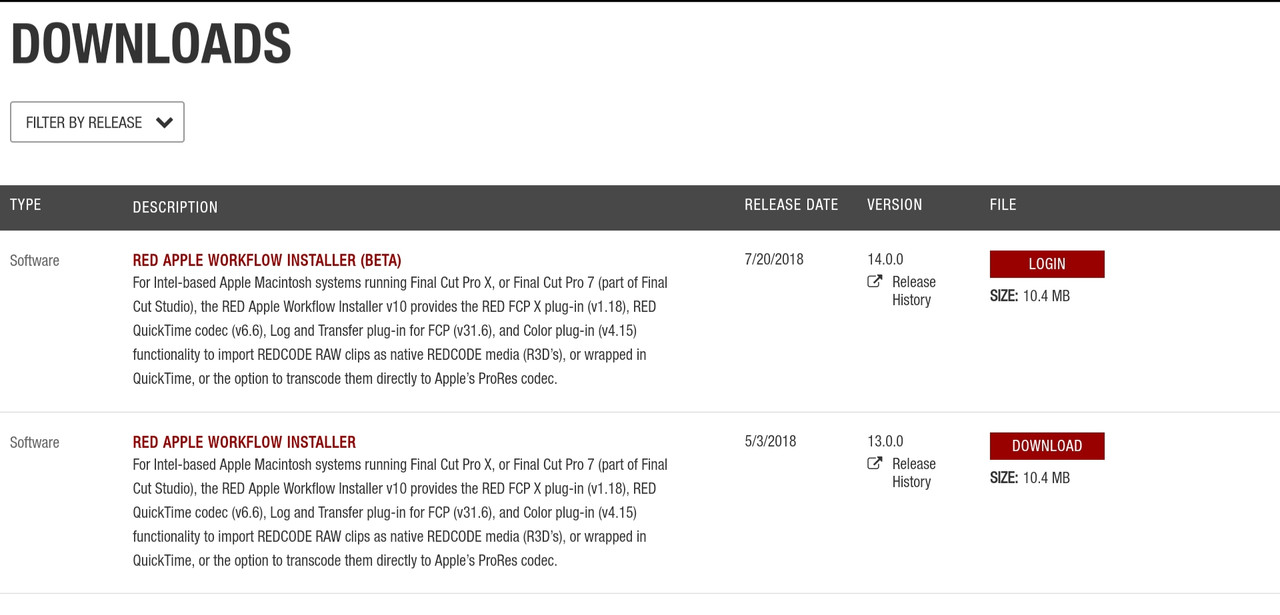
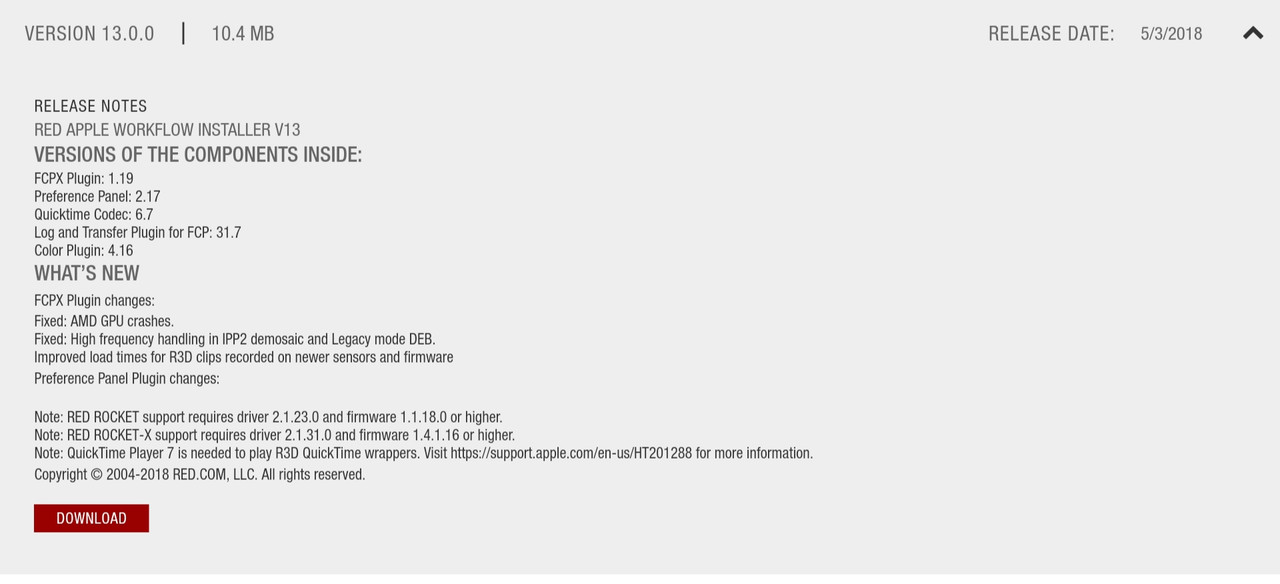
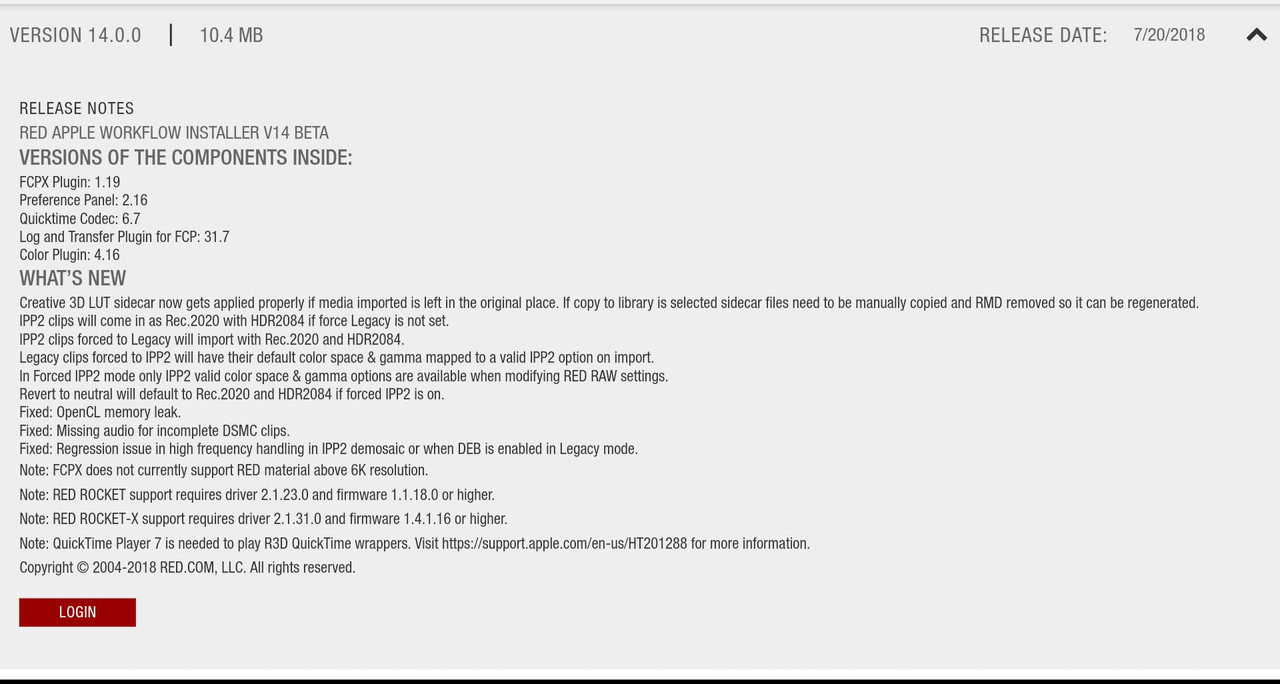
The apple workflow from red.com is the best place to start.


20190403-203359.jpg


https://www.red.com/downloads/options?itemInternalId=16135


20190216-132926.jpg


20190216-132637.jpg
 
RippleLIVE Episode 8


Will Be "Live" Shortly


By Ripple Training


In this week's RippleLIVE, Mark & Steve will cover some great tips on Sound Editing and Color Grading in FCPX. Please support the Show by purchasing our new Helpers Plugin for FCP X:

https://www.rippletraining.com/produc...

==============================
Want to Edit Faster? Our new FCP X tutorial APP is now for sale on the Mac App Store:

https://itunes.apple.com/us/app/editi...
 
Final Cut Pro X: Checking For and Converting Incompatible Media


By Final Cut Pro Help


Apple is preparing to complete the transition from 32-bit to 64-bit technologies inside macOS. To prepare for these future versions of macOS, Apple has update Final Cut Pro and other apps. These updates include a feature to detect and convert incompatible media. If you would like more details read the article titled About incompatible media in Final Cut Pro X https://support.apple.com/HT209000 on their support site.

If you are concerned about this transition and the way the feature works, watch this video.

Submit your questions via email, Instagram, or Twitter @FinalCutProHelp - FinalCutProHelp@me.com

Get Final Cut Pro X from the App Store: https://apple.co/2JfG5wq

Follow @FinalCutProHelp on Instagram, Twitter, and Facebook

Support this channel and become a better Final Cut editor by reading An Awesome Guide to Final Cut Pro 10 available from:

Amazon (Kindle) https://goo.gl/YyGDSc

Apple (iBooks) https://goo.gl/MYE1Zk

Rakuten (Kobo) https://goo.gl/V9svYf

Barnes and Noble (Nook) https://goo.gl/nEQrH5

#FCPH #FinalCutPro #FCPX #FCP #FinalCut
 
FCPX Project to DaVinci Resolve and Back


By Serge M


FCPX Project to DaVinci Resolve and Back

In this video, we'll take a look at how to export your Final Cut Pro timeline into DaVinci Resolve for color grading, and back into Final Cut Pro for finishing touches.

Final Cut Pro has some great color grading tools, but still not as good as DaVinci Resolve. If you prefer to use DaVinci Resolve for color grading, there is an easy way to export a Final Cut Pro timeline as an XML file, import it into Resolve for color grading, and round trip it back into Final Cut Pro for finishing touches and export.

Color Grading in DaVinci Resolve Course - https://www.rippletraining.com/produc...

▶️Get Custom Royalty Free Music for your Next Project from FCP Audio - https://fcpaudio.co.uk/?ref=9
** Use coupon code LPTGUY15 , for 15 percent off all your
purchases**

▶️ FREE 26 Page Complete Final Cut Pro Keyboard Shortcut Guide - http://eepurl.com/dtLx4z

▶️ Please SUBSCRIBE for more FCPX Tutorials - https://goo.gl/hCmYEh
 
How To Use PhotoShop Layers In Final Cut Pro (MacMost #1873)


By macmostvideo


https://macmost.com/e-1873 If you want to use complex graphics or create an animation in Final Cut Pro, you can build your image in Photoshop or another advanced image editing app that supports layers. You can then import that layered document into Final Cut Pro and access the layers. You can apply changes and effects to each layer, or use them to animate portions of the images.
 
FINAL CUT PRO X - Save & Recall Custom Speeds in FCPX


By MOJO PIX


Store all your Custom Speed settings as a double clickable effect!
 
Back
Top