peter richweisz
Well-known member
- Joined
- Feb 2, 2017
- Messages
- 77
- Reaction score
- 1
- Points
- 8
- Location
- Phuket/Bangkok/Thailand
- Website
- www.richweisz.com
I had my camera out for rent and the guy said he had to adjust them back focus for my PL mount. Now i am doing a gear check for a shoot tomorrow on my EF mount. I can not focus all my (7) lenses to infinity .
I assumed i have to readjust the back focus (first time on a Red Camera) . I went on the manual and it has some discrepancy from my set-up.
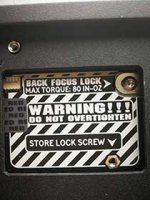
It talks to remove the back focus lock crew with a felix #0. In mine there is no felix 0 screw whatsoever. Instead there is a screw thread more looks like Torx, but when i try to unscrew it just doesnt move , in fact torx 10 doesnt really get a hold on the screw at all. meanwhile operation gide tells not to force .
I attached an image how it looks on mine. Is it possible he has not replaced the felix screw to the lock? Is that possible i have a torx screw and he overtightened it. i do not want to start making back focus adjustment before i make sure the sensor positioning is not locked.
On the other hand in case if the screw is missing is there a point to adjust if i can not lock after the adjustment?
Thanks in advance for any help .
I assumed i have to readjust the back focus (first time on a Red Camera) . I went on the manual and it has some discrepancy from my set-up.
It talks to remove the back focus lock crew with a felix #0. In mine there is no felix 0 screw whatsoever. Instead there is a screw thread more looks like Torx, but when i try to unscrew it just doesnt move , in fact torx 10 doesnt really get a hold on the screw at all. meanwhile operation gide tells not to force .
I attached an image how it looks on mine. Is it possible he has not replaced the felix screw to the lock? Is that possible i have a torx screw and he overtightened it. i do not want to start making back focus adjustment before i make sure the sensor positioning is not locked.
On the other hand in case if the screw is missing is there a point to adjust if i can not lock after the adjustment?
Thanks in advance for any help .