Welcome to our community

Be a part of something great, join today!

  • Hey all, just changed over the backend after 15 years I figured time to give it a bit of an update, its probably gonna be a bit weird for most of you and i am sure there is a few bugs to work out but it should kinda work the same as before... hopefully :)

EPIC slow motion question

Samir Patel

Well-known member
Joined
Jul 8, 2012
Messages
1,981
Reaction score
0
Points
36
Location
Miami, Florida
Since I only have a Scarlet I am not able to tell. Can someone tell me what are the Epic max frame rates in all resolutions with the beta firmware? I think the RED.com pages only state the official frame rates with build firmware. Also curious if you have to jump down to 2K to get 240fps (since the webpage says 200fps for 3K and 300fps for 2K). Also is there a setting in between? 2.5K? Since Jim has stated before that you typically would debayer down to 80% of the original frame for a clear image?
 
All of the information you're after is in either the DSMC Operation Guide or in my Data Sheet threads stickied above.
 
Thanks Phil. I overlooked your very informative sticky. I guess sometime your brain just skips over the stuff at the top. Kind of like I do everytime I visit google. However it looks like according to your thread then I should be able to do 240fps only in 2K mode and not 3K or in-between mode (guessing it doesn't exist). Also what is up with RED.com stating 3K (1-200fps) and your thread stating 160fps max. I'm guessing they have a 200fps in WS mode? I guess what I am after was as when we went to build 5 we were able to squeeze more out of Scarlet I was wondering if there were also more squeezed out of EPIC which was not published.
 
1k ws 400
2k ws 300
2k hd 240

thats all I can remember at the moment and camera isn't on me. Also depending what mood the camera is in it can be a couple frames off in either direction as far as what its current max is. Has something to do with temps I think...
 
My personal belief is it looks good and usable. I know some people differ with that belief, because of the bayer pattern they say it should be at least 3k or 4k, but truthfully 2k HD and WS looks fine when graded well, exposed well, etc.
 
My personal belief is it looks good and usable. I know some people differ with that belief, because of the bayer pattern they say it should be at least 3k or 4k, but truthfully 2k HD and WS looks fine when graded well, exposed well, etc.

Exactly. If exposed and shot well, 2k can look great. They used some 2K slow-mo in Rust and Bone. Not sure if it's featured in this trailer, but here it is anyway (so you can see how good these film makers are!):

 
I also think using a shallow depth of field in 2K helps a lot. Throwing the background out of focus smooths out a lot of artefacts.
I did some wide shots of a guy doing backflips on skis (on one ski with the other leg in plaster as it was broken, but that´s a mother story) and in the background there where quite a few pine trees and they didn´t come out well at all.
 
I also think using a shallow depth of field in 2K helps a lot. Throwing the background out of focus smooths out a lot of artefacts.
I did some wide shots of a guy doing backflips on skis (on one ski with the other leg in plaster as it was broken, but that´s a mother story) and in the background there where quite a few pine trees and they didn´t come out well at all.

Absolutely. The smoother the background, the less likely it is that small artifacts and compression abnormalities to creep up. In fact on Much Ado About Nothing (Shot on Epic) they used this same principle to help intercut a couple of 5D shots (they kept the DSLR "shallow" and figured this would help forgive the high compression)

 
Just a few guidelines for better results.
If you are shooting outdoes in very bright conditions you might be ok, but if it's a studio shoot consider your lighting package carefully.

For optimal results and because you are on a windowed sensor I would consider:

rating at 320iso for less noise
set compression to 3:1

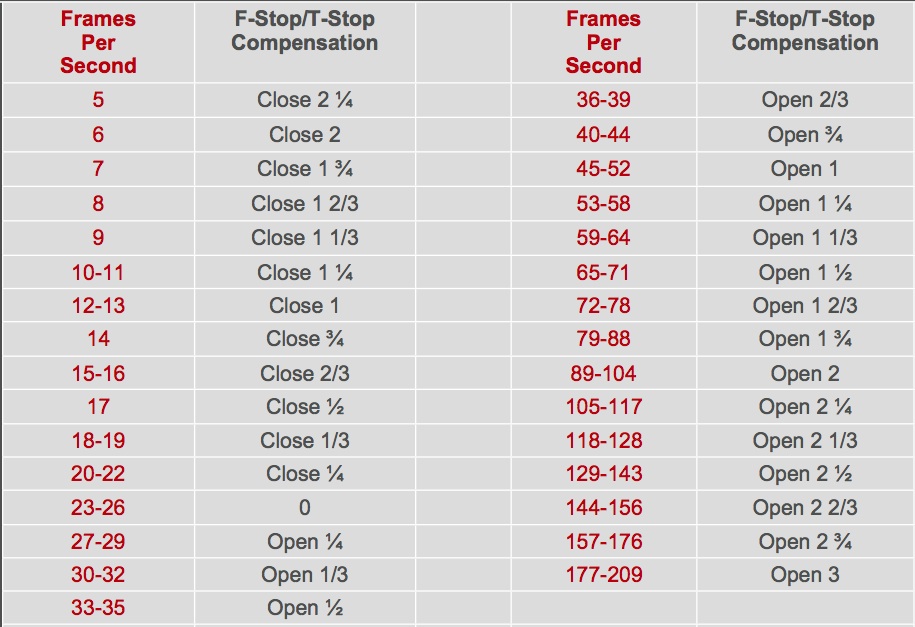
Remember every time you add the base frame rate it means light loss, so:

framespersec.jpg


This table is for film, but it is also a good guideline for EPIC.

Be particularly conservative in a studio environment and extra conservative with green screen. I think many folks think they can go in a shoot 240fps on a green screen and not worry about it, but in. 2k on a windowed sensor, it's already noisier that 5k and then if you have to boost ISO or open a lens to 1.4 where it is never its best or sharpest, then you are begging for problems.

seriously consider shooting 4k 120 and slowing the rest down in post for the cleanest results.

Also check out tho site for all kinds of film calculations, where I found these charts

LINK


Battistella
 
Samir, I shoot a lot of 240fps on the Epic and it can match well with television or 1080 stuff but I find that if you give a little you gain a lot. In that if you take the frame rate down just a little from 240fps to say 220 or in to the teens like 214 you start to see your compression rate drop significantly and then your shooting around 5 or 6:1 compressin and that is where a lot of the compression artifacts are not as pronounced when putting the Epic clips next to 1080 or even larger format work.
David said it best that if your outside in a lot of light the images look great but if your using artificial light and indoors you need to take care and do some test shots to see what it actually will look like on a large monitor or screen.
Don't forget that there are some noise reduction software that will help clean it up a bit if needed. And the shooting at a larger format 3 or 4K and then slowing it down a bit will give you a much better image to start with.
Good luck
 
On the topic of Epic Slo- Mo
Here's the scenario: One of the creative teams at an agency here in Toronto that I work with on occasion call me up on Wednesday morning to ask if I'm available to shoot an account pitch video... I asked when; they responded that they would be at my studio in an hour -
oh and they needed to leave Wednesday afternoon with a completed edit. No problem.

I didn't know what we were shooting until they walked through the door, and didn't have any crew hanging around to help me. So a lot of the decisions around shooting were made by default; I've also been in the ad world long enough to know that a pitch video isn't about technical prowess, but rather to give the emotional feel of what a campaign or spot will be about.

Tech specs:
Epic 3KHD
90º shutter
160 fps
8:1
all shots on a RED 18-50 zoom (again, didn't have time to fuss with lens changes)
No CC in post, beyond a small tweak of the shadows.

We started out by testing at 2KHD and nearly 300fps - looked at the shot in RedCine-x and decided to shoot 3KHD 160fps at 90º shutter instead. 2KHD looked soft, partly because of 2K, and mostly because I wasn't prepared with enough light and had to be wide open, giving a far too narrow DOF.
 
Thanks for all of the responses guys!

Tom, I'm a bit busy right now in my day job but we should definitely get together some time when things slow down.

Glen that video looks great! And I really like food spots shot on RED. Can you suggest any must have lighting for getting started in shooting food/liquor?
 
Glen that video looks great! And I really like food spots shot on RED. Can you suggest any must have lighting for getting started in shooting food/liquor?

You'll need a few HMI sources - fresnel & Par, diffusion frames, dots & fingers, bounce cards, and use a few Dedo's to pinpoint light on specific things.


One other thing - countless hours of practice...
 
You'll need a few HMI sources - fresnel & Par, diffusion frames, dots & fingers, bounce cards, and use a few Dedo's to pinpoint light on specific things.


One other thing - countless hours of practice...

love this answer. Where is the the link?
 
Agree that more resolution and less compression to create 100-160 better frames followed by a trip to Twixtor or Chronos yields better results on most material than windowing down to get to 240-300fps in camera.

FWIW, the Phantom 4K Flex released just a couple months ago is the way to go if you need kick ass slow motion.

Cheers - #19
 
Remember every time you add the base frame rate = a stop of light loss, so:

24fps @ f22
48fps 1 stop more f16
72fps 2 stops more f11
96fps 3 stops more f8
120fps 4 stops more f5.6
144fps 5 stops more f4.0
168fps 6 stops more f2.8
192fps 7 stops more f2.0
214fps 8 stops more f1.4
236fps 9 stops more need to compensate with ISO gain here so 320 to 500 (unless you are using a Kubrick lens)

Sorry David but thats wrong
if you start with
24fps @f22 you get
48fps @f16 thats right but then
96fps @f11 (2 stops)
192fps @f8 (3 stops)

48fps to 72fps would be a 1/2 stop light loss whereas 96 to 120 fps would be a quarter stop light loss.

Otherwise i agree with you, shoot in highest possible quality and rate to 320 ISO
 
Back
Top