Welcome to our community

Be a part of something great, join today!

  • Hey all, just changed over the backend after 15 years I figured time to give it a bit of an update, its probably gonna be a bit weird for most of you and i am sure there is a few bugs to work out but it should kinda work the same as before... hopefully :)

EPIC R3D

What I've been using is x4 RedMag readers connected to a x4 e-sata ext-miniSAS Fanout cable. With a H380 dedicated to the readers. Lto/CF/2.5"/etc on the other 4 Channels. And the H6F0 x16 port Atto card for a 16TB RAID 0. If I can secure the data quickly, I can check it quicker, encode it faster, and Copy to single drives without bottlenecking, 128GB Mags take 9 minutes, The Read Speed is around 200MB/s on the RedMag cards. So can copy multiple Mags to the RAID.

In the case of Thunderbolt, You will need to use your x1 PCI-e slot for e-sata adapter which has maximum 250MB/s. Cannot do multiple transfers like this, and what about Client Drives? Even with my SAS/RAID Setup I still can't copy fast enough. It almost requires a 5-6 drive RAID or SSD RAID for Transfer to Client or Post. At least I can guarantee they will walk home with it. Long before the G-tech drives are done/
 
RC 5:1 is a good high quality starting point. Many big budget features used 5:1 (ie. spiderman).
RC 6:1 and 7:1 good alternates if you need to be more prudent about data throughput.
RC 8:1 even more so.
I'd reserve RC9:1 thru RC12:1 for high speed shots where you don't have the flexibility to go lower.

thanks for sharing these precious nuggets Deanan. This is really great information! thanks!

EDIT: Can you tell is how the above relates to:

64GB SSD
128GB SSD
256GB SDD

in terms of storage/record times?
 
Hi Alex.
Nice setup by the way. That's why I have multiple data setups I can have on one trolley a Macpro setup very similar to yours (only I use Proavio raid boxes) and at the same time 2 X MBP + 2 X QIO connected to 2 X SR2 boxes (Stardom) + 2 X e-sata client HDD + 2 X Redmag readers and 2 X UPS + a Lead-acid battery (3 hour full setup self contained power supply). On a second trolley a second Macpro setup and with this I can dedicate each Macpro setup to a separate 3D rig at the same time and transcodes, one-light and playback on the same machines.
Equally though I can use one trolley with the Macpro and 2 X MBP setups to accommodate a dual (none Epic or Codex) camera shoot laptops for downloads Macpro for transcodes, one-light and playback.

Riavia
In and as far as mobility goes your rite there is still and always will be a need to have a mobile and compact data setup. MBPs are the obvious solution and we will always need at least 1/0.5 meters of desk space to work on so trolleys become a great tool now and in the future and most trolleys (Magliners, Figliners or self engineered) can hold a tower so may as well take one on set. There isn't always enough space for data setups so I always find the closest possible sheltered area to set to build a data setup or build up in my van which can normally be parked quite close to set.

Either way there is no way to avoid large machinery on set from now on to be able to cater for 3D rigs and ever increasing data rates. The only times in which I see a single laptop data setup being handy is when there will be an extended shoot period in an isolated set without regular accessibility i.e backing up in the back seat of a light airplane or a small boat and I say this from experience.

Hope this helps.
 
RC 5:1 is a good high quality starting point. Many big budget features used 5:1 (ie. spiderman).
RC 6:1 and 7:1 good alternates if you need to be more prudent about data throughput.
RC 8:1 even more so.
I'd reserve RC9:1 thru RC12:1 for high speed shots where you don't have the flexibility to go lower.

Deanan nailed it - this is the best way to describe it and I completely agree.
 
thanks for sharing these precious nuggets Deanan. This is really great information! thanks!

EDIT: Can you tell is how the above relates to:

64GB SSD
128GB SSD
256GB SDD

in terms of storage/record times?
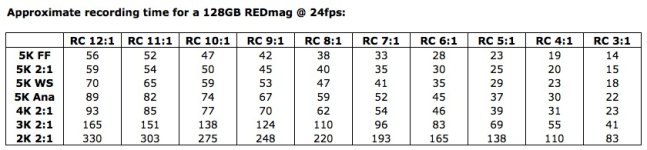
Recording time for a 128GB SSD :
 

Attachments

  • RED - SSD Recording Time.jpg
    RED - SSD Recording Time.jpg
    68.6 KB · Views: 0
Back
Top