Welcome to our community

Be a part of something great, join today!

  • Hey all, just changed over the backend after 15 years I figured time to give it a bit of an update, its probably gonna be a bit weird for most of you and i am sure there is a few bugs to work out but it should kinda work the same as before... hopefully :)

Epic Firmware suggestions

New to Epic so maybe I'm missing something here. If not . . . Way better Focus Assist!! My middle age eyes are taking a dump. On 5" monitor, mosquito view (red outline) is barely noticeable, the green circle "Confirm" is a freakin micron thick and I haven't found a Peaking style assist. Make the Focus Assist user adjustable - so I can decide how dominant I want the outlines to be on screen (I would immediately make the "Confirm" outline about 4 times thicker). Focus is critical on a large sensor cam and the only thing you can't fix in post. With no playback this is a critical issue to me.

Problem is that products are designed by 27 year old engineers for 47 year old users. Please have your sharp eyed young engineers put on a pair of reading glasses to blur their vision to simulate what I can see on the monitor. Wearing glasses on set sucks. Please give me the tools to avoid that requirement.
 
Deanan, have you considered making a "relative" compression ratio option, where the camera automatically selects the lowest compression ratio for any given framerate/resolution? I constantly shuffle through framerates, and sometimes I forget to change the compression ratio. So I end up accidentally shooting 24fps at 12:1. It's tough to keep all the framerates and matching compression ratios in my head.

Or amybe just being able to set 3 presets.

5K FF @ 24fps 6:1
4K HD @ 120fps 6:1
2K 2:1 @ 299fps 10:1

It would be great to just toggle modes or set this to A B or C buttons.

Where are presets stored now without the SD card
 
New to Epic so maybe I'm missing something here. If not . . . Way better Focus Assist!! My middle age eyes are taking a dump. On 5" monitor, mosquito view (red outline) is barely noticeable, the green circle "Confirm" is a freakin micron thick and I haven't found a Peaking style assist. Make the Focus Assist user adjustable - so I can decide how dominant I want the outlines to be on screen (I would immediately make the "Confirm" outline about 4 times thicker). Focus is critical on a large sensor cam and the only thing you can't fix in post. With no playback this is a critical issue to me.

Problem is that products are designed by 27 year old engineers for 47 year old users. Please have your sharp eyed young engineers put on a pair of reading glasses to blur their vision to simulate what I can see on the monitor. Wearing glasses on set sucks. Please give me the tools to avoid that requirement.

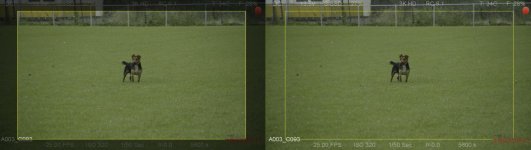
In 1.7.9 there is an option called focus, its a form of peaking and works great!
 
- image flip on the touchscreen. For shooting 3D, it would be nice to flip the monitor horizontal so the epic which is mirrored by the mirror in the rig, can be flipped back and used for the AC for example. Also when you you turn around the 3d rig, it would be nice to flip the image without flipping the complete monitor and having upside down menu. so image flip would only apply to the picture and not the menu's.

- Grey out the area outside your marker area's. So when shooting 2:35 that is possible the grey out the area outside, like 25,50, and 100% options.

-

I posted these suggestions exactly (minus 1 day) a year ago i just noticed when searching this thread, but still these two things are missing and really high on my wish list. The look around is a quite important one. I attached a picture of what i mean. For framing and monitor output is would a lot nicer if you could gray out the area outside the frame guide, so i get a better feeling of the framing.

Another one what is really needed is audio playback, the lack of this really cripples the otherwise really nice playback function. (and thumbnail overview would also be really nice (like every sony or canon camera has for years)

Also when i try to make a custom frame guide and set the aspect ratio to 1.78, if doesn't make this ratio, but a different one. In 3K HD, when i make a custom frame guide of 85%, 16:9 aspect. If i fill in 1.78 i don't get the right measurement... Looks like a bug
 

Attachments

  • lookaround.jpg
    lookaround.jpg
    64.7 KB · Views: 0
So here's my wish list of things that i hope can be implemented in firmware in the near future and are realistic to ask:

- IMAGE FLIP ON THE LCD - really should be nice to have this asap. (look at the C300, image can flip/flop all sides, works like a charm :)
- Magnify like on the canon 7D, 5x or 10x zoom, and then the possibility to move the box to wherever you want on the screen. Also magnify during recording would be nice. And magnify without magnify's the hd-sdi output also would be nice, to have the choice to just magnify on the lcd.
- One button toggle between clean and menu's LCD mode, now you have to scroll through 4 or 5 option every time. just like on the R1, where you assign the top button of for example the 7" screen and the pictures fills the screen or you see menu's
- Playback thumbnail overview, would make it so much easier to find back shots when you want to playback.
 
Back
Top