Welcome to our community

Be a part of something great, join today!

  • Hey all, just changed over the backend after 15 years I figured time to give it a bit of an update, its probably gonna be a bit weird for most of you and i am sure there is a few bugs to work out but it should kinda work the same as before... hopefully :)

Easy way to create offline pro-res proxies from an Epic, without additional hardware?

Mark Deeble

Well-known member
Joined
Aug 20, 2010
Messages
188
Reaction score
0
Points
16
Location
Kenya
Website
www.deeblestone.com
Hi - I am new to RED workflow and I am planning to shoot the Epic in a lightweight EFP mode on a 2+ year project in Africa and am looking for a a way of creating pro-res proxies for a field based off-line edit, based around a mac-book pro and 27" iMac, running FCP7.

As it is EFP, I really don't want the additional weight or power drain of an onboard ki-pro mini or Pix 240.
I'll be copying with shot-put pro, logging with catdv and then archiving to LTO 5 with Cache-A's Prime Cache.
Is there a software solution?
I am grateful for any advice..... :)
 
Thanks Greg - I have looked at REDCINE-X but didn't see any pro-res settings in the export options - we'd like to go to pro-res 422 proxy 640x360.
I'll check out R3D data manager -thanks.
 
Liam - I've not used Premiere Pro. We'll be shooting Epic A-cam and Si2K (cineform RAW) B-cam and remote - probably split 80/20 and averaging c 3O mins of footage a day and ending up with c. 200-250 hrs. Power in the bush is a real issue though. We are camping, and I was hoping to keep everything battery powered (off solar + small generator), keeping storage to a minimum, hence the MB pro with bus-powered drives ( where possible) and going pro-res proxies for the in-field offline.
Do you think Premiere Pro suitable for my application?
 
I'd recommend RCX Pro, but please check again – it can export ProRes LT in any format by adding custom settings of your own to the settings list for export. Don't forget to reduce de-bayer resolution too or you'll wait forever.

IMHO, RCX Pro is making better use of limited hardware resources while Premiere Pro shines with a CUDA capable card plus RED rocket. The only advantage of Premiere would be checking focus issues automatically when the clip or timeline is paused in full rez, while you'll need to switch or export a still in RCX Pro, making focus checks quite fumbly.
 
You should run a test on RCX Pro. I'm not disputing what Mark/Uli suggest, but transcoding to ProRes will eat your MBP battery - as will using bus powered drives. A few of days of rain and you might be screwed.
 
Thanks Greg - I have looked at REDCINE-X but didn't see any pro-res settings in the export options - we'd like to go to pro-res 422 proxy 640x360.
I'll check out R3D data manager -thanks.

My 2 cent are that 640x360 is not enough to juge on focus from the huge 5k file. you could make some edit decision that will get you in trouble when watched at full resolution.

I would opt for minimum 1920x1080 prores Lt

Would love to see your project.


Pat
 
we'd like to go to pro-res 422 proxy 640x360.
If I may ask - why that size? It's not very edit friendly. Also, are you shooting the Epic in a 16x9 frame size?

- Oliver
 
You need to have FCP installed on system to get ProRes codecs available to you. Is FCP installed on that machine? Agreed about the frame size, although I think you'll be fine in 720P (1280x720). And ProRes LT is a very good codec to edit with. Very light on the system.
 
My offline codec of choice is DVCPRO HD 720P, lightweight, not a memory pig, decent resolution.

In two years, when you are done filming. THe offline choices should be much better than they are at this moment. The online choices too.

You cen set up a render preset to 1/8th resolution and rip through the renders on a MB Pro


David
 
Thanks for all the generous feedback.

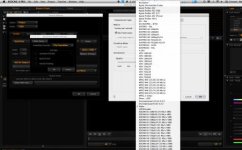
I am not running Redcine-X on the same machine as FCP so I guess that might explain why I only get 11 options ( most of them flavours of DVC pro) when I go export/settings/setup video.
I'll be shooting 16:9, protecting for 1.85:1. I hear what you say about Pro-res LT - I'll have to test vs the 630x360 - this was a recommendation from someone helping us with workflow. I had thought though that it wouldn't be good enough to judge focus, so we'd have to be exporting stills out of Redcine if we had any concerns.
 
Mark, that makes sense then why you don't have ProRes options. I like all 3 NLEs, use them all right now in various workflows. For your project, I suggest Avid MC 5.5. Transcode to DNxHD36. 200 hours of footage at 1080P 23.976 will be around 3TB. In my opinion, that is very manageable. You will want some very good media management tools, and Avid is the best in this regard in my opinion. PM me offline if you want more details.
 
Back
Top