Welcome to our community

Be a part of something great, join today!

  • Hey all, just changed over the backend after 15 years I figured time to give it a bit of an update, its probably gonna be a bit weird for most of you and i am sure there is a few bugs to work out but it should kinda work the same as before... hopefully :)

Dumb question- RED monitor cropping playback

Antonio Forjaz

Well-known member
Joined
Jun 5, 2009
Messages
1,053
Reaction score
1
Points
38
Age
56
Location
Maputo, Mozambique
Website
www.pipasforjaz.com
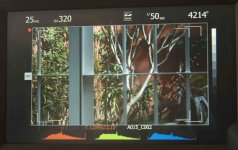
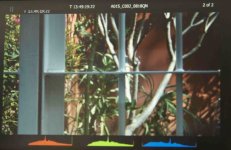
Sorry for the dumb question, but suddenly, I am not sure what I did, but when I playback what I have just shot, it is cropped at the top and the bottom on the RED LCD (5.6 in)... what setting have I changed? How do I get it back to normal?
When I exit playback it goes back to full frame (no crop)???
 
System - Monitor - Preview -video720p
 
I had done that, but it still cropped my shots....I must be going crazy...
 
RED LCD DISPLAY:

Two (2) round and two (2) triangular buttons are located on top of the RED™ LCD.
• The two triangular buttons (A) in the center are used to increase or decrease backlight intensity.
• Right button (B) switches display between Video plus Frame Guides and Menus, to Video plus Frame
Guides only.
• Left button (C) is User Key 5 and can be programmed. Refer to KEY-MAP under PREFERENCES in
SET UP under SYSTEM MENU CONTROLS.


From Build 20 guide
 
look at my pictures...

look at my pictures...

RED LCD DISPLAY:

Two (2) round and two (2) triangular buttons are located on top of the RED™ LCD.
• The two triangular buttons (A) in the center are used to increase or decrease backlight intensity.
• Right button (B) switches display between Video plus Frame Guides and Menus, to Video plus Frame
Guides only.
• Left button (C) is User Key 5 and can be programmed. Refer to KEY-MAP under PREFERENCES in
SET UP under SYSTEM MENU CONTROLS.


From Build 20 guide

This is what happens, I shoot, I don't move camera, then I playback and can you see the difference? I have tried all the buttons you mention above.
 

Attachments

  • RECORING.jpg
    RECORING.jpg
    79.8 KB · Views: 0
  • PLAYBACK.jpg
    PLAYBACK.jpg
    74 KB · Views: 0
Try System setup preferences playback check out the mode and look
 
Try System setup preferences playback check out the mode and look

that was it, it was on 1080p.... now on 720p it is fine
no idea why it changed

thanks a lot
 
Back
Top