Welcome to our community

Be a part of something great, join today!

  • Hey all, just changed over the backend after 15 years I figured time to give it a bit of an update, its probably gonna be a bit weird for most of you and i am sure there is a few bugs to work out but it should kinda work the same as before... hopefully :)

dsmc3 touch

Vicky Marie Marks

Well-known member
Joined
Feb 24, 2017
Messages
85
Reaction score
39
Points
0
Location
California, USA
In all things pandemic, you have high expectations, things get delayed and delayed and when you finally get them its somewhat of a disappointment.
Black widow, No time to die, Dsmc3 touch.

Monitor is only calibrated to rec-709, even though is suppose to be 100% P3 coverage
There is no way to manually calibrate beyond rec709 like you can other SmallHD monitors - because there is no way to input a normal signal for patches.

Having the camera output Rec709 works well, image quality is like a 702.
Anything else is wonky.
No HDR at all -I mean you can select it, but its just ends up as some distorted 709. dci P3/sdr monitoring doesn't seem to work either

The single cable interface is nice, not having to worry about blowing your 12g sdi port is good.
The GUI control is more limited than android/ios red control, that will probably improve.

With camera control now being officially offered on the indy/703/cine - those feel like a better option - your not stuck with just rec709, but you have sdi+serial cable vs just rmi.

It has decent enough specs to do p3/st2084 hdr preview, I'm not sure why they stuck with just 709:

COLORS 100% DCI-P3
COLOR DEPTH 10 bit
BRIGHTNESS 1300 cd/m2

I mean its not a bad monitor, its just not what I thought it would be.
 
Early days I think really.

I have the Cine 7 with the RED license and I do prefer the DSMC3 touch for a variety of reasons, single cable yes being one of them, but also general responsiveness and differences between the implementations themselves.

I can probe the peak brightness pretty easily, I know when it's maxed out it's pretty damn bright. But I agree, HDR monitoring would be absolutely cool and somewhat unique even if done right. Probably a few layers of complexity to that due to various GUI graphics, which I would suspect is why it's not exactly available at launch. Like I don't want to see false color without a very special wrangled HDR version of that for instance or your eyes will bleed.
 
I guess if they factory calibrated for P3, then I would have felt better about features that could be "coming soon" Locked into 709, I dont see a way past that.

If this had been on dsmc2 - yeah it would have been great, pageos would have solved some missing features - but with raptor most of what I need in pageos is already in camera.

If I output log3g10 from the camera and load an ipp2 lut on the monitor, color/gamma are not correct and the monitor ui slows to a crawl.

On the Cine7, under color pipe can you select P3 as a target and load an IPP2 lut and have it display correctly?
 
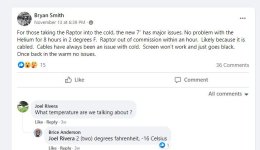
Just pointing this out mainly, but -16 Celsius is a wee bit (a lot actually) below what the Operating Temp is online and in the manual:

"OPERATING TEMPERATURE 0°C to 38°C (32°F to 104°F)"

And I'm betting wind chill was a factor too.

It's beyond the printed range for DSMC2 cameras too, but sounds like he got lucky with Helium.

There's some stuff out there that states it can run at -20-40°C. I don't know if I'd trust those numbers in most cases based on my own experience due to variables found in really, really cold temperatures like moisture/humidity. Things get a little weird and the gear getting damaged also becomes a reality. Permanently so. I've witnessed more than one frosted camera in my life, aerial world occasionally has some fun cold realities sometimes.

Whatever the case, if you're not shielding your camera, cables, and likely anything metal in temps like that it's not going to be a good time.

I haven't been below 35 degrees yet with Raptor. Can't report beyond that yet, but it is winter now, cold places get to about 15-30 at night here currently. I have one location before the year is out that will be in that range, but I won't be shooting with a bare camera in those conditions for sure.
 
I have shot Helium in -32C no issues what so ever. Shooting Nature life in Canada i often shoot in below 0C and i had no issue with old monitors even with cables. if this is the case then i am in it for big supersize
 
I had Monstro/Helium with dsmc 7/lemo, dsmc2 7, in 0F many times, no problems except shorter battery life. I had a Raptor in yellowstone week before for the big horn sheep rut, it was about 5 degrees F, did not have the dsmc3 touch yet, used BM EVF, no problems with raptor. The usb-c cable to the new monitor was an odd choice in the normally all lemo red world and probably the weak link in terms of use in cold weather.
 
Can anyone post a walk through of the dsmc3 touch monitor? I feel there hasn’t been any images showing what the actual interface looks like. Have the raptor and currently using Cine 7. Just saw that SmallHD has a new license for the Cine 7 and DSMC3.
 
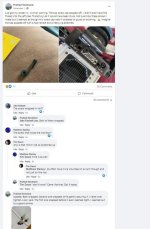
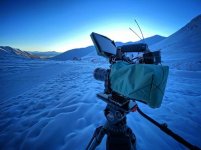
Fresh back from Hatcher Pass in Alaska on a shoot and I can report that Raptor and Touch 7 do work in -10F if you just give them a wee jacket. Monitor was a bit laggy and colors were a bit strange but I was able to do what I needed. Sewed up an old lens wrap and velcroed to the back of the touch and over the camera with some room for the fans. Sensor mostly in the green sometimes yellow but only red for a few mins booting up. I am concerned about the usb-c cable though, as it gets a lot of push and pull with my use especially the end that goes into the monitor. I have 2 replacements coming and hope mine works until they get here. Now to go check on those screws....


013BCE55-C96E-4AC4-8DAC-FE4D8C62B8F1.JPG
 
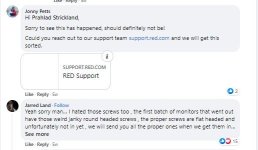
Warning. Don't use the bolts that come with the monitor, the head snaps off. Jarred said the janky screws are being replaced, but my monitor still came with the janky ones last week.


Those bolts are trash. Feels like everytime they get screwed in, the head strips a bit more. Thanks for pointing this out, and glad Jarred acknowledged it haha
 
Thanks for the cold weather report Taylor, probably heading back to yellowstone soon so I'll give the touchscreen a try.


another warning, a few reports of the mount breaking. I find that tightening knob terrible anyway, I was looking for a replacement - note that smallhd has their own locating pin design, not arri compatible which is lame - only anti twist I could find is the wooden camera one, if anyone knows of others please post.

dsmc3touch-mount.JPG
 
Can anyone post a walk through of the dsmc3 touch monitor? I feel there hasn’t been any images showing what the actual interface looks like. Have the raptor and currently using Cine 7. Just saw that SmallHD has a new license for the Cine 7 and DSMC3.


I played with a Cine7 with the Red Control option to see how it compares to the dsmc3 touch, I thought they would be pretty much the same.

Strangely its not. To get the histogram/goal posts you have to leave the camera set to Overlay-Advanced, like you would a regular sdi monitor, its not generated by the monitor - unless its in this weird mode where the overlay is giant and the video is obstructed and not useable.

control responsiveness is about the same, so no big advantage for the dsmc3 touch.

+Cine7 - can be calibrated to P3, DSMC3 touch Rec709 Only
+DSMC3 - Single Cable power/Data/video - but weak usbc style cable

If only the 703 had a red control option it would be an easy choice, but I think the dsmc3 touch will still be going back, I dont think the mount and the usbc connection will hold up over time.
 
Thanks for the cold weather report Taylor, probably heading back to yellowstone soon so I'll give the touchscreen a try.


another warning, a few reports of the mount breaking. I find that tightening knob terrible anyway, I was looking for a replacement - note that smallhd has their own locating pin design, not arri compatible which is lame - only anti twist I could find is the wooden camera one, if anyone knows of others please post.


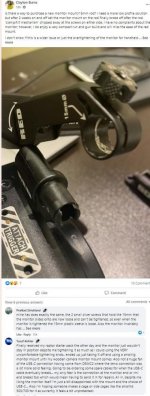
Has anyone managed to get their DSMC3 touch off the 15mm rod mount? It's a hex bolt of some kind, but none of my hex tools are able to reach it because of the design of the housing. Any ideas on a compatible tool? Was hoping to find a backup mounting option.

On a somewhat related note, anyone know what brand the USB-C cable is that SmallHD is using? Hoping to get a braided backup that's still compatible on each end with the ports but not sure where to start.
 
Has anyone managed to get their DSMC3 touch off the 15mm rod mount? It's a hex bolt of some kind, but none of my hex tools are able to reach it because of the design of the housing. Any ideas on a compatible tool? Was hoping to find a backup mounting option.

On a somewhat related note, anyone know what brand the USB-C cable is that SmallHD is using? Hoping to get a braided backup that's still compatible on each end with the ports but not sure where to start.

having so many issues with this monitor. build quality is trash from the mysterious screws, usb wire, poorly designed mounting arm and wonky touch screen response. what a step backward from the DSMC2 monitors.
 
having so many issues with this monitor. build quality is trash from the mysterious screws, usb wire, poorly designed mounting arm and wonky touch screen response. what a step backward from the DSMC2 monitors.

Couldn't agree more. Whenever the monitor is tilted about 45°, I have to tighten the hinge screw so tight it hurts my fingers. Why don't we have a freaking thumb-friendly tightening tab?
 
I removed the mounting arm immediately.
The monitor has a lot of potential but it is in serious need of a firmware update to fix all the bugs.
 
I returned mine. I'd buy a V2 with the mounting issues sorted, a bette cable solution and D3. I feel we might even get one but if so I'll feel bad for all the beta testers.
 
beta tester indeed.
just had to send mine in after about 1.5 months of regular use. the picture glitching and then completely dropping out (note all menu options are fine).


i bought another one from BHphoto in the meantime and it shipped with a good set of screws.

question: does anyone know how to disable SmallHD's software overlays, but keep the Red's touch screen controls active?
 
Last edited:
Just had to send mine in for repair for the same picture drop out. Frustrating. Monitor only lasted me a month. My ultra bright dsmc2 monitor was a tank.
 
Back
Top