Welcome to our community

Be a part of something great, join today!

  • Hey all, just changed over the backend after 15 years I figured time to give it a bit of an update, its probably gonna be a bit weird for most of you and i am sure there is a few bugs to work out but it should kinda work the same as before... hopefully :)

DSMC v5.2.28 Release Build

Not technically true. Blackshading crushes the blacks. The longer your exposure the brighter your black shade. The higher the noise removed gets, the more your bottom stops are crushed. If you used a 1/48th blackshade on a 1/24th exposure I would expect more dynamic range than a 1/24th exposure with a 1/24th blackshade.

Black shading does not crush blacks. It brings blacks in line with what the color science is expecting for black level. You do not gain dynamic range by using a 1/48th black shade with a 1/24th exposure. In this case, you are less accurately representing the black level of the image to the color pipeline.
 
Nikon 17-35

Nikon 17-35

If you are experiencing an issue with your DSMC NIKON MOUNT and an electronically supported Nikon lens, please save a camera log file and submit a technical support request here so our RED SUPPORT team can assist you directly.

NICK

Count me in for the Nikon 17-35 2.8 not working after the update. Sending a camera log.
Mine seemed to have stuck at f8.
 
If you are experiencing an issue with your DSMC NIKON MOUNT and an electronically supported Nikon lens, please save a camera log file and submit a technical support request here so our RED SUPPORT team can assist you directly.

NICK

Thanks Nick, it IS the DSMC Nikon Mount but unfortunately my lens is the 18-300 which is currently not on your list :(

BUT this worked on previous firmware which is why this is weird...
 
Black shading does not crush blacks. It brings blacks in line with what the color science is expecting for black level. You do not gain dynamic range by using a 1/48th black shade with a 1/24th exposure. In this case, you are less accurately representing the black level of the image to the color pipeline.

The longer your exposure the more FPN you'll have in the exposure no? The more noise in the image, the more noise that must be subtracted from the RAW image in order to "bring the black in line with what the color science is expecting". In a worst case scenario the FPN is all white and clipped. You can't bring a clipped pixel "in line with what the color science" expects, it's just clipped. A clipped pixel (prior to image exposure) has zero dynamic range. Does the Dragon sensor perform blackshading prior/during exposure not as a post process after read-out?
 
Ever since upgrading to this firmware, the camera's internal clock is resetting to 0 hours, Jan 1, 2010 after each power cycle. Scarlet X. This is with external AC power. This is new behavior happening since the upgrade from 3.x.

Hi Brant, what´s the status on this? Same here.
Thanks
 
Thank you Alexey. And how do I change it?

Send it back to RED... And, yes, it's bogus to have to pay hundreds in shipping and labour for a $1 battery, but there are no other options... At least, I don't think there are. Even the "authorized service centres" can't do it.
 
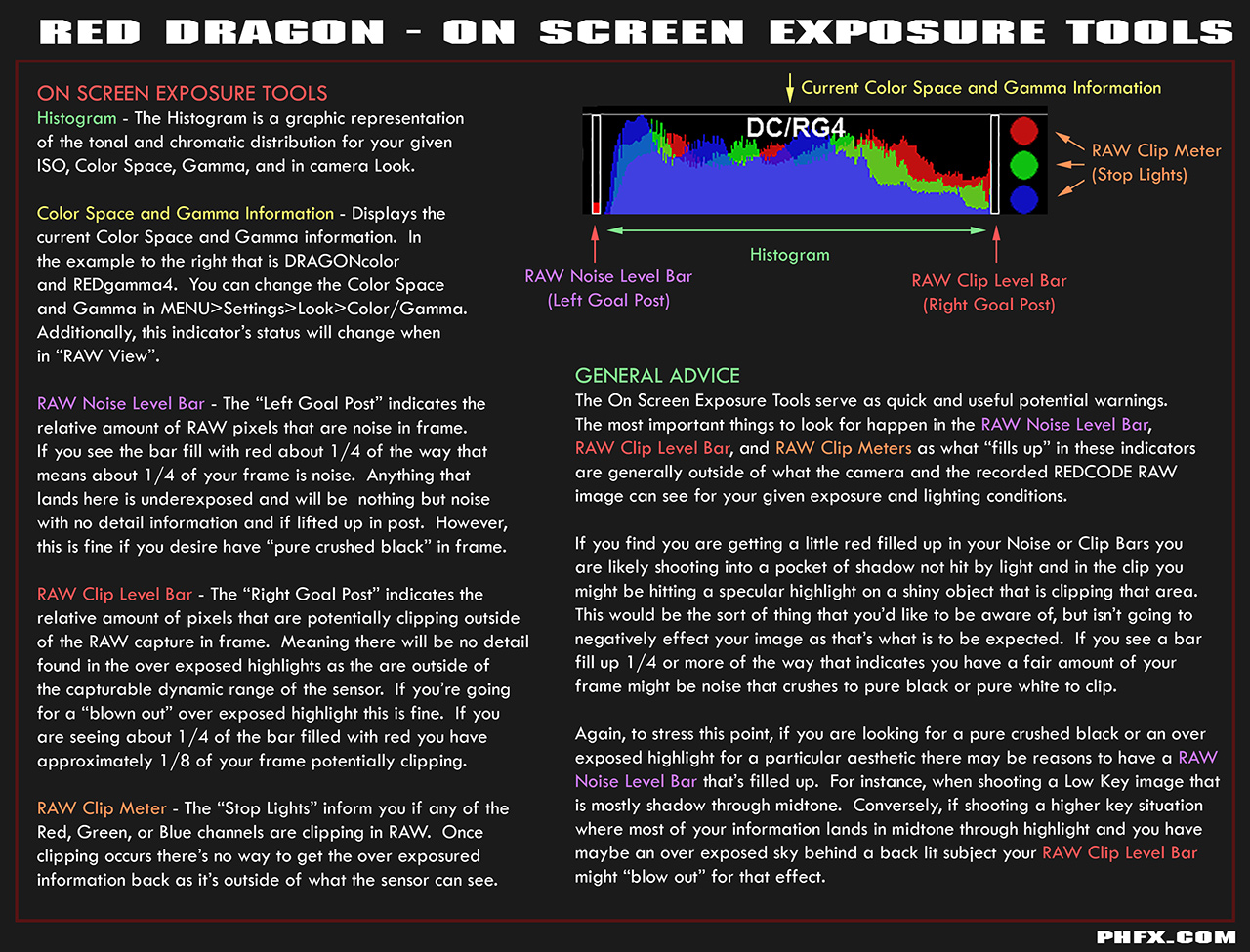
After this update, red scarlet side handle is cutting out, had a weird crash on startup once, time keeps resetting after power cycle and worst of all, when in raw mode, there is a gap on the left between the goal post and histogram, even when underexposed the histogram does not hit the left post, the footage is really milky and blackshade does not fix it? What's going on?
 
Ok I'm a little confused as I was on a pretty old firmware before this, so I don't know when this changed. If I put my settings to 800iso, 5200k, redlogfilm, this matches the raw view. My first question I guess is, when did the raw view show same levels as 800iso? It was always 320 iso before? If I'm in redlogfilm, the histogram has the same gap on the left and right unless I change the shadows. Can someone let me know if this is normal and maybe just explain this change and how it effects exposure now? Any tips would be great as I have a shoot this evening and I can't find anything on other threads.
 
Ok I'm a little confused as I was on a pretty old firmware before this, so I don't know when this changed. If I put my settings to 800iso, 5200k, redlogfilm, this matches the raw view. My first question I guess is, when did the raw view show same levels as 800iso? It was always 320 iso before? If I'm in redlogfilm, the histogram has the same gap on the left and right unless I change the shadows. Can someone let me know if this is normal and maybe just explain this change and how it effects exposure now? Any tips would be great as I have a shoot this evening and I can't find anything on other threads.


Raw view is now defaulted to 800, this happened fairly recently

not sure about the gap thing
 
Thanks for that, is there a thread discussing this move to 800iso for raw and any new best practices for exposure? The images below show what I mean about the gaps in raw histogram. It clips before it hits the edge, this does not happen when red gamma is applied. This may be totally normal but since I upgraded after a long time it would be great if someone can explain why this happens or point me in the right direction. Thanks for help. Much appreciated.
image.jpg
image.jpg
 
I am not seeing BLACK SHADING in the menu on this upgrade. Is it moved somewhere, please help!!!
 
The images below show what I mean about the gaps in raw histogram.

Raw data is about the light measurement on the sensor, whereas the histogram is about the RGB-signal with the gamma map. For this reason the poles on the left and right show different data than the histogram in the middle. Furthermore, with the ordinary game settings whatever ISO you pick the two will not match in all cases. For, the raw and RBG data have a different 'response' to the amount of light. That is, in formal words, the raw data is linear with respect to the amount of light, and once the gamma map is applied, the composition map becomes non-linear.
 
Thanks for that, is there a thread discussing this move to 800iso for raw and any new best practices for exposure? The images below show what I mean about the gaps in raw histogram. It clips before it hits the edge, this does not happen when red gamma is applied. This may be totally normal but since I upgraded after a long time it would be great if someone can explain why this happens or point me in the right direction. Thanks for help. Much appreciated.


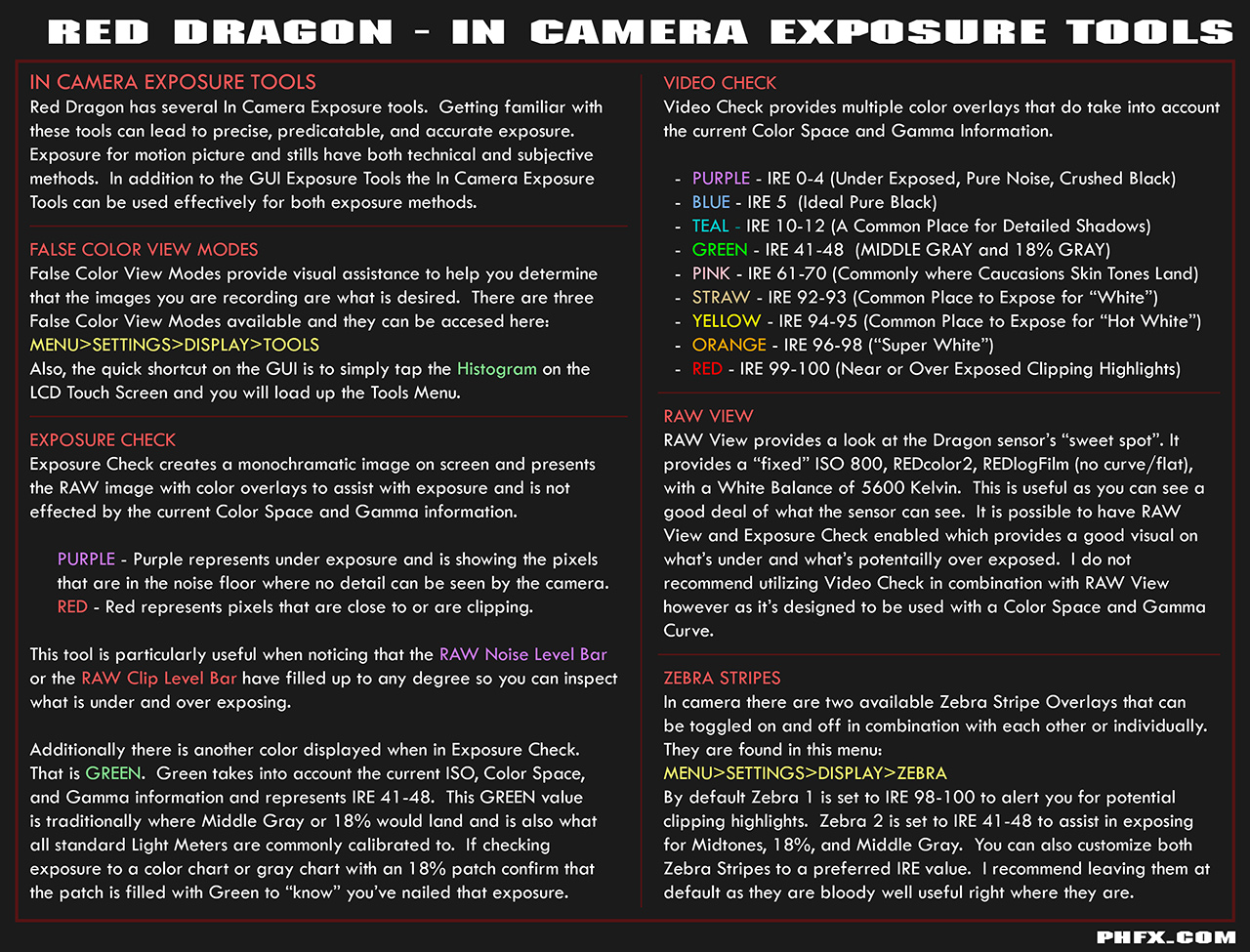
Totally normal and I wrote up some nice notes on it below here.

Long and the short of it is RAW is ISO 800 REDcolor2/REDlogFilm with no curve. The "Goal Posts" and "Stop Lights" are the key to really know if you're in trouble or not. Using RAW View I would say Exposure Check is still a useful tool as it will show what's clipping and what's crushing as well as 18% Gray. I do not recommend using Video Check unless you are in one of the REDgamma gamma spaces as that will accurately tell you where you're content exposed lands in the IRE scale. In RAW view that holds very little relevance however.


Red Dragon - On Screen Exposure Tools


Red Dragon - In Camera Exposure Tools
 
Back
Top