Welcome to our community

Be a part of something great, join today!

  • Hey all, just changed over the backend after 15 years I figured time to give it a bit of an update, its probably gonna be a bit weird for most of you and i am sure there is a few bugs to work out but it should kinda work the same as before... hopefully :)

DSMC Release v6.2.60 and DSMC v6.3.17

Can anyone confirm this new release has prores only playback for dsmc2? I don't want to update my firmware unless it does as I'm about to leave for a week long job and it's a solid (beta) firmware. Thanks in advance

Yes, you can playback ProRes only. You can also toggle between RAW and ProRes in playback if you shot both formats for a single clip. You can not playback AVID yet though.
 
well crap. So I just upgraded. Created two blackshades. Saved to red mag and instead of hitting apply (the one from the red-mag) I accidentally hit the import arrow back to camera. Now looks like the "Calibration Import" status bar has been going for over 5 minutes. Any suggestions? Worried about hard-powering off the camera at this point.

EDIT: nevermind thankfully I let it keep going and it ended up asking me after that long wait if I wanted to apply. Thankfully!
 
Andre,

How do you like that lens, Nikon 24-70 E with your Red? I have been thinking about getting one. Also the Tokina 11-16 (II) [Nikon] now works well, did not work before update.

Jon

Scarlet-W #33
 
Andre,

How do you like that lens, Nikon 24-70 E with your Red? I have been thinking about getting one. Also the Tokina 11-16 (II) [Nikon] now works well, did not work before update.

Jon

Hey Jon,

I could never use the E before on my RED, the iris did not work. I am shooting with the older 24-70 G a lot, my always on lens. Will see how the E performs, maybe I will do a little test to see how they compare. Really happy that I can use it now as well.
 
On wallpower, my CF WEAPON shows 14.7 v. My RAVEN, also on wallpower, shows 15.2v. Both with the new firmware installed.

Is the WEAPON just more efficient?
 
On wallpower, my CF WEAPON shows 14.7 v. My RAVEN, also on wallpower, shows 15.2v. Both with the new firmware installed.

Is the WEAPON just more efficient?

I think the more power you are drawing, the lower the voltage reading will be? Makes sense that the Raven requires less power. Perhaps try entering low power preview mode to see if the voltage increases.
 
I'm a little confused, I installed a firmware before this thinking I would get the DNxHD feature, but it was still in beta. Is DNxHD available in this release?
 

Attachments

  • Ska?rmavbild 2016-07-01 kl. 00.46.36.jpg
    Ska?rmavbild 2016-07-01 kl. 00.46.36.jpg
    12.8 KB · Views: 0
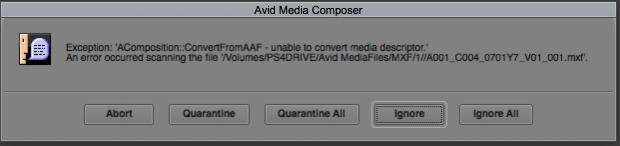
Avid can't scan the MXF files. DNxHR 4444 creates this error.

What version of Media Composer are you using? I don't know the minimum requirements, but our files should definitely work with Media Composer version 8.5.2 or later. Also, there is a new RED R3D plugin that Avid will release shortly that will add greater functionality.
 
What version of Media Composer are you using? I don't know the minimum requirements, but our files should definitely work with Media Composer version 8.5.2 or later. Also, there is a new RED R3D plugin that Avid will release shortly that will add greater functionality.

I'm using v8.5.3
DNxHR 444 won't be scanned in the MXF folder and DNxHD LT seems to be brighter in the blacks (not that proxies matter that much, but would be good to have a consistent color between RAW and Proxies).

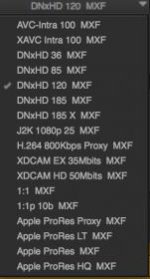
What are the correct bitrate measures for the different DNxHD settings? For 25 fps it should be 36, 120, 185 and 185x, but the DNxHD "LT" is way more blocky and low res than DNxHD 36. When doing offline editing I'm usually going DNxHD 36 for feature and series and DNxHD 120 for commercials and things that need some kind of grade-tests on the fly. May I suggest updating the different names in the camera to reflect the way Avid names it's DNxHD variants?

EDIT: I saw now that DNxHR expands to 0-255 while DNxHD appears as 35-235 as default. (I could AMA link to the DNxHR 444 MXF, but it does not work in the media structure).
 
May I suggest updating the different names in the camera to reflect the way Avid names it's DNxHD variants?

We explicitly asked the AVID engineers what naming convention to use for the DNxHD variants. They said the MBit convention, e.g. DNxHD 36, 120, etc. is deprecated and we should only display the newer LB, SQ, HQ, HQX, and 444 naming conventions.
 
I saw now that DNxHR expands to 0-255 while DNxHD appears as 35-235 as default.
I will double check this behavior. I wouldn't expect the use of full/restricted range to affect how the image looks once imported into Media Composer - tis is something you may want to double check with AVID on.

(I could AMA link to the DNxHR 444 MXF, but it does not work in the media structure).

You would probably have better luck asking the AMA link vs media structure question to AVID support. Like I mentioned in the earlier post, I know there is a pending update to the AMA plugin that fixes some issues like timecode spanning properly.
 
AVID just release version 1.18.0 of the RED AMA plugin:
http://avid.force.com/pkb/articles/en_US/Download/en394823

From their webpage:
New in v1.18.0:
  • Support was added for new RED media: Avid DNx-encoded streams wrapped in MXF files.
  • The plug-in now uses the GPU (when available) for single frame playback.
  • Corrected a problem with audio data corruption that was occurring at R3D span boundaries.
  • Corrected structural metadata: interleaved audio signaling, image geometry, and container ID.
  • The installer no longer checks the version of installed Avid Editor applications.
 
AVID just release version 1.18.0 of the RED AMA plugin:
http://avid.force.com/pkb/articles/en_US/Download/en394823

From their webpage:

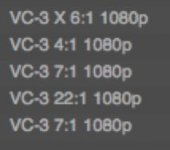
We who edit in Avid rarely use AMA, there's better NLEs for non-native codec editing, like Adobe Premiere. AMA is resource heavy and native MXF structure editing is what we need to work. I've installed the v8.6 version of Avid and the new codecs, but Avid still can't render out a QT ref or same as source clip, meaning render times for client approval or offline reviews will be hours longer. We need the native DNxHD 36, 120, 185 and 185x (bitrate varies according to fps of the media) for the MXF in camera, because Avid doesn't seem to understand the codecs in Media Composer. If you look at the images the codec used from the Weapon is not the same as it's listed in the media creation settings for Avid. This means that using QT refs or Same as Source will not work. We absolutely need those features to work, it's more important than AMA working.
 

Attachments

  • Ska?rmavbild 2016-07-04 kl. 15.59.51.jpg
    Ska?rmavbild 2016-07-04 kl. 15.59.51.jpg
    5.5 KB · Views: 0
  • Ska?rmavbild 2016-07-04 kl. 16.00.05.jpg
    Ska?rmavbild 2016-07-04 kl. 16.00.05.jpg
    9.7 KB · Views: 0
Not receiving Nikon Lens support on 70-200 2.8 G, 1.5x Adapter, Sigma 50mm and 24mm also failed to activate Iris. 35mm was ok. Rolled Dragon body back to 6.0.44

Hi Thomas,
I’m sorry to see that you’re having issues with your DSMC Nikon Mount.

The Technical Support team at RED would like to help you resolve this issue. Please submit a Technical Support request on support.red.com and attach the log file from this camera. We will forward the log file information to our Engineers for further analysis.

Thanks.
 
Back
Top