Welcome to our community

Be a part of something great, join today!

  • Hey all, just changed over the backend after 15 years I figured time to give it a bit of an update, its probably gonna be a bit weird for most of you and i am sure there is a few bugs to work out but it should kinda work the same as before... hopefully :)

DragonColor into Resolve how to? on project already started.

BigLu

Well-known member
Joined
Feb 8, 2008
Messages
1,670
Reaction score
0
Points
0
Location
SoCal Camarillo / LA baby
Dragoncolor into Resolve.

I have started a feature color grading using multiple versions ago. It has been in REDcolor 3
I want to apply REDcolor Dragon to all my previous and future clips. How can i do this properly after a project is 1/2 way threw plz

I know how to do it on a per clip 1 clip at a time basis but how can this be done globally or several clips at a time.

thanks
Luis
 
Can't you set camera RAW Project settings to Dragoncolor and then in your project use those project settings in the camera raw tab on the color page and it should convert everything in your Resolve timeline?
 
If i understand you correctly I fear it will carry all the other settings also including Kelvin which is specific to each clip scene and even ISO has changes threw out the cuts in the original Metadata.

I don't want to globally affect any of those settings
 
If i understand you correctly I fear it will carry all the other settings also including Kelvin which is specific to each clip scene and even ISO has changes threw out the cuts in the original Metadata.

I don't want to globally affect any of those settings

hmmm. Kind of a pain in the ass but can you open your project in RCX-Pro, set all of them to Dragoncolor (make sure your meta updates), then in Resolve, select camera metadata in the project settings camera raw window and the white balance, Dragoncolor, etc. will stick. It's a workaround but could take some time.
 
All of my files are already DRAGONcolor in RCX Pro
the mete data has it already.

Choosing metadata on files already in timelines in Resolve with work of power windows and such will not globally or selectively take DRAGONcolor unless i do it 1 by 1
its the 1 by 1 that I'm trying to overcome.

If i do it 1 by 1 I'm just changing the Decoder in color space from REDcolor 3 to DRAGONcolor
but this SUCKS 1 by 1 its a joke for such a powerful piece of software.
 
All of my files are already DRAGONcolor in RCX Pro
the mete data has it already.

Choosing metadata on files already in timelines in Resolve with work of power windows and such will not globally or selectively take DRAGONcolor unless i do it 1 by 1
its the 1 by 1 that I'm trying to overcome.

If i do it 1 by 1 I'm just changing the Decoder in color space from REDcolor 3 to DRAGONcolor
but this SUCKS 1 by 1 its a joke for such a powerful piece of software.

Agreed, it's a pain in the ass.
 
All of my files are already DRAGONcolor in RCX Pro
the mete data has it already.

Choosing metadata on files already in timelines in Resolve with work of power windows and such will not globally or selectively take DRAGONcolor unless i do it 1 by 1
its the 1 by 1 that I'm trying to overcome.

If i do it 1 by 1 I'm just changing the Decoder in color space from REDcolor 3 to DRAGONcolor
but this SUCKS 1 by 1 its a joke for such a powerful piece of software.

It's not a joke if you know what the fuck you're doing. Reading the manual once in a while may be beneficial as well...
Select all shots in the timeline, change the Gamma and Color Space settings and click on "Apply changes to all selected clips", done!
And please learn the difference between "Apply changes to all selected clips" and "Apply settings to all selected clips""
You'd think some people who call themselves "colorists" after all this time would finally learn something as basic as this...
And yes, in case you' re wondering, I just did all this in 10.1.5 and it works like a charm. No bugs here.
 
It's not a joke if you know what the fuck you're doing. Reading the manual once in a while may be beneficial as well...
Select all shots in the timeline, change the Gamma and Color Space settings and click on "Apply changes to all selected clips", done!
You'd think some people who call themselves "colorists" after all this time would finally learn something as basic as this...

While I agree with the fervor I don't agree with the heat here. Lu's a decent dude and primarily a DIT. That weird zone between on set looks and being a full blown colorist is indeed "weird" and developing all the time.

I do agree though. The manual, though a maze a mirrors and misdirection, does help. So does reaching out here on Reduser for experienced user's help such as yourself.

The trick is when to share information and when to hoard it all to yourself :)
 
On that phone with Blackmagicdesign Resolve Support for 1 HOUR today and the tech support person couldn't figure it out so he went to the "engineers" he said and they said its not possible.

Works like charm? Not here and not for others.
NOPE it won't stick restarted Resolve and it does not stick.

But thanks for the answer.
 

Attachments

  • Screen Shot 2014-05-19 at 6.08.17 PM.jpg
    Screen Shot 2014-05-19 at 6.08.17 PM.jpg
    10 KB · Views: 0
May be a bug particular to my set up but dragon colour does not stick (you set it and you case it but when you come back it has gone) in resolve 10.15..

Anyone else seen this?

Sorry to part high jack...

Thanks

I have also seen this. I have reported via the Post Production forum at blackmagic design.
 
On that phone with Blackmagicdesign Resolve Support for 1 HOUR today and the tech support person couldn't figure it out so he went to the "engineers" he said and they said its not possible.

Works like charm? Not here and not for others.
NOPE it won't stick restarted Resolve and it does not stick.

But thanks for the answer.

Just did it and worked fine. Try switching the settings over to say "Camera Metadata" or whatever then switch back to what you actually need.

However!!!!!


I have also seen this. I have reported via the Post Production forum at blackmagic design.

This. And the odd duck here is that CameraRGB and DRAGONcolor seem to be the same in the most recent version of Resolve. Don't know what's up with this.
 
I mentioned the Resolve 10.1.5 DRAGONcolor bug in another thread. Blackmagic Design is aware of it.

I reported it back on May 10. I heard back from someone who said he could reproduce the problem. I don't know how long it will be before it's fixed. Version 11 is due out next month. Hopefully, we'll see another update before then.
 
Well, then I guess, I have a magic version, because as I mentioned, selection of DragonColor worked just fine and for all 20 or so shots in the timeline did "stick".
Jake got a special "magic" version to thank him for the official "Blackstone Cache" coming in v11... :blush5:

Call me crazy, but I don't change anything in the middle of a job. If the project looked OK so far, I'd leave it as is and work around it. Nothing is worth risking screwing up a feature, especially when you're halfway in. Never, never, never change versions or global parameters until the job is finished.

The problem with changing color science in the middle of the job is that the individual, specific adjustments on each shot are going to react in a non-linear way, so Big Lu is just gonna have to go back and trim them again. If it were me, I'd just get over it, live with what you've got, and move on with life. Use DragonColor on the next job.
 
If i understand you correctly I fear it will carry all the other settings also including Kelvin which is specific to each clip scene and even ISO has changes threw out the cuts in the original Metadata.

I don't want to globally affect any of those settings

As I said, read the damn manual and learn the difference between "Apply changes to all selected clips" and "Apply settings to all selected clips". If you'd bothered to read the manual, you'd know, that using "Apply changes to all selected clips" will not change color temperature, ISO or any other selections.
And if you worry about making a mistake, make a copy of the project and do it then. Manual explains that procedure as well.
I'm just tired of people asking questions, that are as basic as they come and anyone using particular software as a "professional" be it DIT or a colorist, MUST know these basics. Instead of looking at the manual for an answer, they just post the question, because they can't be bothered to read the manual. Resolve manual is one of the very best and it is an incredible source of useful information. Blackmagic spends a lot of time and effort making sure the information is very concise and up to date. Instead, BM support is forced to deal with people who can't be bothered to read the manual and clog up the support, that happen to be free and can be used for something someone truly needs. If support cost money every time someone wanted an answer to a simple question, I guarantee, they would read the manual back to back before they would shell out the money for something, that is the manual.
 
Jake got a special "magic" version to thank him for the official "Blackstone Cache" coming in v11... :blush5:

Call me crazy, but I don't change anything in the middle of a job. If the project looked OK so far, I'd leave it as is and work around it. Nothing is worth risking screwing up a feature, especially when you're halfway in. Never, never, never change versions or global parameters until the job is finished.

The problem with changing color science in the middle of the job is that the individual, specific adjustments on each shot are going to react in a non-linear way, so Big Lu is just gonna have to go back and trim them again. If it were me, I'd just get over it, live with what you've got, and move on with life. Use DragonColor on the next job.

Yes, that's another beef of mine. People change the OS version, the software version, change hardware all in the middle of the project and then they are amazed when it all comes crashing down. But hey Marc, we are just the old timers, that are relics of the old days. We must get on with the new ways of doing business and start flying by the seats of the pants.
I WANT MY DRAGON COLOR, NOW!!!
 
Well, then I guess, I have a magic version, because as I mentioned, selection of DragonColor worked just fine and for all 20 or so shots in the timeline did "stick".

Jake, you probably won't see the bug if all of your clips are set to DRAGONcolor.

The problem is setting one clip to DRAGONcolor, selecting a second clip with a different color space setting and reselecting the first clip again. The field doesn't update ("stick") and retains the value of the previously selected clip.

If that works for you, you may actually have a magic version.
 
Perhaps nothing more than "a shot into the blue", but this is what works for me (on Mac) if things starts to feel that way:

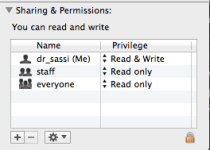
Do you have "read&write" rights/permissions to the RMD files with the account you locked into Resolve?


(BTW, thank you Phil for switching the "AC" on, when things gets "hot" ;o)


Screenshot from one of my RMD (Information tab).
 

Attachments

  • Screen Shot 2014-05-20 at 8.26.43 AM.png
    Screen Shot 2014-05-20 at 8.26.43 AM.png
    16.7 KB · Views: 0
Last edited:
Back
Top