Welcome to our community

Be a part of something great, join today!

  • Hey all, just changed over the backend after 15 years I figured time to give it a bit of an update, its probably gonna be a bit weird for most of you and i am sure there is a few bugs to work out but it should kinda work the same as before... hopefully :)

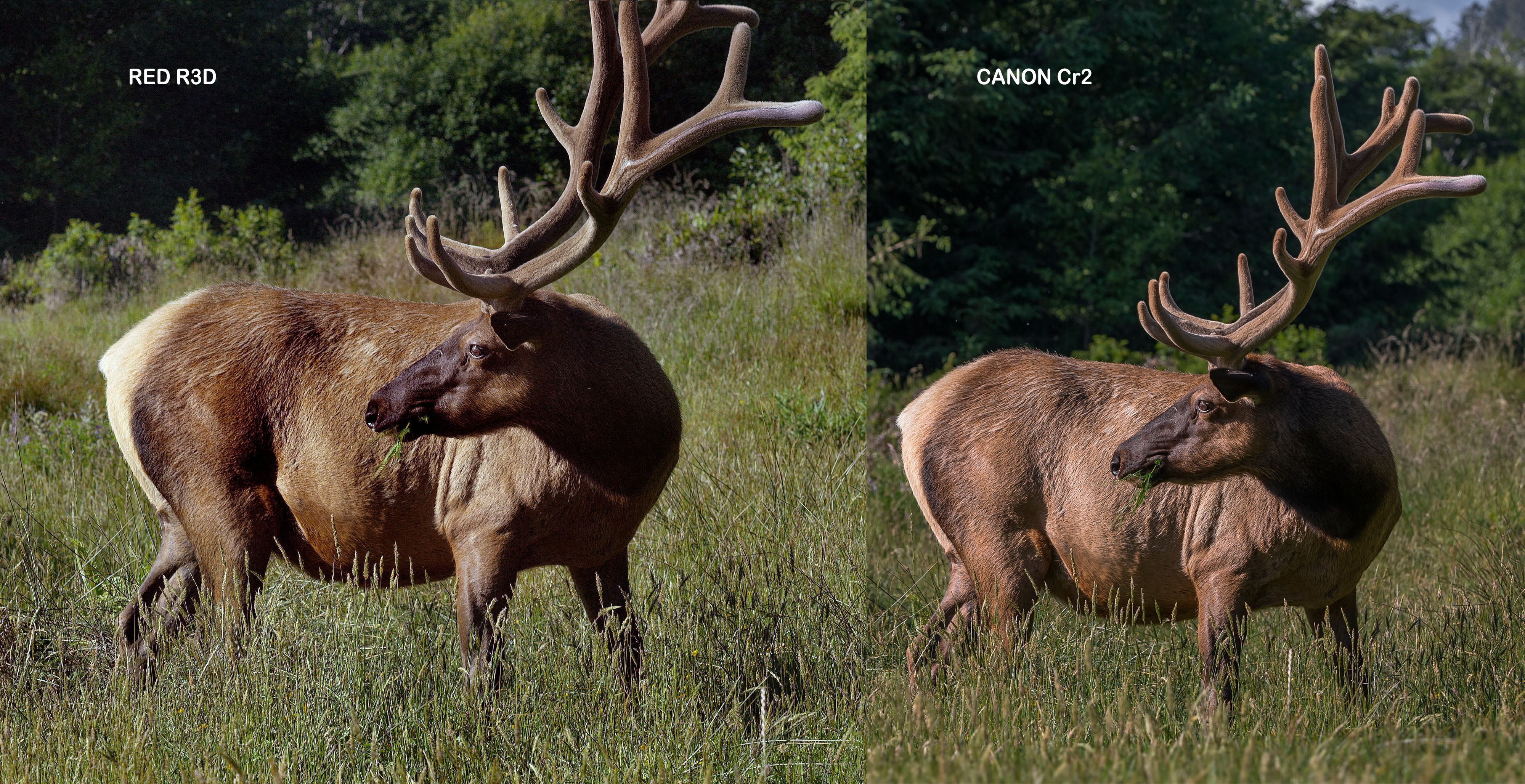
Dragon vs Canon 1Dx Color Matching

I have not followed this thread in detail but to me the issue is low exposure. It could be shot with more than twice the light hitting the sensor. and the tail of the elk would still be within range.

This is why I think that ISO 800 for many shots is unnecessarily underexposed, say 1 stop more light would be better. Which leads to the conclusion that the "native" sensitivity of Dragon is probably more in the ISO 320 than in the ISO 800+ realm. Ok, one can dial in ISO 800 and expose a tad brighter, or bring down the EVF's brightness... haha.

For comparison check this R3D. It's the noise of my camera, best viewed at ISO 12800: https://www.dropbox.com/s/lfpi8vdd6u9shr9/A003_C002_0604X2.0000054F.R3D

Hans
 
Personally I think the RAW controls in PS with Cr2 files is better than REDS RCX...
I also think there is more information in a CR2 compared to a R3D.

That said... I managed to get a pretty close look going, but I could not match the contrast under the belly, But once again I think that's the Photoshop / Cr2 controls being slightly better. Mind you I only spent about 30seconds trying to match them.. I wouldn't be to upset though, the images are pretty close.
I also would have shot this image at 250 or 320 iso... it would have been much cleaner.

Would have been interesting if you used the same lens. :) Some glass has less contrast than others.

deer%20grade.jpg
 
Last edited:
This is why I think that ISO 800 for many shots is unnecessarily underexposed, say 1 stop more light would be better. Which leads to the conclusion that the "native" sensitivity of Dragon is probably more in the ISO 320 than in the ISO 800+ realm. Ok, one can dial in ISO 800 and expose a tad brighter, or bring down the EVF's brightness... haha.

For comparison check this R3D. It's the noise of my camera, best viewed at ISO 12800: https://www.dropbox.com/s/lfpi8vdd6u9shr9/A003_C002_0604X2.0000054F.R3D

Hans


I say 800 ISO is more than fine for what these cameras are actually built for... which is 4k delivery. If you aim to deliver 6k yes then you need to expose very properly.

As for this elk shot, It's under exposed and only about half the capacity of the camera is in use. the photo sites works better the more light they get until the are flooded, so in the elk case the most flooded photo site was filled to about half.... result is then naturally less than half of whats possible with dragon.
 
To my eye and after having looked at the R3D.

Shot is at 48 FPS 10:1 172 degree shutter with 1.6 stops of motion mount.

So this is not a "normal" shooting situation. There are many variables. Theoretically i see it as a combination of WB, high detailed scene and black shading problem.

Had a black shading been done with all of these parameters I think you would not be seeing some or most of what is being discussed in this thread.

That said, there is a bit of a "square shape" aliasing type thing going on if you zoom into parts of the fur.

Make no mistake, this is an extremely high detailed scene with all the moving grass (even ever so gently) and animal fur, leaves on trees etc.

5600K and zero tint adjustment out of the box is rarely what the WB actually is. Is there a chart reference in the lighting situation? I carry a little passport color checker for these situations and then take a WB off that and apply it as a base look.

I'd like to have seen this at 24FPS at about 6:1 compression with a black shading done at temperature to see the comparison. I find that the black shading is quite an important factor on dragon to avoid any of that clumpy looking noise. When I say that, I mean I have noticed that when zooming into footage to extremes (1000% or more) you can start to see where these "problems" originate.

Plus all the other normal stuff of color cast between lenses and specific camera manufactures is normal. It can be matched up, that doesn't seem to be the problem though. My hunch is that it is the 48FPS/compression/ motion mount combo, but that does not really explain the magenta cast (even in toil's grade the nose is purplish) that remains when you start to correct it.


Battistella
 
...As for this elk shot, It's under exposed...

Not sure what else is going on in the shot, but I too was under the impression the highlights in the tail would have still held with more exposure given to the shadows on the neck.

Would have been interesting to see where things ended up if the shot had been manually bracketed by adjusting the aperture ring when rolling.
 
Call me dumb, but I would have actually liked the new olpf with the old calibration better. The only thing I disliked about the old combo was the olpf flaring. But honestly, the old calibration was much cleaner before they shifted the new calibration up to get one stop more in the highlights, but at the expense of the low end.

Zeb, my recommendation would be to shoot shots like these at 320ISO and get as fat of an exposure as possible. Your footage is slightly underexposed by a stop or so. To give a better example of exposure, slide your iso on the r3d down to 320 and check out the histogram/waveform and you'll see you still have room on both sides. The majority of your image pretty much falls below 60IRE. So by shooting at 800 and trying to expose to the right, you're not actually capturing all the DR the camera has to offer.
Screen-Shot-2014-06-04-at-10.30.47-AM.png
 
Fat? Phat? Thick? Meaty?

Fat? Phat? Thick? Meaty?

My definition of a "fat" digital negative (sic) is more about captured discrete tone values than just ETTR to improve the S/N ratio. When choosing exposure level in search of the "fattest" file I like to roll the iris up and down the scale while watching the histogram. I'm looking to "spread out" or "unstack" the values, and seeing where some of the peaks go when I shove the exposure to extremes. I'm also looking at the scene and considering how I want to portray key elements, making sure I'm not doing something silly like crushing skin tones, etc.

I always keep in mind that with Bayer CFAs the original captured data set is the raw (sic) material from which a RGB image will be constructed. I am trying to feed the algorithm as much real data as I can.

Step 1) avoiding "full well" photo sites and the noise floor

Step 2) avoiding low color temp lighting, especially when important elements are 2 or more stops under key

Step 3) ETTR to reduce noise with far less risk of an ugly clip

When I am wearing my DIT hat and working with a DP who is all about delivering a unique "look", my goal is typically to provide feedback on what trade offs a particular exposure strategy might reveal after processing. Like with film, many cinematographers are deliberately looking for something other than a "faithful" reproduction of the real life scene in part by using areas of the exposure curve that alter contrast/chroma/etc relationships. Since biased exposure ratios have become an endemic part of the visual language of cinematography, digital capture needs to support such techniques without exacting too high a cost in terms of collateral damage like excessive noise or ugly clipping.

FWIW, I think that digital capture is typically best served by a cohesive strategy that combines in/on camera choices with post processing choices in a way that leverages the strengths of each. For example, when shooting with the latest digital sensors like Dragon, I'm even more inclined to worry less about exactly where middle grey lands and more about ratios/noise floor.

Cheers - #19
 
Shooting wildlife at high shutter speeds... sometimes under exposure cannot be helped, especially if you need a deeper depth of field than at T1.3. Those animals don't hold still to plug in some lights for your key and fill.

Playing with my light meter this week has been illuminating. Matt Ryan did a good test with terribly underexposed footage I took of my son sleeping. Wish he'd post the amazing ability of the raw footage and his CC work.

I have not followed this thread in detail but to me the issue is low exposure.
 
Call me dumb, but I would have actually liked the new olpf with the old calibration better. The only thing I disliked about the old combo was the olpf flaring. But honestly, the old calibration was much cleaner before they shifted the new calibration up to get one stop more in the highlights, but at the expense of the low end.

Same here. My turn is up to send in my Dragon to get the new OLPF but I think I'm going to hold off for awhile to see if new firmware addresses this as I don't like what I've seen so far in the shadows with the new OLPF/calibration.
 
I don't think the Elk image is underexposed by 1+ stops as has been suggested. The Elk's tail is just under clipping - had I opened up the exposure by a stop or two you could kiss the entire hind quarter detail goodbye. Push the ISO slider to 1600 or 3200 and see what I saw for histogram/Stop Lights in the field.

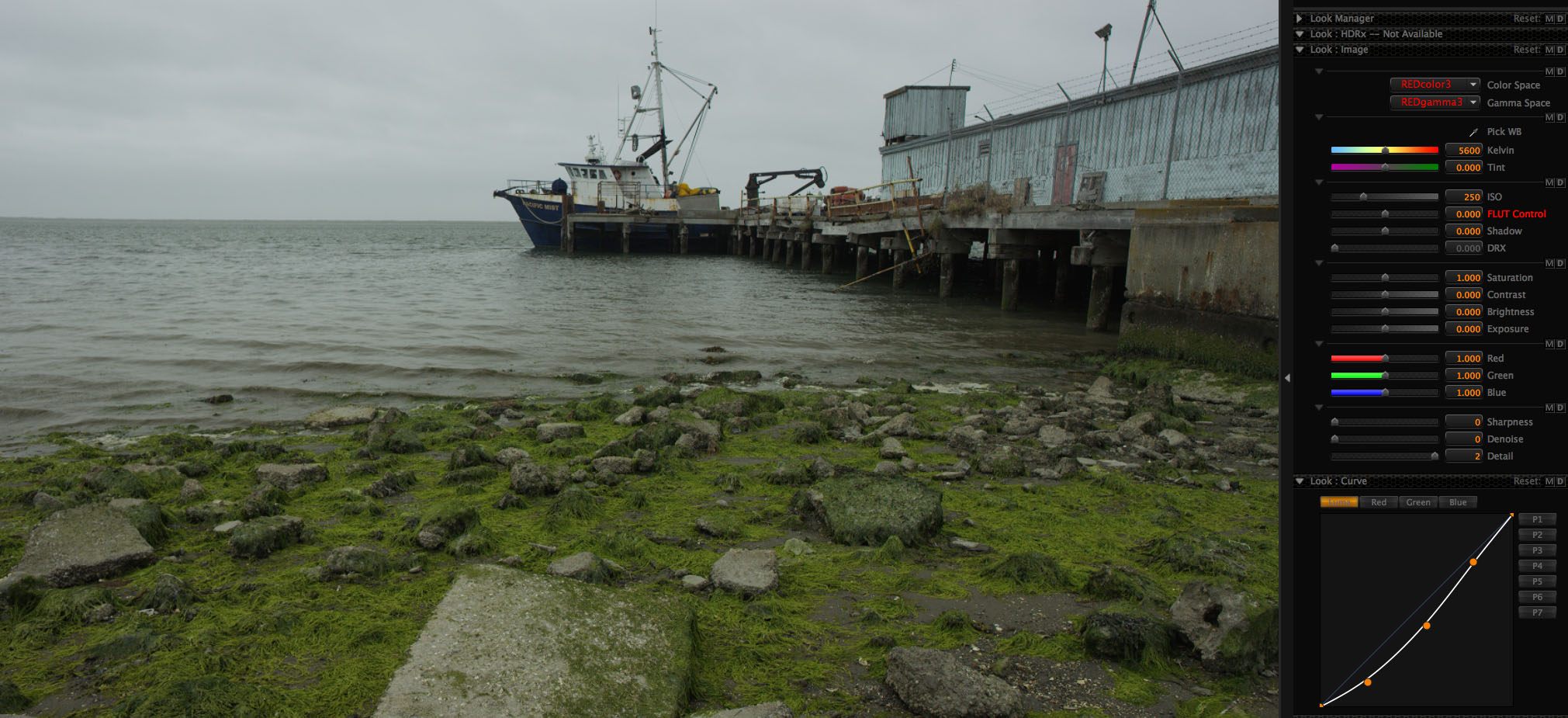
Would you say that the Boat is also underexposed? No way. It just real noisy in the shadows for what ever reason. You will clip the sky to get the shadows to expose at middle gray. They're shadows . . . they're supposed to be dark.

https://dl.dropboxusercontent.com/u/...05208G_001.R3D

Problem is that the Elk is not a DSC Labs -21 Zone Gray Chip Test Chart - it's in wide complex gamut color, with moving dynamic texture at the required 10:1 compression (for 48fps/6KFF shooting). IE: my real-world usable DR where color fidelity and fine hair detail matters.

I'm going to request a Service Ticket to send my Dragon and Motion Mount back to RED for testing to certify that it is all working to spec. I'm hoping that there is something out of tune with the pretty thing or I just screwed up in button pushing.

My take away from this thread so far is that I should shoot Dragon at ISO320 to get a clean image. Still not sure how ISO affects noise if I am exposing 1 stop under Stop Light clip. Could someone please explain that to me real slowly so my simple mind can understand how ISO is in fact not just Meta Data and it actually bakes in noise at time of acquisition. This is not what I understood previously but I'm slow on the uptake at times. My understanding was that ISO just set your middle gray point so you would want to increase it in bright scenes and lower it in dark scenes to get the maximum recovery range for each.

Thank you for all the comments and insight. Still learning here
 
Zeb B said:
My take away from this thread so far is that I should shoot Dragon at ISO320 to get a clean image.

Since you said you used the raw exposure tool, I am not sure a lower ISO would have made much difference since you were looking at the RAW data. As usual, thank you for sharing. You always seem to post situations that expose issues. No pun intended.
 
In quick moving situations I expose 1 or 2 stops under Stop Light clipping. Seems like that is the fastest most accurate way to put maximum light on the sensor without clipping. Anyone have a better suggestion for maximum color fidelity and minimum noise? BTW: this expose for the highlights and dig out the shadows in post method is what I do with my PhaseOne with good success. I shoot just under the red warning blinkies showing up on specular surfaces or the brightest clouds. Basic ETTR stuff.

Seems that if you are 1 stop under highlight clipping (according to the Stop Lights) you have done all you can do to feed the sensor, minimize noise and therefore maximize usable DR and produce good color rendition
 
In quick moving situations I expose 1 or 2 stops under Stop Light clipping. Seems like that is the fastest most accurate way to put maximum light on the sensor without clipping. Anyone have a better suggestion for maximum color fidelity and minimum noise?

Seems that if you are 1 stop under highlight clipping (according to the Stop Lights) you have done all you can do to feed the sensor, minimize noise and therefore maximize usable DR

I personally think your in the right zone already Zeb. And your correct, if you lifted your exposure anymore on the deer... Its tail area would have been over exposed. Simple as that.
Stick to what you know.

Cr2 files and the controls to grade them are slightly better than RED. Thats just the truth of it all. I've never been able to move around within my Dragon R3D images as good as my Cr2's. Ever. I truly think the RAW data captured in those canon files and the controls to move within that file are better than RED's.

That said...
RED by some miracle of technology have managed to create a codec such as the R3D to be able to record up too 100 FPS @6k compared to small bursts from the Canon of 8 FPS @7k. There has to be some form of compromise in compression and colour depth to be able to perform high speed RAW capture. Phantom / Arri / Black magic included.

Also.. Your deer image I put into Resolve and was able to replicate the canon shot , but had to put about 5 minutes of work into it. Better tools obviously...

By the way, your Boat image is a good as it gets from an exposure point of view @250 iso.
I shoot everything on my dragon at 250 iso. For a reason... Less noise, cleaner etc... and I never have clipped highlights or skies.

boat_250iso.jpg
 
Looking into this a bit deeper and trying to eliminate potential chaos.

Zeb, this was shot with the Motion Mount btw. Bigger question. You did Black Shade when switching to the Motion Mount right? This might be what's causing weirdness.

I have never used a motion mount, but I don't understand something here, so please help me. The motion mount affects the light coming from the lens to the sensor. Black shading is done with no light falling on the sensor. Why does black shading have any part in this at all?
 
From what I understand: there is no reason to redo Black Shading with Motion Mount unless you change the Shutter Speed - just like normal Black Shading. Installing a Motion Mount in ND only mode does not require a redo of Black Shading. RED Engineering can jump in here at any point to correct my misinformed ass ;-)

Thank you Mark Toia - I respect your direct F1 efficiency approach to everything
 
In quick moving situations I expose 1 or 2 stops under Stop Light clipping. Seems like that is the fastest most accurate way to put maximum light on the sensor without clipping. Anyone have a better suggestion for maximum color fidelity and minimum noise? BTW: this expose for the highlights and dig out the shadows in post method is what I do with my PhaseOne with good success. I shoot just under the red warning blinkies showing up on specular surfaces or the brightest clouds. Basic ETTR stuff.

Seems that if you are 1 stop under highlight clipping (according to the Stop Lights) you have done all you can do to feed the sensor, minimize noise and therefore maximize usable DR and produce good color rendition

But look at the r3d in redlog film mode.... That is important as it''s to me the closest to raw you can view it....

And then you see that it's shot two stops under. So if you want a clean image but ofcourse still save the tail of the elk or whatever is your highlight point you need half one stop at the most. So check your r3d image again in dragon color and redlogfilm with no adjustments at 800 iso... then check it at 1600 iso and then at 3200 iso... the hisotgram is not crunched or even touching the clipping point at 3200 ISO.

As it is your noise becomes exponentially worse the lower exposure you got, so in that sense the sensor is not linear at all, so but opening up two stops will cut your noise levels down to less than a third and same thing for fidelity, your colors will more then tripple.
 
Thank you for all the comments and insight. Still learning here

Hi Zeb,

thanks for this thread! We are all learning. Would you mind to have a look at my noise shot and compare that to your noise? Or even better, could you post a noise shot of your camera for comparison reasons?

Thanks!

Hans
 
What wierds me out in red Cine X pro is that when setting it to linear color space in advanced settings it does not behave linear at all. It uses dynamic rounding when sliding iso up and down, why is that? to me the histogram then would just be lifted linearly no?

I even think that should be the case when in red log film or such but it's not. The histogram goes to the right/ at higher levels like 80% or such then it really starts to clamp together, it's somewhat like a film emulator but in the computer world where I come from I would very much want the colors to move linear when moving iso around, Not modifying the histogram in any way, no? I mean when raising iso it should burn out if you go over the top then your color grad should hold it down if wanted.

Sorry for hijacking the thread if there is a long explanation then I guess we should take that elsewhere.
 
In quick moving situations I expose 1 or 2 stops under Stop Light clipping. Seems like that is the fastest most accurate way to put maximum light on the sensor without clipping.

Hey Zeb,

It sounds like you are trying to protect highlights by underexposing by a stop. Plus if you are monitoring at ISO 800 that might be "protecting" you further by a stop, hence why Bjorn is saying you might be two stops under. I am finding that this is less necessary with Dragon. You can literally set the camera to ISO 250 or 320 open the iris utill you see stop lights (determine what is clipping) and then wind it back until the stoplights are gone. In my tests I found that exposing a scene at 320 and then Pushing a bit it post, gives you a lot less noise (if you have hit it with enough light). If you are exposing at 800 (rating the sensor at 800) then you are giving it less light to begin with. Personally I care a bit more about shadow detail and don't mind how the highlights roll off with dragon. It's a balancing act.

So at 250 or 320 when I want to dig a bit out of the shadows, a bit more light has been put into the sensor's phtosites compared to if it were at 800.

Giving yourself a stop of exposure headroom is your choice but that means there is that much more light that could be hitting the sensor before clipping and that includes the shadows.

When highlights are more important, or mood or whatever creative choice, then it is important to perhaps rate at 800 and fill those shadows with light to taste, but always knowing that the noise floor will be different.

One thing is for certain, even in low light, ANY ISO we put on the image after the fact is gain. Gain produces noise, for the least amount of noise my strategy is this.

-Black shade at temperature and the shutter angle you are filming at.
-get as much light into the photo sites as possible without clipping
-Limit the amount you "boost" the image in post
-Fast glass in low light situations
-look at the noise goal post and change compression in high detail scenes

One reason I love this camera so much is that it forces you to produce a film like discipline and it is an honest sensor. What I mean by that is that (i think unlike ALEXA which changes it matrix with each baked in ISO switch) if you don't hit it with enough light then it responds just like film would.

Many of these other digital film cameras do all kinds of compensation at high ISO's to hide these "problems" but that is because they are baked in. The real beauty of this system is it's honest, like film, if you FUG up, it will let you know.

That produces a wanting to learn to get it right and when that sharing exchange is happening in places like this thread here on REDUSER, then I think it's really productive.

Battistella

PS: I know it is a DSMC system but the Canon is designed only to capture one frame and it does that really well. The tradeoff, you can't make a movie with a 1D. Still, I think the dragon is capable of producing equal or superior images to the 1D which is purely a stills camera and is gear specifically for that purpose.
 
Back
Top