Welcome to our community

Be a part of something great, join today!

  • Hey all, just changed over the backend after 15 years I figured time to give it a bit of an update, its probably gonna be a bit weird for most of you and i am sure there is a few bugs to work out but it should kinda work the same as before... hopefully :)

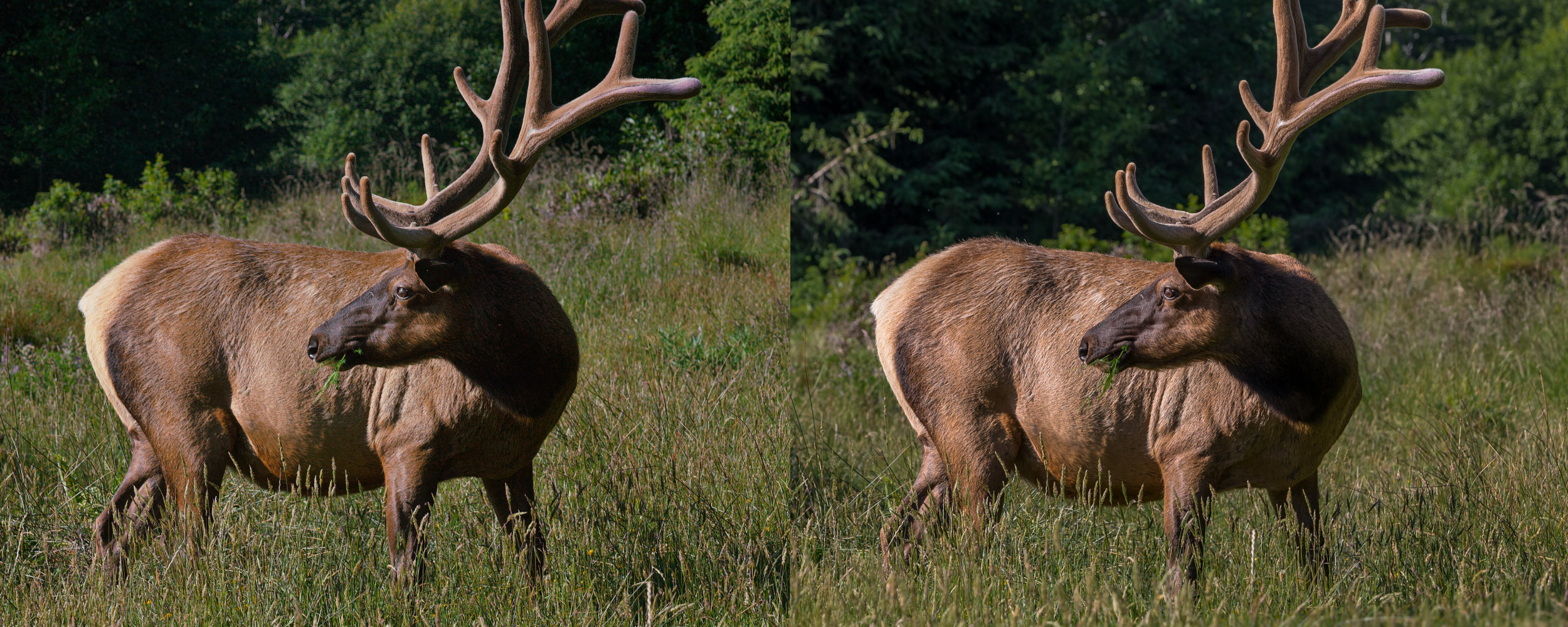
Dragon vs Canon 1Dx Color Matching

See if this looks better on the Red shot:


This is a trivial, trivial match in Resolve. I've had far worse shots to match, particularly when one of the cameras is misadjusted. I would never, ever try to judge camera quality just on the basis of an uncorrected file like this.

Update: I see the o.p. took down the original posted Red image, but this is a better match now to the 1D.

You're just way over-crushing the backs (in a way that would not pass QC) to help saturation. Not exactly an acceptable solution.

That said, I'm not a fan of the motion mount, Creates weirdness I know, and in other situations i fear maybe weirdness I can't even guess at, that might take me by surprise. I personally would not trust it.
 
Last edited:
Had a play in Redcine-X, then fiddled a bit more with the contrast, saturation and sharpening in the photo-viewer I was using.


Canon (colours unadjusted) -


Dragon -


Canon (colours unadjusted) -


Dragon -


Kind of similar I guess. Not sure how you'd get the Dragon shot to look like the LightRoom adjusted Canon shot though.

Close but what I've noticed is the blue cast in the shadows. There is just something off about the image and making heavy adjustments shouldn't be necessary.

I mean it took a lot of adjustments just to get close to what I did with 5 sliders with the 1DX (Which the starting color was already good)...
1DxDragon.jpg
 
Thanks Matt!! Great screen shot doc

Standing by to see if it's the arrows or the archer

Phil, RED . . . care to comment if my camera is broken or what I can specifically do to test it to be sure?
 
Thanks Matt!! Great screen shot doc

Standing by to see if it's the arrows or the archer

Phil, RED . . . care to comment if my camera is broken or what I can specifically do to test it to be sure?


If you are in LA at the end of next week or the following I'd like to do a side by side. I want to do a direct comparison utilizing the same black shade, shooting target, and glass and we'll see what's going on. That's the best I can offer.

I've actually been asked to do this with other Dragon owners to make sure everything is "happy dance time".
 
Wow Phil!! You are truly a soldier and resource for RED! Very generous to offer your time to us like that. Really nice gesture.

Do you see anything in the R3D's that would indicate something is worth opening up a service ticket for or testing at your place? If soft and noisy is what Dragon is at 48fps 10:1 on dynamic scenes then so be it. Just need to get confirmation that there is nothing broken or abnormal with my camera vs the average Dragon. Matt seems to think it's busted. I hope it is so it can be fixed. Not sure what could be wrong since there is no way for me to introduce noise like that unless the Black Shade is fuqed. I had green T/E the whole time and it's certainly not underexposed.
 
There are many possibilities for weirdness. The footage doesn't seem too out of whack, but it's 9:1 and I need to see the black shade and temperature info to know anything for sure.

A thing to note. REDCODE was rewritten for Dragon and does indeed hold detail better across compression ratios. At higher ISO values you may experience a more "energetic" dance to the image texture on playback. Lower ISO values you really won't see that.

The general think I'm seeing in your footage makes me think that the camera's black shade wasn't ideal for your shooting conditions or the camera wasn't up to calibration temperature.

Too many variables to speculate really. You're a nice dude and I don't mind helping out if I can.
 
Tip of the Elk's tail to the shadow of the neck . . . more than the Dragon 16+ stops of exposure range? Hard to believe. I guess that goes to real world usable DR which is ultimately determined by Signal to Noise. You can't have high DR and high shadow noise. Looking at many of the above grades the shadow areas are just crushed making the image maybe an 8 stop DR shot. There is no depth to the resulting image - 16 stops is an HDR look with very open shadows - not a crushed JPG.

To the Black Shade: does there exist a single Official RED Engineering Document that is comprehensive and specific? I see millions of conflicting user generated posts on the subject and a scattered bit of RED hints but no current RED generated PDF style doc that explores this subject in depth. Why the mystery?

The Black Shade was done without a "Failed" indication, the camera was certainly up to temp and the T/E was green. That's all I know to do with the user controlled Black Shade component. What else could have been done and how do I pre-flight for BS issues so I don't have surprises in post? If there was a BS issue would that not show up in the Meta Data somewhere as a tagged bit of info? Seems like it should.

Would also like to know specifically how ISO800 creates more noise since I was lead to believe that ISO is Meta Data only and 800 is the high DR go-to setting to preserve highlights . . . like the Elk's ass. My friend saw this post and sent me a private message saying that on Dragon he only shoots up to ISO500 since that is much cleaner. How? Is there digital gain going on behind the scenes after all?

Would like to see if RED Engineering could jump in here come Monday.
 
Zeb B said:
My friend saw this post and sent me a private message saying that on Dragon he only shoots up to ISO500 since that is much cleaner. How?

If the PM came from who I think it was, he selects ISO 500 and uses more light to expose than he would have at ISO 800. In your case, did you set the T-stop or MM ND based on ISO 800? By that I mean you adjusted one, the other, or both based on the histogram/tools. If so, you would have used less ND or a lower T-stop, depending on the look you wanted, at ISO 500 and gotten more light to the sensor. You probably could have used T5.6, if you set to ISO 400, and had less DOF, possibly closer to the Canon look.
 
In these situations I shoot in RAW preview mode to see the histogram, ETTR watching the Stop Lights keeping a stop or two inside clip. In the Elk shot the Motion Mount was set to minimum ND. There is no clipping on the Elk's tail and it was certainly ETTR which should have resulted in the cleanest image since I did not starve the sensor of light. The camera was set to ISO800 through basic menu input. All my questions remain
 
Hey Phil, I found out what the issue was:

That Canon JPEG that Zeb posted was is Adobe RGB color space.

You're brought it in as sRGB without doing a color space conversion.

This makes the Canon file look much duller than it is. So you're matching the wrong thing.

It actually isn't that hard to make the RED footage match the Canon JPEG originally posted... here's my quick attempt. Too much blue in the highlights still but it's OK for what it is.

I tried to use ADD to develop but Redcine-X just gave me errors. Hmm... without ADD the 1DX has the edge in the dynamic range, it seems.

I also tried to adjust the unsharp mask a bit to match the overall local contrast texture better:

ELK_ba_v01.jpg


Bruce Allen
www.boacinema.com
 
Tip of the Elk's tail to the shadow of the neck . . . more than the Dragon 16+ stops of exposure range? Hard to believe. I guess that goes to real world usable DR which is ultimately determined by Signal to Noise. You can't have high DR and high shadow noise. Looking at many of the above grades the shadow areas are just crushed making the image maybe an 8 stop DR shot. There is no depth to the resulting image - 16 stops is an HDR look with very open shadows - not a crushed JPG.

This is the most important aspect to this thread.

We all want the tool that can capture 16+ stops of DR and do it with beautiful colour fidelity.

Maybe its the MM, maybe its the BS, maybe its 'how RAW is RAW', maybe Zebs cam is fuqed. I would love to know what it is.
 
Phil,

It's disconcerting to me that multiple other Dragon owners would want to bring their cameras to you and side by side to make sure their cameras are ok. Were they unhappy with the results they were getting? The overall impression I get from posts on reduser (for what it's worth) is that Dragon 1) Doesn't have as much DR as claimed and we had hoped and 2) Is marginally better and sometimes possibly worse than MX in terms of noise in the shadows and low light performance. My Epic is at RED now getting fire in it's belly so I'll be able to determine for myself soon enough...but I'd love to know why others feel compelled to look at their cameras side by side with yours.
 
Phil,

It's disconcerting to me that multiple other Dragon owners would want to bring their cameras to you and side by side to make sure their cameras are ok. Were they unhappy with the results they were getting? The overall impression I get from posts on reduser (for what it's worth) is that Dragon 1) Doesn't have as much DR as claimed and we had hoped and 2) Is marginally better and sometimes possibly worse than MX in terms of noise in the shadows and low light performance. My Epic is at RED now getting fire in it's belly so I'll be able to determine for myself soon enough...but I'd love to know why others feel compelled to look at their cameras side by side with yours.

Heh. Not exactly what was going on. When there were literally a handful or three handfuls of Dragons out there there was a lot of communication among shooters to look a bit deeper into what Dragon is all about and how it worked. Especially when those first early test shoots happened. I mean there really weren't many Dragons around last year. Also, remember there was an interesting moment of Old Sensor Calibration and the Older OLPF versus the new tech. That actually is what produced the most "hey what do you see now" sort of testing.

Those early days we were all exploring how to appropriately shoot with Dragon. It was a new camera system and everybody involved wanted to make the best images possible with the tech.


As for your points:

1. I don't have permission to post it, but I have been sent a nicely shot Xyla-21 chart that shows you exactly "where things land" in relationship to Dragon and Mysterium-X by a fellow Reduser. Interestingly enough, this is in line with the results I have posted. Red's number of 16+ stands as I can count on an ISO 800 6K Dragon image exactly that. Dragon actually sees more than that, but you likely won't be visibly seeing more than 16-ish measured stops for a given scene unless you want the footage to look real flat. With a proper gamma curve you are pushing things into a more 13-16 stop range depending on your preferences for the shot. You'll likely see these .R3Ds real soon. This all happened real recently.

2. I don't really feel it's better or worse. It's different though. Stressing Mysterium-X in low light at higher ISOs will produce blotchy large noise patches. Dragon is a finer "grain" and less erratic. That's what it looks like at ISO 12800. As for the 250-2000 usable ISO range that comes from both the accuracy of color and tonal placement as well as the usable image with some noise/grain.

The key thing people always miss is that Red was initially designed as a digital film alternative and part of that relevance comes from what people experienced when choosing film stocks in the past. Different ISO values across the range are also there to provide "texture control" as much as it's there to allow you to shoot in a variety of lighting conditions. For "film folk" like Dragon in the ISO 800-1600 range, though it is significantly cleaner than S35 Film at those sensitivities. Red doesn't employ any on board noise reduction.

For instance Fincher/Cronenweth shot all of Gone Girl at ISO 800 because they wanted a consistent texture across the film. Daylight, interiors, and night scenes. All ISO 800. They liked how it looked. It's also a good place where tones are approximately spread out equally above and below middle grey in terms of what exactly Dragon can see.

Dragon will never be as clean as a DSLR or a similar tech camcorder that employs noise reduction at say ISO 6400. If you need to do that and aren't satisfied with the cleanliness you are looking at post noise reduction techniques. Also it's important to note every camera that "see deep into the night" that way is utilizing noise reduction and it is indeed nuking fine detail.

Red's not making camcorders. They are making a digital cinema camera and part of that (as with other manufacturers) is providing a bit of texture control and that has relevance when it relates to image noise or digital grain. More significantly it has a lot to do with overall image character.

The real talk I have in regards to ISO? I literally am shooting Dragon like I would shoot film. Like more so than I was even on Mysterium-X. You can shoot a bit lower ISO and an bit highers ISO with Dragon than Mysterium-X and get good results. I go into a project selecting my ISO like I would a film stock and I stick to it. Select my lenses because of that choice. Light my scene because of that choice. I try to keep it consistent on a project or at least on a scene by scene basis.


Outside of those points, resolution gains are obvious. Format size is more "bigger and right". And for most the color and organic feel to the Dragon footage is going to be reason enough to upgrade.
 
So I just need verification that the noise you see in the shadows on the boat at 200% and detail resolution is normal for Dragon:

https://dl.dropboxusercontent.com/u/117794729/Dragon Canon Elk/A040_C012_05208G_001.R3D

No Motion Mount, Leica Summicron-C, New OLPF installed correctly


Looking into this a bit deeper and trying to eliminate potential chaos.

Zeb, this was shot with the Motion Mount btw. Bigger question. You did Black Shade when switching to the Motion Mount right? This might be what's causing weirdness.
 
I appreciate your amazing efforts Phil. I think it's time for RED Engineering to take the lead on this. We are all simple users looking for clues to a light switch to see what they already know.

Cheers Zeb. Hopefully they'll find whatever's going on.

Ideally when the Motion Mount is attached a black shade should be run as it takes over the shutter completely and leaves the actual shutter on the sensor at 360 degrees.
 
I appreciate your amazing efforts Phil. I think it's time for RED Engineering to take the lead on this. We are all simple users looking for clues to find a light switch to see what they already know. A current Comprehensive Official RED Black Shading Guide would be a great start. There is no need for this topic to remain a spooky mystery.

I would like to know what they think about the provided R3D's concerning noise, color and sharpness

Testing DR in a lab with greyscale cards is a bit different than in a field of wind driven grass and a subject with a million hairs of fur. The Elk scene can cause a compression algo to crash and produce noise where it might not with simple subject test scenes. I'm no math major but between that logic and the OLPF softening it seems like a likely explanation to why we are seeing such noise and softness.

To your point: if there is anything that will cause a Black Shade fail (like switching to a Motion Mount) it would follow that a warning should pop up to warn the user that they are about to record crap images.
 
Holy moderator time travel posting batman!

It was me. Posted then quickly deleted / edited but Phil out drew me with his reply to the original post ;-)

I hate "last edited" posts - OCD I guess
 
Hey Phil,
Could you point me to the procedure page for the required Black Shading after swapping out the regular PL to Motion Mount used in ND only mode? Not seeing that in the MM Operations Guide or your guide Page 12 or by Google search:
https://www.red.com/downloads/5232b2222f74a90e200001a8
http://www.artbyphil.com/temp/redQuickReferenceGuide/RedQuickReferenceGuide.pdf
http://www.reduser.net/forum/showth...eady-to-ship&p=1260729&viewfull=1#post1260729

Sure would be cool to have that Official RED Comprehensive Black Shading Guide as a Sticky


Thx!
 
Heh. Not exactly what was going on. When there were literally a handful or three handfuls of Dragons out there there was a lot of communication among shooters to look a bit deeper into what Dragon is all about and how it worked. Especially when those first early test shoots happened. I mean there really weren't many Dragons around last year. Also, remember there was an interesting moment of Old Sensor Calibration and the Older OLPF versus the new tech. That actually is what produced the most "hey what do you see now" sort of testing.

Those early days we were all exploring how to appropriately shoot with Dragon. It was a new camera system and everybody involved wanted to make the best images possible with the tech.

Thanks for clarifying.

On the noise front, I always found the MX sensor touchy in the 2-10 IRE range at ISOs 500 or above...especially noticeable if you have a solid color wall at that low exposure in the shot. I had a project with a grey cyc shot at 640 and the noise on the cyc was noticeable while subject was well lit and looked clean. On the other hand, I shot some nice looking night exteriors on a feature at ISO 1000 with very low levels showing on the histogram and it looked great theatrically projected.

To me, the shadow noise in Zeb's boat shot looks pretty similar to what I would expect from the MX sensor at ISO 800.
 
Back
Top