Welcome to our community

Be a part of something great, join today!

  • Hey all, just changed over the backend after 15 years I figured time to give it a bit of an update, its probably gonna be a bit weird for most of you and i am sure there is a few bugs to work out but it should kinda work the same as before... hopefully :)

Dragon Noise Confirmation

Kenny Mosher

Well-known member
Joined
Jun 3, 2011
Messages
525
Reaction score
1
Points
18
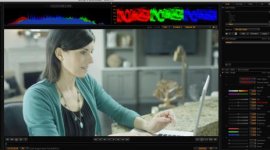
I just wanted to post an R3D from our first gig with our new Dragon. We upgraded to the latest firmware 5.1.38 and performed the default Black Shade after the camera warmed up for about 15 minutes. This project was shot at 23.976 fps and 48th shutter so we did not do the custom Black Shade.

Just based on my Epic experience from the last couple of years, this seems a little noisy for ISO 800. What do you guys think?

https://copy.com/ieWlbCV16dvJ
https://copy.com/wSqX4r9mPvIn

Look at the noise in the shadows. Let me know if you have issues downloading these R3Ds.

Thanks!
 
Last edited:
Looks pretty acceptable to me. Not totally noise free but its not displeasing to my eye. Just ran a quick grade on it. Seems to be fine.
 

Attachments

  • Dragon Noise Test.0000473F_S000.0000000.jpg
    Dragon Noise Test.0000473F_S000.0000000.jpg
    81.9 KB · Views: 0
Given this is 5K material it looks about normal to me, although the shot is underexposed, I'd say correct exposure (assuming it wasn't a creative choice) would have been ISO 1280.
Here is a 1:1 crop of the noise at ISO 1280 from a full debayered output...
Dragonnoise.jpg
 
It doesn't seem to very sharp... I am curious.... This seems like such simple test and shot... But I can't believe it is on a Dragon, or even an Alexa.... There seems to be no sharpness ( I should be able to see pores at this image size) and also it does seem to be a little noisy ...

I shot my feature on Dragon... 800 SSDs and have projected at 4K in a theater and not one of the shots looks like this... And I used smoke and diffusion...

Curious
 
Under exposed. And yes, a bit soft. That said, it looks just fine overall and by the time it's sampled down to 4K or lower we probably wouldn't need to add any sharpening, although I probably would add just a wee bit.
 
Yes as stated here your histogram does not peak even when I bring it up to 5600ISO.... so basically you only used the lower end of the sensor. Simply you shot your scene more than f4 stops under perfect exposure...

If you would have exposed to the right and then pushed down 4 stops, then your image would have looked exactly the same... but made out of glass instead of sandpaper :)


So yes, looks about right for well under exposed 800 ISO.

See screendump when brought up to 6800ISO with no clipping.


Evin just so I understand what do you mean with " I'd say correct exposure (assuming it wasn't a creative choice) would have been ISO 1280." ?

I mean he got 4 or 5 stops to go before he's highlights hit the roof so no real reason for laying so low if clean image is the goal, or? Needs to open up or bring more lights simply. Or just see the noise go away in the downsampling :)
 

Attachments

  • PastedGraphic-23.jpg
    PastedGraphic-23.jpg
    20.7 KB · Views: 0
Thanks guys for the feedback. I am still trying to figure out the best way to set exposure on the Dragon, but I agree that its underexposed. This is the old OLPF FYI. I am not sure what FW we were on because I updated it right when we got it back from Red.
 
Here are two other R3Ds. One is 5K and one is 6K.

https://copy.com/30lRTUrcNu8V
https://copy.com/4hkjxXxkVYLi

We were looking at RG3 on set but I think it might be better to use RLF with an s curve applied to get a better sense of the true exposure. I have always found RG3 to be under exposed.

Thanks again!
 
Thanks guys for the feedback. I am still trying to figure out the best way to set exposure on the Dragon, but I agree that its underexposed. This is the old OLPF FYI. I am not sure what FW we were on because I updated it right when we got it back from Red.


I checked again, I can actually bring up your ISO to 12800 and still do I not hit the roof... So same as with epic if you want clean no noise images set your iso in camera to 800 then expose so that your histogram is pushed to the right but make sure none of the RGB warning lights next to the histogram is lit. If you want a bit more highlight protection you go up to the point where one of these lights goes on and then you back down a little bit. Then you maxed out the sensor without clipping. Ofcourse if you got things that need to burn out since they are not really relevant for your scene and whats relevant is far lower in exposure you make sure that part of the image is not taken into account.

Then you got other scenarios where there simply is not enough light... theny you open up as much as you can and shoot... for those instances I also always think twice if 360 shutter would hurt or if I can go that way. Like for scenes with not much moment. Also sheeting it with lower framerate is another trick I use alot of times.

But If you got light and want to stay clean make sure your histogram is pushed to the right to the point before the goalpost right to the right of the histogram is about to go up.
 
Björn, I was assuming he was going for a low key look, just went a little too far. If indeed he was going for a balanced exposure then I think ISO 4000 is about right...
Dragon4000.jpg

Actually if you look at this as a properly exposed ISO 4000 image it looks great!

Also I'm noticing that with the extra DR of the Dragon it's easy to assume that because you can see detail that it's not noisy, but you really need to keep an eye on your meters and understand where you're placing tonality.
 
Last edited:
Thanks for the tips! This is very helpful and I am going to try exposing this way from now on. What gamma space do you like to work in while on set?
 
What gamma space do you like to work in while on set?

RC3/RG3, it's the only thing you can show video village anyway without a lot of splainin' to do. Trust your meters, both in camera and incident, don't use the monitor or EVF to expose until you've spent a lot of time shooting, grading and comparing the final results.
 
RC3/RG3, it's the only thing you can show video village anyway without a lot of splainin' to do. Trust your meters, both in camera and incident, don't use the monitor or EVF to expose until you've spent a lot of time shooting, grading and comparing the final results.

Cool thanks!
 
Here are two other R3Ds. One is 5K and one is 6K.

https://copy.com/30lRTUrcNu8V
https://copy.com/4hkjxXxkVYLi

We were looking at RG3 on set but I think it might be better to use RLF with an s curve applied to get a better sense of the true exposure. I have always found RG3 to be under exposed.

Thanks again!

Don't look at the picture look at the histogram in raw or 800ISO then you know what you expose. Dragon has so much latitude that you can pretty much see a white frame on the screen and it will look great when pushed down in post. So the raw histogram should be to the right or your running for noise. Then when you know thats what you have you can use iso, flut or any other screen changing setting to push things down so it looks good on screen.

So to state an example.

if you look at your screen and it looks good at 800 iso at a certain stop. then you can ND down 3 stops and bring iso up to 3400. then you got the exact same image, the only difference is that you introduced 3x the noise.

It works the same the other way around, remove 3 ND's and push iso down 3 stops and you then divided the noise by 3....

So even though dragon got great range its off course noise towards the left and clean towards the right.

But going to far to the right is not good, if the above is difficult you can use the false color function instead but that does not really show what color channels land at etc. so I prefer the histogram.

Björn, I was assuming he was going for a low key look, just went a little too far. If indeed he was going for a balanced exposure then I think ISO 4000 is about right...
[I

Yes but even if you want a low key look it's nothing wrong to use the good end of the sensor. So more light to the sensor is the key.
 
Yes as stated here your histogram does not peak even when I bring it up to 5600ISO.... so basically you only used the lower end of the sensor. Simply you shot your scene more than f4 stops under perfect exposure...
Yep. Sadly, the histograms generally tell the truth.
 
Hi all,

I don't post all that often but...

Wow, so let me get this straight, you can underexpose by a whopping 4 stops such as in a situation like this and still come out with completely useable (and in this case, actually quite nice images) by moving ISO up to 4000? I know this isn't ideal but in situations where available light isn't always great combined with not the fastest lens on your camera, this is very encouraging. A bit like how the C300 works now but without all the 8bit compression & the 'baked-in ness'.

And all from such a tiny cam.

As well as all the other genres of film & TV, Natural History shows are going to love the dragon.

BIG thanks to Bjorn, Luigi & Geoff plus all the others for all these fantastic examples displaying the range of the Dragon's capabilities.

PS anyone tried any Dragon HDRx yet on top of all this existing Dragon DR?

Really need to save those pennies.

Cheers,

Craig Lees
SX UK
www.3dstories.co.uk
 
Back
Top