Welcome to our community

Be a part of something great, join today!

  • Hey all, just changed over the backend after 15 years I figured time to give it a bit of an update, its probably gonna be a bit weird for most of you and i am sure there is a few bugs to work out but it should kinda work the same as before... hopefully :)

Dragon GOALPOSTS and Exposure Tool

Eric Haase

Well-known member
Joined
Apr 1, 2009
Messages
1,041
Reaction score
0
Points
36
Location
Los Angeles
Website
www.ericjhaase.com
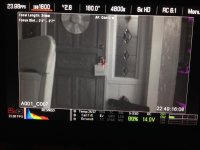
Just received Dragon upgrade and getting into everything. I noticed that the Goalposts on the shadow side seem to be SUPER sensitive- they fill up very quickly when there is seemingly a very small amount of pixels that would be noise, based on the Exposure Check tool.

I was under the impression that the goal post filled on the left for shadow information that had no detail or would appear as noise- information that falls out of the useable range. True, false, more complicated?

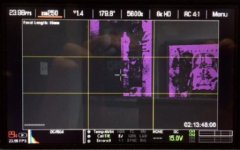
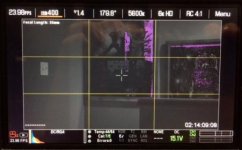
When I toggle on EXPOSURE check even though the goal post is a third full there is only a tiny portion of the frame colored purple. I had thought that the purple areas were the areas causing the goal post to fill up. Is this the case?

Did something change with Dragon? MX didn't seem to have this disparity. I am not seeing similar behavior on the highlight end.

Notice in the first image the goalposts are almost at the same height but there are much larger areas of the image lost in highlight as indicated by red, and only a very small area of the image lost in shadow as indicated by purple.

Thoughts?
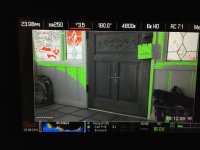
 

Attachments

  • EXPOSURE 2.jpg
    EXPOSURE 2.jpg
    103.4 KB · Views: 0
  • EXPOSURE 1.jpg
    EXPOSURE 1.jpg
    100.2 KB · Views: 0
When using the exposure tool, you also need to enable raw so your see the actual raw data reflected. Currently what you see is tied to ISO, etc... Currently the exposure tool is not working like the manual says it should. Been broken for a long time.

Nope.

It's not broken anymore :) (expection being very high ISOs)* - but it's extremely accurate between ISO 250-ISO1000

And RAW view has been re-calibrated to ISO 800 - see firmware notes (v5.1.47)

FYI - In DSMC firmware builds v5.1.47 and later - RED has re-calibrated the RAW view mode to RLF (REDlogfilm), RC2 (REDcolor2), 5600K, 800 ISO, 0 TINT.

And ... the EXPOSURE tools is now working great - without switching to RAW view.
 
I might need some help understanding this as well. Newest beta, same thing. In false color no purple, but bar on the left is filled up. Dont know which to trust.
 
Yes at high ISOs the exposure tool seems to tweak a little but it's very consistent at regular ISOs up to 2000 or more.

My my main issue is what I described in the original post which from my recollection is different than MX especially when it comes to the low end clip and purple exposure check. I used to be able to guess what was filling up that goalpost on the low end just by looking at the image and then confirming that guess with exposure check and looking for the purple. Not anymore.
 
Mark L. Pederson said:
It's not broken anymore :)

Dumb question. When I have the exposure tool enabled and then I toggle raw on/off, should I see the amount of purple change? Or should they be the same?

It looks like it is not working correctly to me. Can you take a look at the iPhone video I just shot? The amount of purple changes as I move ISO between 250 and 1280 when raw is off. When I turn raw on, then there is no change in the amount of purple.

I am on beta build 5.2.16.

On a side note, I thought it was working for a second, then I changed the aperture. Its a Canon mount and I am using the Otus 55mm lens.
 
"Trust the bar"

Also check out Video Check and where Blue and Teal is currently landing in regards to this.

In RAW View you get what Mark described. No matter where the ISO is at you get the same values as the presented REDlogfilm/REDcolor2, 5600K, and 800 ISO image.
 
Dumb question. When I have the exposure tool enabled and then I toggle raw on/off, should I see the amount of purple change? Or should they be the same?

It looks like it is not working correctly to me. Can you take a look at the iPhone video I just shot? The amount of purple changes as I move ISO between 250 and 1280 when raw is off. When I turn raw on, then there is no change in the amount of purple.

I am on beta build 5.2.16.

On a side note, I thought it was working for a second, then I changed the aperture. Its a Canon mount and I am using the Otus 55mm lens.

Stacy - I'll re-test when I am back in NY to confirm - but as I recall - you will see a wee bit of difference at more etreme ISOs - look at the purple on 400 vs 500 vs 640 vs 800 - they should be extremely close. Maybe 250 and 1280 are a bit different, etc.

The reason is doesn't move at all in RAW view is that RAW view is actually locked at a fixed ISO (800). It will also be more "accurate" (for exposure puposes) when your are looking at RLF - which is what RAW view is also locked at.
 
Mark L. Pederson said:
The reason is doesn't move at all in RAW view is that RAW view is actually locked at a fixed ISO (800).

That is a good point! :-) Should 800 on both look "similar" then? Ignoring the fact that one is RLF and the other is RG4.

Best way I would describe my video is that at 250 the purple is thick. As you go up, it thins out, though still in a similar area. Appreciate you taking a look.
 
Stacey,

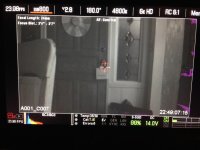
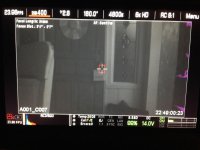
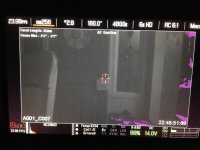
That is not at all the behavior I am seeing. Check out this series- while I increase the ISO the purple changes just a little but not very much at all. If it were taking the ISO into account, there would be no purple at all at 1600. I believe it is actually reflecting the "RAW" low end clip point. Also note that the frame that indicates when the camera was set to RAW view mode. It is the same as the others.

SO I think it is safe to say that the Exposure tool is independent of ISO.

Which leads me back to my main problem here- that goalpost is COMPLETELY full but there is NOT A LOT OF PURPLE. It is REALLY easy to set off the low end goal post. In fact, it fills up a third of the way when barely anything in the frame shows purple in exposure check. Reading the manual, it states that:

"RAW NOISE LEVEL BARThe RAW noise bar displays the amount of pixels in the image that are in noise. For example, if the bar is about 1/8 of the total height, this would indicate approximately 1/8 of the total pixels in the image are at an exposure level at risk of displaying noise when pushed at higher ISO or FLUT values in post-production."

I suppose that maybe the key is pixels at exposure level AT RISK OF DISPLAYING NOISE WHEN PUSHED AT HIGHER ISO OR FLUT...IN POST PRODUCTION.

So most of the image in this example is at risk of displaying noise WHEN PUSHED in post, and not necessarily currently noisy and most certainly not necessarily clipped on the low end (otherwise they would be PURPLE I guess - even though the manual states the same definition for purple --- "Purple: Underexposed; indicates sensor exposure levels that are likely to be noisy if gained up in post- production."

The RED/Highlight clip seems NOT to behave in this weird way. Goalpost fills up proportional to the mount of RED present in the exposure tool. Seems right and what I would expect.

Here is a link to the R3D Trim of this clip:
https://www.dropbox.com/s/s1v33uucveob22b/A001_C007_0607NP_001.R3D
 

Attachments

  • EXPOSURE 2 5.jpg
    EXPOSURE 2 5.jpg
    109 KB · Views: 0
  • EXPOSURE 2 4.jpg
    EXPOSURE 2 4.jpg
    100.2 KB · Views: 0
  • EXPOSURE 2 3.jpg
    EXPOSURE 2 3.jpg
    95.5 KB · Views: 0
  • EXPOSURE 2 2.jpg
    EXPOSURE 2 2.jpg
    93.5 KB · Views: 0
  • EXPOSURE 2 1.jpg
    EXPOSURE 2 1.jpg
    98.9 KB · Views: 0
Let's start checking things off though.

- Black shade again and get camera up to operating temperature.

It's hard for me to evaluate this via the internet, but let's check a few variables off the list.
 
Back
Top