Welcome to our community

Be a part of something great, join today!

  • Hey all, just changed over the backend after 15 years I figured time to give it a bit of an update, its probably gonna be a bit weird for most of you and i am sure there is a few bugs to work out but it should kinda work the same as before... hopefully :)

Dragon aliasing color shift

Just happened upon this. Relates to a question I have wanted to ask. I have always found the images from the Dragon to be super 'natural' a lot of the time. Akin to what we look for in good stills. And I remember one time we were zooming way in on skin tones from different cameras, I think Canon and Sony. And I noticed that the Dragon skintone was made up of many little different colored dots, whereas at the same magnification the other images looked uniform - all one consistent fleshy tone. My thought was that this was the 'trick'. That in truth an object like skin, hit by light, is not 'skintone' but a very complicated amalgamation of lots of colors. I realize that this may seem duh obvious to many, but to me it was the answer in some way as to why the image looked natural. And is therefore - intentional.

Along the lines of what Blair said above. I wonder if some manufacturers make a choice in the programming to unify the tones of adjacent pixels to help paint a 'preferred' image and make it more in this case black and white. Even if. In fact. What the sensor sees is more complicated.

In any case - I have to say the images both looked good. Good enough. So this is not meant as anything more than wondering if that is the difference with how a Dragon sensor perceives versus a more decisively opinionated and processed approach. One sensor allows for the fact there is a little CA. The other processes this out.
 
Tarquin, what you might be seeing is lack of noise reduction on the raw files from the Dragon. Sensors deliver noise equally across R,G, & B (and blue generally appears noisiest because that channel is darkest / least sensitive), so you'd expect to see noise that is red, green and blue. If you see noise that is predominantly luma in nature (appear monochrome) it could mean that some chroma noise reduction has occurred. You'll certainly see this in some of the cheaper consumer cameras.

Graeme
 
Just looking at the samples in the first post, its possible that the Arri is doing cross color suppression in their debayer algorithm and or CA reduction as well.

At the expense of some resolution it should be possible to create a processing routine that would identify and eliminate color aliasing artifacts that fit a particular metric. It's an inherently destructive approach that could "scrub off" real details, but it would be expedient and in most cases the audience would never know what was missing. To me, the biggest downfalls of such a scheme would be loss of details that lead to a almost kinesthetic sense of texture/feel and the lack of user control over the amount of suppression applied.

Cheers - #19
 
From the DPXs that were supplied, I applied a curve in AE and rendered out a jpeg.

I'm going to check the r3d now...
 
I haven't looked in a while to see if AFX is savvy to it, but that looks a great deal like font-smoothing style sub-pixel resampling.

Certainly the R3D does not look like that...
 
I don't think this is CA -

Here's the 5k no curve applied:

H002_C001_0125DM.0000000F.0000000 (11-54-26-22).jpg


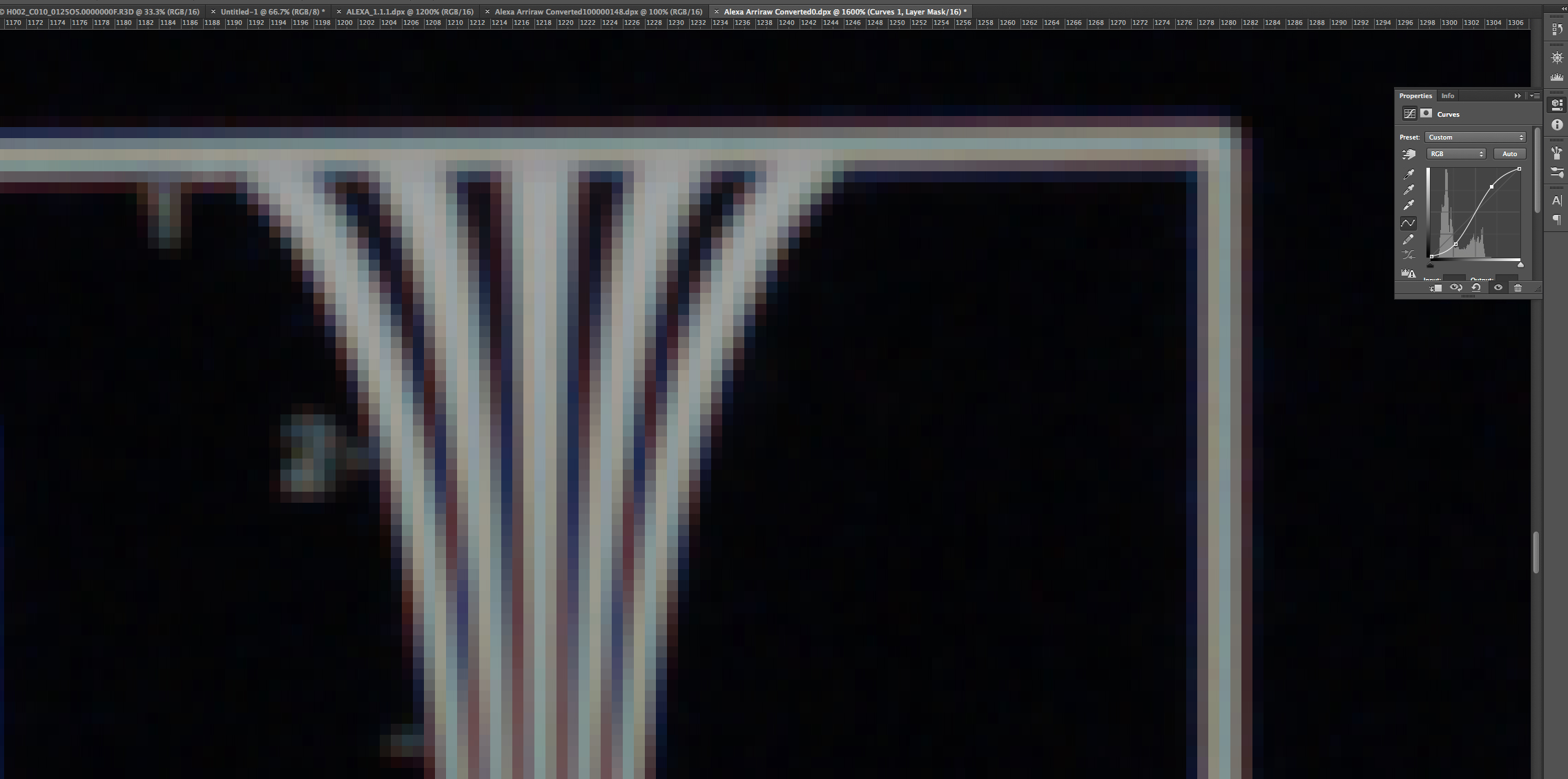
And the zoom at 1600:

Screen Shot 2015-04-07 at 3.51.03 PM.jpg
 
The r3d absolutely shows it on my screen - here's a screen grab at full res:

John - can you post a screen grab of your redline that doesn't show it?

redcine.jpg
 
Last edited:
You have the correct file - look at the green fringing. On the Arri grab, it is not color shifted green - it is gray.
 
And just so we're clear - I'm not complaining. I'm asking what causes this effect which is completely invisible when you are not zoom waaaaay in.
 
That's what I see. However, where are the pink shifted pixels coming from in the original scaled version? That's got to be a resampling issue. Resizing for me never shows the right hand edge as pink and the left as green.

The green halo is just very marginally missed focus on the Dragon shot IMHO.
 
I think its also worth bearing in mind that the Dragon OLPF is very much on the edge of introducing aliasing by design. There's no excess of softening which means that you do indeed see false coloured pixels here and there.
 
I think its also worth bearing in mind that the Dragon OLPF is very much on the edge of introducing aliasing by design. There's no excess of softening which means that you do indeed see false coloured pixels here and there.

Are LLO and STO very similar in regards of aliasing? Or is one "softer"?
 
I think its also worth bearing in mind that the Dragon OLPF is very much on the edge of introducing aliasing by design. There's no excess of softening which means that you do indeed see false coloured pixels here and there.

I scrolled around and the effect seems to be everywhere there is a high contrast element.

What puzzles me is that the black is true, the white is true, but the aliasing has a heavy green shift. Seems like there should be a clear (albeit very complicated) answer as to where in the food chain it is getting introduced.
 
That's what I see. However, where are the pink shifted pixels coming from in the original scaled version? That's got to be a resampling issue. Resizing for me never shows the right hand edge as pink and the left as green.

The green halo is just very marginally missed focus on the Dragon shot IMHO.

So you're saying it is ca? Because out of focus without ca would just be gray... right?
 
I've tried the Dragon skin tone R3D from daylight and tungsten shots, Stop 0, H001_C010_0124DC.0000000F and F002_C010_0125TA.0000000F and zooming in I see mild CA, but nothing really glowing. Downsizing the exported dlx in photoshop to 1920x1080 they still look fairly monochrome with just a hint of the CA poking through.

Yup, what was the workflow to produce the down sampled image?

Graeme

Is the dominant theory that the Alexa (and Blackmagic Ursa which also doesn't show the fringing) is actually correcting the ca of the lens out of the image?
 
Mark, the Alexa DPX called "ALEXA_1.1.1.dpx" you used for the comparison is not the same image as the Arriraw file available for download (00100000148.0000025.ari). The Arriraw file exhibits a similar chromatic aliasing when zoomed, in both Arriraw Converter and in Photoshop when saved from that program as a DPX. Behold...


Rendered from Arriraw Converter as a DPX using LogC - Wide Gamut with a curve applied in Photoshop (open in a new window for a larger version).

Arriraw_aliasing.jpg
 
Last edited:
Thank you Brian - good detective work. It's kind of rainbow in the Alexa raw image.

I went and checked an old chart I shot with spherical Lomos and it did not have that green halo - so it probably isn't the sensor... though that might have been my Mysterium X.

Maybe John is right...
 
Last edited:
The DRX feature in Redcine-X helps with that pink fringe, it desaturates the highlights or whites. The Arri 3D Lut does that natively for the Alexa.
 
Back
Top