Welcome to our community

Be a part of something great, join today!

  • Hey all, just changed over the backend after 15 years I figured time to give it a bit of an update, its probably gonna be a bit weird for most of you and i am sure there is a few bugs to work out but it should kinda work the same as before... hopefully :)

DPX - Final Workflow!!! Ahhhhh!

Scotty Fox

Active member
Joined
Dec 3, 2013
Messages
26
Reaction score
0
Points
0
Hello everyone,

So ended up on a workflow that I think will work based on what I'm dealing with, but ran into a snag with .dpx files.

As I posted before my biggest issue was getting my rescaling info and speed changes to stick with my clips when sending for VFX and CC.

After going around and around with REDCineX and trying get those scaling and speed changes over to that program for a r3d trim I gave up (was using XML export). The speed changes worked (if I remember correctly) but the scaling didn't. So kind of defeated the purpose.

I ended up deciding after speaking with others that .dpx might be the better way to go. I relinked my offline edit (1080p ProRes) in Premiere Pro CC to my 4K .r3d files. I then rescaled and made sure the speed changes were still okay. Then I would export .dpx clips for the VFX artist and colorist with that info baked in so I no longer have to deal with that.

I made sure my source settings for the .r3d clips were "Redlogfilm" and "Redcolor3", and exported using the default settings Premiere gave me for .dpx exports (screen grab attached).

But I checked out the dpx sequence in AE and it was blown out. I sent to the VFX artist to test (he's using Nuke) and he also said it was blown out.

I haven't worked much with dpx files (well actually never), so I'm learning as I go. Was curious if anyone here had any thoughts and/or experience with this and what the best settings will be assuming all VFX work will be done to match the original plates.

Thanks again!
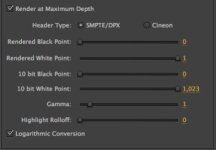
 

Attachments

  • DPX_Export.jpg
    DPX_Export.jpg
    11 KB · Views: 0
I do not know this workflow specifically, but with no other answers I would suggest that part of the problem is that you are going out as SMPTE when you should be going out as CINEON to match your REDLOGFILM gamma curve. Not sure if that will change the sliders to all the defaults you need, but should get you close.

Another option would be to get the clips into After Effects and export the required shots from there.

After Effects has a properly color managed environment. It will take some reading up on your behalf to get your workflow right - but setting your workspace color settings etc is a lot more explicit in After Effects.
 
I have never done a Premiere DPX workflow, but I have done it with quite a few other kinds of software (including Avid, Quantel iQ, and Clipster) and it can work just fine.

I don't think RedCineX-Pro is the best tool for speed changes and reframing. You might be able to just roundtrip the R3Ds out of Resolve as DPX 10-bit Log and then back into Resolve. See what that does.

Clipster is what I've used the most for conforming DPX files at post houses, and it's an extremely fast, capable tool for large projects.
 
Thanks for the responses Craig and Marc.

I tried exporting with Cineon, but it gives me the same issue. I actually tried using "standard" settings (pretty sure that's what it was called) in PrPro and it gave me a non blown out image. The only issue was that it gave it a more saturated look though. Again, probably in the settings.

I didn't think that was a good idea to use standard though, being that I shot RAW files, doesn't that cut down my range to work on later? Or those I'm sending the files to? At least that was my understanding.

I'm giving AE a try now, to see if I have better luck. REDCineX is horrible at the scaling and speed changes. Speed changes being the worst, as I'd have to take off all the speed changes in PrPro, export and import the XML into REDCineX, then resize the clips and leave the speed changes off until the roundtrip. Huge pain and not ideal at all. So scratching that.

It's interesting though because I can export a .dpx out of REDCineX using a .r3d file and it looks PERFECT. No blow out issues. I can go Full Range or over range and as long as Logarithmic Conversion is off it's great. Looks like it should with Redlogfilm and Redcolor 3 settings.

So it seems to be a Premiere thing as mentioned. I'm going to be doing some more reading about .dpx and trying to get a grasp on that with Premiere but we'll see. Might just have to trouble shoot with the colorist if the problem continues.

I'd use Resolve but I don't have it, and the Lite version only allows 720p exports if I'm not mistaken. I'm mastering at 2K.
 
I didn't think that was a good idea to use standard though, being that I shot RAW files, doesn't that cut down my range to work on later? Or those I'm sending the files to? At least that was my understanding.
I've never had a problem getting tons of range out of DPX 10-bit log files. There are hundreds of $50 million+ movies out there you've already seen that were all color-corrected from DPX 10-bit log files, and they looked fine.

I'm giving AE a try now, to see if I have better luck. REDCineX is horrible at the scaling and speed changes. Speed changes being the worst, as I'd have to take off all the speed changes in PrPro, export and import the XML into REDCineX, then resize the clips and leave the speed changes off until the roundtrip. Huge pain and not ideal at all.
What if you ask the advice of your VFX person? Maybe they can do the speed changes in the software they have available.

I'm not a Premiere guy, so that's not something I can advise on very well. I have some problems with the way Adobe runs their companies, and while I use some of their products, I don't think they're optimum for video editing, effects, or color correction; I think the alternatives out there are better.
 
So update:

Checking CINEON didn't do anything. Neither did Logarithmic (checked and unchecked). The images were still blown out when exporting from Premiere Pro.

I brought the project into AE, exported with the same settings as Premiere and AE worked fine. The image came without any blow out and looked like it should.

REDCineX does the same, perfect export just as AE. But it looks like I'll have to go with AE over REDCineX due to speed changes and rescaling.

So what's up with Premiere, what the heck is it doing? Obviously it would be easiest to go out of Premiere, but AE is doable. But there must be something to correct it in Premiere.

What if you ask the advice of your VFX person? Maybe they can do the speed changes in the software they have available.

I really was trying to keep that work out of the VFX artists hands as one, I want to make sure it's all done how I want it (I'll be sending the files overseas and don't want to waste time going back and forth to make sure it's done correctly), and second, I can't pay him extra for the time to rescale and reapply the speed changes.

So outside of .dpx, the only other option that I've heard is using ProRes 444, and exporting that with a "redlogfilm" and "redcolor3" color space to the colorist (for non vfx shots) and giving the vfx artist .r3d and letting him export ProRes 444 after his work to the colorist for grading.

I just didn't pick that route because I was concerned with loss of quality and latitude for the grade.

Thanks for the help everyone.
 
In the past I've used a similar route, but I first export to 4K ProRes4444 out of Premiere Pro CC, then I use Media Encoder to create the DPX files.

Be warned, DPX files take about 12 times longer to render out than ProRes4444 at matched resolutions, so plan your time accordingly.

DPX can be advantageous if you're working with a VFX / Finishing artist who is far away from you, because you can send replacement frames if any get corrupted in the finishing process.

ProRes4444 is great too because it's just so easy and quick to work with, but it is just one large .mov file, so if anything goes wrong, you'll have to re-export and send the whole thing.
 
Yeah, shoot. I was getting a little more interested in using 444, but my VFX artist just let me know he won't be able to export that. (using Nuke). So he'd be exporting dpx anyway, and so I'd be giving dpx and 444 to the colorist. Might just keep it all .dpx instead now. Funnnnnnn.

Interesting note on the single frame swaps. I didn't think of that but that's a definite plus being that it is long distance. Thanks for pointing that out Burke.
 
Back
Top