Scotty Fox
Active member
- Joined
- Dec 3, 2013
- Messages
- 26
- Reaction score
- 0
- Points
- 0
Hello everyone,
So ended up on a workflow that I think will work based on what I'm dealing with, but ran into a snag with .dpx files.
As I posted before my biggest issue was getting my rescaling info and speed changes to stick with my clips when sending for VFX and CC.
After going around and around with REDCineX and trying get those scaling and speed changes over to that program for a r3d trim I gave up (was using XML export). The speed changes worked (if I remember correctly) but the scaling didn't. So kind of defeated the purpose.
I ended up deciding after speaking with others that .dpx might be the better way to go. I relinked my offline edit (1080p ProRes) in Premiere Pro CC to my 4K .r3d files. I then rescaled and made sure the speed changes were still okay. Then I would export .dpx clips for the VFX artist and colorist with that info baked in so I no longer have to deal with that.
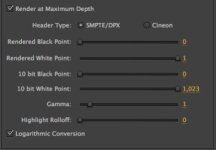
I made sure my source settings for the .r3d clips were "Redlogfilm" and "Redcolor3", and exported using the default settings Premiere gave me for .dpx exports (screen grab attached).
But I checked out the dpx sequence in AE and it was blown out. I sent to the VFX artist to test (he's using Nuke) and he also said it was blown out.
I haven't worked much with dpx files (well actually never), so I'm learning as I go. Was curious if anyone here had any thoughts and/or experience with this and what the best settings will be assuming all VFX work will be done to match the original plates.
Thanks again!
So ended up on a workflow that I think will work based on what I'm dealing with, but ran into a snag with .dpx files.
As I posted before my biggest issue was getting my rescaling info and speed changes to stick with my clips when sending for VFX and CC.
After going around and around with REDCineX and trying get those scaling and speed changes over to that program for a r3d trim I gave up (was using XML export). The speed changes worked (if I remember correctly) but the scaling didn't. So kind of defeated the purpose.
I ended up deciding after speaking with others that .dpx might be the better way to go. I relinked my offline edit (1080p ProRes) in Premiere Pro CC to my 4K .r3d files. I then rescaled and made sure the speed changes were still okay. Then I would export .dpx clips for the VFX artist and colorist with that info baked in so I no longer have to deal with that.
I made sure my source settings for the .r3d clips were "Redlogfilm" and "Redcolor3", and exported using the default settings Premiere gave me for .dpx exports (screen grab attached).
But I checked out the dpx sequence in AE and it was blown out. I sent to the VFX artist to test (he's using Nuke) and he also said it was blown out.
I haven't worked much with dpx files (well actually never), so I'm learning as I go. Was curious if anyone here had any thoughts and/or experience with this and what the best settings will be assuming all VFX work will be done to match the original plates.
Thanks again!