Welcome to our community

Be a part of something great, join today!

  • Hey all, just changed over the backend after 15 years I figured time to give it a bit of an update, its probably gonna be a bit weird for most of you and i am sure there is a few bugs to work out but it should kinda work the same as before... hopefully :)

Digital Cinema Package

Wow, Alexander, as far as I can say fast-reading through your article, thats really a good piece of work! Thank you for sharing it! I would say, everybody who reads it and searches little bit through this reduser-thread here should be able to create DCPs on his own....amazing!

Congrats for your sucessful test on the Dolby DSS100.


But there´s one thing that would interest me very much:
In this thread here on reduser, everything is about picture, pixel, colorspace conversion and so on. But there is few information concerning the audio specifications. I don´t mean samplerate or bit-depth, the noumber of channels, it´s more about the audio-levels etc. Ok, people who did audio mastering for film projects which were printed to film or were given to a DCP posthouse won´t have any problems cause they know everything about it. But I think about people who don´t know much about leveling, distributions channels, dB scales etc. are happy about OCT and the chance to bring their content to cinema, maybe create their DCP with completely wrong levels and when this file is played back in the cinema (even if it´s only for test pupose) it would be bad if they do any damage to the audio equipment...

Ok, maybe I´m to careful but I just remember the handbook for creating content for E-Cinema applications when I gave the materials to rowo-digital and in that handbook there were things written about special levels for audio about -82 dB leq as specification for commercials etc. For the film, there will be different specifications I think but maybe it would be good to add some facts about audio mastering to this thread here.

Just my 2 cents,

greetings
Felix
 
Great thread guys, you are always briliant!!!
 
I don´t mean samplerate or bit-depth, the noumber of channels, it´s more about the audio-levels etc.

Digital Cinema System Specification Section 3.3 Audio Specification:

3.3.2.5. Digital Reference Level
Digital inputs and outputs shall have a nominal reference level of -20 dBFS (decibel
below full scale) and output 85 dBc (decibels referenced to the carrier) sound pressure
level per channel measured with pink noise.
 
Cinemaslides is up on http://github.com/wolfgangw/digital_cinema_tools
Run cinemaslides -h to see the docs, basically. Run cinemaslides -v debug [...] to see some guts.

Nice. I wonder if slideshows could also be achieved using timed-text tracks. I think you can display PNGs directly, set display duration, and fade in/out. The server would need to support SMPTE 429-5 and I'm not sure if they all do.
 
wrt subpicture specs: DCI's Compliance Test Plan has

section 4.5.4. Timed Text Resource Encoding which says:

"... The subpicture must be of PNG format, decode without errors, and the size (geometry) must be smaller than, or equal to, that of the main picture ..."

Totally like the idea. Might need MainPicture assets which could be tiny, though ...
 
wrt subpicture specs: DCI's Compliance Test Plan has

section 4.5.4. Timed Text Resource Encoding which says:

"... The subpicture must be of PNG format, decode without errors, and the size (geometry) must be smaller than, or equal to, that of the main picture ..."

Totally like the idea. Might need MainPicture assets which could be tiny, though ...

It was something I had thought about awhile ago, but never really dug deeper into it. I had hope to re-visit it again, because generating a single PNG would be a lot easier and faster than doing everything in final cut and creating a DCP.
 
I tried to gather all the thoughts into one article on DCP creation. Check it out:
http://www.stereofinland.com/?page_id=49

Comments are welcome.

Step 3 in your article has the chronological order of Interop and SMPTE mixed up: Interop was implemented on servers to have a working scheme while SMPTE developed related standards. They're done for some time now and around now there's a firmware rollout to update servers.
 
Speaking of a 25P DCP, is there a way to make a 2K or 4K SMPTE 25P DCP with open cinema tools ? Or are we stuck with easydcp ? Thanks !

Compiled asdcplib-1.6.34 that is used in open cinema tools and typed the command asdcp-test -h
...
-p <rate> - fps of picture when wrapping PCM or JP2K:
Use one of [23|24|48], 24 is default
...

No 25 fps.

To answer the digital cinema resolutions question from Subhadip Sen:

HD workflows where the 1920x1080 container of HDCAM-SR tape is standard should be changed to 2K workflows for digital cinema work. The 1.77 aspect 1920x1080 fits ok, but 1.85 or 2.39 inside a 1920x1080 container does not fit. The RED 2K 2:1 2048x1024 resolution does fit the 2.39 digital cinema presets with cropping to 2048x858 (if this was intended when shooting), but to get to the 1.85 digital cinema preset you have to crop and scale to get to 1998x1080. 1920x1080 1.77 material can have black padding on the sides to achieve 1998x1080 or be scaled and cropped. Digital cinema servers can play 1920x1080 but the standard is 1998x1080 so it is preferable. The reason that 1080 material fits better than 1024 material is that the side masking can be adjusted in a common height cinema. I would recommend padding to 1998x1080. if all the 2048x1024 information is vital scale to a 1998x1080 container, but remember that having this much black padding above and below the picture kills the contrast.


The main problem when making 24 fps DCPs from 25 fps material, even with software like time factory 2 which keeps the channels in phase and keeps the pitch, is that they could alter the sound mix in the conversion process and introduce artifacts. If you slow down the sound you get a pitch change. So being able to play 25 fps DCPs on the doremi cinema server is great.

I did use the openjpeg encoder first to make DCPs but found it too slow for time critical use.

The biggest problem with mastering DCPs is the Quality Control stage. The best option is to check it where it will be played, if you get a DCP made or checked at a post house make sure they know what they are doing and tell them exactly what you want and what equipment the DCP will be played on.
 
Last edited:
To note: You can do the 4% pitch change from 25fps to 24fps without a change to the pitch. Protools, amongst others, does it well. There are many methods so it is important to try each to see which work best for the film.
 
Compiled asdcplib-1.6.34 that is used in open cinema tools and typed the command asdcp-test -h
...
-p <rate> - fps of picture when wrapping PCM or JP2K:
Use one of [23|24|48], 24 is default
...

No 25 fps.

Thanks Knut but are you sure ? I'm not an expert at all, I don't understand anything about these command-line things, but for the 1.6.34 version the change logs are :

- Added edit rate constants to AS_DCP.h (25, 30, 50, 60).

Doesn't that mean a possibility of adding 25 fps ?

Gosh, this is so complicate ! I wonder why nobody releases a simple plugin to export DCPs from Adobe Media Encoder, Compressor, etc...
 
The latest asdcplib release (1.6.34) indeed has those framerate-related changes. Only that 2 sets of changes are missing plus the -h output wasn't updated. I guess John will release a fix in due time. Basically asdcplib is set and ready to roll 24, 25, 30, 48, 50 and 60 fps.

Bigger problem, it seems, would be the changed rate constraints for the JPEG2000 codestreams.
 
Thanks Wolfgang. It looks like EaysDCP is the way to go to be sure of the result at the theatres... Is there anyone else interested in the basic licence (2000 euros) ? I would need it just for a 2K and a 4K version of a feature film. If there are other people interested for a few encodes maybe we could make a common purchase ?
 
Actually, looking at openjpeg's code (svn checkout http://openjpeg.googlecode.com/svn/branches/v2/ openjpeg-read-only for v2) suggests that the necessary changes to comply with additional framerate/codestream constraints should be trivial. Probably coming up soon.

I can't get over the missing framerate issue, though. Those missing framerates (16 to 24 for historical works) are a /big/ deal for restoration projects, cinematheques, for film culture -- the knowledge about and appreciation of the many-winded roads film history took us along.

When you're used to seeing works from the silent era in native speeds (ranging from 16 to 24, this on a 3-blade shutter film projector) any pull-up or blending technique (to get 24 fps digital) will look apalling, mildly put.

The argument, at the time, against the inclusion of lower framerates (to my knowledge, which is limited) was "It might break optimization schemes for 24/48 fps". Anyone knows more about the related process?
 
Yes Wolfgang, I really don't understand why the DCP norm didn't fully integrate the other usual frame rates 16, 24, 25, 30. It's not a problem for many video projectors (2k and 4k included), so it would have been so practical.

I decided to shoot my first feature at 25P to get no problems for the DVD release which is the most common way for people to watch a movie today. The blu-ray norm gives the possibility of putting the 25P into a 1080i stream. Really, I don't understand this DCP norm.
 
24, 25, 30, 48, 50 and 60 are in place and will work on all installed platforms, it's a matter of firmware/software updates.

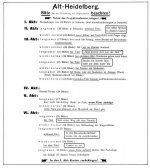
What's missing are speeds below 24 fps. 16 fps wouldn't be enough, by the way. Production and presentation in the silent era utilized the whole range from ~ 12 to ~30. For example see the attached Kopienbegleitkarte for Alt-Heidelberg (1922). It has very specific speed instructions for screenings which were accompanied by an orchestra.

Not being able to play this adequately on a modern high-tech platform is somewhat ironic and bitter sad at the same time, at least that's how I feel about it.
 

Attachments

  • Alt-Heidelberg_1922_Kopienbegleitkarte.jpg
    Alt-Heidelberg_1922_Kopienbegleitkarte.jpg
    54.3 KB · Views: 0
Tiny DCP for testing SMPTE 429-5 compliance (Subtitle trackfiles) on cinema servers is up on http://github.com/wolfgangw/digital_cinema_tools/raw/master/dcp_s429-5_test.tar

It's been assembled with the test material from cinecert's site (http://www.cinecert.com/asdcplib/S429-5-test.tar.gz) and should display 1-2-3-4 on a black background (00:00:05:00 - 00:00:06:23). Let us know whether it works on your server.

See http://wiki.github.com/wolfgangw/digital_cinema_tools/misc for a note on how to build asdcplib's S429-5-cgi.cpp
 
Back
Top