Welcome to our community

Be a part of something great, join today!

  • Hey all, just changed over the backend after 15 years I figured time to give it a bit of an update, its probably gonna be a bit weird for most of you and i am sure there is a few bugs to work out but it should kinda work the same as before... hopefully :)

Desaturated shadows?

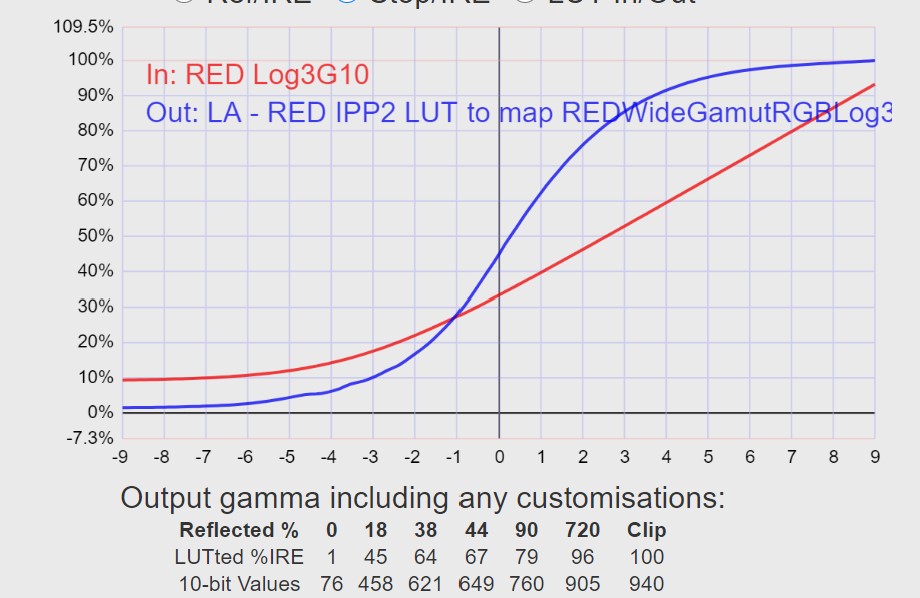
Here's another weird thing I've found when checking the LUTs. Seems to be some inconsistencies in the S-curve of Red's High Contrast / Soft roll-off.

High Contrast / Soft Roll-off
IPP2-HIGH-SOFT-Chart.jpg


It never gets down to pure black and the curve at the shadow end is not smooth at all which might be a reason for why we see "splotches" in shadows and low light areas. With it never going black, it's impossible to get a perfect contrast if using this as an output LUT with a grade applied before it. It will always have elevated blacks. On good screens, this will always be visible as noted.

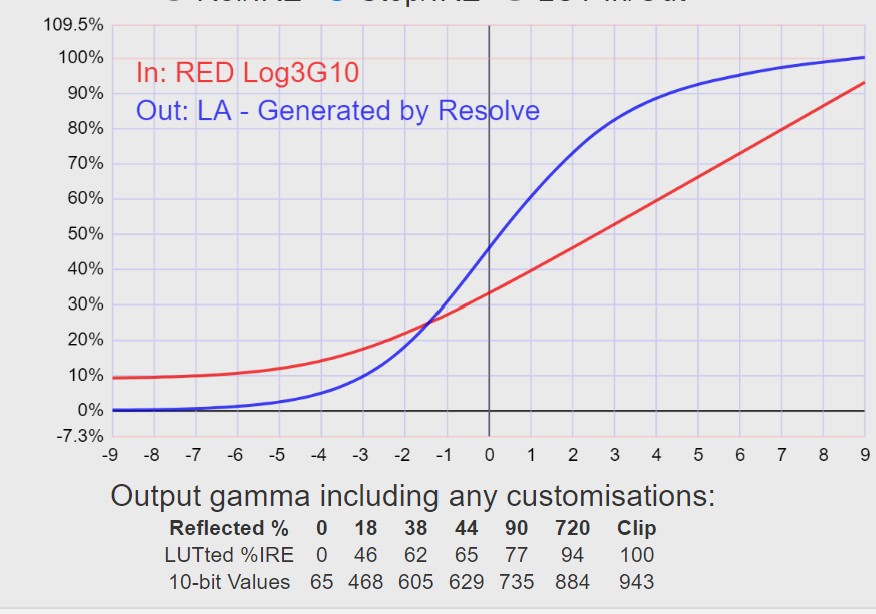
Here's my own LUT in comparison.
CGLUT-Chart.jpg
 
But I'm talking about problems with their tone map transforms that are integrated into the camera, you can shut them off and use whatever you like, just as I've done with my LUT. The file is RAW, 16bit, their tone mapping is just metadata decode. You can even start with linear if you like. There's a difference between hardcoded tone mapping, like if you shoot ProRes with IPP2 High/VerySoft, but if you shoot R3D you can change it however you like. At the moment I'm working on a LUT that has nothing of the problems I initially pointed out. But I'd like Red to adress the behavior of their IPP2 tone mapping LUTs because as it is now I can't really use them for a fast turnaround but instead develop my own transform for it. Only hurdle I have now is to get this new LUT transform to the level of quality as Red's in terms of reliability and consistency, while making sure I get rid of out of gamut problems and such.

So I'm not really sure what you are talking about when you use terms like LOG and tone mapping in the way you do. It's RAW, so it doesn't really matter as long as the sensor doesn't screw things up.

It is raw, but logarithmically encoded, if that makes sense. The highlight information in 16bit linear is largely pointless, so 12bit logarithmic encoding allows for much smaller files while being visually lossless. Though that is all speculation, as red is pretty tight-lipped about exactly what redcode is, and I know it can be unpacked into a 16bit working space.
 
Nobody goes pure black for their digital cinema cameras on the variety of LUTs offered for various gammas. Basic R709 does and does early, but most people are paying for a textured black when it comes to RED, Arri, Sony, Canon, etc... 1%-10% is common.

That's not to say there's not reasons to go pure black. That's also not to say there's reasons to avoid it either.
 
Here's another weird thing I've found when checking the LUTs. Seems to be some inconsistencies in the S-curve of Red's High Contrast / Soft roll-off.

High Contrast / Soft Roll-off

IPP2-HIGH-SOFT-Chart.jpg


It never gets down to pure black and the curve at the shadow end is not smooth at all which might be a reason for why we see "splotches" in shadows and low light areas. With it never going black, it's impossible to get a perfect contrast if using this as an output LUT with a grade applied before it. It will always have elevated blacks. On good screens, this will always be visible as noted.

Here's my own LUT in comparison.

CGLUT-Chart.jpg

Thanks! This is interesting. How are you getting this data?


the tone curve I often see on the output looks a bit like cheap TV's or monitors sometimes, when they mess up the tone curve and grey splotches or anomalies form. Which is partly why I thought the SmallHD was the issue in the beginning, and now I want to revisit SmallHD. I feel a little bad like I have had a low opinion of them, when it was more likely the camera's output.
 
It is raw, but logarithmically encoded, if that makes sense. The highlight information in 16bit linear is largely pointless, so 12bit logarithmic encoding allows for much smaller files while being visually lossless. Though that is all speculation, as red is pretty tight-lipped about exactly what redcode is, and I know it can be unpacked into a 16bit working space.

It's a wavelet compressed RAW file. DCT in Komodo.


Nobody goes pure black for their digital cinema cameras on the variety of LUTs offered for various gammas. Basic R709 does and does early, but most people are paying for a textured black when it comes to RED, Arri, Sony, Canon, etc... 1%-10% is common.

That's not to say there's not reasons to go pure black. That's also not to say there's reasons to avoid it either.

But for something to be used as an output LUT or tone map with a grade set before it, you can still get textured blacks if you want. The problem is that if it never gets down to zero, you can never do anything pure black, it will always be elevated. So if you actually have shadows that should be going into black but aren't, you will instead have a visible grey shade that stands out, especially against something like black bars for other aspect ratios. Of course pure black can be dangerous, but it should still exist within the range of the color space you're in. Especially if you have a roll-off into black you will get those textured blacks, but when it gets dark, you can get very dark.

As I've worked on this LUT now and measured it to reach pure black with a smoother roll-off, it really erases those problems I initially pointed out. Now it doesn't look elevated at all, but it doesn't crush blacks either until it naturally gets there. And the green tint that plagues Komodo's low range seems to be gone or improved when going straight from the LOG3G10. It really stings my eyes when I cut back and forth between the normal mid/soft LUT and this one when it comes to this green cast and it improves changes in white balance if I need to cool something through that by adjusting white balance slightly off.

The only thing I'm still struggling with is the out of gamut stuff. I tried using DragonColor2 as the limiting factor instead of Rec709 and it works very well, but I'm not sure it's better than Red's LUTs. It also works better with fire and yellow colors.
 
Thanks! This is interesting. How are you getting this data?


the tone curve I often see on the output looks a bit like cheap TV's or monitors sometimes, when they mess up the tone curve and grey splotches or anomalies form. Which is partly why I thought the SmallHD was the issue in the beginning, and now I want to revisit SmallHD. I feel a little bad like I have had a low opinion of them, when it was more likely the camera's output.

By analyzing the LUTs using LUTCalc. And yeah, it's hard when we have both cameras and monitors not handling things optimally, hard to pinpoint the problems. At first I thought this was a problem with my monitor since it's a bit hard to spot by just looking at material, but since I felt something was wrong watching my material and started digging I started to see oddities in the actual tone mapping. I'm no expert in this so I'm not sure if an uneven curve is normal or not, but considering that my own LUT has been made using actual splines, it's no wonder it's smooth. So why is the Red LUT looking like that? That's the odd thing.
 
So why is the Red LUT looking like that? That's the odd thing.
Yes, that’s the odd thing, and the unnerving part about handing off red footage. and it is no small wonder reds sit on shelves at rental houses, as i doubt renters care to jump into building custom luts when Arri or Sony just look right straight out of camera.

important to realize there are still somethings that pretty much only red does:
- Gemini 4K 120fps Anamophic raw
- Komodo compact global shutter
- Helium 8K s35
- Monstro 8K vista vision

there aren’t many cameras with those specs. And the Ranger and Komodo bodies are rather fantastic. just need that extra finesse from red HQ.

but the default lut is a little disorienting and it just emphasizes some of the monitoring issues as well. Exports look pretty bad at defaults. i think i sent you a screen grab in your inbox. you can disregard some of my early assumptions in that. as it seems you’ve got it figured iut now.
 
Yes, that’s the odd thing, and the unnerving part about handing off red footage. and it is no small wonder reds sit on shelves at rental houses, as i doubt renters care to jump into building custom luts when Arri or Sony just look right straight out of camera.

important to realize there are still somethings that pretty much only red does:
- Gemini 4K 120fps Anamophic raw
- Komodo compact global shutter
- Helium 8K s35
- Monstro 8K vista vision

there aren’t many cameras with those specs. And the Ranger and Komodo bodies are rather fantastic. just need that extra finesse from red HQ.

but the default lut is a little disorienting and it just emphasizes some of the monitoring issues as well. Exports look pretty bad at defaults. i think i sent you a screen grab in your inbox. you can disregard some of my early assumptions in that. as it seems you’ve got it figured iut now.

I don't think it's a problem for larger productions, IPP2 is more niche for fast turnarounds and lots of productions use ACES or develop their own LUTs. For DXL2 they have their own color science throughout. But I think it is safe to say that it's time to maybe do a slight rework tweak to the color science of IPP2 from Red. Graeme is the expert at the wheels so I hope he takes notice of this discussion and at least dives into some of the concerns.

Primarily the desaturated low end, the elevated black point and for Komodo, the green tint cast that is very visible whenever things get low key.

I tested this on some DSMC2 Dragon material as well and the new LUT against the Red High/Verysoft feels like night and day. Much more neutral with the green cast neutralized. And I think that neutral is a key word here, it shouldn't really be "a look" when it comes to standard tone mappings.


Red High/Verysoft

Jon2red-1-4-4.jpg


New LUT

Jon1-1-4-3.jpg
 
But I think it is safe to say that it's time to maybe do a slight rework tweak to the color science of IPP2 from Red. Graeme is the expert at the wheels so I hope he takes notice of this discussion and at least dives into some of the concerns.

let’s hope.

just going off what i hear around LA, it is certainly part of what is bringing down the perception of red. and in my case it also made me think smallhd had some weird banding issues in the shadows. but now seems more likely just to be Red’s base rec709 profile causing some of these issues. and in the case of the OLED EVF, it is amplifying the issues. The signal sent to the OLED is lifted, and the standard rec709 LUT is lifted, and then the oled signal is just squeezed into a confined contrast ratio. the splotchy anomlies just disorient further. not the best experience for an evf that cost nearly the same price as an entire Komodo body. but i don’t even think the oled is at fault, seems to be red’s transform decisions at the heart of the issue. hopefully Komodo sales will help them get back up and running soon. And with a much lower cost entry point into the IPP2 eco system, i don’t think IPP2 will be so niche going forward.
 
There's an increasing number of colorists that are disavowing the use of LUTS, namely the folks at Mixing Light as well as Alex Von Hurkman. LUTS have limitations as I've described; and, as you are discovering. By using a LUT you turn over control of the foot and knee rolloff of your footage to whomever wrote the LUT. The use of a Color Transform is a much more accurate way of transforming color spaces in a color managed workflow(scene referred), rather than a display referred workflow that uses LUTS. The nice thing about Resolve's CST is the ability to select the foot and knee rolloff, or to turn it off completely. Resolve's CST distinguishes between luma remapping as well as color remapping, giving the editor a choice of the transform is performed. Even ACES cct introduces a foot rolloff defined by the ACES consortium. Yes, using a LUT or vendor defined tone mapping makes the color space conversion easier, but the negative effect is that the editor loses control of how this rolloff happens. If the editor has the time, it's much more accurate to manually define the tone mapped curve on an individual clip basis.
 
Last edited:
That's why Red has different rolloff versions of the transforms, in order to give that control while enable a standardized workflow. And this is only a problem if people use the settings version of input and output LUTs. Place them as a node and you have control over grading both before and after that node. This is the type of node based LUT workflow I'm trying to make as a replacement for using the Red LUTs. ACES is still not ready for prime use and the speed of using a node output LUT is much better than trying to balance a grade from scratch every time.

The problem with LUTs is that people use them wrong. Use them right and they work great. I also don't really like "look" LUTs. The look is made in the grade, the LUT is there to create a specific transform to neutrality that speeds up making the creative grade. This is why I'm not a big fan of sales of "look" LUTs. Those that so many YouTube creators buy and just slap on their footage, usually a regular teal/orange look.

So the problem I'm pointing at in this thread is that Red's own LUTs for IPP2 workflows are a bit flawed. Not in their mathematical precision, but in that they always force you to rebalance everything the same way every time before starting the creative part. And the green cast is a serious problem on set since it's not neutral. On Komodo this is an even greater problem since the transforms seriously push green as soon as it's not perfect 5600K white and bright.

If the intention with the IPP2 LUTs is to speed up workflow, they don't really do that as they are right now. Both the desaturated lifted shadows and the green cast make them unusable as output LUTs without having an adjustment after it, which defeats the purpose of using it like that. It's basically closer to how Deakins works with Alexa. Instead of using some baseline defined by Arri, he made his own LUT that he uses all the time. Because of it he can work on set and in post with a defined look that will look the same throughout with minor tweaks. If the standard camera brand LUTs have problems we need either adjustments to the color science or make our own LUTs to use throughout the process. Doing mathematical adjustments manually is nothing anyone has time with, the creative part is the important part, which requires a neutral and working baseline.
 
I've made some more changes to the LUT so this is really the version before it. It still is going from 0% - 100%, but is a bit less contrasty. It especially counters a green cast and how shadows behave underexposed. Some shots look a little off due to the lower contrast, like the shot of the model being less contrasty, but I also used the most contrasty version of the Red LUTs so the medium one is a bit closer to mine. But there certainly is improvements when changing white balance and lowering luminance intensity. While the most extreme areas get "splotchy" by the nature of how R3Ds work, it doesn't really do that in color variances as much. As with the video showing this, the Red high/verysoft gets pink and green splotches moving around while just darkening the image at a neutral white balance.

Both videos have the same RAW settings between them.

Shadow behavior (I upped the saturation a bit so that it doesn't get drowned in compression)


DXL2 with Red and new LUT

 
Tinkered with the LUT some more and I'm starting to arrive at a point where it's a really good and neutral place. Gonna start beta testing with it on real stuff as well.

It also works on any other Red with very pleasing results.

Red High/VerySoft
Number1.jpg


CGLUT
Number2.jpg
 
Back
Top