Welcome to our community

Be a part of something great, join today!

  • Hey all, just changed over the backend after 15 years I figured time to give it a bit of an update, its probably gonna be a bit weird for most of you and i am sure there is a few bugs to work out but it should kinda work the same as before... hopefully :)

DAVINCI RESOLVE and ***HACKINTOSH***

Hi Luigi, Do you tested this type of pcie extender?
http://www.orbitmicro.com/global/pe-flex16-g2-p-15074.html

I have pci extender and pcie x1 extender and work perfectly... maybe you can make a supercomputer without water... I recommend you gigabyte super oc 480 or 470, because you have more space to insert the extender. I didn't try 16x extender because i don't have any 16x free slot...

Saludos,

Jose.
 
Hello Jose, good solution.
I've never tried this solution.

thanks friend

Luigi
 
Off Topic:

As a former professional systems builder that is a very very nice build man, love the cleanness of it.
Lovely work.

Thanks for noticing Jay. I have actually improved upon those pics since then, and got the corsair h50 cpu cooler, and tidied up the wiring a lil. Makes the build look a little nicer IMO and keeps the cpu about 20 C colder. I'll try to post a pic or two soon.

cheers,
-MD
 
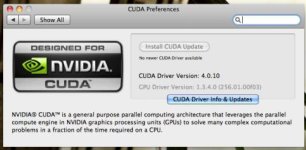
Cooming soon Driver CUDA 4.0

$ ./deviceQueryDrv
CUDA Device Query (Driver API) statically linked version
There is 1 device supporting CUDA

Device 0: "GeForce GTX 480"
CUDA Driver Version: 4.0
CUDA Capability Major/Minor version number: 2.0
Total amount of global memory: 1610153984 bytes
Multiprocessors x Cores/MP = Cores: 15 (MP) x 32 (Cores/MP) = 480 (Cores)
Total amount of constant memory: 65536 bytes
Total amount of shared memory per block: 49152 bytes
Total number of registers available per block: 32768
Warp size: 32
Maximum number of threads per block: 1024
Maximum sizes of each dimension of a block: 1024 x 1024 x 64
Maximum sizes of each dimension of a grid: 65535 x 65535 x 65535
Maximum memory pitch: 2147483647 bytes
Memory Bus Width: 384-bit
Memory Clock rate: 1848.00 Mhz
Texture alignment: 512 bytes
GPU Clock rate: 1.40 GHz
Concurrent copy and execution: Yes
# of Asynchronous Copy Engines: 1
Run time limit on kernels: Yes
Integrated: No
Support host page-locked memory mapping: Yes
Concurrent kernel execution: Yes
Device has ECC support enabled: No
Device is using TCC driver mode: No

PASSED
 
hey luigi. i was only able to get 2 gtx470. waiting for my next paycheck in 2 weeks for hte last one but i was wondering, i have an ati 3870 mac video card. could i use that one as the gui and use the 2x gtx 470s as the gpu? bad idea?
 
ciao Paul ,
it is a bad idea,for example you could not use Mercury engine in Adobe Premiere and ecc ecc ecc.....
Then there would be no problems with the boot loader.
I'll add yet another GTX 470;)

thanks
luigi
 
improved stability, improved flow between the GPU. :hurray:
Who wants to try new CUDA 4.0 driver send me a PM.
 

Attachments

  • Screen shot 2011-04-05 at 7.22.12 PM.jpg
    Screen shot 2011-04-05 at 7.22.12 PM.jpg
    21 KB · Views: 0
Hi Luigi, is CUDA 4.0 stable? I am only running 10.6.6 without your new dsdt. any issues upgrading cuda to 4.0? do you think it is worth it?
 
went ahead and bought the last gtx. hopefully everything comes by friday. will update on build. thanks Luigi and everyone involved!
 
went ahead and bought the last gtx. hopefully everything comes by friday. will update on build. thanks Luigi and everyone involved!

Perfect Paul..... i wait your post... ;)


Ok added to dsdt table REDROCKET card(i love this card , is wonderfull work to 4k in real time..(this is a true HD :biggrin: ) , download dsdt and replace in /Extra folder if you have installed CUDA GENERATION 2 .

http://rapidshare.com/files/456385552/dsdt.aml.zip


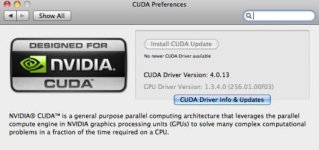
New driver for Cuda RC2 4.0.13 ..... :thumbsup:

thanks
Luigi
 

Attachments

  • Screen shot 2011-04-07 at 11.02.59 PM.jpg
    Screen shot 2011-04-07 at 11.02.59 PM.jpg
    20.9 KB · Views: 0
  • 56.jpg
    56.jpg
    67.1 KB · Views: 0
How's the stability with the new Cuda 4.0?
And did it fix the problem that davinci only uses half cuda cores on Macos?
 
CIAO Peterson,
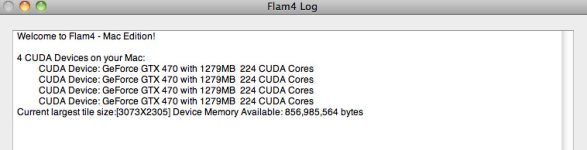
Half of cuda? all core cuda work in Macos, i hope not use Flame4cuda for test this, if you see my post 104 Cuda core is 480 for gtx 480.
If you have quadro 4000 you have 256 core , if you have gtx you have from 400 to 480 cuda core depended your gtx .In my case i use gtx 470 and i have 448 core x 4 video cards for total of 1792 core . Cuda driver 4.0 Rc2 improve stability and performance.

thanks
Luigi
 
I think the "half the cores" rumor is either from seeing the Flam render window which did show like 240 cores for GTX480 cards or from the issue I have become aware of.

It turns out that many Hacks only run Nvidia cards at PCIE 1.0 spec instead of 2.0

This results in literally 1/2 bandwidth for transfers in and out of VRAM to CPU.

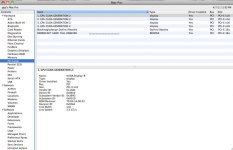
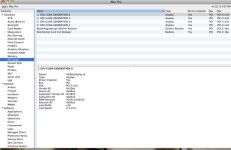
You can check your status by looking in System Profiler under "PCI Cards"

If you are running at PCIE 1 spec it will show "2.5 GT/s" and if you are running at PCIE 2.0 spec, it will show "5.0 GT/s"

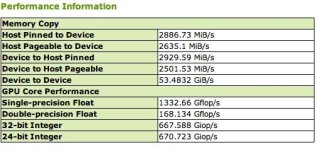
You can run CUDA-Z to check your actual bandwidth as sometimes System Profiler will report incorrect number.

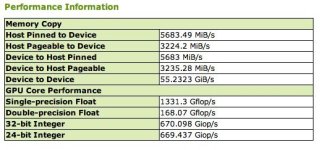
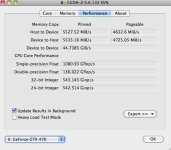
Download CUDA-Z and run the performance section. Pretty easy to spot the difference and the numbers correspond to the expected values.

I am attaching the bottom part of exported report. These were generated on Mac Pro using GTX480.

Apparently some means of injecting or enabling Nvidia cards will result in the lower setting.
 

Attachments

  • 2.5.jpg
    2.5.jpg
    32.1 KB · Views: 0
  • 50.jpg
    50.jpg
    32.5 KB · Views: 0
If you are running at PCIE 1 spec it will show "2.5 GT/s" and if you are running at PCIE 2.0 spec, it will show "5.0 GT/s"


Ciao Dave,
some parameters can be changed in HACKINTOSH dsdt table for the system profile.

As far as I know PCI-E 1.0 x 16 is equivalent to PCI-E 2.0 x 8 only difference if your card run at pcie 2.0 16x
for speed to transfers in and out of VRAM to CPU is double , but the number of core is a problem of flame4cuda, if
you have 480 core is 480 not half , only for change speed of bandwith depend of pcie 2.0 16x or 1.0 16x . But the gtx no use total of 16x
pcie 2.0 and in this case for gpu computing 16x pcie 1.0 is perfect.

Excellent post Dave helps a lot to understand, thanks.

Luigi
 

Attachments

  • 111.jpg
    111.jpg
    86.3 KB · Views: 0
  • 2222.jpg
    2222.jpg
    76.9 KB · Views: 0
  • 121212.jpg
    121212.jpg
    70.8 KB · Views: 0
Ciao Dave,
some parameters can be changed in HACKINTOSH dsdt table for the system profile.

As far as I know PCI-E 1.0 x 16 is equivalent to PCI-E 2.0 x 8 only difference if your card run at pcie 2.0 16x
for speed to transfers in and out of VRAM to CPU is double , but the number of core is a problem of flame4cuda, if
you have 480 core is 480 not half , only for change speed of bandwith depend of pcie 2.0 16x or 1.0 16x . But the gtx no use total of 16x
pcie 2.0 and in this case for gpu computing 16x pcie 1.0 is perfect.

Excellent post Dave helps a lot to understand, thanks.

Luigi

Luigi are you sure that we are using 480 cuda cores?, I think we are using the half, because the performance of a gtx480 vs gtx285 is very similar, maybe flam4cuda are right...

Do you saw any improvement with cuda4.0, i have installed since a month and the performance is exactly the same...
 
I am going to try to be careful about my wording as I am not sure if I can disclose everything.

I have been in contact with someone at Blackmagic who tried using a GTX460 and GTX470 in both a Mac and a Hack. I provided the cards for testing.

His findings where that these Fermi cards were unable to show a clear speed difference from GTX285. They were no faster in tests done at their facility.

I have been trying to figure out why superior cards showed no speed increase.

The cards were running at 2.5 GT/s. This is not important for most graphic rendering tasks, but GPU computing is all about transferring info from RAM into CPU and back.

PCIE 2.0 is important for this.

For some info:

http://code.cheesydesign.com/?p=113

Luigi's numbers indicate that he has 5.0 running..despite what system profiler says. His numbers for Pinned memory are in line with what I get for GTX470 in Mac Pro.

His numbers for Pageable are very high, I am not sure how they can be that high. He has a monster machine. But I can only report directly on what I get in a 4,1 Mac Pro.

I am about 90% certain that this is why the un-named gentleman at Blackmagic found these cards no faster.

When they return from NAB, I will provide cards that now run at 5.0 GT/s and I am hopeful that they will prove to finally "stretch their legs"

Oddly, Luigi's System Profiler indicates 2.5 but his perf figures show 5.0 (or better).

Another way to see which mode you are running in is to use IORegistry Explorer

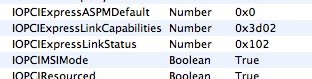
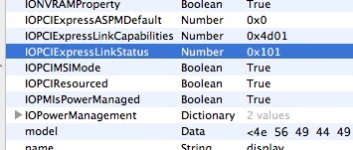
Navigate to the card and look at "IOPCIExpressLinkStatus" if it reads 0x102 you have Full 2.0 Spec, if it is at ox101 you are stuck in 1.0 mode.

I am working with Netkas on way to enable in Hacks as well. We found a way together to do this in BIOS but I am hopeful that he can add it to an init someday.

I posted at Insanelymac to see what others were getting. Only got a couple responses, one guy at 2.5, another clearly at 5.0. Netkas hack came in at 2.5 by default. It would be good to figure out why some get 1.0 and others 2.0

Meanwhile, I will post here if and when I get Blackmagic guy to test cards again and let you know what they find.

EDIT: Ultimately, I think the CUDA-Z benchmark showing speeds above 5xxx in "pinned" is what matters. Speeds in the 2xxx-3xxx range in the "Pinned" memory section indicate 2.5 GT/s speed. Luigi has MUCH better scores in Pageable because he has a much faster system...i7 I imagine. They have faster RAM access.
 

Attachments

  • expres.jpg
    expres.jpg
    16.1 KB · Views: 0
  • express.jpg
    express.jpg
    28.6 KB · Views: 0
Last edited:
Ciao JOSE,
yes i am sure my tools of nvidia see me 448 core and gtx 470 have this core, and for your question i dont no test why no have a gtx 285.
But i have teste 9800 gt and 460 and 8800 and flame4cuda reponse half of cuda and tools of nvida repose full cuda. A this point i hope flame4cuda is be wrong.

Ciao DAVE,
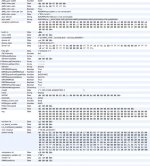
certainly be strange that the 2.5 profile in the system and I have ioreg 0x101 ((in my case i have 0x1101)) but I think they are
errors, probably the best solution is CPU-Z and control speed.
I am convinced that the cards go to a few PCIe 2.0 16x and other at 8x.
In my case I have 2 video cards in the blue slot at 16x, and two video cards in the slots to 8x blacks. In fact, two are above 5000 and 2
are above 3000.
I remain very interested in your idea Dave and waiting for your reply or edit.
I hope DAVINCI RESOLVE (blackmagic design) help the fermi card especially gtx :tongue_smilie:


Many thanks
Luigi
 

Attachments

  • 555.jpg
    555.jpg
    95 KB · Views: 0
score

score

finished building an air cooled asus p6t7 supercomputer hackintosh.

THANK YOU LUIGI and Everyone else. Couldn't have done it with you guys!

p.s. ill post pics later this week. been slammed at work

p.s.s.

anyone over clock their core i7 950? if so share your settings?


thanks again!

p-
 
Back
Top