Welcome to our community

Be a part of something great, join today!

  • Hey all, just changed over the backend after 15 years I figured time to give it a bit of an update, its probably gonna be a bit weird for most of you and i am sure there is a few bugs to work out but it should kinda work the same as before... hopefully :)

Color Charts for RED-One

George D.

Well-known member
Joined
Oct 22, 2008
Messages
980
Reaction score
0
Points
0
Location
N. California, USA
When shooting with a Red One or the upcoming Scarlet, is it ABSOLUTELY NECESSARY to use a DSC Labs Cam Align-Chroma Du Monde color chart?
For someone on a limited, documentary, budget, it seems a little pricey at over $1,000.oo.
Thanks.
 
No. Red shoots raw so precise in camera setup doesn't matter much. As long as you get your exposure right everything can be adjusted in post. You may want to shoot a color reference chart of some sort to help color correcting in post though.
 
Just "any" color chart won't work.

Just "any" color chart won't work.

According to the Red 101 DVD I just watched, it is VERY important to have an extremely good color chart at the head of each memory card or hard drive. I don't think "just any" color chart would work. The old film type certainly won't.
Any other suggestions?
Thanks.
 
Thanks Dave, and I can see why DSC are the best, but the cost is severe.
The chart (Macbeth) that is shown on the webpage info you gave me, is the very one that I've used all my adult life for film. But, according to the Red 101 DVD it is NOT a good chart for the Red.
So, what to do.
 
I have a $5 grey card, which I shoot once per day. Or per scene, if there is time.
 
If it's out of your budget then it's out of your budget.
Just use the chart you can afford to match different scenes and be done with it.
 
When shooting with a Red One or the upcoming Scarlet, is it ABSOLUTELY NECESSARY to use a DSC Labs Cam Align-Chroma Du Monde color chart?
For someone on a limited, documentary, budget, it seems a little pricey at over $1,000.oo.
Thanks.

No. It's a tool you can use to match shots and scenes photographed in disparate situations, but it's not NECESSARY.
 
A good color chart gives you a reference of the light and colour in that scene, which is very useful to track through post. A proper grey card is good - you can properly white balance, but it only tells you color temp, not what actuall colors are doing.

Graeme
 
Thanks Dave, and I can see why DSC are the best, but the cost is severe.
The chart (Macbeth) that is shown on the webpage info you gave me, is the very one that I've used all my adult life for film. But, according to the Red 101 DVD it is NOT a good chart for the Red.
So, what to do.

I havent seen the Red 101 so don't know their reasons. DSC sell short life charts which are prefectly fine so may be that would work or if your just matching shots the Macbeth is a good compromise. Its much better than nothing.

The other point is who is going to be using it and for what purpose. If its to run to do a film out or such where the information is important then a DSC chart may be considered very important. If its for TV and documentaries a reference is still important and useful to check but the colorist may be grading to a look or taste so may not be so relevent. In this case a Macbeth or good grey card would be just fine. Work to best practice where you can and do your best when you cant.
 
According to the Red 101 DVD I just watched, it is VERY important to have an extremely good color chart at the head of each memory card or hard drive.

I'm pretty sure thousands of hours of RED have been shot and graded without color charts at the head of each hard drive or memory card. I'm not sure where that's coming from really. I've seen guys shoot charts on new reels as a workflow thing to help the editors.

A color chart in every new lighting setup makes more sense to me. But again, it's not like you're out of luck and need to burn your footage if you didn't shoot a chart.

What's nice to have is a color reference chart in your scenes so when you're color correcting in post you have references to known values. It's not required at all, but it makes life a little easier.

I'd love to see the logic as to why a MacBeth chart no longer works in digital. Where's Mike Most when you need him?
 
A good chart acts as a record of the light. Knowing the color temp of the light is a very important part of colorimetry. Having known colors acts as a good confirmation that everything is right.

A Macbeth is not the best of charts are they're not traceable. There are also "fake" macbeths around and their colours are just wrong, and very visibly wrong too. To me, the DSC is just a better chart - traceable, calibrated, accurate.

Graeme
 
A good chart acts as a record of the light. Knowing the color temp of the light is a very important part of colorimetry. Having known colors acts as a good confirmation that everything is right.

A Macbeth is not the best of charts are they're not traceable. There are also "fake" macbeths around and their colours are just wrong, and very visibly wrong too. To me, the DSC is just a better chart - traceable, calibrated, accurate.

Graeme

I completely agree about DSC charts which is why we use them, But if you are not fortunate to have one, then whats the next best thing to use ?
 
Next best thing is a real macbeth from X-Rite. Failing that, any chart that you can physically carry through to post because if you later find that chart is somehow "off" you can always get it measured and figure out some correcting factor.

Graeme
 
I agree that the DSC charts are the best, but their pricing is so crazy only labs and camera manufacturers can buy them!

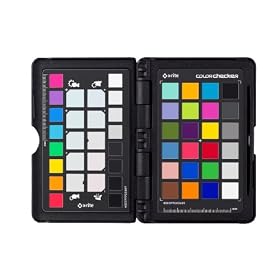
I just found out about this neat little kit yesterday X-Rite ColorChecker Passport.

41bn%2BZHr-hL._AA280_.jpg


It's a pocket-sized Macbeth chart in a hard case along with warm and cool patches to easily warm up or cool down a scene in post (using the white-balance picker). Also has some sort of software that builds Adobe camera calibration files. I've ordered one.

There's a really good video of it in action on X-Rite's SITE.
 
I agree that the DSC charts are the best, but their pricing is so crazy only labs and camera manufacturers can buy them!

I just found out about this neat little kit yesterday X-Rite ColorChecker Passport.

41bn%2BZHr-hL._AA280_.jpg


It's a pocket-sized Macbeth chart in a hard case along with warm and cool patches to easily warm up or cool down a scene in post (using the white-balance picker). Also has some sort of software that builds Adobe camera calibration files. I've ordered one.

There's a really good video of it in action on X-Rite's SITE.

Nice find- and it is only $100. I wonder if the software that is included with it can be integrated into a Red Workflow ... even if it couldn't having a chart like this on hand would be very helpful for matching shots later.
 
Relative value of specific chart options aside, shooting charts for each set up should actually save you money, even if the chart is rather pricey - unless your color correction is done for free by a quality colorist (good luck with that ;-).

I have worked with first rate colorists who take a quick look at the charts but largely ignore them because their eyes and instincts are all they really need. That said, for me at least, the charts save me tons of time in grading. By quickly white balancing and checking the chart, I can get to the result I want much faster - and time is money. Just sayin'

Cheers - #19
 
You can get IT8.7 color charts intended for scanners that come with lot-based or in some cases individual calibration data from a spectrophotometer, and they aren't all that expensive. http://www.targets.coloraid.de/

However, you have to know what you are doing to use them to calibrate a camera, for example you have to arrange the lighting to prevent glare off the surface, which may not always be possible. I'm not sure what level of accuracy is needed... if you need a NIST-traceable standard, this isn't it. But if all you need is consistency for the duration of your shoot, as opposed to absolute accuracy, I'd think they would serve.
 
Just shoot a chart- ANY chart!

Just shoot a chart- ANY chart!

Most colorists tell me that the footage they shoot usually has absolutely NO color reference whatsoever.

That's the absolute worst. Avoid that however you can.

In lieu of nothing at all I once used a cheap swag coffee cup that had SD SMPTE bars printed on it. These bars were comically wrong, but you could recognize them as SMPTE bars. They were so off, I thought they might be a joke that was over my head.

I put that thing at the head of the first shot after every new lighting set up. After the shoot, I took the cup and shot it next to a MacBeth color chart and a Tiffen greyscale.

That turned out better than it had any right to.

I try to use slates with a color pattern. That pretty much sucks as a "chart" goes- but it is SO much better than nothing at all. Its there in every take though. If you shoot the slate and a chart together you can establish a delta... if you do that well enough its almost as good as shooting a chart every scene.

The main problem with slates is that they get dirty, scuffed, and otherwise discolored in all sorts of unsavory ways. If you have a brand new slate, the color bars can actually be very handy. I just CC'd an unexpected green tint on some footage (from some bad CTO on an HMI) using just the slate as reference, it came out just fine.

The next step up is a Tiffen Color Separation Guide and Gray Scale (Small)

There is also a large version.

This is a really good color reference for the price. (~$23 USD). If a colorist can't use those to get primaries set then they suck.

The main issue is that they are uncoated, and they get damaged/discolored very easily. Also, they are printed on materials that will age poorly/ You really need to replace them often. I usually just buy a set or two for every new project that doesn't have a budget for a "real" color chart. If you take care of them they can last 6-8 months or so of light use.

I shoot it at the start of the shoot under my "big" lights, whatever they may be. (Current shoot: an old ARRI 1.2k HMI fresnel, last shoot: work lights, shoot before: Arrisun 18/12... so it goes) After that I usually bring them out only when I have something weird going on.

Some AC's will cut them up and attach them to the clapper or slate. (Some use the grayscale, others use the color, I saw one use both... ) The nice thing if you do this is that its then in EVERY take under the lights. That said I've never done this myself, nor asked my AC's to do so.

Sure a calibrated, certified, traceable, well maintained chart is a huge help, and can deliver far better results than anything I mention above. Chances are however that if you have to worry about the budget for a top notch chart, then you can't afford the sort of colorist, or coloring suite, that can take full advantage of it.

So, just get something. Whatever it is keep it clean, and use it consistently.
 
If budget is really an issue, then if nothing else at least buy the VON 18% grey card... (VON is a Reducation inside joke sort of, its a GREAT idea)

You can do a quick white balance as Graeme suggests and makes grading so much easier and faster. Im now VON slating every single shot. Fotokem 18% grey chart is better than nothing and has a very basic Cyan Yellow Magenta color chart on the bottom.
 
Back
Top