Welcome to our community

Be a part of something great, join today!

  • Hey all, just changed over the backend after 15 years I figured time to give it a bit of an update, its probably gonna be a bit weird for most of you and i am sure there is a few bugs to work out but it should kinda work the same as before... hopefully :)

Color Charts for RED-One

The problem with using a color reference attached to a slate is that the slating is rarely shot under the important lights in the scene. Often they are lit by a Maglite or one of those horrible LED lights, other times by an onboard light or Obie light, which may or may not be what you are balancing to.
 
Yes indeed, if the reference is on the slate and the slate is not under the same lights as the subject, you're screwed. I just saw a shot like that last week that I was trying to debug some color stuff on and it really confused me until it was pointed out that the slate was being illuminated by a flashlight....

So I took the wb off the whites of her eyes, which is never perfect, but sometimes it's all you've got...

Graeme
 
I try to shoot one chart at the beginning of each shoot day - or new lighting scenario (i.e. going from tungsten to daylight). They are certainly not "necessary". If you know what you are doing and you have a good colorist - your footage will look good.

If you hold up production to shoot charts - you will not look good! I try to fit them in early on in lighting with a source close to what I consider "white light" for the scene.

Macbeth's have served me well in film and in digital.
 
Where can you buy a Von Card 18%. If you google it you get Von Joshua baseball player card from 1948.
 
Kodak 18% grey cards are cheap and available everywhere (like local photographic stores).

All I'm going to say is: if there's no absolute reference for what the color temp of the lights is, any attempt to achieve accurate color later on is pure guesswork.

Graeme
 
When shooting with a Red One or the upcoming Scarlet, is it ABSOLUTELY NECESSARY to use a DSC Labs Cam Align-Chroma Du Monde color chart?
For someone on a limited, documentary, budget, it seems a little pricey at over $1,000.oo.
Thanks.
You should shoot at least the McBeth chart in the appropriate light ing. HEre is a link to one at Film Tools. It's ot that expensive and you'll be really glad you did it.

http://www.filmtools.com/maccol.html
 
The major difference with the DSC charts is that they have a serial number, so they're traceable, and they're individually calibrated, so they're accurate. They're also made of metal, so are rather more robust!

Graeme
 
Yes indeed, if the reference is on the slate and the slate is not under the same lights as the subject, you're screwed. I just saw a shot like that last week that I was trying to debug some color stuff on and it really confused me until it was pointed out that the slate was being illuminated by a flashlight....

So I took the wb off the whites of her eyes, which is never perfect, but sometimes it's all you've got...

Graeme

A flashlight? that is hilarious!, but probably not to you :( ...

FYI- we shot all exterior, in available light only, and we slated before (not next to) we shot the grey/color charts. It worked wonders in post...

but agree with Blair. Whats your budget? How long is your project? Person who started post is shooting a doc... they will SAVE way more than $1000 cost in post on CC alone.

EDIT: WHich DSC LABS Chart? Im on Filmtools and there are several avail from $300 to $1100.. Im assuming the $1100 CDM-28R Chroma DuMonde Color Calibration Chart?
 
RED Charts

RED Charts

I suppose this would be a good place and time to remind people that we now have a set of RED charts, which you can see here http://dsclabs.com/new_products.htm

With a MSRP of $480, it's more affordable than anything we've offered of this nature before.

Michael
DSC Labs
 

Attachments

  • New BuzzSaw__DSC_Chart_1 (500 x 333).jpg
    New BuzzSaw__DSC_Chart_1 (500 x 333).jpg
    33.3 KB · Views: 0
DNG Camera Profile vs. RED RAW White Balance

DNG Camera Profile vs. RED RAW White Balance

I agree that the DSC charts are the best, but their pricing is so crazy only labs and camera manufacturers can buy them!

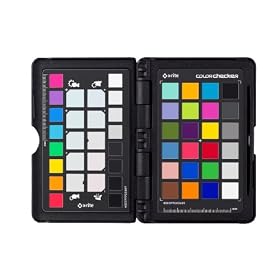
I just found out about this neat little kit yesterday X-Rite ColorChecker Passport.

41bn%2BZHr-hL._AA280_.jpg


It's a pocket-sized Macbeth chart in a hard case along with warm and cool patches to easily warm up or cool down a scene in post (using the white-balance picker). Also has some sort of software that builds Adobe camera calibration files. I've ordered one.

There's a really good video of it in action on X-Rite's SITE.


For photography this chart is perfect.

I used this with DSLR extensively.

You can create an acurate Camera Profile with 24 patches adjusted which resultes in a very natural color reproduction.

With Adobe RAW Import (Photoshop / After Effects ...) you can add these profiles easily so we also used this with DNG Sequences in After Effects for Phantom HD Gold footage with great success.

RED RAW files calibrated the same way with RedCineX would be great too.
Not just one gray patch (White Balance) but 24 values of a X-Rite color chart stored in a profile - this would be handy.

Non destructive and editable ...

Did someone find a way to get the color checker work with RED RAW this way ?!?


Regards,

Marcus C. Hambsch

Germany
 
I was taught to shoot a color chart on each camera set up just before the clapper shot. Red wouldn't be selling their small bnder charts if they wern't necessary or at least suggested. The AC or 2nd AC holds it up for 7 sec or whatever, puts it down and holds up the clapper.

Good point on using it on every lighting change, but my experience is that most lighting changes are between set ups, not so much during a set of takes. But of course this happens as well.

Whether or not you're paying $400, full boat on line at $1,200+, or as B stock at the end of NAB, it's a cheap investment relatively speaking.
 
they say the stupidest question is the one not asked.... here ya go

whenever I use the white point picker in the red cinex to balance to a grey card the colors get all funky and skin tones get magenta. If I pick something "white" in the scene it seems to adjust the tint for me very well and then I can do as I please with the color temp. What am I doing wrong? Why is everyone saying to white balance off a grey card. Thanks for the help!
 
You can white balance off any neutral tone that is not clipping. That's why traditionally people don't like white cards as they are more likely to be clipping. Grey cards are darker though, so more likely to be noisy.

Warning on grey cards though - it's hard to find a neutral one! The Kodak 18% grey cards I have are definitely yellow-ish.

The DSC charts' grey is very neutral though. It's quite obvious when you put the Kodak grey card next to the DSC and see the yellowish-ness stand out.

Jason - send me an R3D snapshot of a frame you're having bother white balancing with and I'll take a look-see.

Graeme
 
Does anyone have any tips on exposing a colour chart? I have yet to use one but as the light you will be shooting it under will be different every time are there any rules to keep some sort of consistency? eg should you aim to expose it at 50% every time? Thanks,
Tim.
 
Back
Top