Welcome to our community

Be a part of something great, join today!

  • Hey all, just changed over the backend after 15 years I figured time to give it a bit of an update, its probably gonna be a bit weird for most of you and i am sure there is a few bugs to work out but it should kinda work the same as before... hopefully :)

Channel Z - The Dragon's Den

Zeb B

Well-known member
Joined
Sep 30, 2011
Messages
4,933
Reaction score
1
Points
0
Location
In The Moment
This is where I will be posting various bits of work, tests and stuff of interest. Some of which might possibly contain topless men and women so might not be appropriate for all viewers. So possibly NSFW

Mono Chrome Dragon - First Look R3D's:

http://www.reduser.net/forum/showth...s-First-Look&p=1365229&viewfull=1#post1365229

Dragon Skin Tones NSFW:
http://www.reduser.net/forum/showth...ng-Test-NSFW&p=1361688&viewfull=1#post1361688

Hexolux Color Rendering w/Dragon:

http://www.reduser.net/forum/showth...Dragon-R3D-s&p=1357740&viewfull=1#post1357740

DJI RONIN Group Buy
http://www.reduser.net/forum/showthread.php?115115-DJI-RONIN-Group-Buy

Must See at NAB 2014!

http://www.reduser.net/forum/showth...t-NAB-2014!!&p=1340454&viewfull=1#post1340454

Dragon 6K / Angenieux Optimo DP Coverage test:
http://www.reduser.net/forum/showth...Dragon-s-Den&p=1333315&viewfull=1#post1333315

How to Distress a Lens:

http://www.reduser.net/forum/showth...tress-a-Lens&p=1339738&viewfull=1#post1339738

Hexolux LED Spotlight Product Demo:
http://vimeo.com/87642264

Dragon w/New OLPF + Summicron-C first look:

http://www.reduser.net/forum/showth...Dragon-s-Den&p=1334172&viewfull=1#post1334172

Dragon w/New OLPF + Summicron-C, T2.0 - T22 DR, w/6 Stop HDRX Tests - First Test = WORST CASE EXPOSURE OF LESS THAN T1 in foreground blacks:

http://www.reduser.net/forum/showth...Dragon-s-Den&p=1335686&viewfull=1#post1335686

Dragon w/New OLPF + Summicron-C, T2.0 - T22 DR, w/6 Stop HDRX Tests -Second Test = More balanced frame with T4 on foreground to T128 on white chair:

http://www.reduser.net/forum/showth...Dragon-s-Den&p=1336184&viewfull=1#post1336184

OLPF Flare Issue - Resolved by RED:
http://www.reduser.net/forum/showth...ssed-by-Red)&p=1338251&viewfull=1#post1338251

Dragon low light night time high dynamic range / low noise test:
http://www.reduser.net/forum/showth...ps-and-Clips&p=1342588&viewfull=1#post1342588

First tests with 35mm Square Front Lomo Anamorphic - noisy as fuck night time footage test:
http://www.reduser.net/forum/showth...o-Annie-Vibe&p=1342105&viewfull=1#post1342105
Second tests with 35mm Square Front Lomo - Shot as noise free as possible:
http://www.reduser.net/forum/showth...o-Annie-Vibe&p=1343942&viewfull=1#post1343942

Compressing for Web Delivery:

http://www.reduser.net/forum/showth...st-Practices&p=1339764&viewfull=1#post1339764

Music Vid for a friend of mine shot on Epic:

http://vimeo.com/67625151
 
Last edited:
Dragon 6K / Angenieux Test

Dragon 6K / Angenieux Test

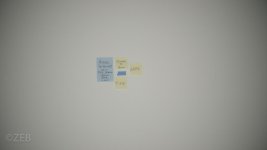
Here is a quick vid testing the 6K coverage of the Angenieux Optimo DP 16-42 and 30-80mm. My Dragon has the new OLPF but not sure if that really matters for this test. This only tests for visible vignette not distortion, CA, flare etc

The Tiffs look color funky - just an RCX through LR thing me thinks. RU only allows 5 attachments per post so this will take a couple.

Edit: I just uploaded a bunch of tiffs only to find out that RU rezzes them down to nothing so you can't read the Post-its. Check the R3D instead for now until I can figure out a way to get better quality tiffs to upload.

Video:
https://vimeo.com/87928045

Here are the links to the R3D's
https://dl.dropboxusercontent.com/u/117794729/Angie6K Test/A008_C020_022868.0000013F.R3D
https://dl.dropboxusercontent.com/u/117794729/Angie6K Test/A008_C021_02282V.0000014F.R3D
https://dl.dropboxusercontent.com/u/117794729/Angie6K Test/A008_C026_0228VT.0000011F.R3D
https://dl.dropboxusercontent.com/u/117794729/Angie6K Test/A008_C027_0228C2.0000012F.R3D
https://dl.dropboxusercontent.com/u/117794729/Angie6K Test/A008_C028_0228RR.0000014F.R3D
https://dl.dropboxusercontent.com/u/117794729/Angie6K Test/A008_C029_0228DL.0000014F.R3D
https://dl.dropboxusercontent.com/u/117794729/Angie6K Test/A008_C034_022808.0000011F.R3D
https://dl.dropboxusercontent.com/u/117794729/Angie6K Test/A008_C035_02284W.0000013F.R3D
https://dl.dropboxusercontent.com/u/117794729/Angie6K Test/A008_C036_02285G.0000011F.R3D
https://dl.dropboxusercontent.com/u/117794729/Angie6K Test/A008_C036_02285G.0000014F.R3D
https://dl.dropboxusercontent.com/u/117794729/Angie6K Test/A008_C040_0228HJ.0000013F.R3D
https://dl.dropboxusercontent.com/u/117794729/Angie6K Test/A008_C043_0228H4.0000016F.R3D
https://dl.dropboxusercontent.com/u/117794729/Angie6K Test/A008_C044_0228S3.0000015F.R3D


Interesting results although lots of work

Cheers!

-ZEB
 

Attachments

  • ZEB_Angie_test-100.jpg
    ZEB_Angie_test-100.jpg
    18 KB · Views: 0
  • ZEB_Angie_test-101.jpg
    ZEB_Angie_test-101.jpg
    20.7 KB · Views: 0
  • ZEB_Angie_test-102.jpg
    ZEB_Angie_test-102.jpg
    16.8 KB · Views: 0
  • ZEB_Angie_test-103.jpg
    ZEB_Angie_test-103.jpg
    14.6 KB · Views: 0
  • ZEB_Angie_test-104.jpg
    ZEB_Angie_test-104.jpg
    18.3 KB · Views: 0
Last edited:
NSFW

Got my Dragon with new OLPF late Friday (I held off when I first got the upgrade email - got lucky on OLPF timing when I finally mailed it in). Jumped into the studio with a model friend tonight to shoot some for your RU enjoyment. At T2 the Crons have a real shallow DOF and some CA. Some R3D's for you to play with. NSFW if your work is not safe for viewing fine art boobies.
https://dl.dropboxusercontent.com/u/117794729/A004_C001_0223GG.0000270F.R3D
https://dl.dropboxusercontent.com/u/117794729/A005_C008_022341.0000000F.R3D

https://dl.dropboxusercontent.com/u/117794729/A005_C022_0223XZ.0000071F.R3D
https://dl.dropboxusercontent.com/u/117794729/A005_C025_0223S4.0001592F.R3D
https://dl.dropboxusercontent.com/u/117794729/A006_C019_02230A.0000863F.R3D
https://dl.dropboxusercontent.com/u/117794729/A004_C012_0223EZ.0002636_S000F.R3D


Let me know what you think and maybe some grading suggestions. Cheers!
 
Dragon New OLPF 6 Stops HDRX - R3D files

Dragon New OLPF 6 Stops HDRX - R3D files

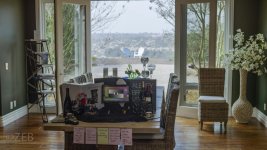
This is a WORST CASE EXPOSURE RESCUE test. Not the way I would shoot it:

Dragon, New OLPF, 6 Stops HDRX, Summicron-C at T2, R3D files ©ZEB
Here's both a clip and R3D snapshot of a very high Dynamic Range scene I put together to challenge the Dragon HDRX function to the max. Please reply with your suggestions about how to improve the test setting and your grading ideas. Grey card at RED Cambook spot metered at T1.6 @ISO800 1/48th. The Post-its in the foreground have the shot info on them.

The frame is not meant to be pretty. It is a -T2 foreground to a T22+ background so expect flare, CA and other stretch marks. The test was for extreme DR only. Of course in real life I would maybe put an 3 stop Grad ND filter on a matte box, provide some bounce light into the foreground to narrow the DR range and close down the lens to clean up the CA. Again, that was not the exercise.

I'm now a believer in Dragon / HDRX acquisition. What needs improvement is the frame blending technology for HDRX to be a smooth workflow that takes full advantage of the amazing range of the RAW data. Perhaps FCPX could have a plug-in to allow that to happen outside of RCX.

Tiff:
https://dl.dropboxusercontent.com/u/117794729/HDRX Tests/6_StopsHDRX_tiff.tif

R3D Single Frame:
https://dl.dropboxusercontent.com/u/117794729/HDRX Tests/6_StopsHDRX.SingleFrame.R3D

R3D Clip:
https://dl.dropboxusercontent.com/u/117794729/HDRX Tests/6_StopsHDRX_Clip.R3D
 
Last edited:
Simple Blend does not work well on this clip at all. A window looks required to me.

The link below is what I consider the best demonstration of architectural HDR and the workflow used was -- I believe -- not windowed. I would love to know how to get this look with a simple Red workflow.

https://vimeo.com/36863089
 
An snapshot TIFF export from RCX (not ADD) then quick exposure fix out of LightRoom. No localized adjustments or "windowing" done. Removed the CA fringe and did some global noise reduction. The RAW information is there - no white clipping and no plugged blacks - it's a 1% to 99% exposure scene. Of course it's not going to be an easy A+X frame blend since the idea of the test was to try and break the HDRX function. Shooting from a less than T2 foreground to a better than T22 background with 6 stops of HDRX is about as extreme as it gets! Once Resolve gets current with the Dragon R3D's it's game on!
 

Attachments

  • ZEB_6StopHDRX_LR-100-2.jpg
    ZEB_6StopHDRX_LR-100-2.jpg
    94.2 KB · Views: 0
Last edited:
Simple Blend does not work well on this clip at all. A window looks required to me.

The link below is what I consider the best demonstration of architectural HDR and the workflow used was -- I believe -- not windowed. I would love to know how to get this look with a simple Red workflow.

https://vimeo.com/36863089

The Vimeo clip is done via locked down / powered slider, time lapse shots of +/- EV frames then blended in post. Not fair to compare that with a live action movie camera that does not have those constraints. It's like saying "why can't I do Milky Way shots with the Dragon like I can with the 5D?". You can if the process is the same . . . a time lapse workflow. What a 5D can't do is 6 Stop HDR on live, hand held footage.
 
Not sure I follow you. The Vimeo clip has motion in the waves, it is HDR video.
 
Not sure I follow you. The Vimeo clip has motion in the waves, it is HDR video.

Sorry, you're correct. Just saw a couple seconds of it. Yup, that's the Magic Lantern hack. Not sure if RED is down with that ;-)

That being said - you are correct that there is much that can be done in the form of frame blending beyond the current offering in RCX. For now I am confident that at least on acquisition the HDRX is solid since my test is beyond what I would ever attempt to actually film.
 
Last edited:
Dragon 6 Stop HDRX with foreground fill light

Dragon 6 Stop HDRX with foreground fill light

Hey Guys,
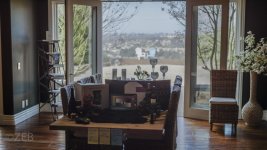
Took another 6 Stop HDRX test shot of the extreme DR setting but this time with some fill light in the foreground and lens stopped down to T4. The results are closer to what I might actually film in an extreme situation.
The spot metered range now is from T4 on foreground grey card (much less for detail in the black shirt) to T128+ on the background chair. A quick export of the Simple Blend A+X frame through LightRoom shows that all the RAW info is there. When we get better Blend tools from either RCX or Resolve and others HDRX will rock!

Here's a jpg of the LR image and links to that and an R3D you can play with. Cheers!

Lightroom JPG:
https://dl.dropboxusercontent.com/u/117794729/HDRX Tests/ZEB_6StopHDRX_T4_LR-100.jpg

R3D:
https://dl.dropboxusercontent.com/u/117794729/HDRX Tests/ZEB_HDRX_6Stop_T4.R3D
 

Attachments

  • ZEB_6StopHDRX_T4_LR-100.jpg
    ZEB_6StopHDRX_T4_LR-100.jpg
    98.3 KB · Views: 0
Wow! The JPEG looks great. I am having the hardest time getting anything looking decent in RCX. Any advice? It seems the more i mess with it the worse it gets.
 
Wow! The JPEG looks great. I am having the hardest time getting anything looking decent in RCX. Any advice? It seems the more i mess with it the worse it gets.

Not your fault my friend. RCX is basically a Dalies and Looks Preview tool in my view. To take full advantage of the HDRX function the A+X frames need to be processed by a program like PhotoMatix does for stills:
http://www.hdrsoft.com/

The point of my testing is to see for myself that at least I can trust that the aqusition of the image (even at 6 Stops) is solid . . . just waiting on better frame blending tools and a workflow now. Maybe Resolve will have something in their next update to work with Dragon footage. The Simple Blend in RCX is a great starting point since it provides a fat negative - that's what I exported to LightRoom to create the JPG.

Would like to hear from others on what they see the HDRX workflow being.
 
Had a play and this HDR test is much better in my opinion. First image is the original out of RCX with Simple Blend and curves. Second image is the same image ran through photoshop to do some tone mapping. Wish we had tone mapping in RCX..

Out of RCX:
ZEBhdrOriginal.jpg


Intermediate:
ZEBhdr2.jpg


Photoshop tone mapping (it's overdone but I wanted to push it):
ZEBHDR.jpg
 
Had a play and this HDR test is much better in my opinion. First image is the original out of RCX with Simple Blend and curves. Second image is the same image ran through photoshop to do some tone mapping. Wish we had tone mapping in RCX..

Out of RCX:
ZEBhdrOriginal.jpg


Intermediate:
ZEBhdr2.jpg


Photoshop tone mapping (it's overdone but I wanted to push it):
ZEBHDR.jpg

Nice! It would be cool to have programs like Topaz for HDRX in motion. Tons of tone mapping and HDR options on the stills side - what are the options for motion?
http://www.topazlabs.com/adjust
 
Here's the link to the full rez JPG which was color and exposure corrected in LightRoom from the "A+X Simple Blend Tiff" out of RCX. No localized adjustments or windows used.
https://dl.dropboxusercontent.com/u/117794729/HDRX Tests/ZEB_6StopHDRX_T4_FullRez_LR-100.jpg

I am very impressed with the Simple Blend's ability to avoid the usual HDR halos and other artifacts. I ran the A+X frames through PhotoMatix HDR and was not able to get a frame blend result that looked as natural as the Simple Blend. That is amazing to me. Nik's HDR also has problems with a 2 frame / 6 stop difference blend which makes the Simple Blend ability to bridge that range even more impressive.

I also ran the Simple Blend Tiff through Photoshop to get this B&W image - which is better for evaluating tone quality on high DR images since you're not distracted by color tint. There is detail in the black cloth in the foreground and you can just make out the vertical gaps in the white chair in the background. That is like a T1 to T128+ dynamic range! On the B&W image I applied a film type of Agfa APX Pro 100 for a look.
https://dl.dropboxusercontent.com/u/117794729/HDRX Tests/ZEB_HDRX_6Stop_T4_FullRez_BW.jpg

BTW: there's tint on the windows so that creates a weird difference on color temp and exposure with the open doors.
 
Last edited:
Have you tried running the video files through Photoshop? Turn the video layers into a Smart Object and then you can apply the normal Photoshop filters to them and export as a finished video.
 
Have you tried running the video files through Photoshop? Turn the video layers into a Smart Object and then you can apply the normal Photoshop filters to them and export as a finished video.

Haven't fooled with that. Any good tuts out there for that workflow?
 
All I did was download the R3D plugin for Photoshop.
https://www.red.com/downloads/508ebcee17ef022b21000558

Open the R3D file from PS and you get a mini version of RCX. Click the A-Frame and hit OK. Do the same with the X-Frame then drag the X-Frame layer onto the A-Frame canvas and now you have both frames on 2 separate layers.
Right-click on each layer and select "Convert to Smart Object". Then you should be able to use your Topaz filters. Export the results and voila.
 
Thx! Sounds straight forward - I'll give it a try
 
Back
Top