Jonathan Pears
Well-known member
- Joined
- Jan 17, 2013
- Messages
- 590
- Reaction score
- 5
- Points
- 18
- Location
- Santa Monica, CA
- Website
- www.backtoawake.com
Hey all, i searched around for a while, but couldnt see a topic on this just yet, apologies if i missed it somewhere.
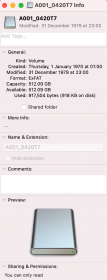
Using Red 512GB Cfast, with Red Reader and cable, into a M1 14" MacBook Pro (all current OSX). Went to update the komodo, and the cards are read only for some reason, and i cant seem to change that in disk utility, or in camera. Not sure why they changed to this, never had this before, so any help will be much appreciated.
Thanks!
Using Red 512GB Cfast, with Red Reader and cable, into a M1 14" MacBook Pro (all current OSX). Went to update the komodo, and the cards are read only for some reason, and i cant seem to change that in disk utility, or in camera. Not sure why they changed to this, never had this before, so any help will be much appreciated.
Thanks!