Welcome to our community

Be a part of something great, join today!

  • Hey all, just changed over the backend after 15 years I figured time to give it a bit of an update, its probably gonna be a bit weird for most of you and i am sure there is a few bugs to work out but it should kinda work the same as before... hopefully :)

Catalina OS on Macbook pro = Slow offload speeds from Mini Mags

Matt Hardy

Well-known member
Joined
May 9, 2016
Messages
49
Reaction score
0
Points
6
Location
Lake Tahoe, Ca
Help!

I just updated a 2013 macbook pro (used primarly for DIT) from El Cap to Catalina 10.15.2. Everything seems to work fine but today when I was dumping footage off the minimag to an external HD speeds were CRAWLING.... like 2 hours for 120 gb - usually takes about 20 minutes. Transfers between 2 external drives work fine. Something to do with how the red reader/minimag are seen by the OS?

ANy Ideas?

Thanks,
 
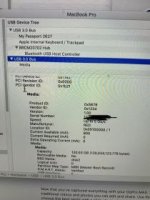
try a different cable. looks like its reverting to USB 2. You can check this by clicking on the apple logo / about this mac / system report / scroll down to USB and then look at the mag reader, if it says 12Mb under speed then thats the case
 
Thanks Jarred. I check and attached my screenshot. It says up to 5 g/b. Is there anyway to see live transfer speed. Using reds Usb c to usb 3 cable on the newer reader model.
 

Attachments

  • EDA8CFCE-8A8E-4F2A-AC7D-28DBC8930394.jpg
    EDA8CFCE-8A8E-4F2A-AC7D-28DBC8930394.jpg
    10.9 KB · Views: 0
Thanks Jarred. I check and attached my screenshot. It says up to 5 g/b. Is there anyway to see live transfer speed. Using reds Usb c to usb 3 cable on the newer reader model.

If you use Hedge (an offloading app that I definitely recommend) or Forklift (a Mac file-transfer app that uses rsync), you'll be able to see the transfer speed.

Hedge: https://hedge.video
Forklift: https://binarynights.com
 
Unless I am mistaken that upgrade probably took you to an APFS system. I had some issues when I first upgraded to APFS for Mojave. Is your external HD an SSD or a spinning drive? My issues were all with SSDs as some SSD controllers had some APFS compatibility issues. I think these were all cleared up though, as my Mojave suddenly started working fine after a month or so, I believe after a series of updates to the OS.

You may want to test with a different external drive or better yet do your testing to your main drive.
 
Unless I am mistaken that upgrade probably took you to an APFS system. I had some issues when I first upgraded to APFS for Mojave. Is your external HD an SSD or a spinning drive? My issues were all with SSDs as some SSD controllers had some APFS compatibility issues. I think these were all cleared up though, as my Mojave suddenly started working fine after a month or so, I believe after a series of updates to the OS.

You may want to test with a different external drive or better yet do your testing to your main drive.

This sounds right. I tested other drives and things were fine. It seems to be having issues with the red minimag ssd’s. Spinning external to spinning external works fine.
 
To be clear, I did not have trouble with any RED media as I don't own any currently. It was specific external SSDs. For sure though I would make sure your OS has all updates. I would think all the APFS bugs would be worked out by now but who knows.
 
On every MAC OS in the "Utilities" folder there is an App called "Activity Monitor" that can reveal quite a few performance parameters including transfer speeds. I often check this as occasionally a spinning drive just seems to transfer data at half the rate of another identical drive. If so a cable swap and a reboot can sometimes fix it although clients keep turning up with crappy cheap HDDs to record their valuable projects.
 
Still no luck on speeding things up. I have tried different reader and different cables. When I check "activity monitor" I get around 35-70mb/sec read and 10-55mb/sec write. Average write is probably around 40mb/sec which is slow. I do think this is an issue with APFS on the new Catalina update. Possible the Red Mini Mags aren't talking correctly to APFS? Any way to update firmware on these cards? These cards are the grey 120GB minimags.

Also I noticed that the red light on the minimag reader blinks then goes solid, then blinks, then goes solid.... repeating this. I don't remember it doing this in the past?
 
APFS is just for your main system SSD/HDD and other media you specifically format as such. It should not have any bearing on the MiniMags or their performance. If it’s a recent conversion to APFS on your system, things do go slow with all the initial indexing and conversion. I’ve seen some performance issues like this if a file system is converted to APFS instead of just a fresh format and reinstall of everything. If you’re copying between the MiniMags and other external media, APFS should not be a factor at all.

Is Activity Monitor showing anything else gobbling up your system performance? How are other things running? It may not be the MiniMag or RED reader hardware, it could be an issue with the other external media. How is the other media connected? And what is it? With the upgrade to the new OS, you could be running into more indexing issues on the external media, especially if it’s a large drive or RAID that already has lots of files on it.
 
The only time I've seen a slowdown in write speeds on my Mac was with a cable that was not supplying the proper power to the drive. The culprit usually is a USB A to USB C cable being used with anything bus-powered. I've had those little LaCie drives slow to a crawl on even my iMac Pro.

Under About This Mac > System Report > USB, can you click on each drive and the card reader while they're transferring? There should be an info section that shows the power current needed and the power current overhead. I'm not sure if any "bus-power confusion" would show up there in the numbers, but it might be worth checking out.
 
Still no luck on speeding things up. I have tried different reader and different cables. When I check "activity monitor" I get around 35-70mb/sec read and 10-55mb/sec write. Average write is probably around 40mb/sec which is slow. I do think this is an issue with APFS on the new Catalina update. Possible the Red Mini Mags aren't talking correctly to APFS? Any way to update firmware on these cards? These cards are the grey 120GB minimags.

Also I noticed that the red light on the minimag reader blinks then goes solid, then blinks, then goes solid.... repeating this. I don't remember it doing this in the past?

Hey Matt don't need an updated firmware, even the OG 120Gb Minimags work fine on the new Catalina update ( I just tried one to confirm ) It really sounds like a cable issue and/power issue as Jeff suggested. .. the blinking LED points to the same. If you tried different PROPER Gen 2 USB C cables or a thunderbolt cable and it still is an issue there may be something wrong with your minimag reader but you said you tried a different reader so it's a bit weird. What filesystem are your minimags formatted as?
 
When I've experienced this, it was always a cable issue. The first time it happened resulted in me having to learn more about firewire connections than necessary. The only time it wasn't a cable, I did an update on a OSX machine that was a few generations behind. Then it had a similar situation to yours the first time on set with it. We were using SxS media. First 128 GB cards of the day estimated hours to transfer. Not good on a multi cam shoot, rolling long takes. Long story short, we switched out computer to diagnose the slow down on the first. Our problem was not segrated to just that type of media though. Our other drives speed were also affected.
The resulting problem, Purgeable Data. I had nearly 380 GB of purgeable data on that machine. I got rid of that and my speeds returned to normal on day two. Not sure if this if your situation but it was our resolve.
 
Back
Top