Welcome to our community

Be a part of something great, join today!

  • Hey all, just changed over the backend after 15 years I figured time to give it a bit of an update, its probably gonna be a bit weird for most of you and i am sure there is a few bugs to work out but it should kinda work the same as before... hopefully :)

can't access Output Tone Map / Highlight Roll-off settings ?

Raphaël_FR

Well-known member
Joined
Aug 3, 2016
Messages
80
Reaction score
0
Points
6
Location
France
Hello,

I'm struggling to configure Resolve 20 properly, but I can't access (it is gray) the Output Tone Map and Highlight Roll-off settings in the RAW tab, as you can see in my screenshot.
Is this due to an incorrect setting on my part, or could it be a bug in Resolve? Has anyone else encountered this and found a solution?
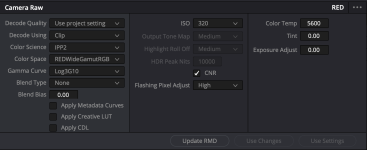
Capture d’écran 2025-08-03 à 11.53.19.png

Thanks in advance!
 
These controls will only be available when you chose "RED IPP2" from the "Output DRT" list in the Project Settings / Color Management.
This "RED IPP", in turn, will only show up in the drop down list when you first select a "Timeline color space" above that allows the gamut mapping to be used.

Timeline color space:
P3-D65 (not D60)
P3-D65 ST2084 1000 / 2000 / 4000 nits
P3-DCI
Rec.709 Gamma 2.2 / 2.4
Rec.709 ARIB STD-B67
Rec.2020 Gamma 2.4
Rec.2020 HLG ARIB STD-B67
Rec.2020 ST2084 1000 / 2000 / 4000 nits

With "Use separate color space and gamma" checked, these are the corresponding ones in the ...

Left drop down:

AstroDesign
P3-D65
P3-DCI
Rec.709
Rec.2020
REDWideGamutRGB
sRGB

Right drop down

ARIB STD-B67 HLG
Gamma 2.2 / 2.4 / 2.6 / (not 2.5!)
RED Log3G10
REDlogFilm
sRGB
ST2084 (all of them)
 
Also, your screenshot from the Color page looks like the Project is set to DaVincei YRGB. The Gamma Curve set to Log3G10 there and predefines the other settings. When you change the Gamma Curve setting to one of the other settings like BT.1886, HLG, HDR SR.2084, they will get enabled.
 
Back
Top