Welcome to our community

Be a part of something great, join today!

  • Hey all, just changed over the backend after 15 years I figured time to give it a bit of an update, its probably gonna be a bit weird for most of you and i am sure there is a few bugs to work out but it should kinda work the same as before... hopefully :)

Can R3D FILES be SEPARATED ??

George D.

Well-known member
Joined
Oct 22, 2008
Messages
980
Reaction score
0
Points
0
Location
N. California, USA
As I continue to learn our Red-One Camera, I just want to make sure I don't make any unrepairable mistakes. Therefore, I'm asking those of you "in the know" for help.

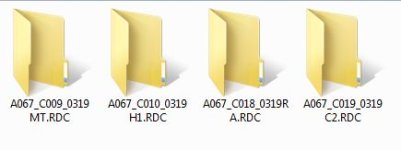
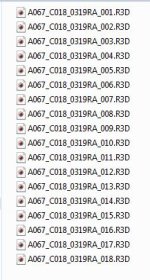
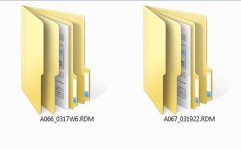
When the R3D files from the Red Drive are downloaded into our Windows7 PC, there are several "main" files. Within those files are, what I will call "secondary" files. And, within those secondary files, are even more files all with the Red symbol on them. See attachments.

My question is this:

For organization, cataloging, and filing purposes, can those "secondary" files be separated from the "main" files and stored individually according to subject, etc, WITHOUT damaging them or compromising the data? Or, do they HAVE to stay within the main files? I "do" realize the small files with the Red symbol cannot be removed from the secondary files, but can the secondary files be removed from the main files?

I am hoping that there is no problem with pulling these secondary files out, because it will make filing, cataloging, and later editing, much easier.

Any help or advise is appreciated.

Thanks.

.
 

Attachments

  • Main Files (R3D).JPG
    Main Files (R3D).JPG
    20.6 KB · Views: 0
  • Secondary R3D Files.JPG
    Secondary R3D Files.JPG
    18.6 KB · Views: 0
  • Files within Secondary Files.JPG
    Files within Secondary Files.JPG
    39 KB · Views: 0
George,
I don't know if I understand your question right, but anyway:

- when you format your red drive on camera there will a *.RDM folder be created
- each time you hit record on your camera, there will be a subfolder in this mainfolder, for example A081_C001_03202U.RDC, A081_C002_0320JR.RDC, etc. --- C001 stands for Clip Number 01, C002 for Clip number 02 etc
- in this subfolder you will find the *.RD3 (redcode raw) file(s) - as red is using FAT32 as disk format system, longer takes (depends also on resolution, compression, etc.) will be chopped into multiples files

I don't see any benefit of seperating the files from the folders, but maybe I am wrong.
Does this answer your question?
best wishes and kind regards,
martin
 
George,
I don't know if I understand your question right, but anyway:

- when you format your red drive on camera there will a *.RDM folder be created
- each time you hit record on your camera, there will be a subfolder in this mainfolder, for example A081_C001_03202U.RDC, A081_C002_0320JR.RDC, etc. --- C001 stands for Clip Number 01, C002 for Clip number 02 etc
- in this subfolder you will find the *.RD3 (redcode raw) file(s) - as red is using FAT32 as disk format system, longer takes (depends also on resolution, compression, etc.) will be chopped into multiples files

I don't see any benefit of seperating the files from the folders, but maybe I am wrong.
Does this answer your question?
best wishes and kind regards,
martin

No, I'm sorry Martin, it doesn't.

Thanks.

.
 
By "secondary files" you mean sub-folders that each contain the R3D files that make up a single clip, right?
 
Yes, they can be removed, as all you need is the R3D files, but almost no one does this "separation." Why would you?

If you won't ever use the proxy files, you can hit a setting and tell the camera not to generate them in the first place.

Stephen
 
Yes, they can be removed, as all you need is the R3D files, but almost no one does this "separation." Why would you?

If you won't ever use the proxy files, you can hit a setting and tell the camera not to generate them in the first place.

Stephen

Proxy files? If you mean the Quicktime proxy files, I set the camera not to generate those long ago.

I'm sorry if I'm using the wrong terminology. I am not as young as you guys, and therefore, am not as familiar with all this new technology and terminology.

PLEASE look at the attachments to understand what I'm talking about.

Why would I want to remove them? Because why have "another" file that is not necessary? And, I can more easily remove the ones I don't want and keep the ones I do.

I am NOT talking about the R3D files themselves. I would never remove or separate them. I'm talking about separating what I am calling the "secondary" files from the original folder.

I guess I'm not explaining myself very well, but I'm trying. ;)

Thanks.

.

.
 
The only files in your images are the R3D files. The other images are just file folders. The R3D files are all you need.

Stephen
 
The only files in your images are the R3D files. The other images are just file folders. The R3D files are all you need.

Stephen

Thanks, I got it now. I appreciate you clearing that up for me.

Have a great day, and enjoy your shootin' !!

.
 
I copy the file structure as it is off the CF/SSD on one drive (backup) but for editing just enter "R3D" in the search box (this isolates all the R3D files), Ctrl+A (select all), Ctrl+C (copy), and Ctrl+V (paste) to a different drive/pool/array (source). From there, drag the R3D straight into the NLE's media bin or timeline, pretty simple. I have only ever used the R3Ds, but always good to keep the original file structure backed up.
 
Hm...

1, don't mess with the catalogue structure
2, don't mess with the catalogue structure
3, don't mess with the catalogue structure

Exept from that, your attachment shows the catalogues and one single segmented (because of disk format, so don't kill the segments, please!) long take situated in its corresponding catalogue/directory.

Leave it that way. You may not know why you want it that way today, but as it doesn't take up any more space, just trust me on thisone!

And BTW, don't ever rename the r3d's or any of the files within the catalogue

Cheers!

G
 
It's a bit of a pain but leave the structure as is. If you want, make a folder for the shoot and toss the group of folders(all your takes) in it. The purpose of your question is to organize your shots, correct? If you rename the R3d files, you could have trouble in post later down the road.

Say you want a 1080p cut of your work now. You make it. Two years pass and everything is 4k. So you want to go back and make a 4k cut of your work. Well if your R3Ds are all named, "Mikes Visit to China Shot 1" 2, 3, etc... the computer might confuse which file is which in the back and forth process.

I haven't had a chance to use AVID or Premier but in FCP7 you could, non destructively, rename all the files in the editor. This is most likely true with the editing software you'd be using.

Does that help at all?
 
Hi George,

I would suggest you keep everything together. That makes it most compatible with all the software out there that supports the RED workflow, because some of those will look for these structures.

What you call levels of files are really folders / directories. A folder can house sub-folders and/or files. The files with the R3D extension are files. Files have data (the frames & audio you recorded, for example) inside them (ie, they have a size). Folders do not have data, they only contain other items such as more folders (sub-folders) or files.

We put these folder structures in place so all the data belonging to a clip is grouped together. This will include the R3D files, but may also include the QuickTime proxies, extra metadata / notes and possibly other things in the future.

Hope this helps,

Rob
 
Are new folders created on clip time or clip size?
 
Hi George,

I would suggest you keep everything together. That makes it most compatible with all the software out there that supports the RED workflow, because some of those will look for these structures.

What you call levels of files are really folders / directories. A folder can house sub-folders and/or files. The files with the R3D extension are files. Files have data (the frames & audio you recorded, for example) inside them (ie, they have a size). Folders do not have data, they only contain other items such as more folders (sub-folders) or files.

We put these folder structures in place so all the data belonging to a clip is grouped together. This will include the R3D files, but may also include the QuickTime proxies, extra metadata / notes and possibly other things in the future.

Hope this helps,

Rob

Thanks! Better to be safe than sorry, so I "will" keep them together.

Thanks again.

.
 
Are new folders created on clip time or clip size?

Not sure I understand your question. But the folders create time will be set to whenever you pushed record to start recording.
 
So if you shoot a long clip, it will make multiple folders right?

I am wondering, if the 2nd folder is created because of file size or at a fixed amount of time.

I would think because of compression, HDR that the 2nd "spill" folder is creative at a fixed file size. Like once a file reaches 2GB, a new folder is created for a continuation of that take.

Looking for a definitive answer.


Not sure I understand your question. But the folders create time will be set to whenever you pushed record to start recording.
 
So if you shoot a long clip, it will make multiple folders right?

I am wondering, if the 2nd folder is created because of file size or at a fixed amount of time.

I would think because of compression, HDR that the 2nd "spill" folder is creative at a fixed file size. Like once a file reaches 2GB, a new folder is created for a continuation of that take.

Looking for a definitive answer.

If you shoot a long clip, it will make multiple .R3D files in a single .RDC folder.

You get one .RDC folder per clip. Within the RDC folder you will get one or more .R3D files with a name ending 001, 002, 003...etc which are sequential 2GB or 4GB "chunks" of the same clip, depending on how long the clip was. Red One generates 2GB chunks whereas Epic seems to generate 4GB chunks. The chunk size is a limitation of the variant FAT32 formatting of Red media. Red-aware applications see the sequential chunks as a single .R3D clip.
 
Found the answer to this question in the RED/ADOBE workflow education.

https://seminars.adobeconnect.com/_a227210/p9h0uv6ekih/?launcher=false&fcsContent=true&pbMode=normal

The "spill off" point is based on file size, not recording time.

The RED ONE has a limit of 2GB at which point another R3D file will be created.

The Epic increased that limit to 4GB. Depending on your settings, compression, HDR, u can do the math and figure out how long a clip can be filmed until it creates a new one. No immediate reason I can think of for watching out for this, should be fine with "spill over clips," but who knows, it might have it's uses.

Hope this help someone besides myself. Best.
 
This process is called "Clipspanning."
 
If you are asking "can i throw away segments from an R3D and still have access to the other bits.. that would require a long answer..but the short one would go "the last segment has an index I believe, at the end of the file, which points to the frame offsets in the R3D, so it would be better in this case to do a RCX R3D crop, and export back to R3D (no recompressing occurs), to keep things tidy, as RCX no doubt recreates that index (used for pointing to the different multi-resolution wavelet data sets etc). The original Redcine didn't mind the results of my early, pre SDK R3D truncator, but later versions did mind (but your luck may vary depending on app.) . Just crop the R3D.. right, now I'll look at your images..

The original catalogue structure isn't important in the context of an archive, as long as the clip is placed in a new structure ie, red work flow no longer matters
 
Back
Top