Dillon Novak
Active member
- Joined
- Sep 15, 2008
- Messages
- 38
- Reaction score
- 0
- Points
- 0
Hello,
I'm using Resolve Lite v9 on a Red Epic project right now. It's my first time using it.
While grading I would see a flashing blue color over anything that was clipping and assumed it was just a warning (it could be something else). Of course, some stuff I preferred to clip since bringing it down made the clipped highlights feel unnatural.
But then it ended up baking in my render when I pulled the clips back into premiere. Does anyone have an idea how to turn the clipping warning off or just how to get rid of it in my render? Thank you so much!
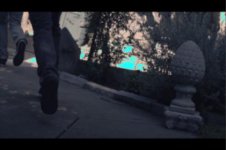
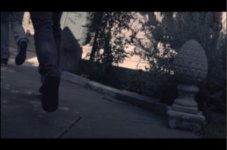
I attached screen shots of the test render on a frame with and a frame without the weird blue color.
I'm using Resolve Lite v9 on a Red Epic project right now. It's my first time using it.
While grading I would see a flashing blue color over anything that was clipping and assumed it was just a warning (it could be something else). Of course, some stuff I preferred to clip since bringing it down made the clipped highlights feel unnatural.
But then it ended up baking in my render when I pulled the clips back into premiere. Does anyone have an idea how to turn the clipping warning off or just how to get rid of it in my render? Thank you so much!
I attached screen shots of the test render on a frame with and a frame without the weird blue color.