Welcome to our community

Be a part of something great, join today!

  • Hey all, just changed over the backend after 15 years I figured time to give it a bit of an update, its probably gonna be a bit weird for most of you and i am sure there is a few bugs to work out but it should kinda work the same as before... hopefully :)

black shading dragon

Status
Not open for further replies.

Jean Guerra

Well-known member
Joined
Feb 10, 2007
Messages
404
Reaction score
0
Points
16
Location
Dominican Republic, Santo Domingo
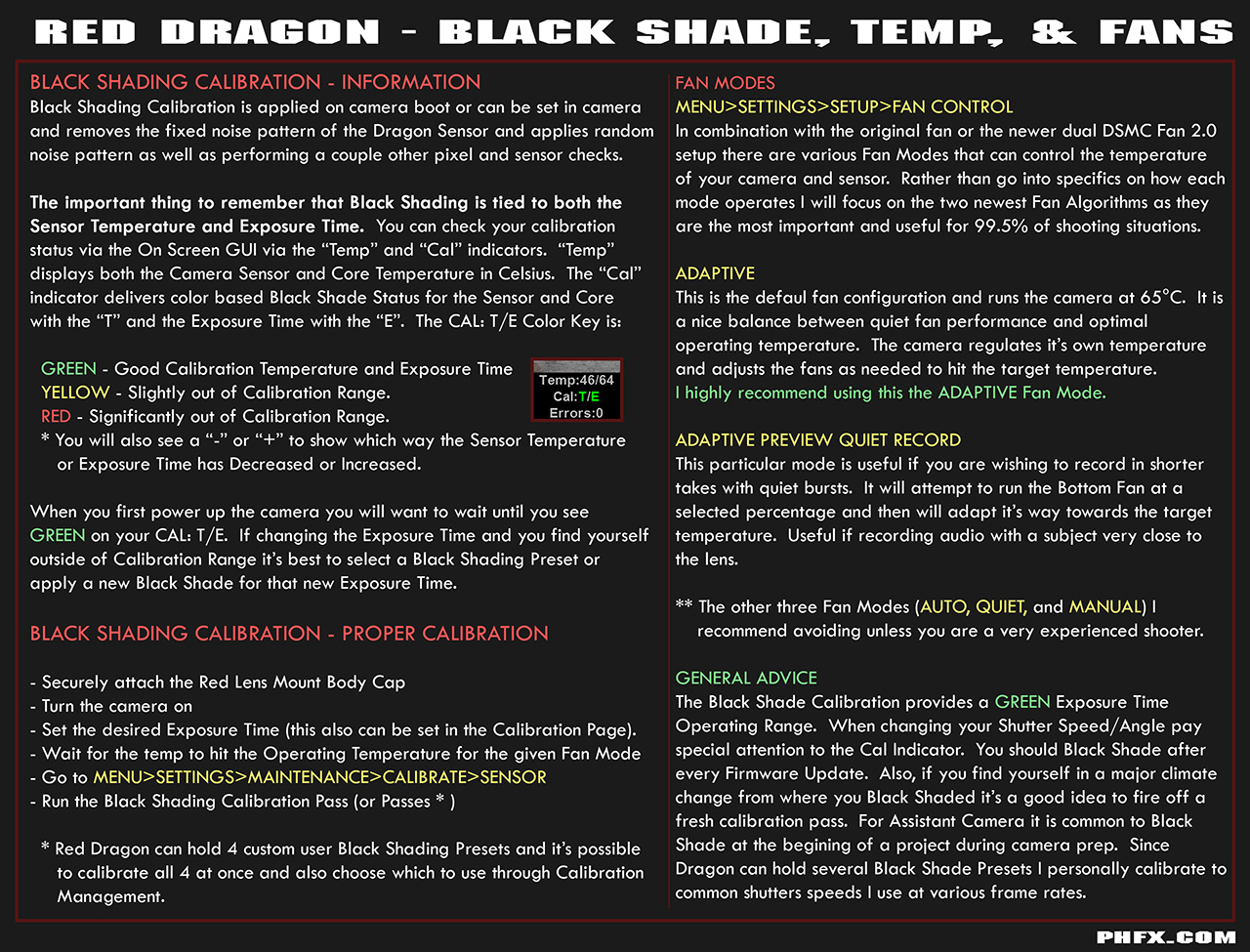
so in the new firmware i see that there are 4 saving slots for black shading, 4 slots with shutter speeds, what does this actually means? do i need to black shade for each shutter speed i would use?? or this means i need to black shade for each ISO i would use?
 
You didn't read the copious amounts of posts written on this topic previously did you?
 
so in the new firmware i see that there are 4 saving slots for black shading, 4 slots with shutter speeds, what does this actually means? do i need to black shade for each shutter speed i would use?? or this means i need to black shade for each ISO i would use?
You could black shade and save for Four (4) different shutter speeds. Then you could switch quickly on set when you had to change shutter speeds. You just load the black shading corresponding to the shutter speed.
 
Framerate doesn't matter, just shutter speed
 
Framerates only make a difference in that most of the time people automatically change shutter speed when changing framerates, i.e. "relative" mode. But if you stay at the same shutter speed even when changing framerates it doesn't make a difference. At least that is how I understand it....
 
wow can't believe they could complicate it....thought it would be simpler on dragon sensor

It is simpler on Dragon in two forms.

1. You have a fairly large working range (shutter speed) per Black Shading Calibration. Slightly better than MX.
2. You can store up to four presets and load them rather quickly from the camera when desired, something you can't do on MX.

As always, I recommend reading my data sheets on the subject:

Red Dragon - Black Shade, Temp, and Fan Info


Last edited:
Can you save these 4 black shades to your computer as well to load up again at a later stage like other presets ??

Phil what are the optimal Sensor and Core temperatures to operate the dragon at. Your data sheet says that adaptive maintains the camera temp at 65 is that referring to sensor or core.
Thanks
 
Last edited:
Can you save these 4 black shades to your computer as well to load up again at a later stage like other presets ??

On Dragon you can save them in camera or transfer them to a REDMAG to be loaded a future time if desired.

Also to note. Black Shading isn't as time consuming as it was back in the earlier days of MX.

Commonly this is done either at the beginning of a shoot, a prep day, or when there is a drastic temperature change.

For instance, in LA we've had temps in the 100+ degrees territory and in the sound stage we have it about 25 to 30 degrees cooler. So when film outside I decided to run black shading pass on frame rates i'll be using while I kept a couple of the lower temperature black shades in camera.
 
Status
Not open for further replies.
Back
Top